

How to Use Alipay in China for Foreigners (2026 Guide)
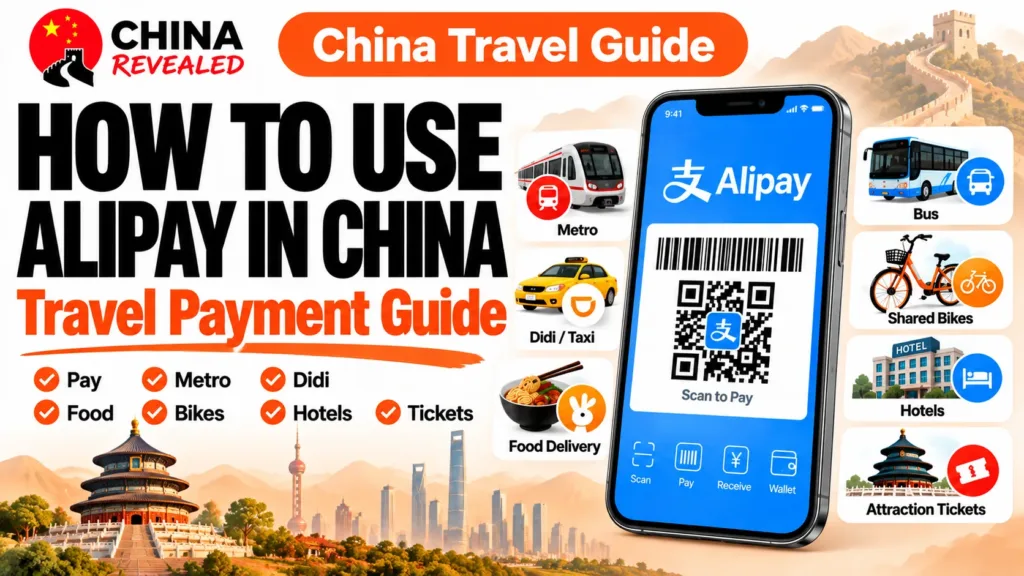
Yes, foreigners can use Alipay in mainland China with an eligible international credit or debit card. You do not need a Chinese bank account, and you can register with an overseas phone number that receives verification messages.
The easiest approach is to set it up before you fly: register, complete the identity checks offered in your account, add your card, and set a payment password. Once you arrive, make a small purchase before relying on it for a taxi, a meal, or a busy checkout.
In our Alipay video guide, we cover payments, food delivery, public transport, Didi, and shared bikes. This written guide adds the details that can save you trouble: when a Chinese SIM helps, what foreign cards cannot pay for, how fees work, and what to do when a payment fails.
About this guide: Prepared by China Revealed, this tutorial draws on our hands-on experience using Alipay in China and the walkthrough in our video. The images illustrate the steps with reference interfaces; screens, service availability and fees can vary. Follow your live account, and treat pictured prices and offers as examples rather than current quotes.
In this guide
- Before you start: what you actually need
- 1. Register, verify your identity, and link a foreign card
- 2. Make a small test payment—and learn the two QR methods
- 3. Alipay fees for foreign cards: the RMB 200 rule
- 4. Use Alipay for metro and bus rides
- 5. Book a Didi ride inside Alipay
- 6. Order food delivery to your hotel
- 7. Unlock a shared bike—and finish the ride properly
- 8. Book trains, hotels, and attraction tickets carefully
- When Alipay does not work: what to check first
- Frequently asked questions
Before you start: what you actually need
Have your passport, your own eligible bank card, and a phone number you can keep using during the trip. You will also need internet access and access to any SMS or banking-app verification your card issuer requests.
Download the official Alipay app from your phone’s app store. This tutorial uses Alipay for mainland China, not the separate AlipayHK wallet. Select English or International Version if offered. If the app opens in another language, look for its language options in Settings. Some mini-programs remain partly in Chinese even when Alipay itself is in English.
Do you need a Chinese SIM card for Alipay?
No—not for registration. An overseas number that can receive verification SMS is enough to get started, so there is no reason to wait until you reach the airport.
A local Chinese number is still useful if you plan to order food or book rides often. Drivers and delivery riders may call, and some mini-programs ask for a mainland contact number. That is why, based on our own experience, we recommend a Chinese SIM in the video: it can make the services around Alipay easier, rather than being a requirement for Alipay itself.
Check what your travel SIM or eSIM includes (see our China SIM vs eSIM guide). A data plan is not necessarily a Chinese phone number with voice calls and SMS. Keep your original number accessible for Alipay and bank verification. If you later change the number on your Alipay account, use the account’s official change-number process rather than creating another account unnecessarily.
1. Register, verify your identity, and link a foreign card
Register your account
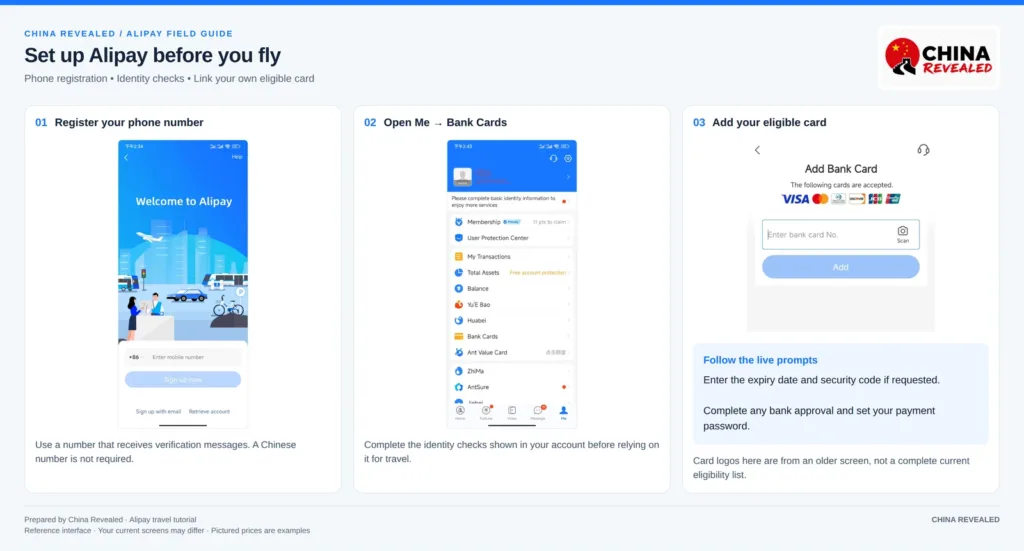
Open Alipay, select your phone number’s country code, enter the number, and follow the verification prompts. Use a number you control. If the SMS does not arrive, check the country code and whether your carrier can receive international or service messages before requesting another code.
Complete identity verification before you need it
The path shown in our video is:
Me → Settings → Account & Security → Identity Information
Your version may instead show Identity Verification, or a Verify now prompt when you add a card. Use the identity section shown in your account. Enter your passport details accurately, upload the passport information page if requested, and complete a facial check if the app asks for one.
Use a clear image without glare, cut-off edges, or fingers covering the details. Do not submit someone else’s document. Verification requirements and review times vary, so do this ahead of travel rather than while a cashier is waiting. Initial limited payments may be available before full verification in some accounts; that does not mean every travel service will work without it.
Add your card
Go to Me → Bank Cards → Add Bank Card. Enter or scan your card number, then provide the expiry date and security code if requested. Complete any approval from your bank. The app may ask you to create a payment password during this process.
Supported card networks include Visa, Mastercard, JCB, Diners Club, and Discover. Eligible overseas American Express cards were added in 2025; issuer restrictions can apply. The app’s current eligibility checks determine whether your particular card can be added.
Adding a card successfully does not guarantee every payment will succeed. Your issuer, the merchant, and the service inside Alipay can each affect acceptance. A second card from another issuer is a useful backup if you have one; two or three cards are not a registration requirement.
Set a six-digit payment password
Follow the setup prompt, or look in Settings → Payment Settings → Payment Password. The exact menu can vary. Choose a password that is not an obvious date or repeated number. This is your Alipay payment password—not the PIN on your physical bank card.
Alipay may use another approved verification method for some payments. Do not assume every charge requires you to enter the six digits.
2. Make a small test payment—and learn the two QR methods
Start with something inexpensive at a convenience store or café. Confirm the chosen card, the amount, and the result in Alipay. This checks the part that matters: an actual eligible merchant payment, not just a card appearing in your account.
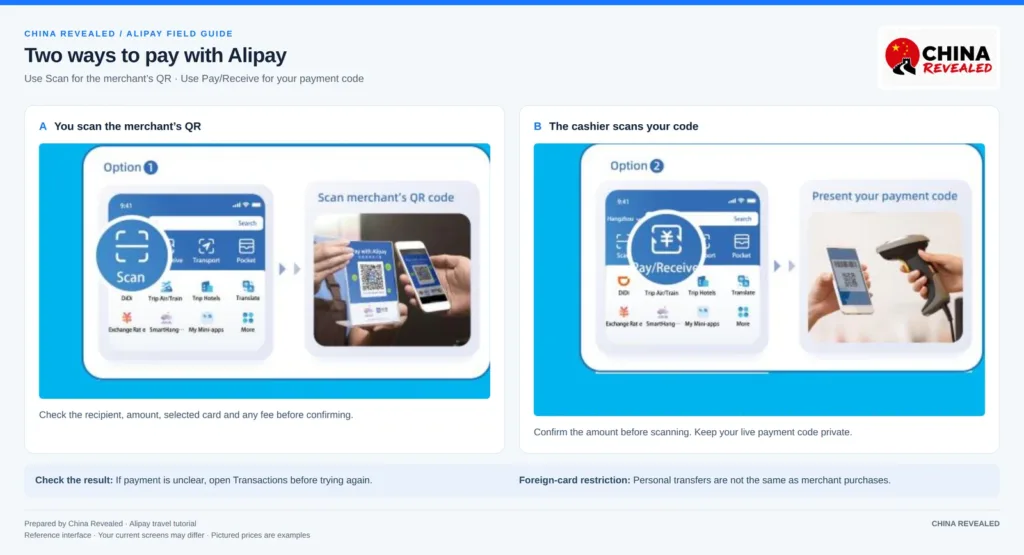
Method A: you scan the merchant’s code
Tap Scan on the home screen and point your camera at the merchant’s Alipay QR code. If the app asks you to enter the amount, check it with the cashier. Review the recipient, amount, selected card, and any fee before confirming.
Not every QR code represents an eligible merchant purchase. If the page is a personal transfer or says your foreign card is unavailable, do not assume retrying will fix it. Ask whether the merchant has another supported payment method.
Method B: the cashier scans your payment code
Open Pay/Receive, Pay/Collect, or the similarly named payment-code button. Select the card you want to use and show the live code to the cashier. Confirm the purchase amount before they scan it, then check the receipt or success notification.
Keep your payment code private. Do not send it to strangers or post it in a screenshot. A cashier-scanned code can authorize a payment without a password prompt on every transaction. Open it only when you are ready to pay, then close it.
If the payment result is unclear, check Transactions before trying again. That is safer than paying a second time because the first screen was slow.
3. Alipay fees for foreign cards: the RMB 200 rule
The standard fee rule for linked international-card purchases is no Alipay service fee for a single payment of RMB 200 or less, and 3% on the full amount for a payment above RMB 200.
For example, a RMB 300 purchase with the standard 3% fee adds RMB 9, making the Alipay-side total RMB 309. The fee is not calculated only on the RMB 100 above the threshold.
Your bank may charge separately. A card with no foreign-transaction fee does not automatically remove Alipay’s service fee. The card network and issuing bank determine the exchange rate for linked international-card transactions; check your bank’s terms and statement.
Read the final payment screen, particularly for a hotel bill or a larger purchase. Promotions or account-specific waivers may change what you actually pay. If the merchant accepts your physical international card or cash, compare those ordinary alternatives. Do not treat repeated splitting of one bill as a guaranteed fee workaround; the merchant and payment rules still apply.
What about limits and refunds?
China announced higher overseas-visitor mobile-payment ceilings in 2024: up to USD 5,000 per transaction and USD 50,000 annually. These are policy ceilings, not a guarantee of your current account or card limit. Verification status, your issuer, and the service you use may impose lower limits. Check Alipay before a large purchase.
Request a refund through the merchant or the service where you placed the order, then track it in the order and transaction details. The transaction service fee is generally refunded in proportion to the refunded amount; check the refund details for your order. Card-credit timing and any bank-side exchange-rate difference are separate; do not expect every refund to appear immediately or to match your home-currency debit exactly.
4. Use Alipay for metro and bus rides
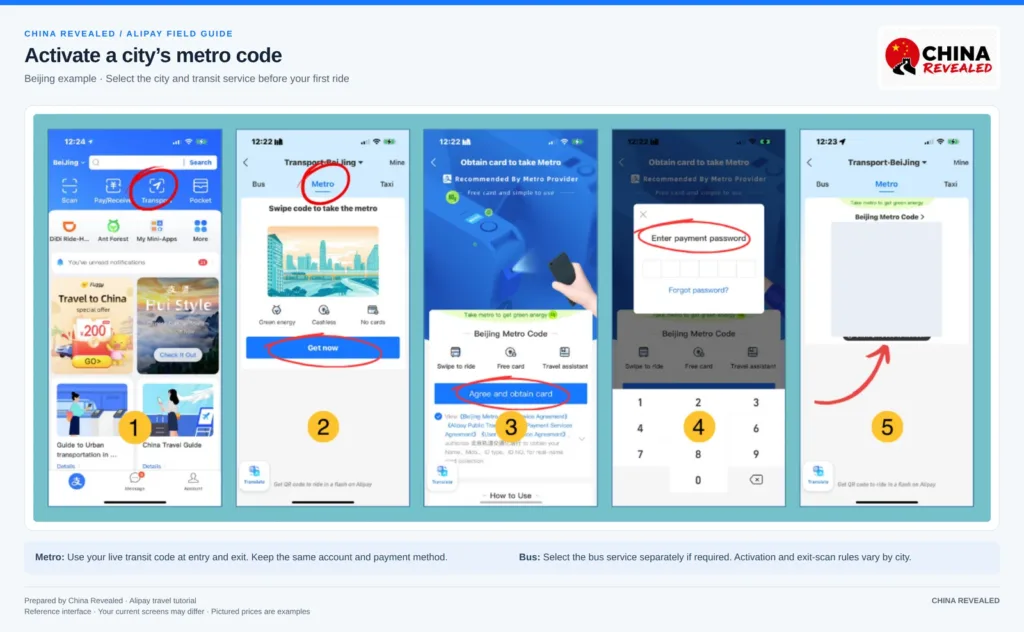
On the Alipay home screen, tap Transport and check the city at the top. Select Metro or Bus, then follow that city’s activation steps. You may be asked to accept the transit agreement, authorize payment, or complete another identity check. The reference image shows a Beijing example; Shanghai has its own virtual transit card.
A new city may require a new activation. Bus and metro services may use separate codes, so open the right one rather than assuming your general Alipay payment code works at the gate.
For the metro, use the activated transit code at entry and exit. Stay with the same account and transit method for the trip. Open the live code rather than relying on a screenshot. If a gate does not open or you have an unfinished journey, ask station staff to help before changing payment methods.
For a bus, look for the QR reader and follow that route’s boarding and exit instructions. Some routes require a scan when you get off; others do not.
If your account or foreign card cannot activate the local code, use a ticket machine or staffed counter, or ask about the city’s visitor transit card. Local acceptance varies. Alipay is convenient, but your whole day should not depend on one transit mini-program working.
5. Book a Didi ride inside Alipay
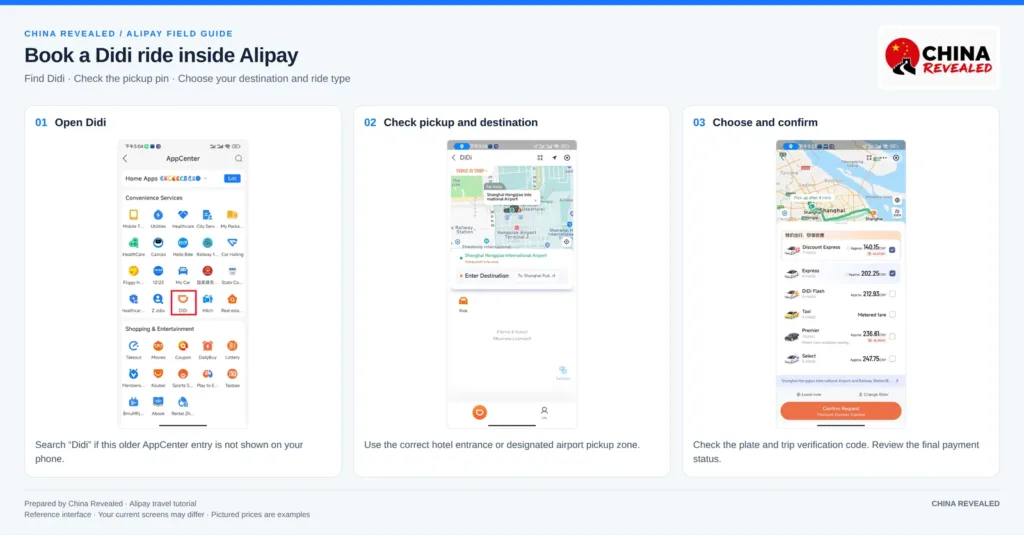
Search Didi in Alipay, or open its icon if it appears on your home screen. Allow location access while using the service, then check the pickup pin yourself. GPS can place you on the wrong side of a road or at the wrong hotel entrance.
Search for your destination’s venue name. If an English result is unclear, use the Chinese name or address from your hotel or booking confirmation. At airports and railway stations, follow the designated ride-hailing pickup instructions rather than waiting in the ordinary taxi queue.
Choose your ride type, review the fare and cancellation terms, and confirm. Before getting in, compare the license plate with the app. Show the driver the verification code displayed on your trip screen; it is often the last four digits of your registered phone number. The in-app translated messages can help if you do not speak Chinese.
The payment flow depends on the ride product. You might see advance payment, an authorization, automatic settlement, or a final payment request. Check the completed trip’s status instead of assuming every ride is prepaid and any difference is refunded automatically.
6. Order food delivery to your hotel
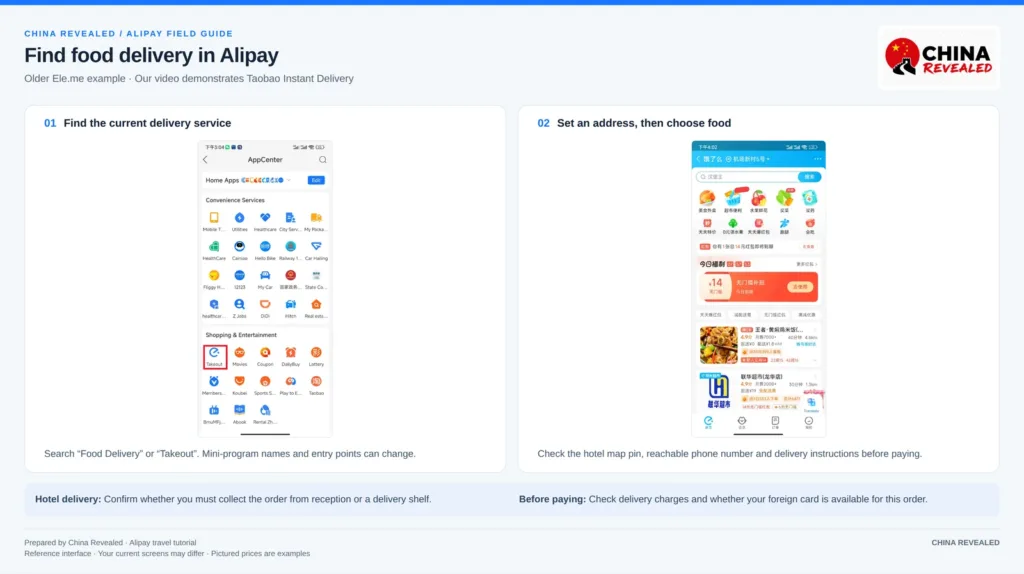
Our video searches Food Delivery and opens Taobao Instant Delivery. Your app may show a different entry, including Takeout or another delivery service. Use Alipay’s search if the icon is missing. Do not expect every mini-program to be fully translated into English.
Before choosing your meal, set a delivery address. In the service shown in our video, the path is Me → Addresses → Add New Address; other versions may use a location or address button at the top of the home page.
Choose the correct hotel on the map, then add a useful contact name and a reachable number. Check the hotel’s delivery policy first. Some properties require pickup at the lobby, reception, or a designated shelf; a room number alone does not guarantee door-to-door delivery.
If the service requires a mainland phone number and you do not have one, ask the hotel whether they can help. Use a staff member’s number only with their permission, and agree on where the food should be left.
A useful delivery note is:
请送到酒店前台,我会下楼取。
Please leave it at the hotel reception; I will come downstairs to collect it.
Check that reception actually accepts deliveries before using that instruction.
Choose the food, review quantities and options, then check the total—including delivery charges—at checkout. Open the payment-method selector to see whether your linked foreign card is available. Card acceptance for that order is not guaranteed simply because the service opens inside Alipay.
Track the order in the mini-program and keep your phone available. The rider may call or send a message. The low meal prices and roughly half-hour delivery mentioned in our video are examples, not promises: restaurant preparation, distance, weather, and busy periods all matter.
7. Unlock a shared bike—and finish the ride properly
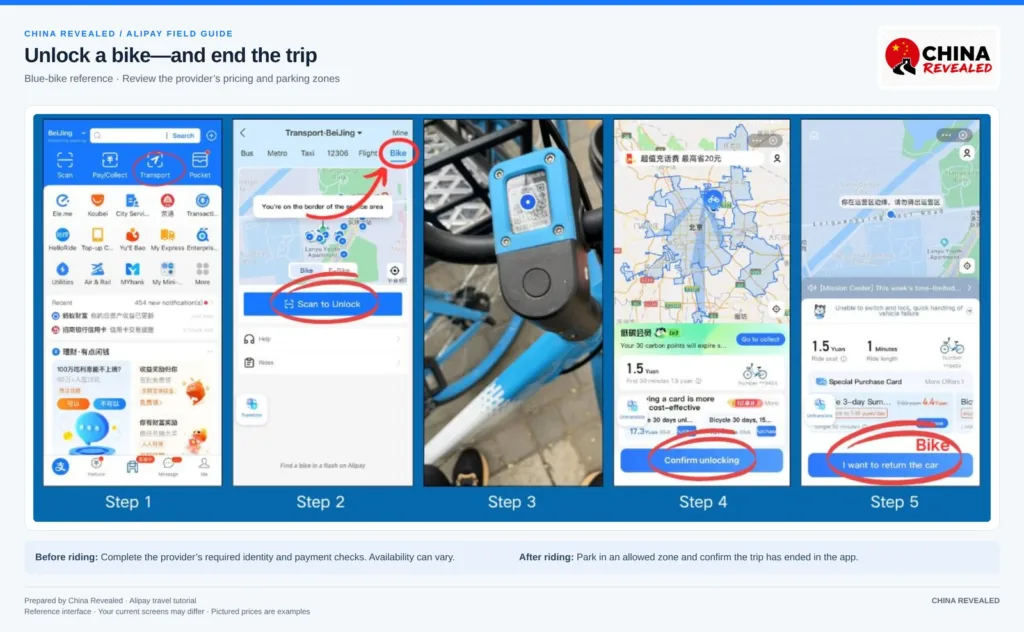
Our video demonstrates a blue HelloBike. Scan the QR code on the bike with Alipay, or use Transport → Bike → Scan to Unlock if that entry is available. Review the provider’s login, identity, payment, and pricing prompts before starting.
Different bike operators can have different eligibility rules. If your passport or payment method is not accepted, do not assume Alipay verification alone resolves it; use the provider’s help or another transport option.
At the end, check the map for permitted parking and follow the provider’s return instructions. A bike standing on the roadside is not necessarily in an approved parking zone. Confirm the trip has ended in the app, not just that you have stopped riding. If it will not end, check the service-zone warning and contact support rather than walking away while a trip remains active.
8. Book trains, hotels, and attraction tickets carefully
Alipay also provides access to travel-booking services. Search the home page for the service you need if you cannot see an icon. The international version includes flight and hotel booking services alongside local transport.
A mini-program booking is still subject to that provider’s rules. Before paying, check whether it accepts your passport and foreign card, confirm your name and document number, and read the cancellation terms. Do not choose a Chinese ID-card option just to get past an identity field.
For hotels, confirm that the property can register and accommodate guests with your passport. For trains and attractions, check whether the booking confirmation is sufficient or whether a separate ticket collection or document check is required. These steps are specific to the booking—not something Alipay registration automatically completes.
Book hotels, flights, train tickets, attractions and other travel services on Trip.com.
When Alipay does not work: what to check first
“My card is linked, but payment fails.”
Check the transaction type first. A foreign card is intended for eligible merchant purchases; it does not support person-to-person transfers, red packets, wealth management, insurance, or other financial services through this visitor payment route. A menu appearing in Alipay does not mean your foreign card can fund it.
For an ordinary purchase, check that the card is selected and your bank has not blocked an overseas or online payment. Complete any outstanding bank verification. Try your backup card or another merchant payment method if available. If Alipay shows a security warning, follow its official instructions instead of repeatedly attempting the same charge.
“It asks me to verify my identity again.”
Read which service is asking. Alipay and a transport, delivery, or booking provider can have separate checks. Make sure the details match your passport. If the offered document options do not fit, contact that service rather than entering invented information.
“The payment is pending. Should I pay again?”
Open the order and Transactions first. Show the status to the merchant. If either side is unsure, ask the merchant to verify the result before making another payment. Keep the order number and receipt for support, but never send your payment password or card security code.
For Alipay help, use the in-app help section or the official international customer-service number: +86 571 2688 6000. Listed service hours are 08:00–24:00 China time, daily. For a delivery, bike, or ride issue, also use that mini-program’s support.
Frequently asked questions
Can I set up Alipay before arriving in China?
Yes. Register with your overseas phone number, complete the offered identity checks, and link your eligible card before travel. Make a small eligible merchant payment after arrival to check that the setup works in practice.
Do I need to top up an Alipay balance?
Not for eligible purchases paid directly with a linked international card. Select the card as your payment method. Do not assume a foreign card can fund your wallet balance. Older tutorials may describe TourPass or TourCard; a separate prepaid product is not required for the direct-card method in this guide.
Can I transfer money to a friend or pay a personal QR code?
Linked international cards do not support person-to-person transfers or red packets. If a QR code opens a personal transfer instead of an eligible merchant checkout, use another supported payment arrangement.
Does an English Alipay account make every service English?
No. The main app can be in English while an individual mini-program is partly in Chinese. Use available translation tools, and get help with an important booking or delivery address if you cannot verify the details.
Can I rely on Alipay for every expense?
No. It covers many everyday travel needs, but acceptance and mini-program access vary. Carry some RMB cash and keep a physical bank card as backups. A charged phone and a working data connection matter just as much as having the app installed.
Is Alipay the same as Alipay+?
No. This guide explains the Alipay app with a linked international card. Alipay+ also connects supported overseas wallets to mainland merchants. If your home wallet participates, it may be another way to pay, but its setup, limits, exchange rates, and fees are separate from the Alipay-card route here.
Before heading out on your first day, check four things: your account’s verification status, your selected card, a successful small payment, and the right pickup or transit code for your next trip. Those few minutes are much more useful than discovering a problem when you are already in a queue.
Watch the full China Revealed Alipay tutorial for the walkthrough, and keep this page handy for the details that are easy to forget.
Watch the China Revealed walkthrough
About China Revealed
China Revealed is the world's largest, most professional, and most comprehensive English-language travel guide platform dedicated to China.
We provide the most extensive collection of China travel guides, destination information, local insights, and practical travel resources, all in one place.
Our comprehensive travel database covers China's provinces, cities, famous attractions, hidden gems, local cuisine, transportation, accommodation, visa requirements, digital payments, mobile connectivity, and everything travelers need to explore China.
What sets China Revealed apart is our unmatched depth of information, professional research, local expertise, and commitment to accuracy. Our guides combine official sources, detailed destination data, firsthand local knowledge, and regularly updated information to deliver reliable, practical, and comprehensive travel advice.
Whether you're visiting China for the first time or exploring beyond the popular destinations, China Revealed is your trusted, all-in-one resource for discovering the real China.
China Revealed — Your Ultimate Guide to China.