

How to Use TenPayGo in China: A Simpler WeChat Pay Alternative for Foreigners
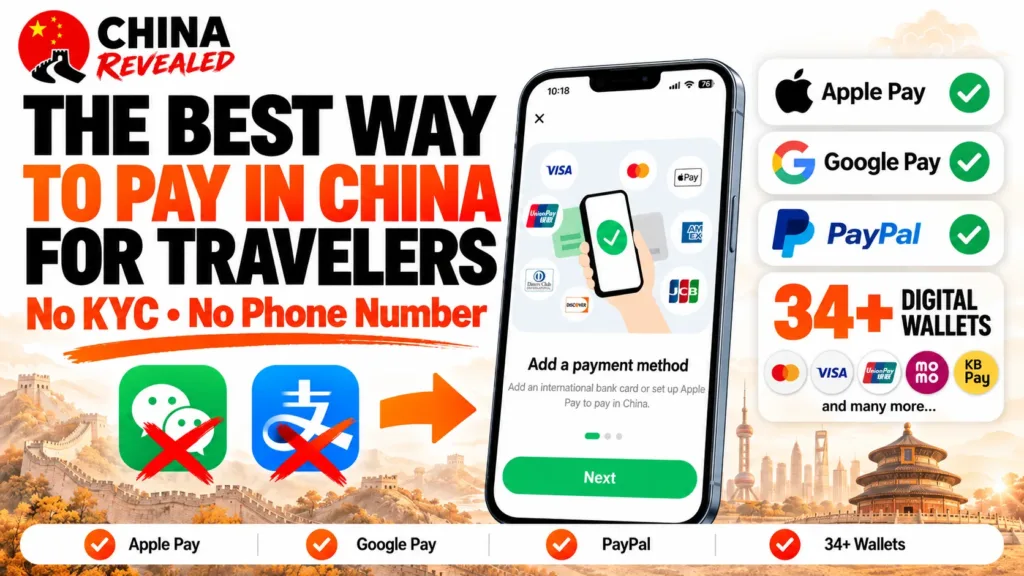
Want to pay in China without setting up a full WeChat account? TenPayGo lets you use Tencent’s Weixin Pay merchant network through a separate, simpler app. Register with an email address, add an eligible overseas payment method, and you can use it for everyday merchant QR payments.
For a short trip, that is a big advantage. You do not have to add friends, use Moments, or deal with WeChat social-account registration just to buy a coffee. TenPayGo supports international bank cards, Apple Pay on eligible iPhones, and selected overseas wallets.
It can take over the everyday merchant-payment job you would otherwise use WeChat Pay or Alipay for. But paying a restaurant is not the same as accessing every mini-program, booking service, or personal transfer feature. This guide shows where TenPayGo is a useful replacement—and when another app still helps.
About this guide: Prepared by China Revealed, this tutorial combines our hands-on TenPayGo setup, our own operation screenshots, and the walkthrough in our YouTube video. Official demonstration images are labelled separately to show in-store payments and Shenzhen transit. Personal payment codes and card identifiers have been obscured. App screens, eligibility and fees can change, so follow the prompts in your own account.
In this guide
- What is TenPayGo, and why use it instead of WeChat Pay?
- 1. Download TenPayGo and register with email
- 2. Choose a foreign card, Apple Pay, or a supported e-wallet
- 3. Complete bank verification and set your six-digit payment PIN
- 4. Pay by scanning the merchant’s Weixin Pay QR code
- 5. Let the cashier scan your TenPayGo payment code
- TenPayGo fees: check the RMB 200 threshold
- Can TenPayGo replace WeChat Pay and Alipay completely?
- When something goes wrong
- Frequently asked questions
What is TenPayGo, and why use it instead of WeChat Pay?
TenPayGo is Tencent’s visitor-focused payment app, with payments powered by Weixin Pay, the mainland-China payment service commonly called WeChat Pay. It is not an unofficial workaround or a separate app from an unknown developer.
Think of it as a more direct way into the merchant-payment network. Instead of creating a WeChat social account and then finding the wallet, you start in a payment-focused app.
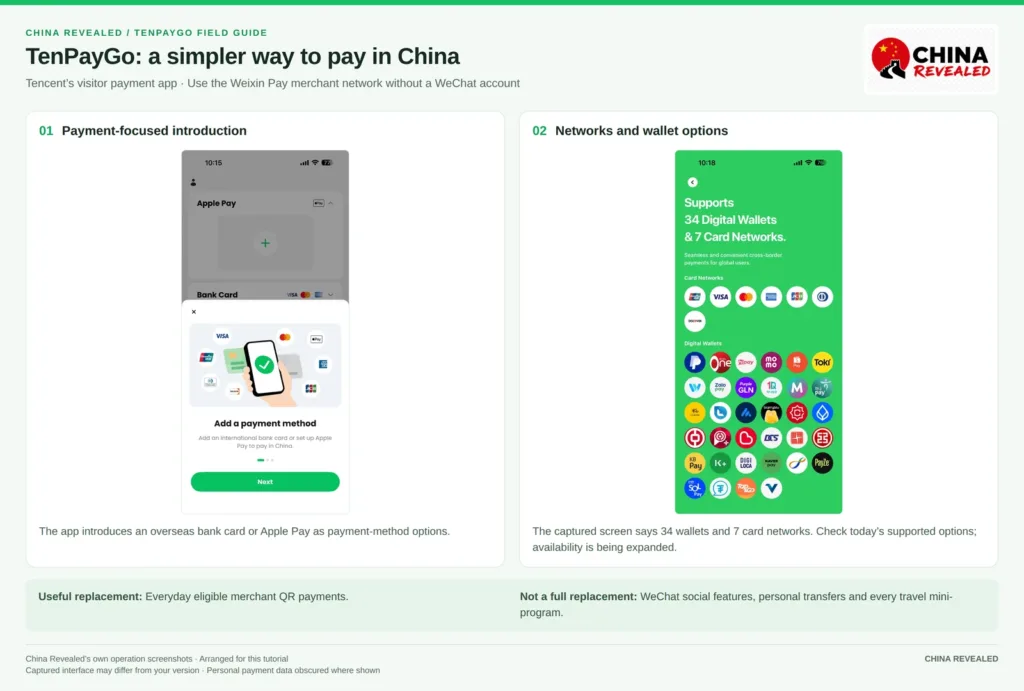
The advantages that matter on a short visit
No WeChat account comes first. You can register directly with email. That means you are not relying on a friend-verification step in WeChat just to enable a payment method. WeChat registration requirements vary, but TenPayGo avoids that separate social-account process altogether.
No Chinese phone number or bank account is needed for the demonstrated basic setup. Use your email and an eligible overseas payment method. You still need access to any SMS, banking-app approval, or email verification required by your bank.
The interface is easier to navigate. Our screenshots show English instructions and three clear payment sections: Apple Pay, Bank Card, and E-Wallet. There is less to work through before reaching a scan button or payment code.
You have more than one way to pay. An eligible foreign card can be linked directly. An iPhone user may prefer the Apple Pay route, while someone with a supported home wallet can follow that wallet’s connection flow.
You are using the Weixin Pay merchant network. That makes the app useful at participating cafés, restaurants, convenience stores, shops, and other businesses in mainland China. Individual approval still depends on the merchant transaction and your payment source.
The main benefit is simpler setup—not a guarantee of zero fees, no verification ever, or perfect acceptance at every QR code.
1. Download TenPayGo and register with email
You can find TenPayGo in the Apple App Store or Google Play. Check that the developer is Tencent Technology (Shenzhen) before installing. Store availability can depend on your account region and device; avoid unofficial APK mirrors if it does not appear.
Our screenshots use the iPhone version. The current iPhone listing requires iOS 15 or later, but the pictured interface is from our captured version rather than a promise that every later release looks identical.
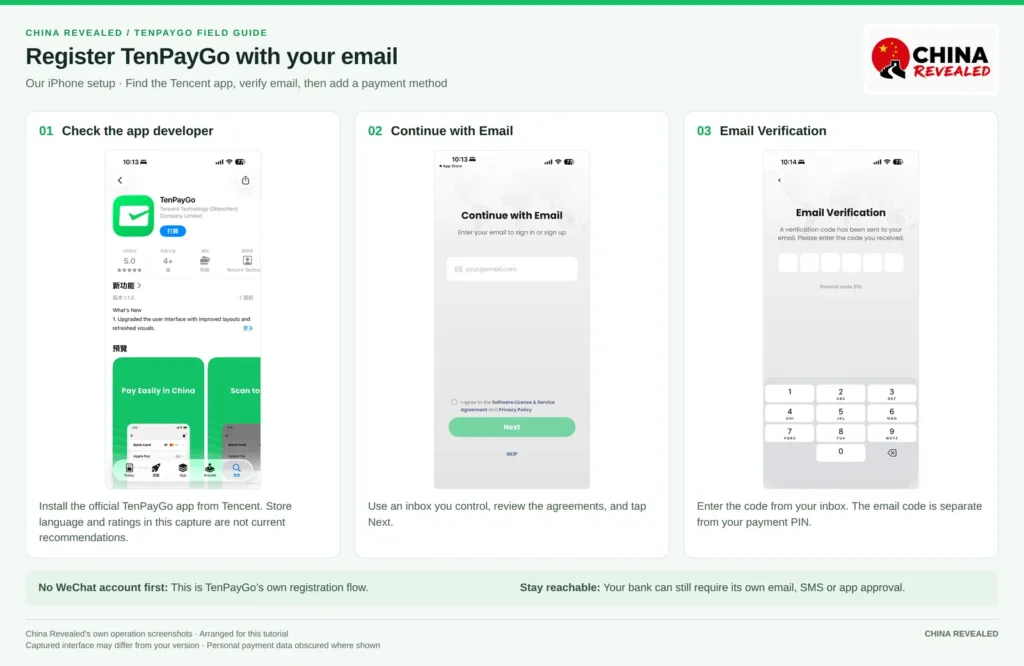
Open the app and choose Continue with Email. Enter an email address you control, read the agreements, select the required checkbox, and tap Next.
Check your inbox for the code, then enter it on Email Verification. If it does not arrive, check your spam folder and the address you entered. Wait for the resend countdown instead of requesting code after code.
Keep that email accessible during your trip. Registration does not require a mainland number, but your card issuer may still need to contact you through the number or email it already has on file.
Does TenPayGo require passport or real-name verification?
Our demonstrated initial flow did not include a passport-upload step. It moved from email registration to payment-method setup, issuer verification, and a payment PIN.
That is different from saying verification can never be required. TenPayGo can request necessary personal or real-name information, and your bank or wallet provider can perform its own checks. Follow any request shown in your account, especially when activating a payment source or changing limits. Do not enter invented details to get past a field.
2. Choose a foreign card, Apple Pay, or a supported e-wallet
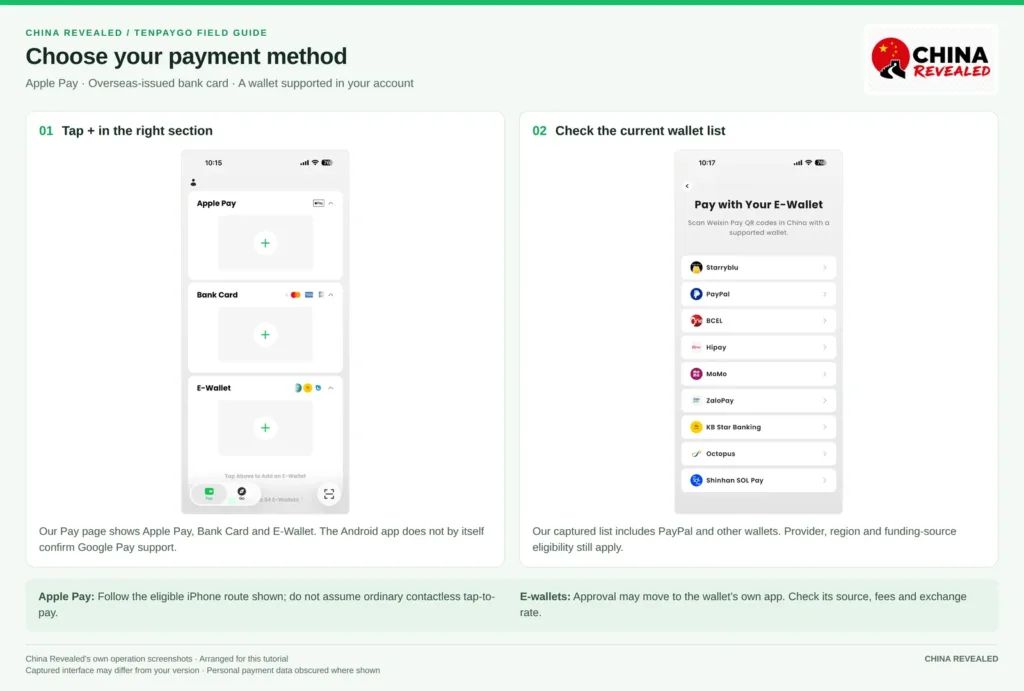
After registration, the Pay page shows your available payment sections. Tap the + in the section you want to use.
Add an international bank card
Open Bank Card and tap +. Provide the card number, expiry date, and CVV or security code if requested, then follow the issuer-verification prompts.
TenPayGo’s supported networks include Visa, Mastercard, American Express, JCB, Discover, Diners Club, and eligible overseas-issued UnionPay cards. A supported logo does not mean every card on that network will work. The issuer, country, card type, and authentication rules can still affect eligibility.
Use your own card issued outside mainland China. If the app asks for an issuer-linked email or other account details, follow the exact prompt and make sure the information matches your bank’s records.
Use Apple Pay on iPhone
In our iPhone screenshots, Apple Pay has its own section. Tap its + and follow the setup shown on your device. You need a compatible device and an eligible card; an existing Apple Wallet card is not automatically guaranteed to work in every TenPayGo payment.
This gives you an Apple Pay route into supported QR-payment scenarios. It does not mean that every Weixin Pay merchant suddenly accepts a normal contactless tap from your iPhone. Use TenPayGo’s payment flow and the method offered for that transaction.
Connect PayPal or another listed wallet
Open E-Wallet to see the options available to you. Our captured list includes PayPal, Starryblu, BCEL, Hipay, MoMo, ZaloPay, and others. The video also discusses home-wallet options such as LiquidPay and Changi Pay; look for your provider in the current app rather than assuming every mentioned wallet is already connected for every user.
A linked-wallet payment may redirect you to that wallet’s own app for approval. Sign in there and check its payment source, amount, currency conversion, fees, and eligibility before confirming.
Wallet integrations are rolling out in stages. Do not treat an old wallet count or a launch announcement as a complete live list. In particular, having a PayPal account is not the same as having a guaranteed working TenPayGo funding source.
What about Google Pay on Android?
The Android app is available, but Google Play availability does not establish Google Pay support. Our hands-on screenshots are from iPhone and show Apple Pay. We have not confirmed an equivalent Google Pay flow, so Android users should use the eligible card or wallet options actually displayed in their app.
3. Complete bank verification and set your six-digit payment PIN
When you link a card, you may see Verifying with your bank. The issuer may require 3-D Secure (3DS): an online card-authentication step, often completed with a banking-app approval or one-time code.
Before travel, make sure you can access those approvals. A working TenPayGo email account will not help if your bank’s verification message goes to a number you can no longer receive.
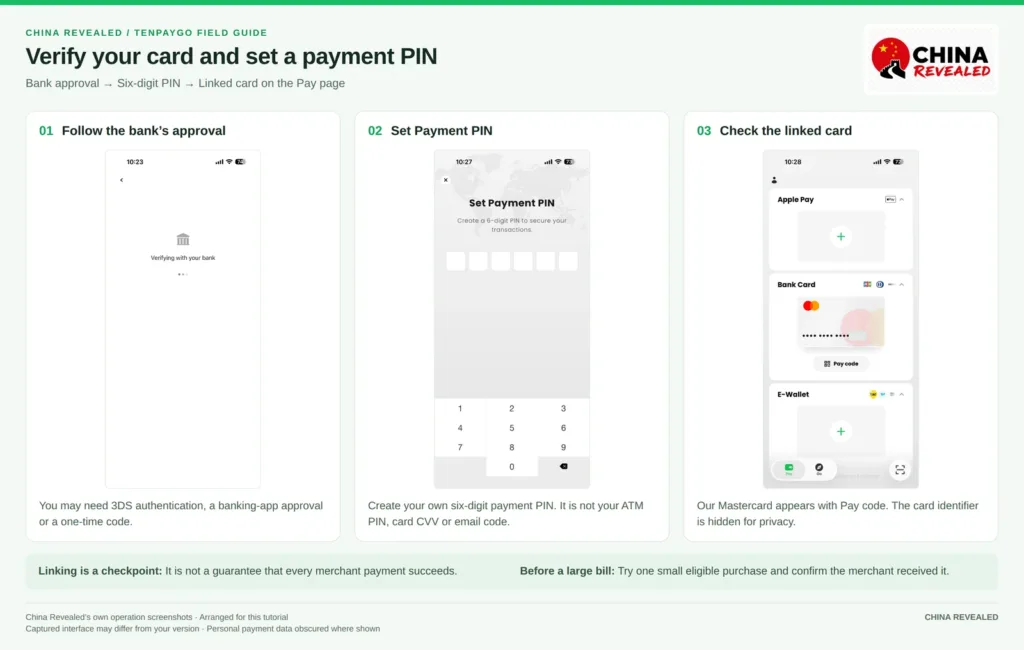
Follow the bank’s request, then create the six-digit payment PIN when TenPayGo prompts you. This is not your email verification code, your ATM PIN, or your card’s CVV.
Choose a PIN you will remember without using an obvious birthday or repeated digits. Never share it with a merchant, a hotel employee, or someone offering to “activate” the app for you.
When the card appears in Bank Card, the linking step is complete. That is a useful checkpoint, but it is not proof that every future purchase will be approved. After arrival, try one small eligible purchase and confirm the merchant received it before relying on the app for a larger bill.
4. Pay by scanning the merchant’s Weixin Pay QR code
On the Pay page, tap the scan icon in the bottom-right corner. Allow camera access, then scan the merchant’s supported Weixin Pay QR code.
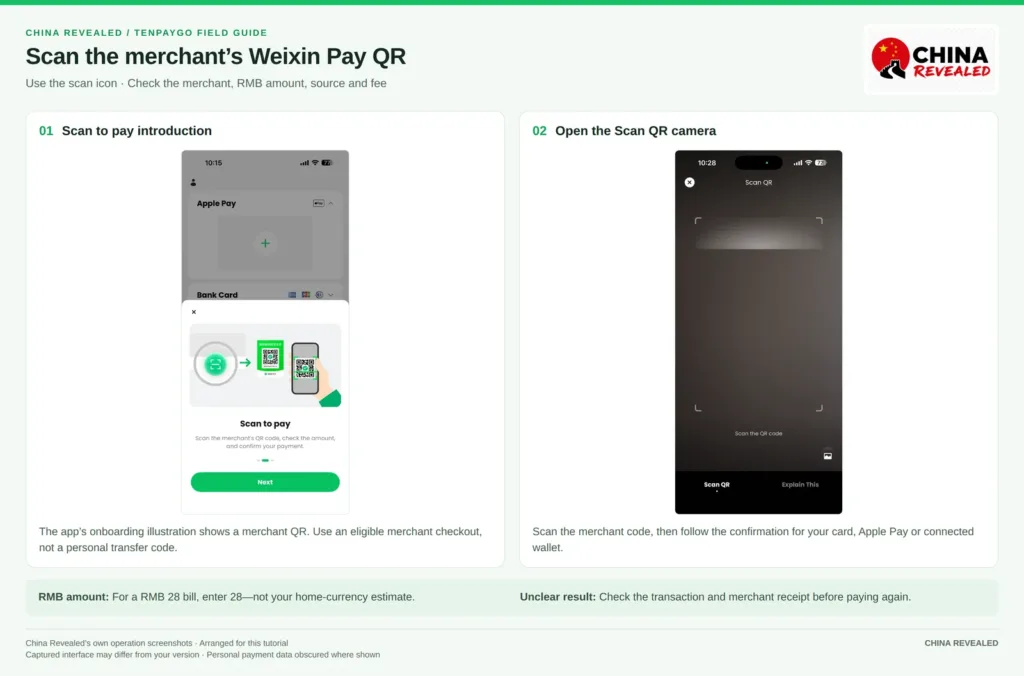
If you are asked to enter the amount, use Chinese yuan, also called RMB or CNY. For a RMB 28 bill, enter 28, not the estimated value in your home currency.
Review the recipient, amount, payment method, and any service fee. Then follow the confirmation shown for that source: it may involve your TenPayGo PIN, Apple Pay authentication, or approval in a connected wallet.
Stay at the checkout until both you and the merchant can confirm the result. A notification can arrive quickly, but a slow or unclear screen is not a reason to pay again immediately.
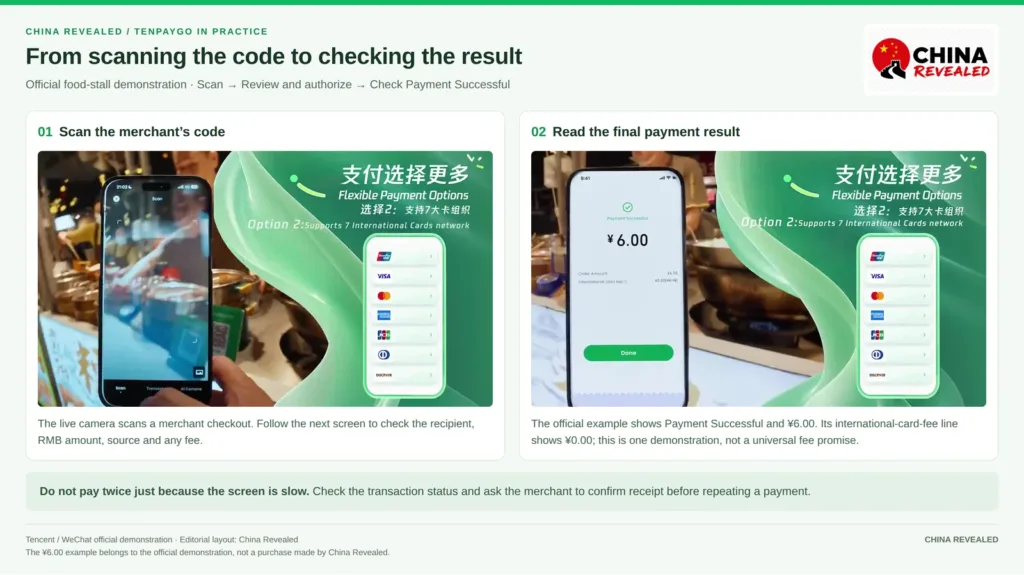
At a café or food stall: what do you actually do?
Order first and confirm the bill. If the cashier presents a merchant QR, scan it in TenPayGo, check the amount in RMB, and authorize the payment. If they hold a scanner instead, open your payment code—the next section explains that method.
You can ask, “Can I pay with WeChat Pay?” Or show this: “可以用微信支付吗?” If the business has a supported Weixin Pay merchant checkout, TenPayGo can be an option. Check the result with the cashier before leaving.
A restaurant table QR is not always a payment code
The code on a table can open an ordering mini-program rather than a checkout. Scanning it in TenPayGo does not guarantee you can browse the menu, order food and pay in the same flow.
If it does not open a supported payment screen, ask for a menu or order at the counter, then ask for the merchant payment code. “请给我商家收款码,我扫码付款。” means “Please show me your merchant payment code; I’ll scan to pay.” Do not assume a broken ordering link means the restaurant cannot accept a TenPayGo merchant purchase.
Why might a street vendor’s QR code fail?
TenPayGo is for eligible merchant purchases, not person-to-person transfers. A street vendor can use a merchant QR code and accept a supported purchase; another seller may be using a personal receiving code that TenPayGo cannot pay.
The seller’s size or age does not determine the result. The transaction type matters. Ask whether they have a merchant code or another payment method, rather than repeatedly scanning the same unsupported personal code.
5. Let the cashier scan your TenPayGo payment code
Supermarkets, convenience stores, and chain restaurants may scan your code instead. For the linked-card route shown in our screenshots, open Bank Card → Pay code.
Check the selected card or payment source, confirm the purchase amount with the cashier, and show the live barcode or QR code. Follow any confirmation prompt on your phone.
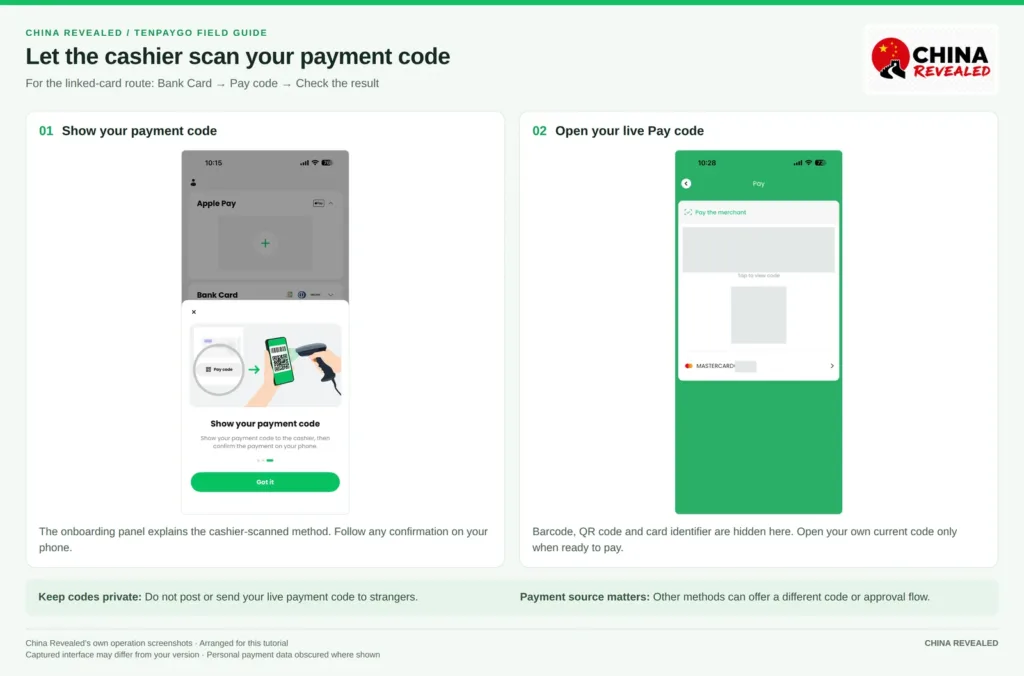
Treat your payment code as private. Do not send it to strangers, leave it visible when you are not buying something, or post it in a travel group. A cashier-scanned payment may not ask for a PIN on every transaction.
If you are using Apple Pay or a connected wallet, use the code or approval method offered for that payment source. Do not assume every source has exactly the same Pay code flow as the linked Mastercard shown here.
TenPayGo fees: check the RMB 200 threshold
The card-payment rule described in our video is no platform service fee for a single payment below RMB 200, and 3% for a single payment above RMB 200. Treat it as a practical guide to the displayed card-payment rule, not a universal fee guarantee for every route or promotion.
A RMB 300 purchase carrying the full-amount 3% fee adds RMB 9, making the payment total RMB 309 before any separate bank-side charges. Check the final screen to see the fee actually applied. If a purchase is exactly RMB 200, use that screen rather than guessing from the “below/above” wording.
Your bank can charge a foreign-transaction fee or apply its own currency-conversion terms separately. A no-foreign-transaction-fee card does not automatically remove a TenPayGo service fee.
A connected overseas wallet has its own fee and exchange-rate rules. The direct-card fee schedule should not be copied onto PayPal or another wallet without checking that specific approval page. Apple Pay is also not a promise of a fee-free transaction.
For larger bills, compare the merchant’s normal alternatives, such as a physical international card or cash where accepted. Do not rely on repeatedly splitting one purchase into small payments as a guaranteed workaround.
Spending limits and refunds
Your available limit is determined by the account and payment source, with possible additional verification. Check it before paying for a hotel stay or another expensive purchase. We are not quoting a single universal TenPayGo daily or annual limit because the service uses account-specific prompts and issuer rules.
Request a refund through the merchant, then track it in your transaction details and the underlying card or wallet. TenPayGo’s merchant-refund terms provide for returning the associated handling fee it charged, if any. Check the actual refund breakdown, particularly for a partial refund. Bank timing and home-currency differences are separate; a refund is not necessarily instant.
Can TenPayGo replace WeChat Pay and Alipay completely?
For everyday eligible merchant payments, it can be your main app. That is the useful claim: you can pay through the Weixin merchant network without creating a full WeChat account first.
It does not make every WeChat or Alipay function available in one place. TenPayGo is not a tool for chatting, joining WeChat groups, sending red packets, making personal transfers, or receiving money from friends. Its general merchant-payment service also does not provide a normal wallet-balance top-up feature.
For food delivery, Didi, shared bikes, attraction bookings, or another mini-program, check whether that service is actually available in your TenPayGo version and accepts your documents and payment source. Access to the merchant-payment network alone does not prove that a booking or ordering flow is included.
That is why our video recommends keeping Alipay as well for a first trip. TenPayGo can handle the simple “scan and pay” job, while Alipay can be useful for the wider set of travel services. You do not have to use all three apps for every purchase, but having another payment route is worthwhile.
For the broader walkthrough, read our Alipay guide for foreigners or watch the Alipay tutorial on YouTube.
Book hotels, flights, train tickets, attractions and other travel services on Trip.com.
Can you use TenPayGo for the metro or bus?
There is a Shenzhen Tong transit-code service being introduced through TenPayGo for Shenzhen buses and metro. As of this guide’s October 12, 2026 update, access is still subject to rollout; the announced wider opening was expected around mid-October. Check whether the transit service appears in your account.
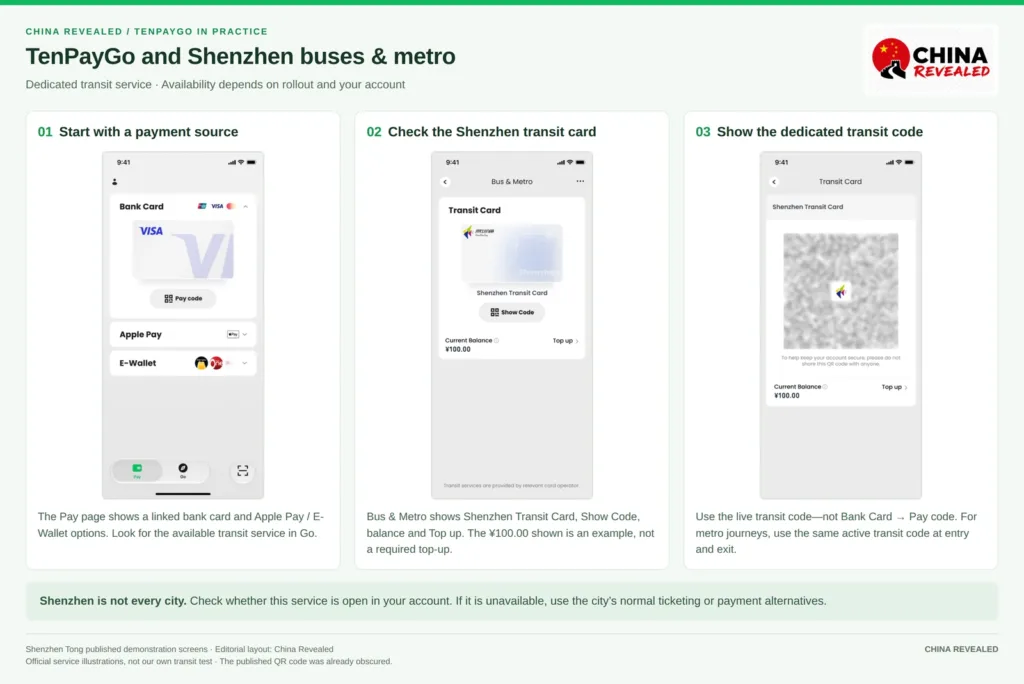
Start with a payment source already set up. Look for the available transit service in Go, and follow its activation instructions. In Bus & Metro, check that the card is Shenzhen Transit Card. The published screen places Show Code under the card, with Current Balance and Top up below it.
Where available, follow its activation and transit-balance instructions. A dedicated transit top-up is different from topping up a general TenPayGo wallet. For the metro, use the same active transit code at entry and exit.
Do not show the normal merchant payment code at a metro gate and assume it will work. Nor should you assume the Shenzhen service is a nationwide transit pass. In another city, check the local ticketing or transit options and keep a fallback.
What is Explain This?
Our scanner screenshot also shows Explain This, an AI-assisted feature intended to help identify things or explain and translate visible content such as menus. It is a useful extra if it is available in your version, not a substitute for checking an important address, allergy, or booking detail yourself.
This guide demonstrates the payment setup. We are not presenting the screenshot as proof of a tested translation result, completed transit ride, or tax refund.
When something goes wrong
Your email code does not arrive
Check the address and spam folder, then wait for the resend option. Make sure you can access that inbox from China. Do not give a verification code to a third party offering to fix your account.
Your card cannot be linked
Check the entered details and whether the card is eligible for overseas online use. Confirm that you can complete 3DS or another issuer approval. If the bank blocks it, ask the issuer or try another eligible card you own, ideally from a different bank.
A Visa or Mastercard logo is not a promise of successful linking. Stop and read a security or verification warning rather than repeatedly resubmitting the same information.
Bank verification opens a blank page or never returns
Some issuer-approval flows open a browser page or another app. If that screen is blocked, check whether a pop-up or redirect was prevented, whether the bank’s app is working, and whether the bank can send your approval code.
Allow a necessary bank-authentication page only after checking that it belongs to the expected bank or payment provider. You do not need to disable browser protections everywhere permanently. After approval, return to TenPayGo and check the transaction status before trying again.
The app says payment failed, but your bank shows a charge
Do not immediately pay again. Open the transaction history from your account or profile, ask the merchant to check receipt, and check whether the bank entry is pending or settled. A pending authorization is not always a completed merchant payment.
Keep the amount, time, transaction reference, and merchant details for support. Hide payment codes and sensitive card information in screenshots. Use the in-app support route or tenpaygo_support@tencent.com if you need help with TenPayGo; your bank or connected wallet may also need to investigate its side.
The merchant accepts WeChat Pay, but TenPayGo still fails
Check whether the code is a supported merchant checkout, whether the selected payment method is available, and whether your bank or wallet declined the transaction. The merchant network gives you reach, not unconditional approval.
Use another accepted method if the issue cannot be resolved at the counter. Carry some RMB cash and a physical card, and keep your phone charged. A simple app is helpful; a working backup is still necessary.
Frequently asked questions
Can I register before arriving in China?
Yes. You can complete the email and payment-method setup before travel where the app and your source are available. Make a small eligible merchant payment after arrival to check that the whole flow works in practice.
Do I need someone to verify a WeChat account for me?
No. TenPayGo has its own registration flow and does not require you to create a WeChat social account first. Your bank or wallet can still ask for its own verification.
Is TenPayGo free?
The app is free to download. Payment fees can apply, and your bank or wallet may charge separately. Check the final amount before authorizing a purchase.
Can I use PayPal to pay in China through TenPayGo?
PayPal appears in our captured supported-wallet list. Follow the current connection flow and check whether your particular PayPal account and funding source are eligible. Do not assume that every PayPal balance or linked card will work automatically.
Does TenPayGo require a Chinese bank account or SIM?
Not for the basic email-and-overseas-payment-method setup shown here. You still need internet access and any verification channel used by your bank. A Chinese number can remain useful for drivers or delivery services outside that basic setup (see our China SIM vs eSIM guide).
Should I uninstall WeChat or Alipay?
Not simply because TenPayGo is easier to set up. Use TenPayGo as your main merchant-payment option if it works for you, and keep the other app if you need its services or want a backup.
For a visitor who only wants to buy things, TenPayGo removes a lot of unnecessary setup. Start with email, add a method you can verify, set the PIN, and learn the two QR actions. Then test it with a small purchase—before the big bill or the crowded checkout.
Watch our full TenPayGo video walkthrough for the same steps on screen.
Watch the China Revealed walkthrough
About China Revealed
China Revealed is the world's largest, most professional, and most comprehensive English-language travel guide platform dedicated to China.
We provide the most extensive collection of China travel guides, destination information, local insights, and practical travel resources, all in one place.
Our comprehensive travel database covers China's provinces, cities, famous attractions, hidden gems, local cuisine, transportation, accommodation, visa requirements, digital payments, mobile connectivity, and everything travelers need to explore China.
What sets China Revealed apart is our unmatched depth of information, professional research, local expertise, and commitment to accuracy. Our guides combine official sources, detailed destination data, firsthand local knowledge, and regularly updated information to deliver reliable, practical, and comprehensive travel advice.
Whether you're visiting China for the first time or exploring beyond the popular destinations, China Revealed is your trusted, all-in-one resource for discovering the real China.
China Revealed — Your Ultimate Guide to China.