

How to Use Meituan in China: A Foreigner’s Guide to Food, Deals and Local Fun
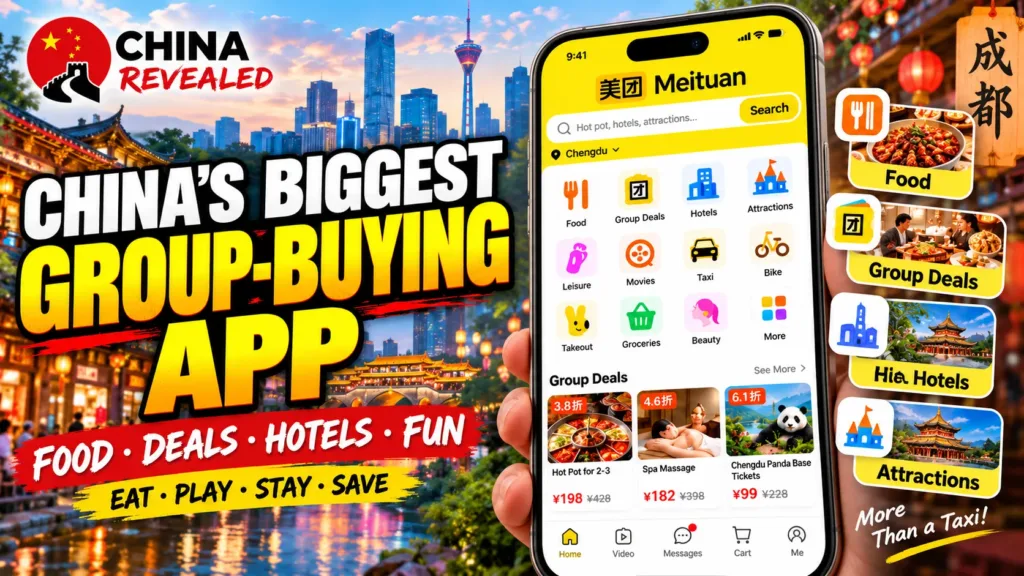
Want dinner delivered to your hotel, a cheaper hot-pot meal, or something to do after sightseeing? Meituan (美团) brings food delivery, restaurant deals and local activities into one app. You can also use it to look for groceries, hotels, attraction tickets and transport bookings.
Meituan started as a group-buying platform and became one of China’s biggest everyday local-services platforms. In its Q3 2025 announcement, the company said its annual transacting users had passed 800 million. That means people who used its services over the preceding 12 months, not simply registered accounts.
For a visitor, the useful part is not the size of the company. It is being able to check a nearby restaurant’s menu, see recent customer photos, compare a set-meal deal and understand the price before walking in.
This guide follows the China Revealed video walkthrough and expands the parts that matter most on a real trip: phone registration, English settings, hotel delivery addresses, payment and redeeming a deal without buying the wrong thing.
About this guide: Prepared by China Revealed from our video tutorial, with practical travel tips and checked app information. The screenshots are published app reference examples arranged into branded step-by-step images; they are not presented as our own completed purchases. Prices, dates and offers pictured are examples, not live recommendations.
In this guide
- What can foreigners use Meituan for?
- Before you start: phone number, address and payment
- Step 1: download Meituan and register
- Step 2: switch Meituan to English
- Step 3: add the right hotel delivery address
- Step 4: order food delivery on Meituan
- How to pay on Meituan with a foreign card
- Step 5: find a restaurant deal or group-buy voucher
- Step 6: buy the deal and redeem it at the venue
- How to cancel or refund a Meituan deal
- Beyond food: groceries and convenience-store delivery
- Massage, KTV, movies and other local activities
- Hotels, attraction tickets, flights and trains
- Common Meituan problems and what to do
- Frequently asked questions
- Try one small order first
What can foreigners use Meituan for?
The most useful features for a short trip are food delivery and discounted deals you use at a business. Delivery brings a meal to an address. A group-buy deal usually gives you a voucher for a particular meal or service, which you redeem at a participating venue.
For example, a restaurant might sell a hot-pot set for two, a café might offer a drink-and-dessert bundle, and a foot-massage shop might sell a one-hour session. These are normally ready to buy directly. You do not need to recruit a group of people.
You can also find supermarkets and convenience stores, massage and spa packages, KTV karaoke rooms, cinemas, gyms, billiards and other activities. Hotels, attraction tickets, flights and train tickets are available too, but these bookings need more careful checking of identity fields and cancellation conditions.
The categories you see depend on your city and app version. Finding a service does not guarantee that every foreign phone number, card or passport will work with that particular booking.
Before you start: phone number, address and payment
Have a working phone number that can receive verification texts, internet access in China and a payment method you have already set up. For food delivery, get your hotel’s Chinese name and full address ready as well.
An overseas number may work for Meituan registration if your country code is offered and the text reaches you. It is not guaranteed. Some travelers see verification errors even when their country appears in the list. A personal Chinese number is often more practical because riders and businesses may need to call you.
A data-only travel eSIM is not the same as a Chinese phone number. Our China SIM vs eSIM guide explains the difference. It can give you internet without giving you a local number for calls and SMS. Keep the number attached to your account accessible while you still have orders, refunds or support questions outstanding.
For payment, prepare Alipay or WeChat Pay with an eligible foreign card before you are hungry and trying to check out. Other choices may appear, but you should not assume every card or wallet is accepted on every order.
Step 1: download Meituan and register
Search for Meituan or 美团 in your phone’s app store. Choose the official main Meituan app with the yellow logo. A separate Meituan food-delivery app also exists; this guide focuses on the main app that combines delivery, deals and local services.
- Open the app and tap Log in / Register if prompted. You may also find the sign-in entry under Me / 我的.
- Select your country or region code, then enter your own phone number in the format requested by the app.
- Request the SMS verification code and enter it before it expires.
- Follow any additional security check shown on your screen.
- Confirm the city shown on the home page. Allow location access if you want nearby results, or select your city manually.
If the text does not arrive, check the country code, roaming and SMS reception before requesting it repeatedly. If the app temporarily limits attempts, wait for the interval it displays. Do not use public SMS-receiving websites or rent an account from an unknown seller.
Meituan can also be accessed through certain WeChat or Alipay mini-program entry points. These can be convenient, but opening a mini program does not necessarily bypass Meituan’s phone verification. Its login, language and service options may differ from the main app.
Step 2: switch Meituan to English
The current Meituan app supports an English interface. Older tutorials that say Meituan is only in Chinese do not describe the current main app accurately.
Open your profile or settings area, look for Language / 语言, choose English, and tap Save. The exact settings entrance can move between versions, so follow the labels rather than a fixed button position.
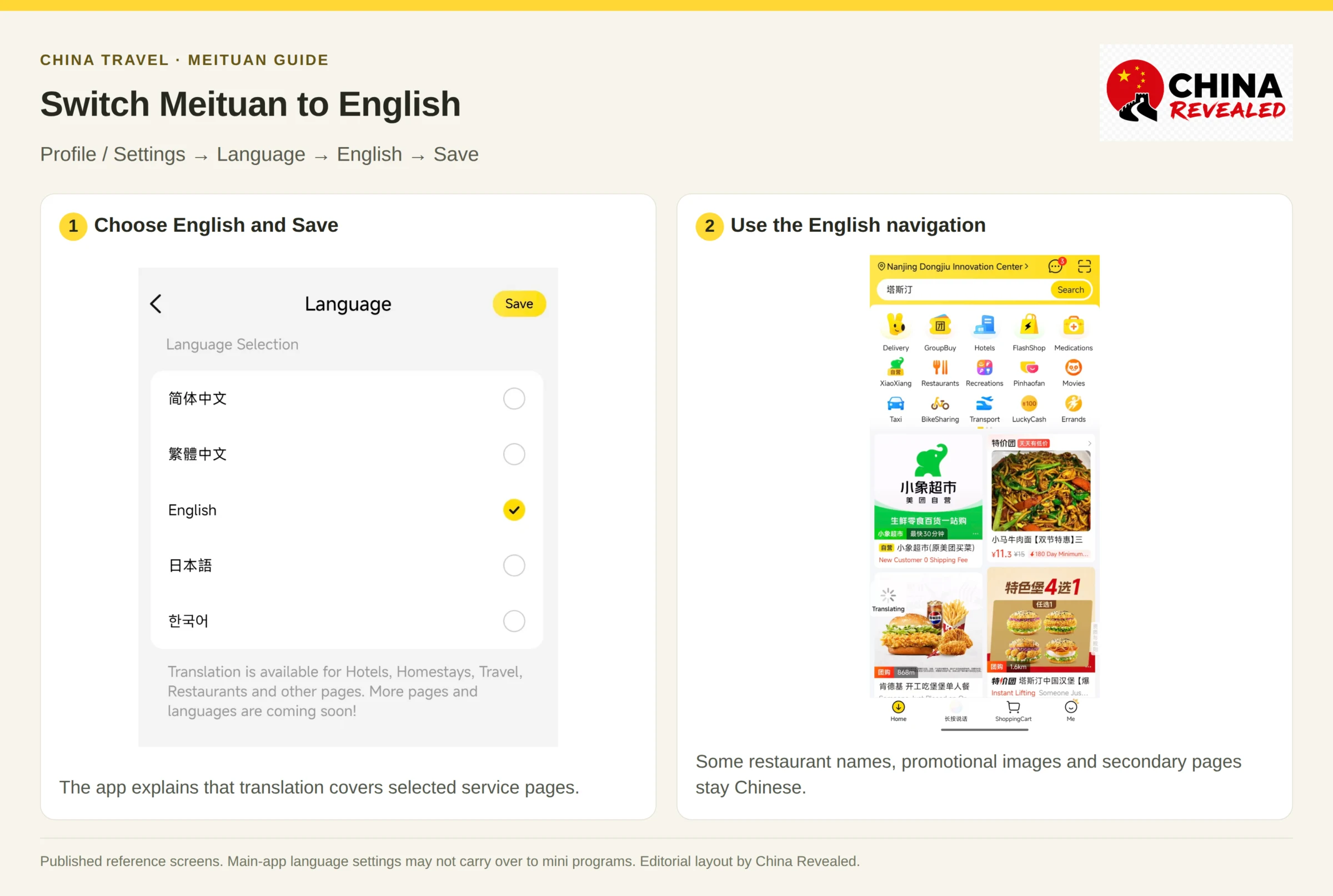
Restaurant names, dish names, text inside images and some secondary pages may still appear in Chinese. Take a screenshot and use your phone’s text-recognition or translation tool for those parts. Prepare an offline translation option before traveling if you rely on a service that may not be reachable on your connection.
Do not assume the main app’s language setting carries over to a WeChat or Alipay mini program. If its menu offers Translate, use that as a fallback.
Step 3: add the right hotel delivery address
In the flow shown in our script, open Delivery → Me → My Address → Add New Address. You may see equivalent Chinese labels such as 外卖, 我的, 收货地址 and 新增地址.
Choose the hotel on the map or paste its Chinese name and address. Then add the contact name, a reachable phone number and any building or room information the address form requests.
Check the exact branch. A familiar hotel name is not enough: chains often have several properties in the same city. Confirm the road, map pin and entrance with reception before saving.
Ask the front desk where food deliveries are accepted. Some hotels require collection from the lobby, a food shelf or a designated entrance. Do not assume a rider can come directly to your room. Add a short note that matches the hotel’s actual policy.
Useful messages to copy:
- 请放在酒店前台,谢谢。 — Please leave it at the hotel reception, thank you.
- 请放在酒店指定的外卖存放处,谢谢。 — Please leave it at the hotel’s designated food-delivery area, thank you.
- 我在酒店大堂。 — I am in the hotel lobby.
Get permission before using someone else’s phone number. If your own contact number is not supported, ask reception whether it can knowingly place an order for you instead of attaching an employee’s number to your account without asking.
Step 4: order food delivery on Meituan
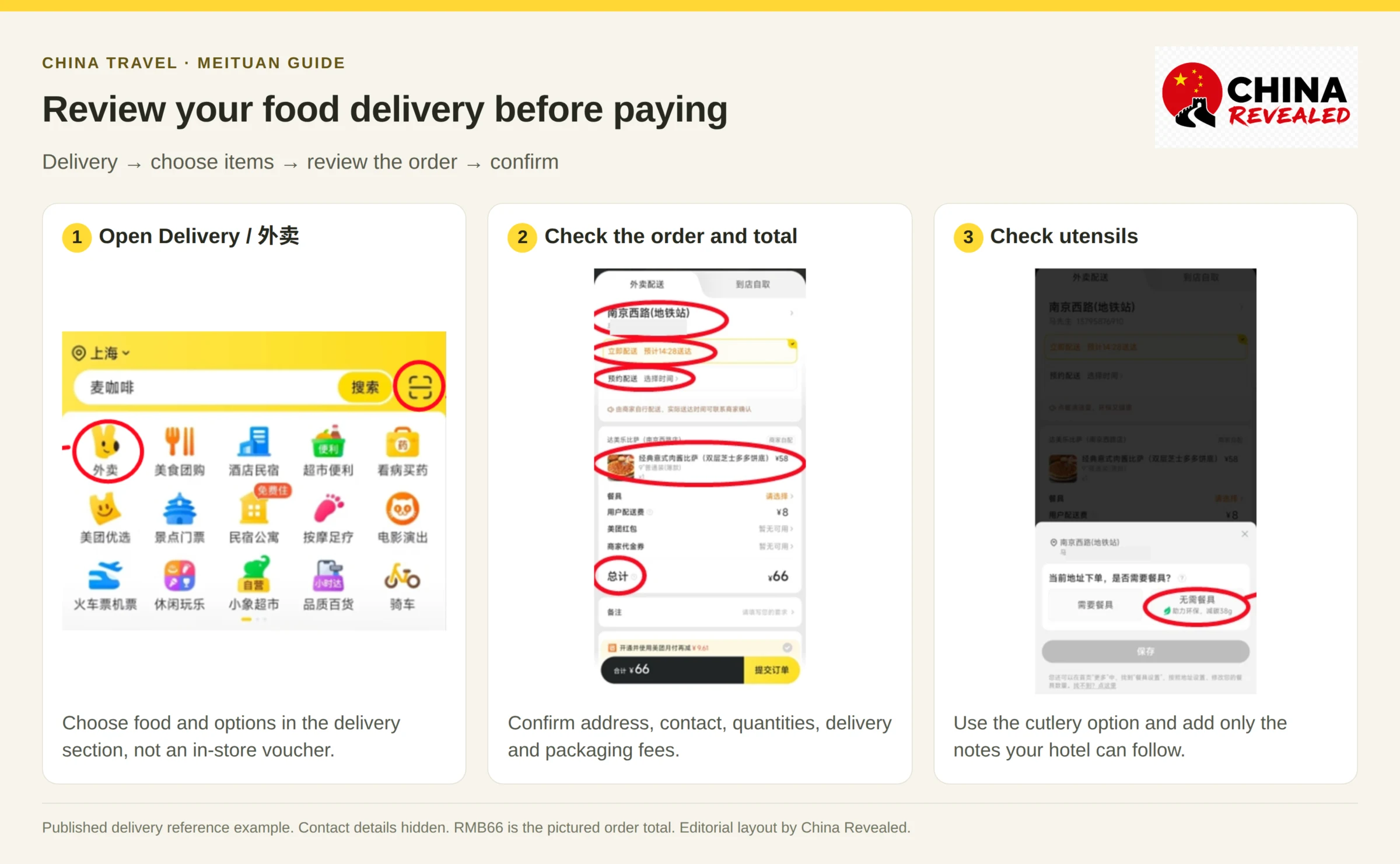
Open Delivery / 外卖 from the home screen. Search for a restaurant or food, or browse nearby options. Coffee, milk tea, desserts, meals and fruit are common choices.
For a first order, choose somewhere reasonably close, check the estimated arrival time and look at recent reviews. A low headline price is not useful if the restaurant has a large order minimum or cannot deliver before you leave the hotel.
- Open the restaurant and select the items you want.
- Choose the available options: size, hot or iced, sugar level, spice level, portion and any add-ons.
- Add the items to your cart and check the quantities.
- Review the minimum order, delivery fee and packaging fee.
- Confirm the address, phone number, utensils and order notes.
- Continue to payment and wait for the result before closing the page.
Why is checkout unavailable?
First check whether you have met the minimum delivery order / 起送价. Some merchants require a minimum spend, while a drink offer may require more than one cup. The requirement is specific to that merchant, not one universal Meituan minimum.
Also check for an incomplete address, missing item options, an out-of-stock item or a closed restaurant. Do not keep adding food if the actual error is a payment or phone-verification problem.
Will it arrive in 30 minutes?
Use the time shown for your order as an estimate, not a promise. Rain, meal rushes, distance and preparation delays can all affect delivery. Avoid placing an order just before you need to leave.
After paying, open the order page to check preparation and rider progress. Keep your phone reachable. If the rider calls and you cannot communicate, ask reception for help. If the app says Delivered, check the hotel’s collection area before assuming the order is missing.
For a food allergy, a translated note alone is not a guarantee. Confirm with the restaurant that it can safely handle the ingredients and preparation you need.
How to pay on Meituan with a foreign card
On many orders you can choose Alipay or WeChat Pay. If you linked a supported foreign card to that wallet, select the wallet at Meituan checkout and complete its payment confirmation.
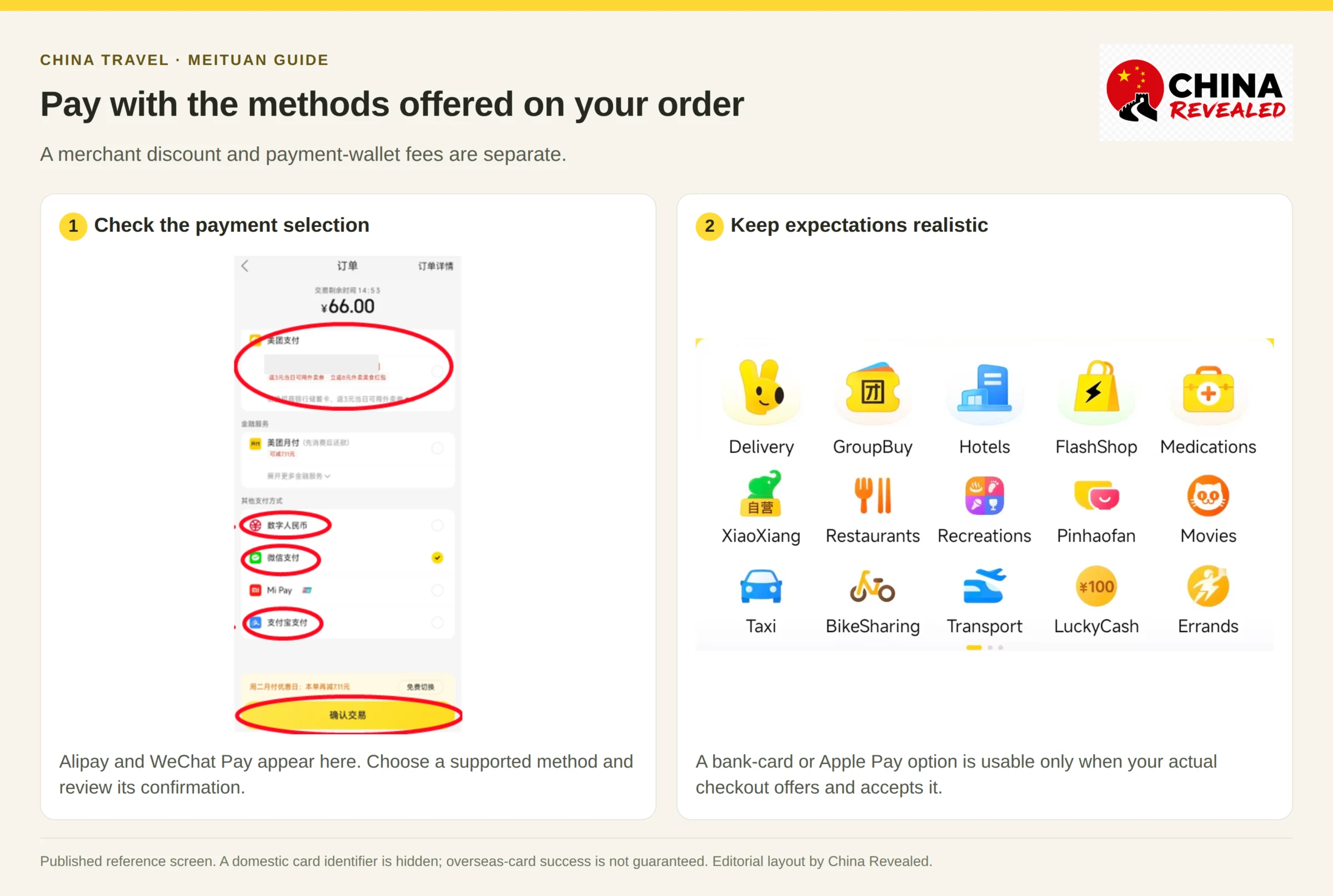
Our video script also mentions bank-card and Apple Pay choices. Use those only when your actual checkout offers them and accepts your card or device. Adding a card to Apple Wallet does not automatically make Apple Pay available inside Meituan. Likewise, a button labelled Meituan Pay is not proof that any overseas card can be linked to it.
Wallet service fees, your bank’s currency conversion and foreign-transaction charges are separate from the restaurant discount. For an international-card payment through Alipay or WeChat Pay, check the wallet’s final confirmation screen for any applicable fee or account-specific waiver.
After payment, return to Meituan and make sure the order is marked paid. A banking notification alone is not the same as a confirmed restaurant order. If you see a pending authorization but the order failed, check its status before paying again.
TenPayGo is not a guaranteed Meituan checkout method. Being able to pay a participating business’s merchant QR in person does not mean you can use the same app to buy a Meituan voucher online.
Step 5: find a restaurant deal or group-buy voucher
Open GroupBuy / 团购, Restaurants / 美食, or search for the store name. Compare nearby results using distance, price, rating and recent customer photos.
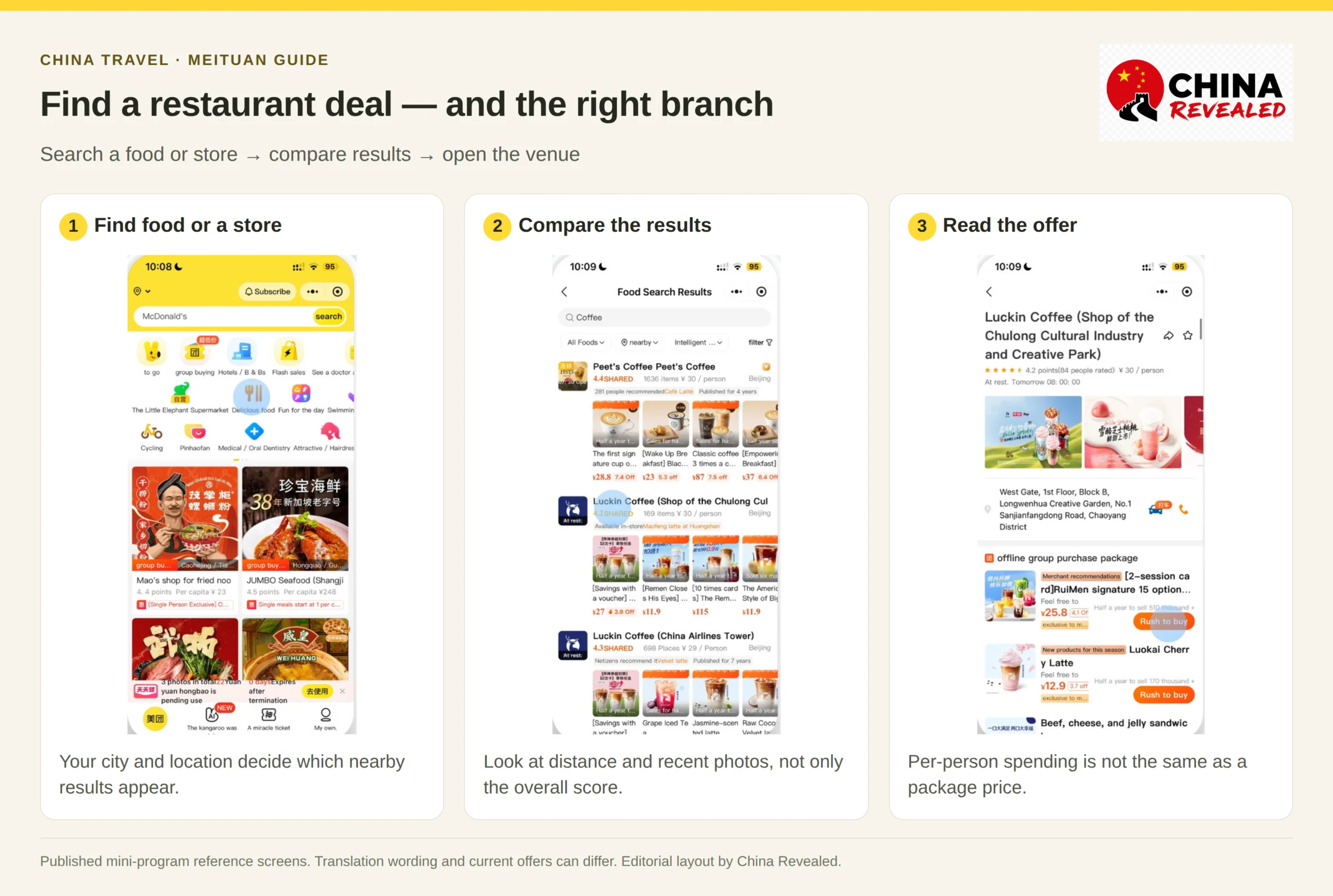
The number shown as per person / 人均 is usually an indicative spending level, not the price of a bookable set meal. Open the actual deal to see what you are buying.
Read recent reviews rather than relying only on the overall score. Customer photos can help you judge portion sizes, cleanliness and the atmosphere. Then confirm that the venue is open and that the deal fits your plans.
A set meal and a cash voucher are different
A set-meal package / 套餐 normally covers the specific dishes or services listed. Check the number of people, choices, drink allowance and extras such as a hot-pot soup base or a service charge.
A cash voucher / 代金券 gives a stated amount of eligible spending value. It may have a minimum spend, excluded items or a limit on how many vouchers can be used together.
For a hypothetical example, a voucher sold for RMB80 with RMB100 of eligible value is not necessarily an unrestricted RMB20 discount on any bill. If the bill is higher, you may need to pay the balance. If it is lower, unused value may not be refunded. The deal’s terms decide.
Check these before buying
- Participating branches / 适用门店: Is your exact restaurant included?
- Contents / 套餐详情: Which items, quantities or services are covered?
- Validity / 有效期: Can you use it on the date of your visit?
- Usage times / 使用时间: Are weekends, public holidays or dinner excluded?
- Reservation / 预约: Do you need to book a time or call ahead?
- Refund rules / 退款规则: What happens if your plans change?
Do not judge value only by the percentage discount or a crossed-out original price. Compare the actual package with what you would otherwise order. A large advertised saving is not useful if the package includes items you do not want.
Step 6: buy the deal and redeem it at the venue
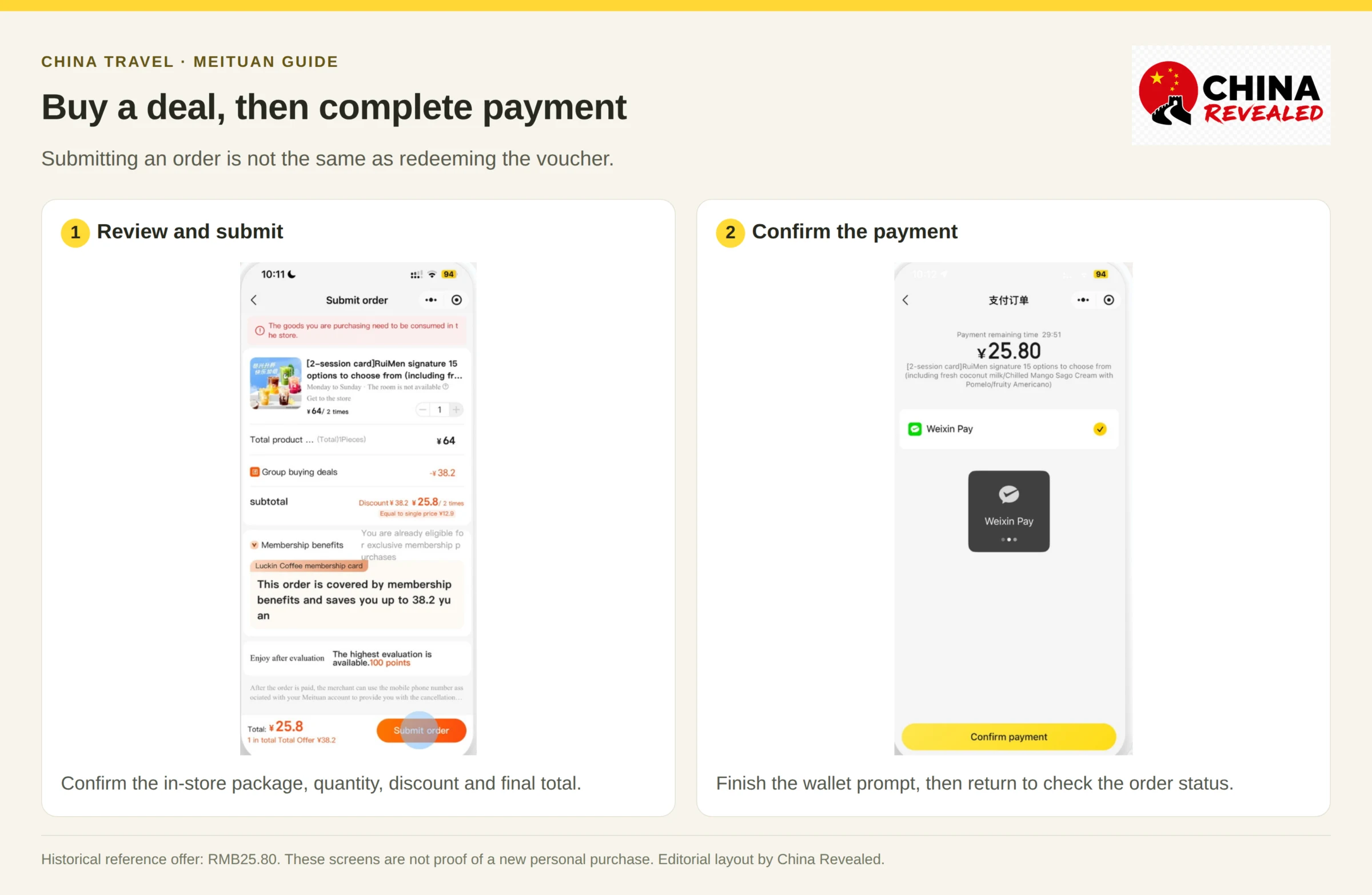
Choose the deal, confirm the quantity and follow Buy now / 立即购买 / 立即抢购 or the equivalent button. Review the total, then submit the order and complete payment.
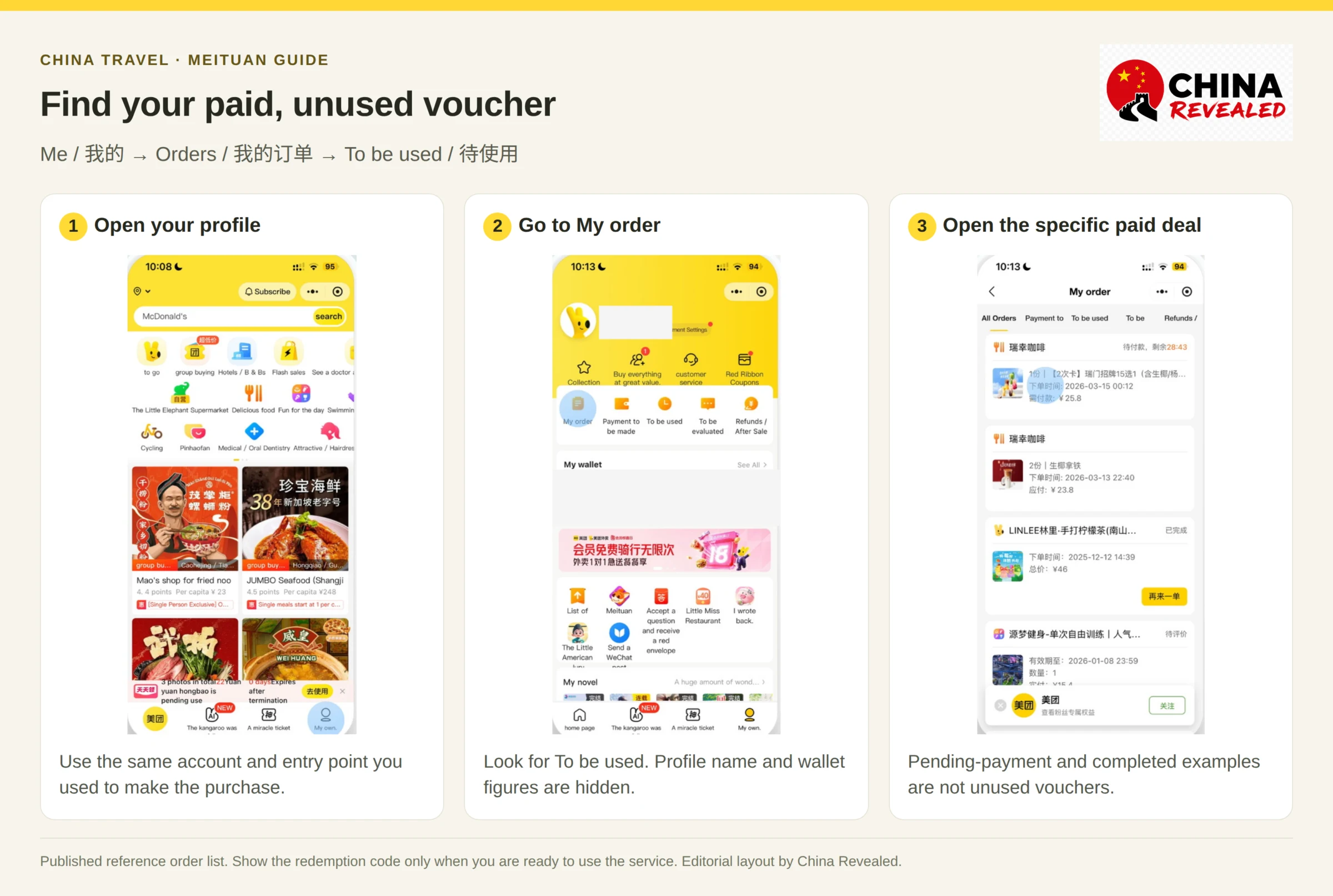
After payment, go to Me / 我的 → Orders / 我的订单. Find the relevant purchase, often under To be used / 待使用, and open its details.
At the venue, tell the staff you bought a Meituan deal. Open the voucher and show its redemption code when you are ready to use the service. Staff will usually scan the code or enter the voucher number to redeem / 核销 it.
A deal voucher is not your Alipay or WeChat payment code. The voucher proves that you already bought a specific offer. A payment code allows a merchant to charge you. Showing the wrong one could lead to paying twice.
Buying a voucher is also not automatically a table reservation. If the restaurant requires booking or has a queue, handle that separately.
When you are already at the counter, ask before buying:
- 现在可以用美团团购吗? — Can I use a Meituan deal now?
- 这个套餐包括哪些东西? — What does this package include?
- 我已经在美团买了这个套餐。 — I have already bought this package on Meituan.
- 需要提前预约吗? — Do I need to reserve in advance?
Only reveal the redemption code when you are ready to receive the meal or service. Once it has been redeemed, it is no longer an unused voucher. Do not post an active voucher QR or code publicly.
Coffee and milk-tea deals may need an extra ordering step
Some drinks use an online ordering or pickup / 自提 flow instead of a cashier simply scanning your voucher. The order may offer Go to order / 去点单, Use now / 去使用, or a link into the brand’s own mini program.
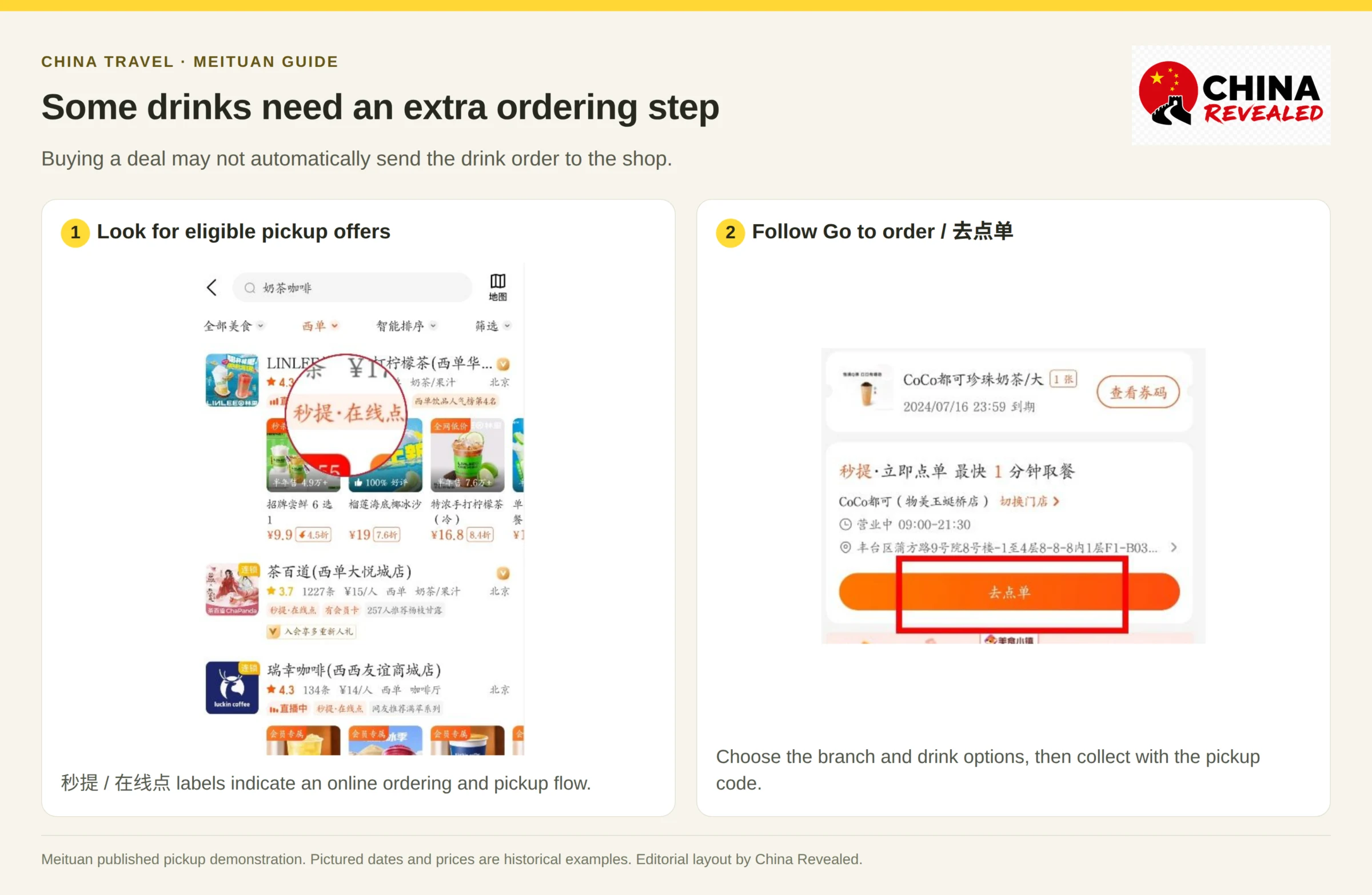
Make sure the final branch is correct, choose any drink options and wait for the pickup confirmation. A voucher code, a pickup number and a payment code serve different purposes.
How to cancel or refund a Meituan deal
Open Me → Orders, select the purchase and look for its refund or after-sales entry. Read the reason and conditions before submitting a request.
Offers marked Refund anytime / 随时退 generally allow a refund request while unused. Automatic refund after expiry / 过期退 applies only when that protection is shown for the product. Do not assume every hotel booking, ticket, delivery or activity has the same rule.
A redeemed deal is not treated like an unused voucher. You may need the merchant’s confirmation or customer-service review, and approval is not guaranteed.
The refunded amount is based on what you actually paid, not the crossed-out original price. Coupons and promotional benefits have their own return conditions. Refunds normally follow the payment route, but processing times and account limitations can affect when and where the money returns.
If staff cannot accept a voucher, keep it unredeemed, show them the participating-branch and usage terms, and contact support from that order. Do not buy a replacement until you understand what went wrong.
Beyond food: groceries and convenience-store delivery
Look for FlashShop / 闪购, supermarket or convenience-store categories. These are useful for water, snacks, fruit, toiletries and everyday items such as a charging cable.
The flow is similar to food delivery: pick a nearby shop, check the item specification and quantity, confirm the hotel address and pay. For a cable, for example, check the connector type and whether a charger is included rather than relying on the product photo.
Delivery coverage depends on the location. A major city may show many stores, while a remote scenic area may have few or none. Use the availability and arrival estimate shown in the app instead of assuming everything can be delivered quickly everywhere in China.
Massage, KTV, movies and other local activities
Open Recreations, Leisure & Entertainment, or search for the activity directly. Meituan can be a useful way to compare a nearby evening plan after a day of walking.
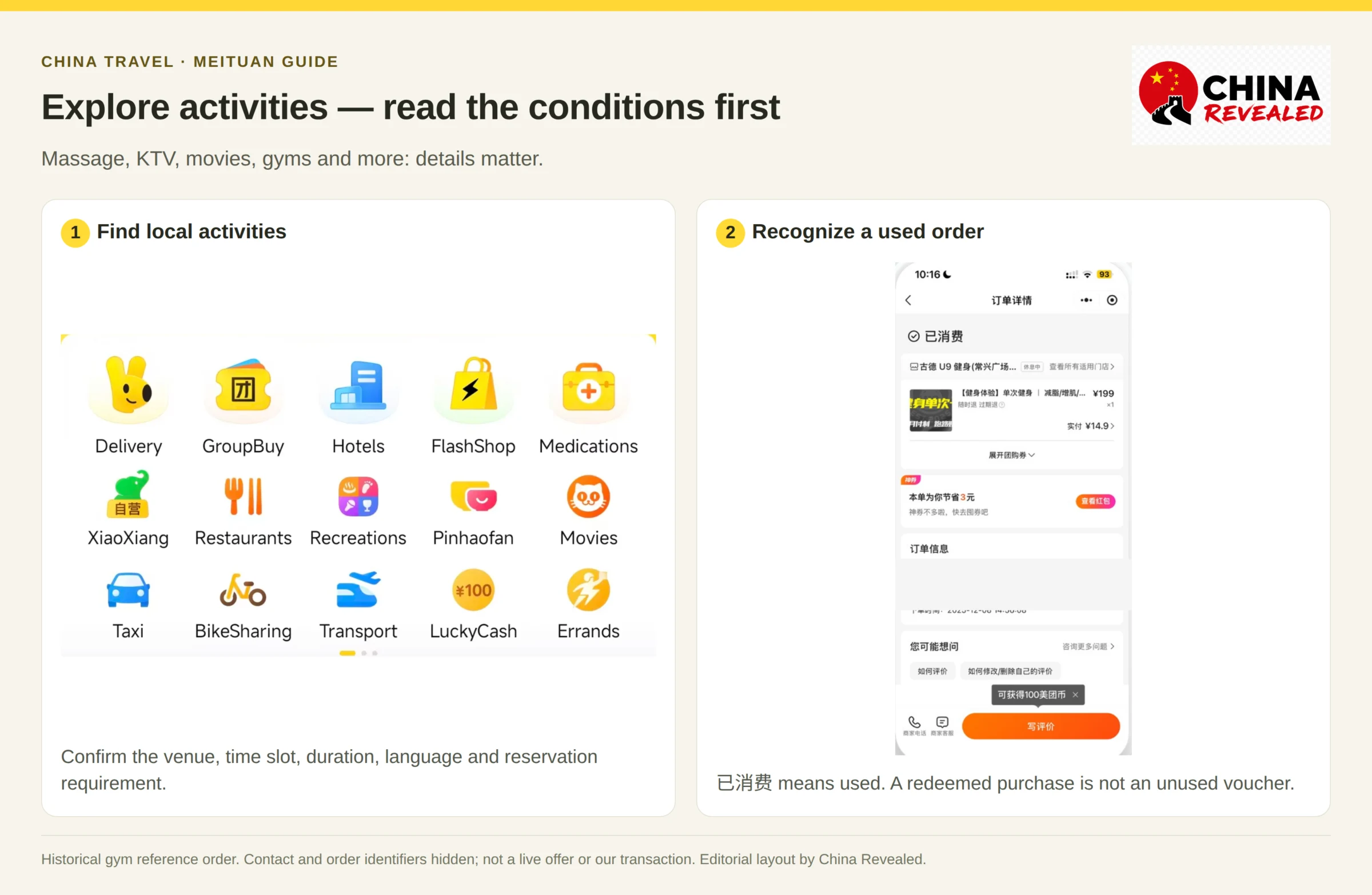
For foot massage or spa, compare the exact treatment, duration, setting and whether any upgrades cost extra. For KTV, check room size, session length and valid time slots; an afternoon package may not work during the evening you want.
For movies, confirm the cinema branch, date, showtime, seats and language or subtitles. A film screening in China is not necessarily an English-language screening. Apply the same check to stand-up comedy and live shows.
For gyms, pools, billiards or climbing, check whether the deal is a single visit, an hourly booking or a first-time-user trial. Ask about equipment rental, lockers and any required reservation.
For internet cafés or esports venues, confirm in advance whether the business can register your foreign passport through its identity system. Finding a listing or buying a voucher does not guarantee admission.
For camping, read what the package provides. A campsite-only deal may not include a tent, bedding, meals, transport or activities. Confirm these before paying, especially if you cannot bring your own equipment.
Hotels, attraction tickets, flights and trains
Meituan also offers travel bookings, but local dining and activities are the easier place to begin. For a booking tied to your identity, check the document options before committing.
Hotels: choose the city and dates, then confirm the exact property, room type, cancellation conditions and check-in requirements. Ask the hotel to confirm it can check you in using your foreign passport. A listing or successful payment is not a substitute for that confirmation.
Attractions: choose the visit date and ticket type. Check whether a separate timed reservation is required and whether the booking accepts a foreign passport. Some tickets use document-based entry rather than a voucher QR alone.
Flights and trains: check the departure and arrival airports or stations, passenger name, passport details, baggage where relevant, and change or refund rules. If the flow only accepts a Chinese identity card, stop and use a booking channel that accepts your document.
After payment, wait for ticket issued / 出票成功 or the final booking confirmation. A paid order that is still issuing is not yet a confirmed ticket. Do not make a duplicate booking just because issuance is taking longer than expected.
Book hotels, flights, train tickets, attractions and other travel services on Trip.com.
Common Meituan problems and what to do
My overseas phone number will not verify
Check the country code and whether your phone can receive the SMS. A country in the selector does not guarantee successful registration. If the app gives an error or retry limit, follow that message. A personal local number with calls and SMS can be a more reliable travel setup.
My foreign card works in a shop but not on Meituan
A physical merchant payment and a platform checkout are different transactions. Check whether the specific Meituan order accepts the wallet you selected, and whether your wallet and issuer allow that transaction. Complete any required verification in the wallet itself. Try another eligible method offered at checkout rather than assuming every foreign card must work.
I bought the wrong branch’s deal
Do not redeem it. Open the participating-branch list and refund conditions. If another branch is not included, contact support or the merchant before traveling there. A chain’s logo does not mean every location accepts every deal.
The restaurant says I need to book first
Buying the offer did not necessarily reserve a table or appointment. Check the reservation terms and ask for an available time. If you cannot use it, review the unused-voucher refund conditions.
I cannot find the voucher
Make sure you are in the same account and entry point used to buy it. Check the order’s payment status, then look under To be used / 待使用. Open the actual paid order; do not confuse a failed payment or a cart item with a purchased voucher.
A refund says processed, but my bank has not credited it
Check the refund record and destination, then allow the processing time shown by Meituan and your payment provider. Keep the order and refund references. Contact support from the original order if the expected period passes.
Frequently asked questions
Can foreigners use Meituan in China?
Yes. Foreign visitors can use supported registration and payment routes to order delivery and buy local deals. Phone verification, individual merchant requirements and passport-only bookings can still create friction.
Is Meituan available in English?
Yes, the current main app has an English language option. Coverage is partial: some merchant content and secondary pages remain Chinese. Mini-program language behavior may be different.
Do I need a Chinese phone number?
Not necessarily for every registration flow, but overseas SMS delivery and service support vary. A personal Chinese number is often easier for rider calls and bookings. A data-only eSIM does not provide those features automatically.
Do I have to form a group to buy a Meituan deal?
Normally no. The restaurant and service packages covered here are usually available to buy directly. Separate products such as 拼好饭 have different mechanics; follow their own terms.
Does a Meituan voucher reserve a table?
Not by itself. If the deal requires a reservation, you must complete that additional step. Check the venue’s opening hours and availability too.
Can I have food delivered to my hotel room?
Only if the hotel’s policy and the delivery arrangement allow it. Many hotels require lobby or designated-area pickup. Ask reception and add accurate instructions.
Can I use TenPayGo to buy Meituan vouchers?
Do not assume so. TenPayGo merchant-QR acceptance in a shop is different from payment options at Meituan checkout. Use the supported method shown on the order.
Are all Meituan deals refundable?
No. Check the specific product’s refund labels and terms. An unused deal marked 随时退 is different from a redeemed voucher, a prepared delivery order or a non-refundable ticket.
Try one small order first
Choose one nearby delivery or one restaurant deal you can confirm with the staff. Set the right city, check the branch and final total, and understand whether you are paying for delivery, a voucher or a reservation.
Once that first order works, Meituan becomes a useful way to find local food, compare services and plan your free time in China without guessing at every counter.
Watch the China Revealed Meituan walkthrough
About China Revealed
China Revealed is the world's largest, most professional, and most comprehensive English-language travel guide platform dedicated to China.
We provide the most extensive collection of China travel guides, destination information, local insights, and practical travel resources, all in one place.
Our comprehensive travel database covers China's provinces, cities, famous attractions, hidden gems, local cuisine, transportation, accommodation, visa requirements, digital payments, mobile connectivity, and everything travelers need to explore China.
What sets China Revealed apart is our unmatched depth of information, professional research, local expertise, and commitment to accuracy. Our guides combine official sources, detailed destination data, firsthand local knowledge, and regularly updated information to deliver reliable, practical, and comprehensive travel advice.
Whether you're visiting China for the first time or exploring beyond the popular destinations, China Revealed is your trusted, all-in-one resource for discovering the real China.
China Revealed — Your Ultimate Guide to China.