

Amap for Foreigners: How to Navigate China Like a Local (2026)

If you are traveling independently in China, Amap is one of the first apps you should install. Known locally as Gaode Maps or 高德地图, it is our first choice for getting around mainland China—not just for drivers, but for anyone walking to a restaurant, catching a subway or finding the right hotel entrance.
The useful details are what make the difference. Amap can show how much walking a subway route involves, which station entrance or exit to use, where to meet your driver and how traffic is moving. On supported roads, its driving navigation adds detailed lane guidance and traffic-light countdowns. That is much more useful than a pin that only gets you somewhere near your destination.
For everyday navigation inside mainland China, we recommend Amap over Google Maps. Its local transport and place information is better suited to the trip you are actually making. You do not need to learn every feature. Start with searching, comparing routes and saving your hotel.
About this guide: Written and organized by China Revealed from our Amap video walkthrough and the practical travel tips in its script. The illustrated steps use real published app screens and clearly identified product demonstrations. Menu names can change, and example journeys, prices and timings are not live quotes.
In this guide
- Why Amap is more useful than Google Maps in China
- Download Amap and set it to English
- Search for the correct place—not just the correct brand
- Compare subway and bus routes properly
- Walking and cycling: choose the mode you actually need
- Driving: live traffic and traffic-light countdowns
- Lane-level navigation: the detail that helps at complicated junctions
- Book a ride—and confirm the pickup point
- Save your hotel before you need to find it at night
- Find food and useful places near your hotel
- If Amap is not working as expected
- Amap FAQs for foreign visitors
Why Amap is more useful than Google Maps in China
Amap is a major Alibaba-owned navigation platform, not a niche travel app. It recorded more than 360 million daily active users on October 1, 2025, the first day of the National Day holiday. That is a specific holiday record, not a claim that the app has that many users every ordinary day.
For a visitor, the more important point is what it helps you do:
- Find Chinese business names, branches, stations and attraction entrances.
- Compare walking, public transit, cycling and driving routes in one place.
- Read subway line directions and station entrance or exit details.
- See traffic conditions and useful driving guidance where supported.
- Check an exact pickup point rather than assuming the GPS pin is enough.
Google services are generally inaccessible through ordinary mainland internet connections. Some overseas roaming arrangements can still reach them, but being able to open Google Maps does not make it the best source for Chinese transit routes or local listings.
Use Amap as your main on-the-ground map in mainland China. You can keep Google Maps for broader trip planning. Apple Maps can also be useful on an iPhone, and Baidu Maps is another established local option. This is a practical recommendation for China travel, not a claim that every other map app is useless everywhere.
Download Amap and set it to English
Get the genuine app before you travel
Search for AMap Global, Amap or 高德地图 in your app store. Look for the blue navigation-arrow icon and the official AutoNavi/Gaode developer, not an unrelated app with a similar name.
Download and open it before departure, especially if you normally rely on Google Play. Basic maps and route planning are free. Optional paid products or transport services are separate; you do not need to buy a subscription just to follow this guide.
Turn on location access
Allow location access while using the app. On iPhone, keep Precise Location enabled; on Android, allow precise rather than approximate location when offered. Otherwise, Amap may know the neighborhood but struggle to place you at the correct corner.
You do not need to give access to contacts or every other optional permission to search for a hotel. If you use spoken navigation in the background, follow the permission prompts for that feature.
Find the language setting
Recent overseas versions support English. If the app is already in English, leave it there. If it opens in Chinese:
- Open Me / 我的, or the profile icon.
- Tap the Settings / 设置 gear.
- Find Language / 语言 or Language Settings. In some layouts it sits under General Settings / 通用设置.
- Choose English and restart the app if it asks you to.
If you cannot find the option, update the official app first. Main menus, translated place names and secondary services do not always have the same language coverage. Some merchant names, notices or booking pages may still be in Chinese.
Do you need a Chinese phone number?
You can start with basic search and route planning without creating a Chinese-phone account. Skip an optional sign-in prompt where that option is available.
Do not confuse using the map with booking a ride. Account syncing, orders and particular services can ask for login, a supported phone number or payment setup. Check the actual service before depending on it. There is no need to spend your first hour in China trying to register an account just to look up your hotel.
Search for the correct place—not just the correct brand
This is the most important tip from our video: copy the Chinese name from your booking or ticket and paste it into Amap.
English search works for many well-known places, but the translated name does not always match a small hotel or restaurant listing. Chinese characters are often the easiest way to remove the guesswork. Add the city or district if the results look wrong.
- Tap the search bar.
- Paste the destination’s Chinese name or full address.
- Open the matching result.
- Check the name, branch, address, pin and distance.
- Only then tap Routes / Route / 路线.
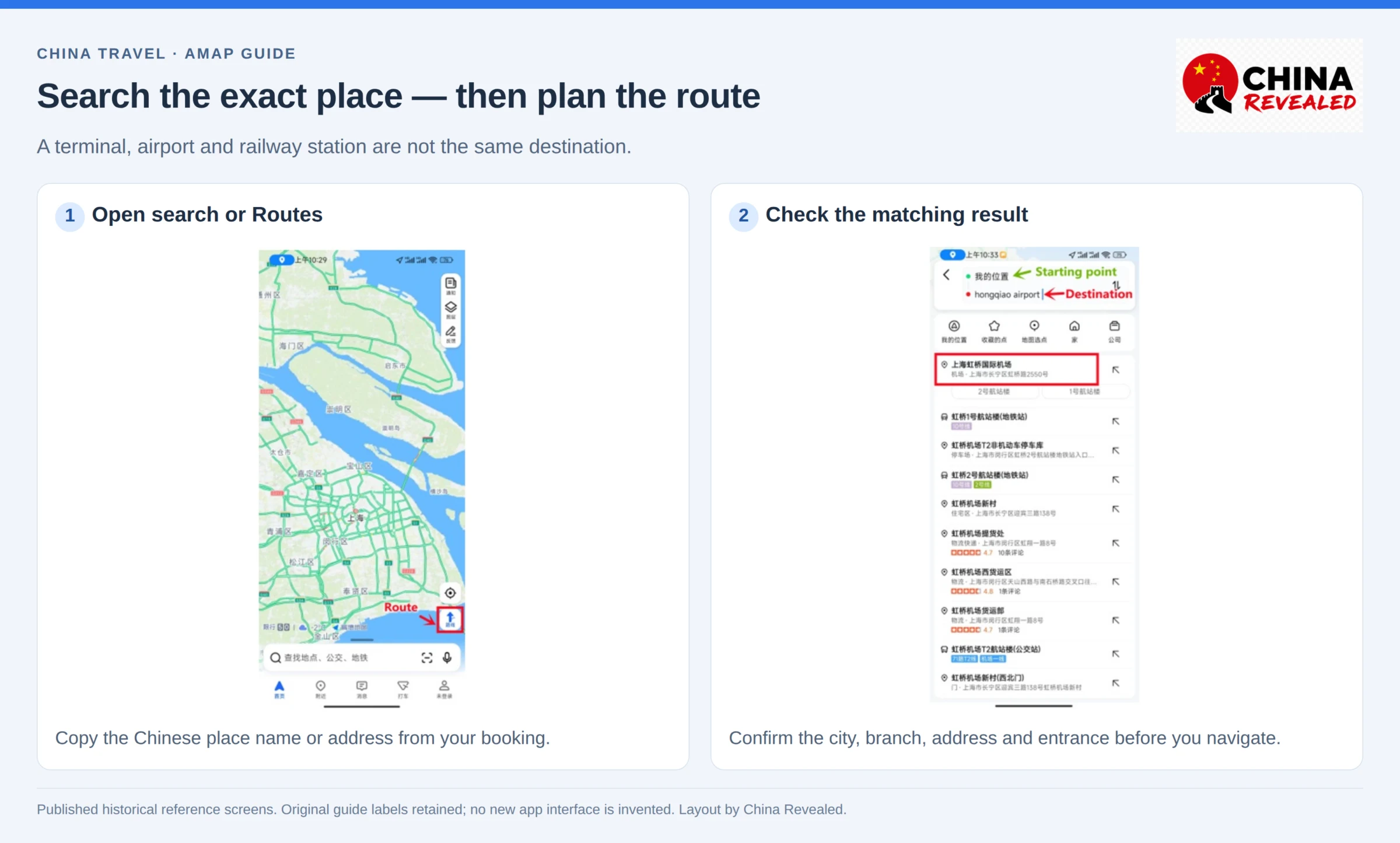
Get the terminal, gate or entrance right
Amap can get you to the right building and still leave you needing the right door. Before setting off, check any entrance named on your ticket or booking.
An airport terminal is not the airport as a whole. Shanghai Hongqiao Railway Station / 上海虹桥站 is not the same as Shanghai Hongqiao International Airport / 上海虹桥国际机场. A mall restaurant may be upstairs, inside a particular building, or reachable from a different entrance than the car drop-off.
For attractions, use the entrance instructions from your booking and the venue. A map pin is not permission to enter through any gate. If the last part looks unclear, ask the hotel or venue for the Chinese entrance name and save it.
Compare subway and bus routes properly
After selecting the destination, tap Routes, then Transit / 公交地铁. Check that the starting point is correct. You can replace your current location with your hotel or a station to plan ahead.
Do not automatically choose the top result. Look at total time, walking distance and transfers. Those are the three numbers that matter when you have luggage, it is raining, or you have already been on your feet all day.
A route with fewer transfers might include a long walk. A quicker suggestion might also include a bicycle segment you are not prepared to use. Read the small walking and cycling icons, not only the arrival time.
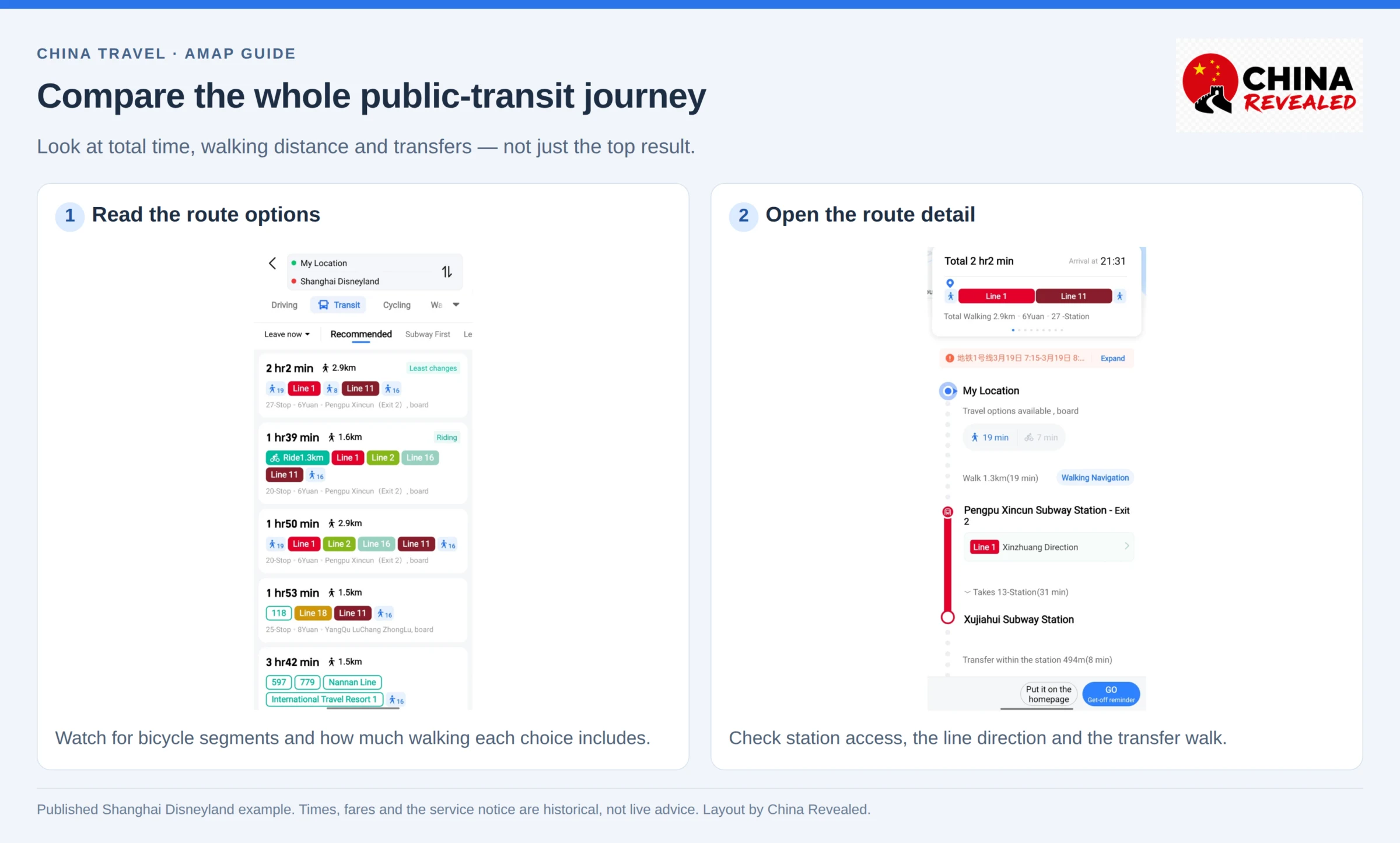
Read the route detail before entering the station
Open a route and check:
- The station entrance for boarding.
- The subway line number and its direction, usually named after a terminus.
- Your transfer station and any internal walking section.
- The exit or terminal access point near your destination.
The line number alone is not enough. Both directions share the same number. Match the direction shown in Amap with the signs on the platform.
Amap can suggest station exits, which is especially useful in large Chinese cities. Follow the actual station signs if an exit is closed or a passage has changed. With heavy luggage, look for an elevator rather than assuming the shortest mapped route is step-free.
Check the departure time too. A daytime route is not proof that the subway will still be running after your late arrival. Live bus information is available on supported services, but not every bus has a reliable countdown.
A route is not a ticket. Amap’s transit instructions do not automatically activate a valid metro payment code. Use the city’s accepted fare method, transit card or ticket separately.
Walking and cycling: choose the mode you actually need
For short trips, choose Walking / 步行. Do not follow a driving route on foot; it can send you to a road or entrance that makes little sense for pedestrians.
Start from the right street corner. If your blue location marker is on the wrong side of the road, give the phone a moment to locate you outdoors and check a nearby landmark. Near malls, stations and large buildings, read signs and floor information as well as the map.
For a bicycle trip, select Cycling / 骑行. Choose Bicycle / 自行车, not the e-bike option, if you are on a normal bike. Compare distance and route shape before starting.
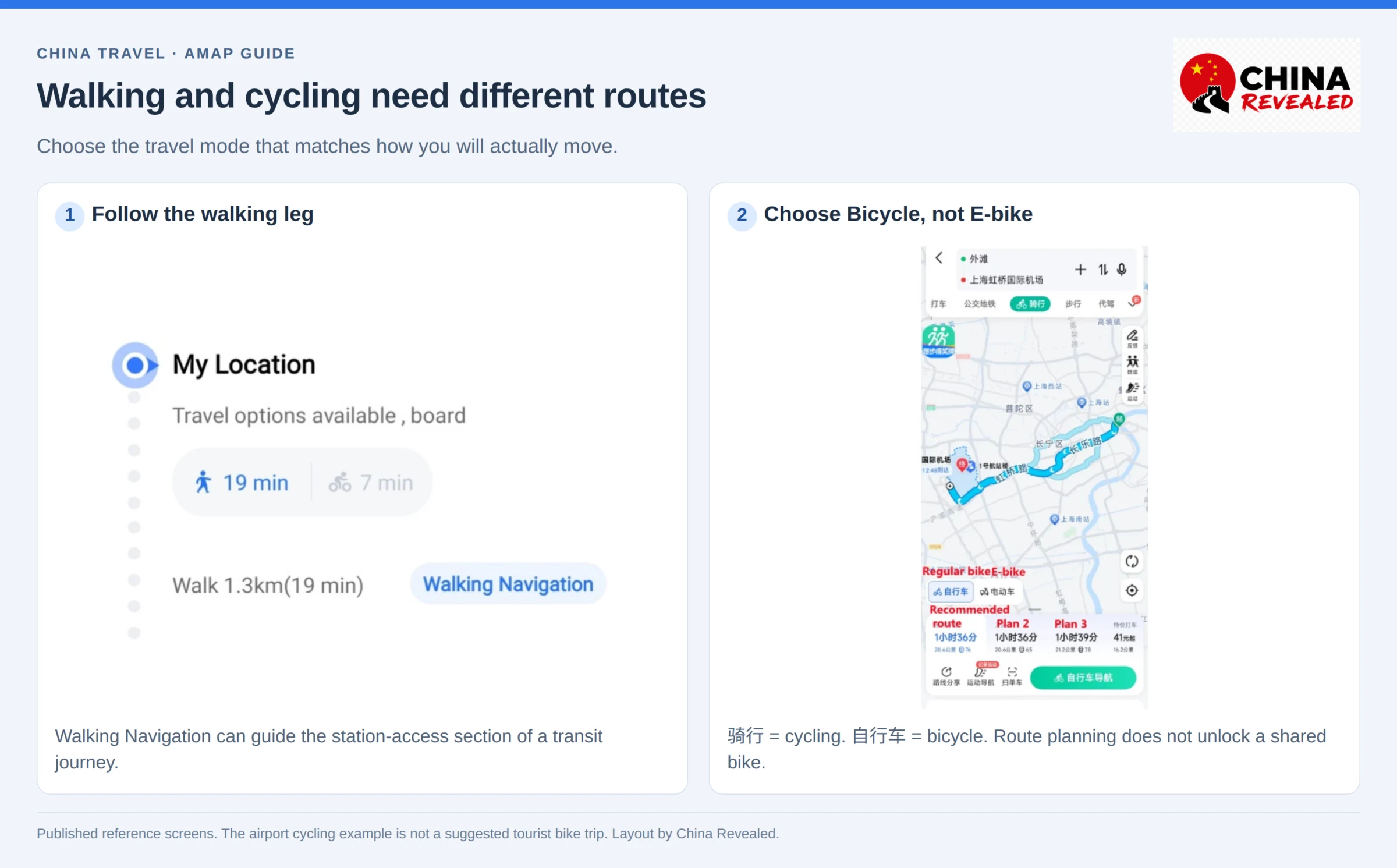
Our video points to Chengdu, Hangzhou and Xiamen as enjoyable places to explore by bike. The useful approach is to start with a short neighborhood ride, not an ambitious journey across an unfamiliar city.
Cycling navigation does not unlock a shared bicycle. A bike operator may separately require an account, identity checks and payment. Follow local cycling rules, use permitted paths and park in the operator’s allowed area.
Driving: live traffic and traffic-light countdowns
Select Driving / 驾车 to compare routes. Amap can show estimated time, distance, traffic conditions and route preferences. A slightly longer route can be quicker when the direct one is congested.
Green usually indicates smoother traffic, while red indicates heavier congestion. Check the options before starting, then let the navigation handle the route. Do not assume the first ETA will remain unchanged throughout the journey.
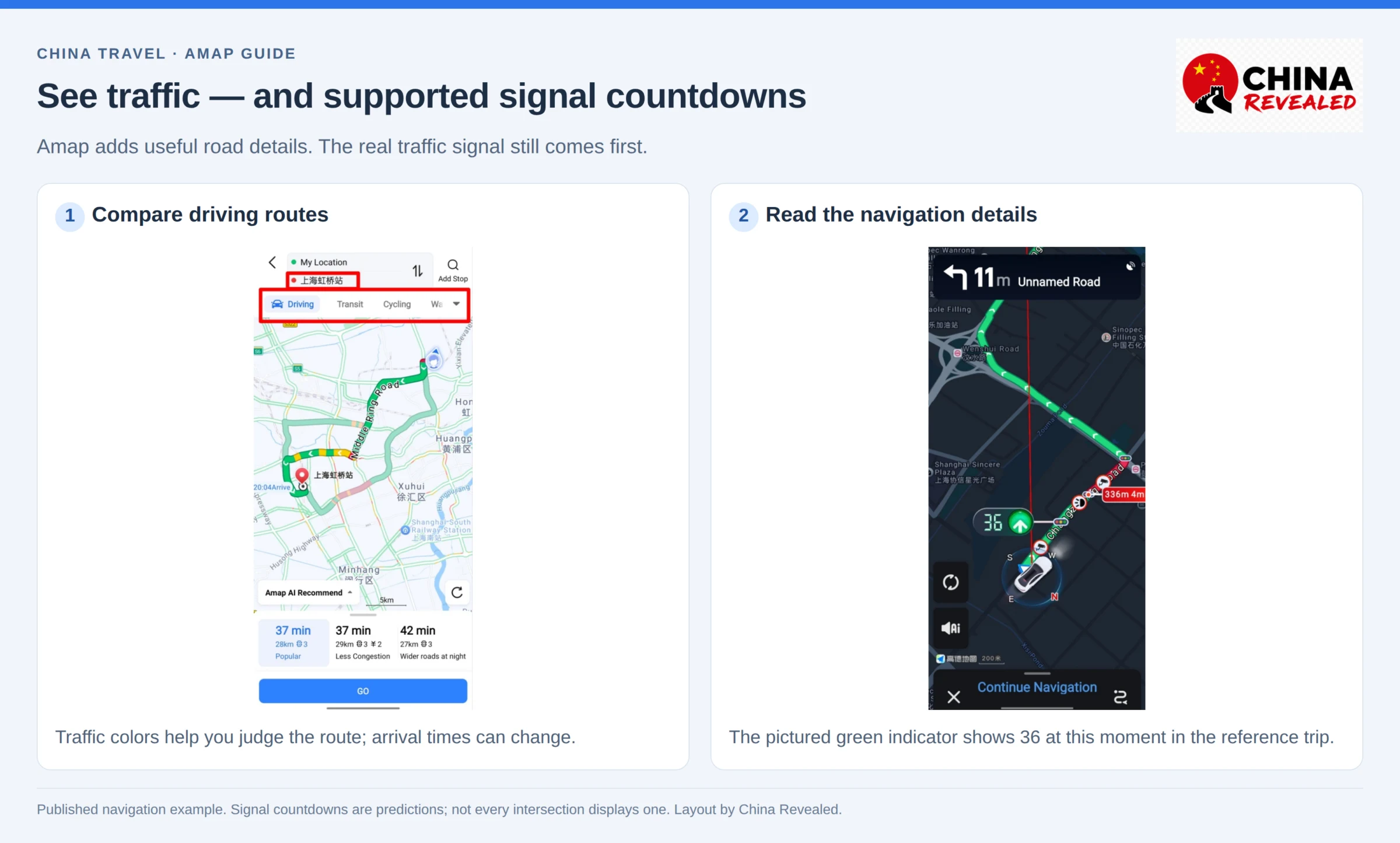
What the red-light countdown actually does
At supported intersections, Amap can display a countdown for a traffic-light change. In some traffic conditions it can also estimate how many signal cycles you may have to wait through.
This is a genuinely useful detail: you can understand why the queue is not moving and prepare for the next change. The feature has also been extended to supported walking and cycling situations.
But the countdown is a prediction, not the traffic signal itself. Amap uses traffic information and AI models to estimate changes. Coverage and display vary by intersection, route, version and conditions. Do not expect a timer at every light.
Always obey the actual signal, signs and traffic officer. Never accelerate to beat the app’s countdown or move simply because the display reaches zero.
Speed limits, cameras and road alerts
Depending on the route and available information, navigation can flag speed limits, cameras, congestion and road issues. These details help you anticipate what is coming, but they are not a promise that every camera, accident or temporary restriction is included.
Set your destination and voice guidance before moving. Use a secure phone mount; if you need to change something, pull over safely or have a passenger handle it.
For foreign visitors, another point comes before the navigation: you need driving permission valid in mainland China. Do not assume a foreign licence or International Driving Permit alone is enough. Check the applicable Chinese licence or temporary driving-permit process before renting a vehicle.
Lane-level navigation: the detail that helps at complicated junctions
Amap’s lane-level guidance is one of its standout driving features. Rather than only drawing a line along a road, it can give a more detailed view of lanes and show where the route goes at a split, junction or exit.
On supported journeys, that can mean a clearer 3D road view, lane arrows and more specific guidance for an upcoming maneuver. It is especially useful when a road separates into several branches and choosing the wrong lane means a long detour.
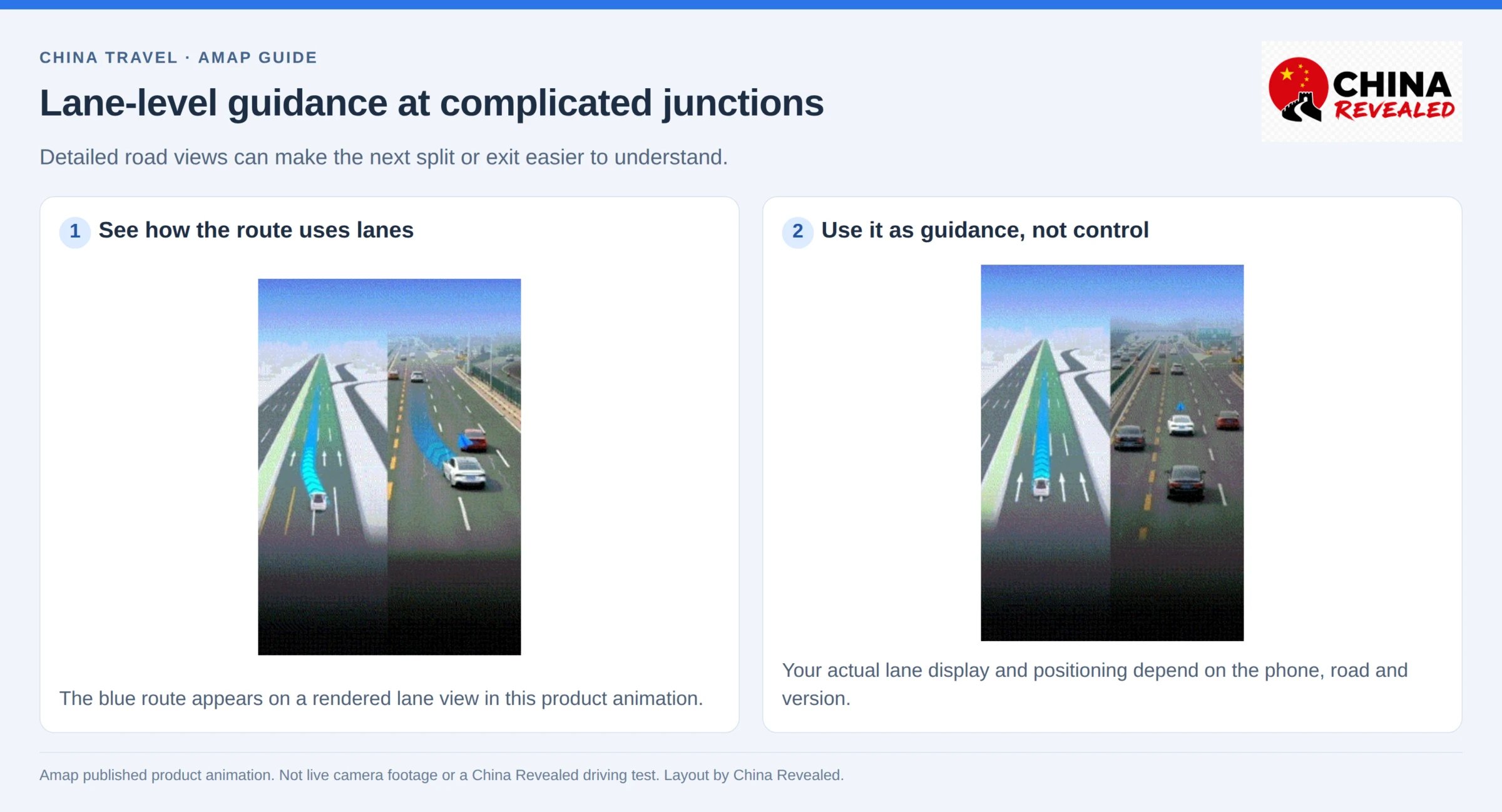
A detailed lane drawing does not always mean the app has pinpointed your exact lane. The appearance and precision depend on the phone, positioning, road and navigation version. Vehicle-integrated navigation can have different capabilities from the phone app.
Update Amap, use precise location and start a driving route. If lane-level guidance is offered in your navigation settings, use the option available there. There is no single switch we can promise will create the same experience on every foreign phone.
Treat it as helpful guidance, not vehicle control. Check mirrors, markings and signs, and change lanes only when safe. If you miss a turn, let Amap reroute rather than making a sudden correction.
Book a ride—and confirm the pickup point
Amap also offers Ride-hailing / 打车. It can compare services from multiple providers, so do not assume every offer is a Didi car or that all the service terms are identical.
- Enter the destination and open Ride-hailing.
- Check the pickup pin and pickup-point name.
- Choose the car category and review the estimated fare.
- Confirm the account, contact and payment requirements.
- Place the order only when you are ready at the pickup point.
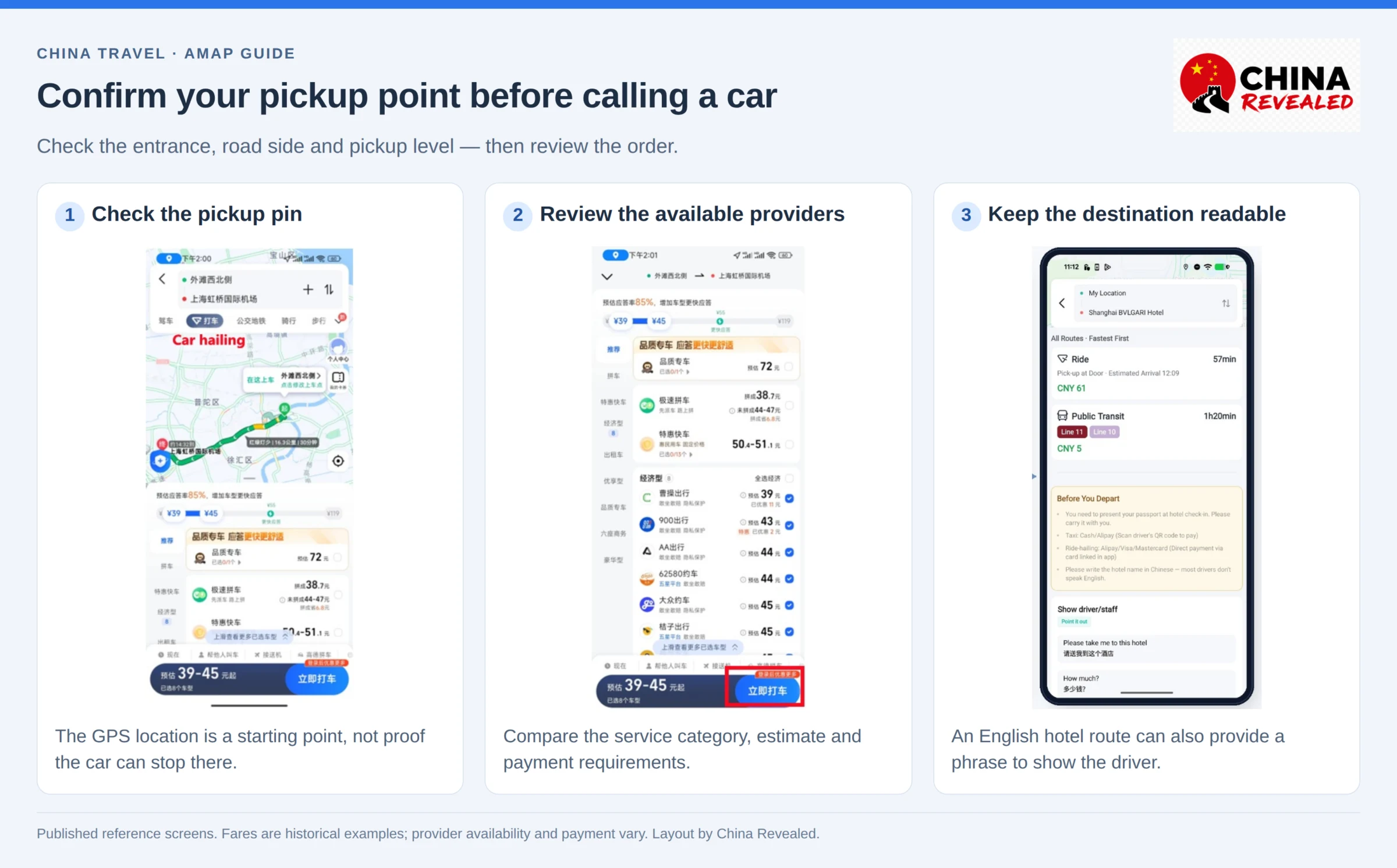
The pickup pin is not enough. Check which side of the street, which entrance and which level. At airports or railway stations, use the designated ride-hailing pickup area rather than asking a car to stop outside any door.
Keep the phone number attached to the order reachable. A data-only eSIM may give you internet without ordinary calls or SMS (see our China SIM vs eSIM guide). The driver may call or message, and translation or a short Chinese destination note can help.
Our video mentions confirming the last four phone digits with the driver. Use the last four digits of the contact number on that booking, if the driver asks—not an unrelated number you also use. Match the car’s plate and driver/order details before getting in.
If Amap’s ride booking or payment does not work with your setup, use it to identify the destination and pickup location, then arrange transport through another working service, such as the ride-hailing option in WeChat, or ask your hotel. The map remains useful even without its booking features.
Book hotels, flights, train tickets, attractions and other travel services on Trip.com.
Save your hotel before you need to find it at night
As soon as you arrive in a city, save your hotel, the station or airport you will use next, and a few places you plan to visit. This is one of the habits we recommend in the video because it removes repeated searching.
Open the place and look for Save / Favorites / 收藏, often shown as a star. In Chinese layouts, 收藏夹 is the saved-places area. Check that you saved the correct branch, not just a brand search.
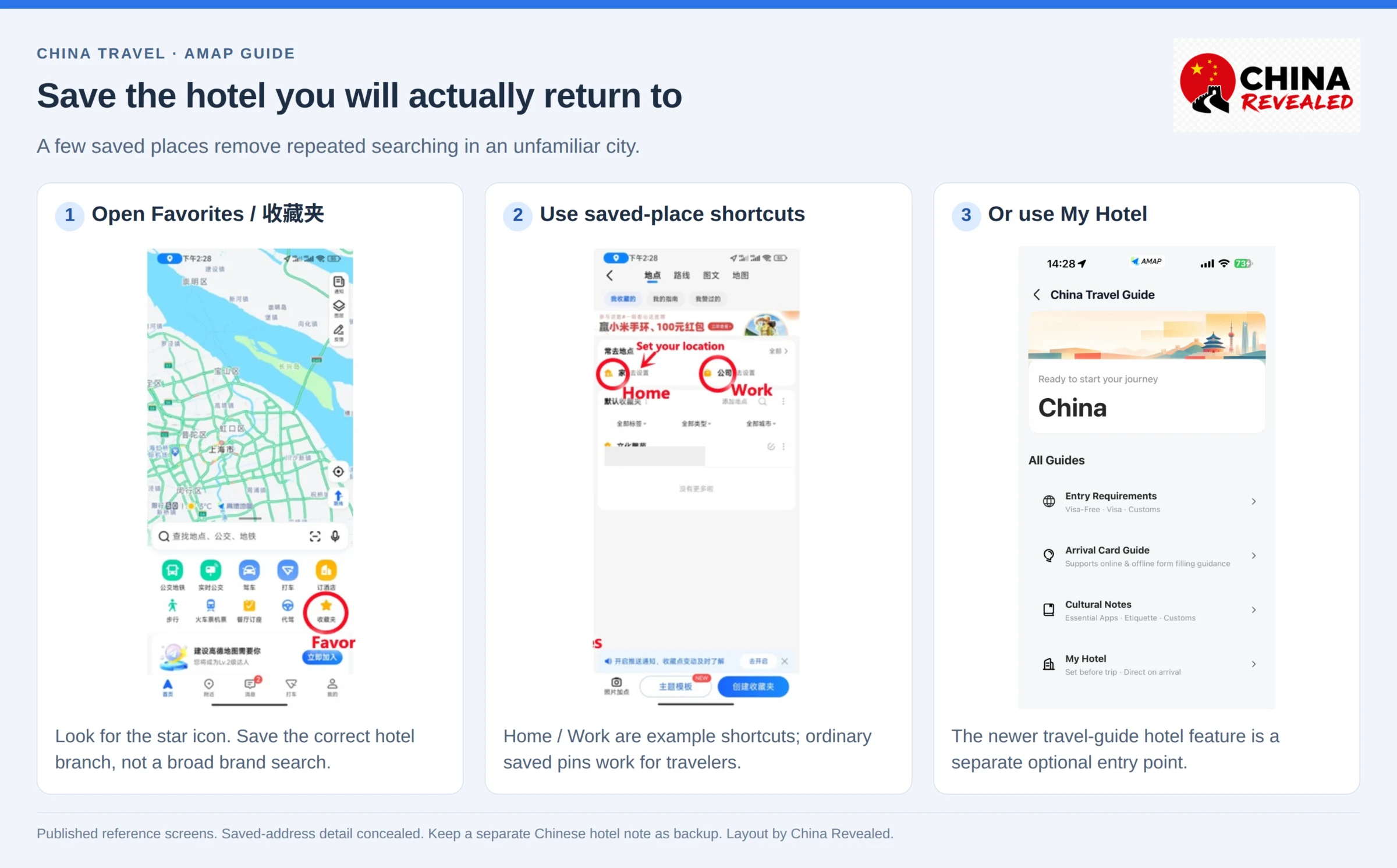
Where Amap offers China Travel Guide → My Hotel, you can also set your accommodation there for arrival routes and local suggestions. You do not have to use this extra feature to navigate; an ordinary saved hotel pin works too.
If the app requests sign-in for saving or syncing, follow the supported option on your screen. Do not assume local saved data is backed up across devices. Keep the hotel’s Chinese name, address and phone number in a separate note or screenshot as well.
Find food and useful places near your hotel
Our video includes a tip for the train ride into a new city: search for tonight’s hotel first, then explore what is around it. That is more useful than searching “restaurants near me” when you are still kilometers away on the train.
Open the hotel result. Look for Nearby / 附近, nearby categories or a search-around-this-place option. Depending on the version, the categories may appear after expanding or scrolling the place page. Search for a restaurant, convenience store, pharmacy or attraction around that location. To have food delivered to the hotel or buy a restaurant deal, use our Meituan guide.
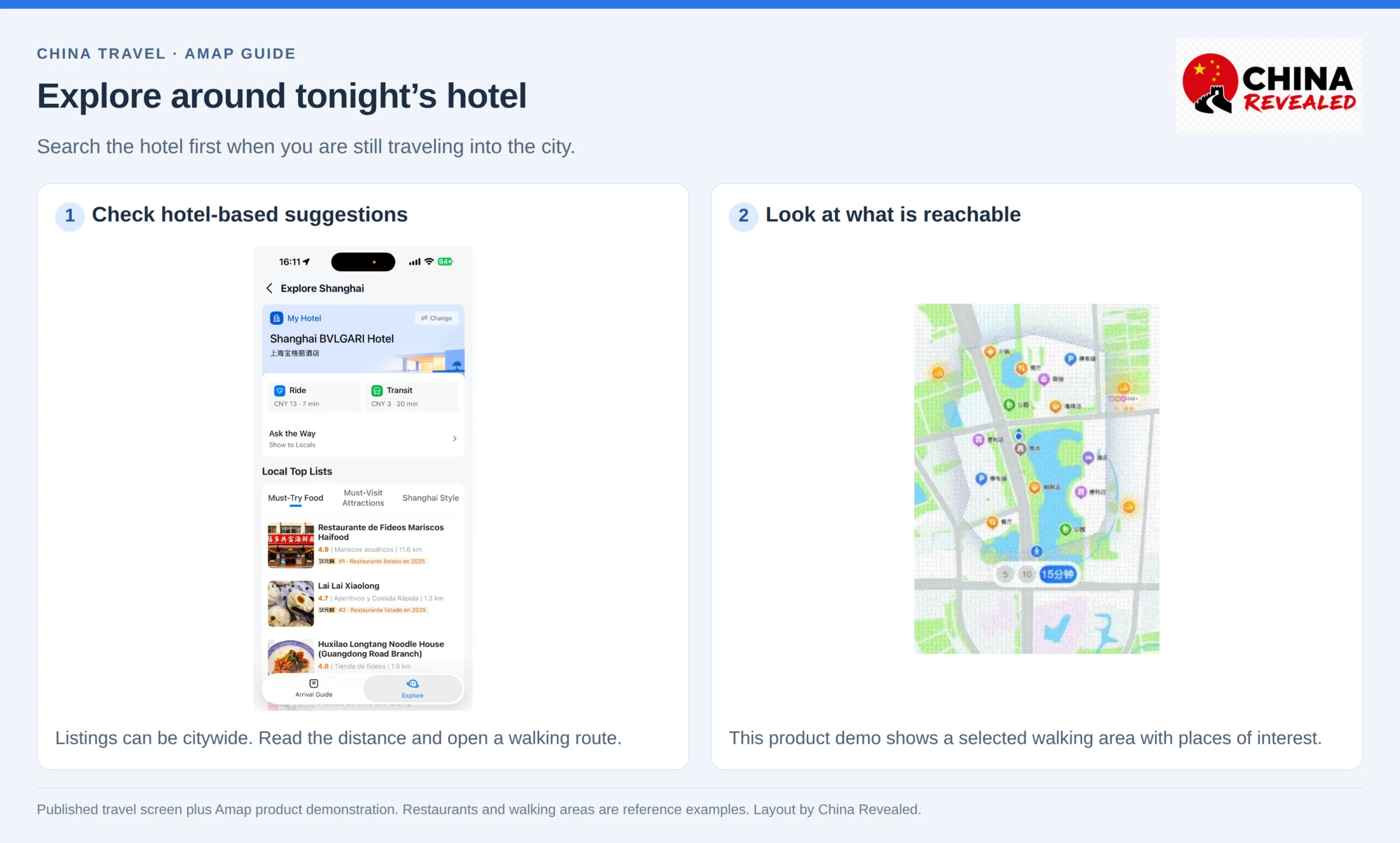
Pay attention to actual walking time, not only the straight-line distance. A restaurant on the other side of a river or a large road may be much less convenient than it first looks.
Check recent photos, opening information and the branch name. A ranking or rating helps you shortlist places; it does not tell you whether a restaurant is open tonight or suitable for a food allergy. Open the route before deciding it is “nearby.”
The newer travel-guide Explore section can provide food and attraction recommendations around your saved hotel or city. Some suggestions are citywide. Check their distances rather than assuming every item is around the corner.
If Amap is not working as expected
English search cannot find the hotel
Paste the Chinese name and address from your booking. Add the city. Remove a translated brand name if it is sending you to the wrong place. If necessary, ask the hotel to send its Amap listing or map pin.
The blue location marker is wrong
Check precise location and step outdoors away from a large building. Wait for the position to settle, then compare it with a visible street or landmark. Indoor and underground positioning can be imperfect. You can manually set the route’s starting point when planning ahead.
The app is showing a driving route when you are walking
Change the travel mode. Do not try to adapt a car route yourself at a highway, tunnel or closed entrance.
The suggested exit is closed
Use station signs and staff guidance, leave through a suitable open exit, then refresh the walking route. Amap’s details do not override a temporary closure.
A taxi or booking page remains in Chinese
The English map interface does not guarantee every provider’s page is translated. Use the Chinese destination and pickup point, a translation tool or hotel help. If you cannot confirm the order terms, switch to a transport service you can use reliably.
You lose mobile data or run low on battery
Where your version offers Offline Maps / 离线地图, download the needed city data on Wi-Fi before setting out. Also keep screenshots of the route and hotel details.
Offline maps are a backup, not a replacement for mobile data. Fresh searches, live traffic, real-time arrivals and ride booking can still need internet. A previously loaded route is not proof that every navigation feature will work offline.
Continuous location and a bright screen use battery. Bring a power bank, use spoken directions where practical and avoid starting a long unfamiliar journey with a nearly empty phone.
Amap FAQs for foreign visitors
Is Amap the same as Gaode Maps?
Yes. Amap is the English name commonly used for 高德地图, also called Gaode Maps. The overseas app-store listing is AMap Global.
Is Amap available in English?
Yes, recent overseas versions support English. Translation coverage varies by feature and place; Chinese names are still useful for searching and showing a driver.
Can I use Amap without registering?
You can start with core search and route planning without an account where the guest option is available. Saving, syncing and transport orders may have additional requirements.
Is Amap better than Google Maps for China travel?
For on-the-ground navigation in mainland China, it is our recommended primary app. Local route and place information, transit details and ordinary mainland network access make it a more practical choice. It is not a guarantee that every Amap result is correct.
Does Amap show traffic-light countdowns everywhere?
No. It supports countdowns at eligible intersections, and the display can depend on the route, version and conditions. Obey the real signal, not an app prediction.
Can Amap pay for subway rides or unlock bikes?
Route planning alone does neither. Use a valid local transit payment method or ticket for the subway, and meet the relevant bike operator’s requirements for a shared bicycle.
What should I learn first?
Search with a Chinese destination name, check the exact place, compare transit routes, confirm your pickup point and save your hotel. Those five skills cover most everyday travel situations. The advanced driving features are useful extras if you will legally drive in China.
For the actual walkthrough, watch China Revealed’s Amap tutorial on YouTube.
Watch the China Revealed Amap walkthrough
About China Revealed
China Revealed is the world's largest, most professional, and most comprehensive English-language travel guide platform dedicated to China.
We provide the most extensive collection of China travel guides, destination information, local insights, and practical travel resources, all in one place.
Our comprehensive travel database covers China's provinces, cities, famous attractions, hidden gems, local cuisine, transportation, accommodation, visa requirements, digital payments, mobile connectivity, and everything travelers need to explore China.
What sets China Revealed apart is our unmatched depth of information, professional research, local expertise, and commitment to accuracy. Our guides combine official sources, detailed destination data, firsthand local knowledge, and regularly updated information to deliver reliable, practical, and comprehensive travel advice.
Whether you're visiting China for the first time or exploring beyond the popular destinations, China Revealed is your trusted, all-in-one resource for discovering the real China.
China Revealed — Your Ultimate Guide to China.