

WeChat Pay for Foreigners: The Power-User Guide to China

If you only want to scan a code and pay for coffee, WeChat is not the easiest place to start. TenPayGo offers a much more direct setup: register with email, add an eligible payment method, and use supported Weixin Pay merchant checkouts.
WeChat is the next step. It is for travelers who also want to message their hotel, stay in touch with local friends, open restaurant mini programs, book transport, and order food. You get more of China’s everyday services, but you have more setup to get through first.
Think of this as the power-user route, not a special “PRO” account. Ordinary foreign visitors can use WeChat Pay. The difference is the work involved: a WeChat account, phone verification, possible registration assistance, payment identity checks, and bank approval. Some travelers finish smoothly; others get stuck before reaching the wallet.
If you want the simpler payment-first option, start with our TenPayGo tutorial for foreigners. If you want the wider WeChat experience, this guide takes you from registration to the travel features worth learning.
About this guide: Prepared by China Revealed from our WeChat travel video walkthrough, with updated payment rules and practical travel tips. The reference screens below come from published app and service guides, arranged into horizontal tutorials with our branding. They are not presented as our personal transactions. Screens and eligibility can differ by account and app version.
In this guide
- Why WeChat is harder to set up than TenPayGo
- Before you start: get these things ready
- 1. Register WeChat with your phone number
- 2. Find Wallet and activate WeChat Pay
- 3. Add an international card and set the payment password
- 4. Make a small test payment before relying on it
- WeChat Pay fees: the RMB 200 rule and the 2026 offer
- 5. Book trains, flights, and hotels inside WeChat
- 6. Call a ride without getting lost at the pickup point
- 7. Order food to your hotel with Meituan
- The extra WeChat feature worth learning: message translation
- Common problems, and what to do next
- Frequently asked questions
Why WeChat is harder to set up than TenPayGo
TenPayGo starts with a payment account. WeChat starts with a messaging and social account, then adds payment services to it. That extra layer matters if you are new to China.
You register WeChat with a mobile number and must complete its security checks. Some accounts need an existing user to help verify registration. Depending on your country and account, an alternative payment-card verification route may appear instead.
After that, you still have to activate Weixin Pay, provide the requested identity information, add your card, complete any bank authentication, and set a payment password. Being able to send a message does not mean you are ready to pay.
The payoff is access to messaging and a large mini-program ecosystem. A mini program is a small service that runs inside WeChat without a separate app download. These can handle restaurant orders, rides, travel bookings, and delivery. Each service still has its own account, document, and payment requirements.
For a short visit focused on shopping and eating out, TenPayGo may be enough for the supported merchant-payment part. For a longer or more independent trip, WeChat becomes more useful. You can use both; you do not need to choose one forever.
Before you start: get these things ready
Have your own mobile number available to receive SMS, your passport, and an eligible overseas credit or debit card. A mainland Chinese number and a Chinese bank account are not required for the basic international-card setup.
Keep access to your bank’s verification channel too. That might be an SMS code, a banking-app approval, or another security step. A travel eSIM that only provides data does not replace the phone number your bank uses (see our China SIM vs eSIM guide).
Our video recommends bringing two or three cards if you already have them. Cards from different issuers give you a useful backup if one will not link or a bank declines a purchase. There is no reason to wait until you have finished dinner to discover that your only card fails.
Start before your flight, on a device and connection you normally use. You can sort out registration and documents at home, then test a small merchant purchase after arriving in China. Keep some RMB cash and a physical card as backups.
1. Register WeChat with your phone number
Download WeChat from the Apple App Store or Google Play. Check that it is the official Tencent app, not a lookalike or an unofficial APK.
Open it and tap Sign Up → Sign up with mobile or the equivalent option in your version. Select the correct country or region code, enter your own mobile number, and set a password. Read and accept the required terms, then complete the SMS and security checks shown.
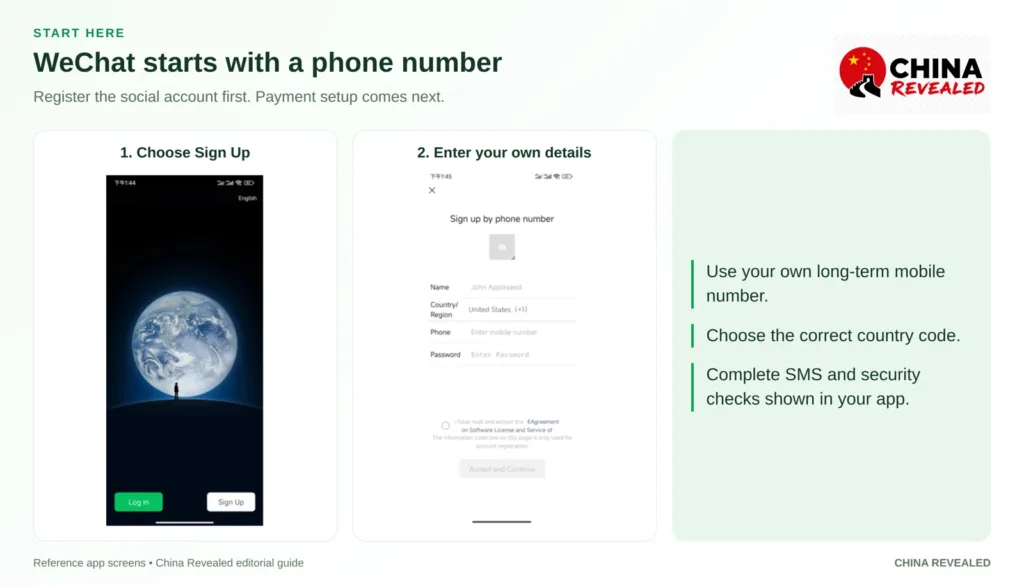
Use a number you will keep. Do not build your account around a hotel employee’s number, someone else’s SIM, or a disposable SMS service. You may need that number again for security checks or account recovery.
If the SMS does not arrive, check the country code and number first. Confirm that the SIM can receive messages, then wait for the resend option. Repeatedly requesting codes is not a useful fix.
If you see friend verification
Not everyone gets this screen. If normal registration works, continue; you do not need to find a verifier just because another traveler’s guide shows one.
If assistance is requested, ask a trusted existing WeChat user to follow the instructions on your registration screen. They may need to scan your registration QR code. Their account must meet the conditions currently shown; not every existing user qualifies.
A friend, guide, or hotel employee may be willing to help, but it is not a service you should assume they owe you. They should only perform the assistance step. Do not give them your password, SMS code, card details, or payment PIN.
No WeChat friend? Check for an alternative
WeChat’s registration guidance describes two alternatives that may be offered: Verify via Payment Card and Verify and Activate Weixin Pay. If one appears in your app, follow that option’s own authentication steps. Do not assume every region or account will show both.
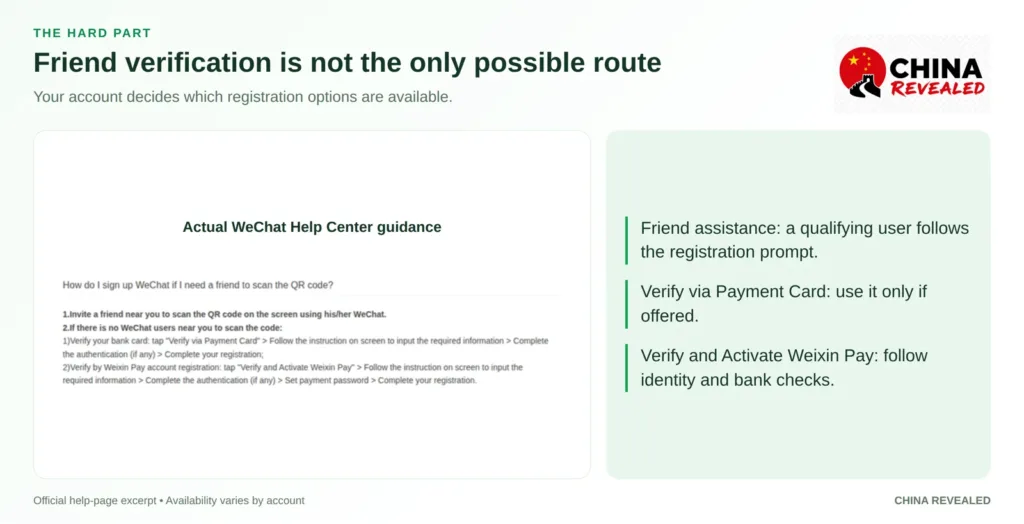
If you remain stuck, use WeChat’s in-app help or official feedback route and keep a screenshot of the error. WeChat recommends registering with the official app on a reliable connection, without a VPN. Do not keep changing devices and retrying the same blocked step.
If all you need right now is payment, use the simpler TenPayGo setup while you sort out WeChat. Paying a stranger for “guaranteed verification” is not a dependable travel plan.
2. Find Wallet and activate WeChat Pay
After registration, go to Me → Services → Wallet → Bank Cards → Add a Bank Card. Some versions call the second menu Pay and Services, and card labels may be slightly different.
WeChat Pay is commonly called Weixin Pay for the mainland-China service. This guide is about spending in mainland China with an eligible international card, not setting up a separate Hong Kong wallet.
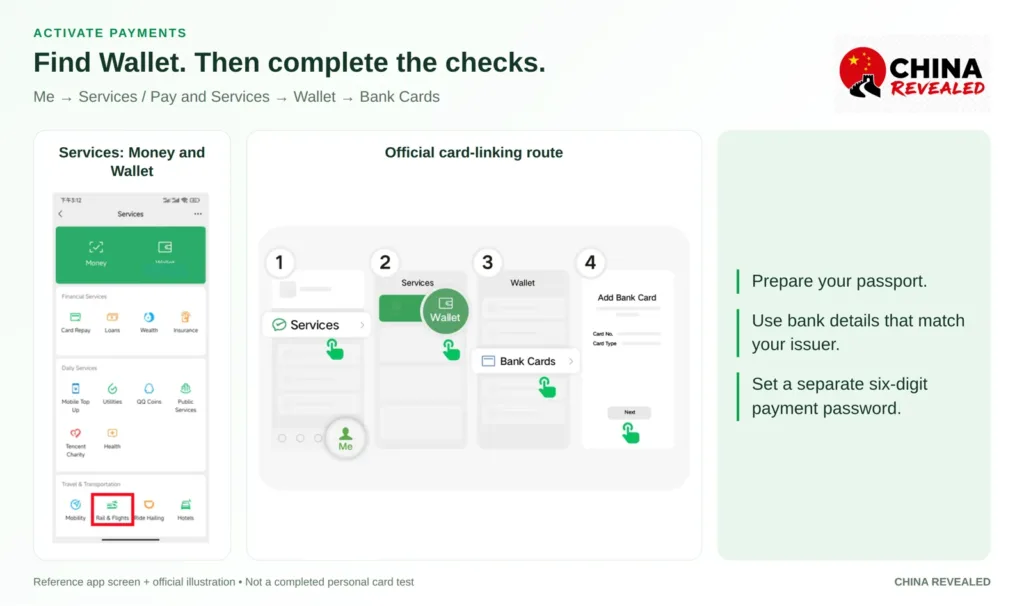
Read the payment agreements and follow the activation prompts. If the wallet menu is missing, update WeChat and check the payment tools available under Me → Settings → General → Tools in your version. Do not assume receiving a friend’s transfer will unlock the right wallet.
Complete the requested identity checks
For most foreign visitors, Passport is the relevant identity-document option. Enter your name and document information exactly as requested. A display nickname is not your payment identity.
If asked for a passport image, use a clear photo of the identification page with all required details visible. Avoid glare, cut-off edges, and unreadable text. Submit it through the app’s identity-verification flow, not by sending it to a person who offers to help.
WeChat Pay’s real-name process can also request an address, occupation, mobile number, and a clear face photo. Follow the fields actually shown. If a payment-restriction notice appears, open that notice and complete the required checks rather than trying to bypass it with a different menu.
Friend verification and payment identity verification are different things. A friend can assist registration; they cannot verify your passport or approve your bank card for you.
3. Add an international card and set the payment password
Enter the card details requested by Add a Bank Card. These can include the number, expiry date, security code, and billing information. Use your own eligible card, and make sure bank-related fields match your issuer’s records.
Weixin Pay supports eligible international credit and debit cards on networks including Visa, Mastercard, American Express, JCB, Discover, and Diners Club. A supported network logo does not guarantee that every card, issuing country, or prepaid product will work.
Your bank may require 3-D Secure, an extra check for an online card transaction. Complete the SMS code or banking-app approval before returning to WeChat. Keep the bank’s registered number accessible during your trip.
Create the six-digit payment password when prompted. This is separate from your WeChat login password, the SMS code, and your card’s CVV. You will use it for payment confirmation or other wallet actions, although some cashier-scanned purchases may not request it every time.
When the card appears in Wallet, setup has reached a useful checkpoint. It is not yet proof that every merchant purchase will go through.
Can you use Apple Pay instead?
Adding a card to Apple Wallet does not automatically make it available in WeChat. Some eligible iPhone accounts have displayed Apple Pay under Wallet → Payment Settings → Other Payment Methods. If your account offers it, follow that setup and the payment methods shown for your purchase.
If the option is absent, do not spend hours hunting for it. Use the direct international-card route, or read our TenPayGo guide with Apple Pay setup.
An Apple Pay option inside a QR-payment flow is not the same as being able to tap your iPhone at every WeChat merchant. Follow the actual checkout offered by the app.
4. Make a small test payment before relying on it
Buy a bottle of water or a coffee at a business with a supported Weixin Pay checkout. Check that the linked card is selected and that the amount is in RMB, also called CNY or Chinese yuan.
Our video’s test is simple: can the account pay, does the card work, and can you complete the payment-password step? Add one more check before leaving: did the merchant receive the payment?
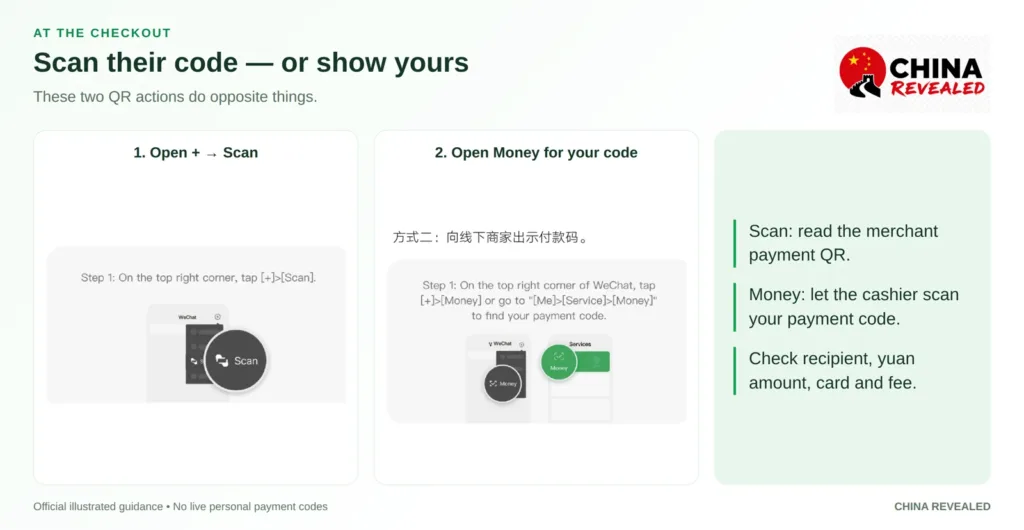
There are two QR actions to learn. They do opposite things.
Scan the merchant’s code
On the main WeChat screen, tap + → Scan and read the merchant’s payment QR. If asked for an amount, enter the bill in yuan: 28 for a RMB 28 bill, not its approximate value in your home currency.
Check the recipient, amount, selected card, and fee. Confirm through the method shown, then wait for the result and the merchant’s confirmation.
A QR code on a restaurant table may open a menu or ordering mini program instead. That is normal in WeChat. Follow the restaurant’s ordering flow if it supports your account; otherwise ask for a menu and a merchant payment code.
Let the cashier scan your code
Tap + → Money, or open Money from Services. Check the payment source, confirm the bill with the cashier, and show the live payment barcode or QR.
Do not show the QR on your profile page; that one adds you as a contact. Do not use a saved screenshot of an old payment code either.
Treat live payment codes as private. Keep them hidden when you are not making a purchase, and never post them in a travel group. After a slow or unclear result, check the transaction before authorizing another payment.
Why a vendor’s code can still fail
An international card supports eligible merchant purchases, not ordinary person-to-person transfers. A seller using a personal receiving code may not be payable with your linked overseas card.
Ask whether they have a merchant checkout. You can show “可以用微信支付吗?” — “Can I pay with WeChat Pay?” If the code is unsupported, use another accepted method instead of scanning it repeatedly.
WeChat Pay fees: the RMB 200 rule and the 2026 offer
The normal international-card rule is no Weixin Pay transaction fee for a single purchase of RMB 200 or less, and 3% for a purchase above RMB 200, subject to the checkout and any applicable offer.
When the 3% fee applies, it is charged on the full purchase, not just the part over RMB 200. A RMB 300 purchase adds RMB 9, for RMB 309 before any separate bank charges.
Your issuer may charge a foreign-transaction fee or apply its own currency-conversion terms. A “fee-free” card does not automatically remove Weixin Pay’s fee, and a platform promotion does not automatically remove your bank’s fee.
Check the newer 90-day first-user offer
In May 2026, Tencent announced a 90-day international-card processing-fee waiver for first-time users linking an international card, starting from the first transaction and covering spending up to RMB 1,000 per day under the offer’s terms.
Older guides often say 60 days. Before budgeting around either number, check the offer actually attached to your account. Eligibility, the daily allowance, and the fee on a purchase are controlled by the current in-app terms. RMB 1,000 is a daily offer allowance, not a promise that every purchase below that amount is always fee-free.
For a large restaurant bill or hotel payment, compare the accepted alternatives and inspect the final fee before confirming. Do not assume splitting one purchase into repeated small transactions is an approved or guaranteed workaround.
Limits and refunds
Check your current account and card limits before an expensive purchase. Online guides quote both older card limits and higher maximum ceilings; neither should be treated as a guaranteed limit for your account.
For a refund, contact the merchant and track the transaction in WeChat and on the underlying card. The Weixin Pay transaction fee is returned proportionally to the refunded amount under its published international-card guidance. Bank processing time and home-currency differences are separate; a refund may not appear immediately.
5. Book trains, flights, and hotels inside WeChat
Open Me → Services and look for Trains & Flights, Rail & Flights, or the travel service available in your version. Alternatively, search for the relevant provider’s official mini program.
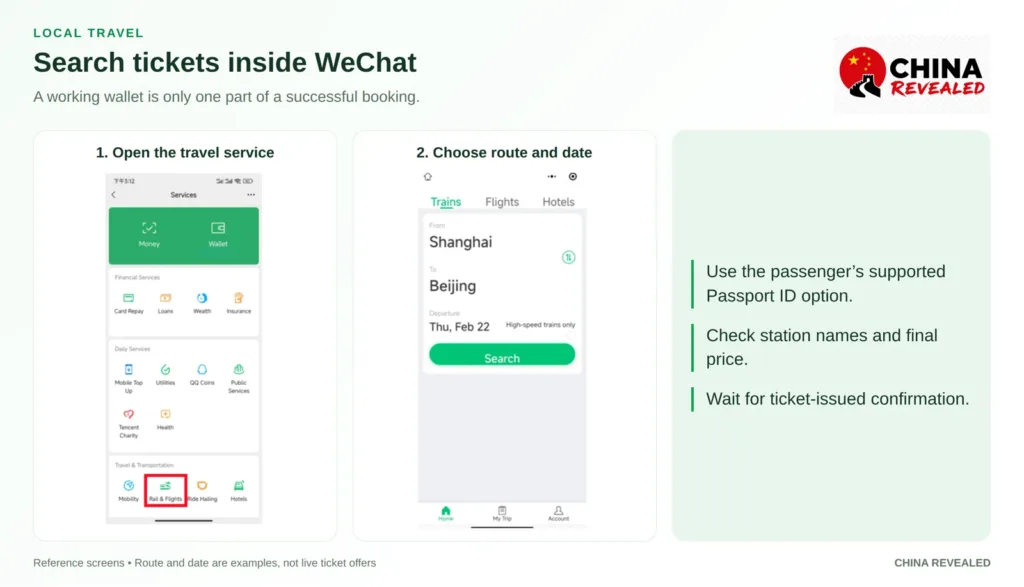
Enter the departure city or station, destination, and date. Check the station names carefully: “Shanghai” and “Shanghai Hongqiao” are not interchangeable, and a city may have several stations.
For a first train booking, add the passenger using the supported Passport document type. Enter the passenger’s name and passport number exactly as required by the booking service. Payment identity and railway passenger identity are separate checks.
Review the train number, departure station, date, class, final price, and change or refund rules. A seat preference, if offered, is not a guarantee of a particular seat.
Wait for the ticket-issued confirmation. An order that is paid, pending, waitlisted, or being processed is not necessarily a confirmed seat. Once issued, save the train and station details, and take the same physical passport used for booking to the station.
If a mini program does not accept your passport or phone number, use the official 12306 English service or another booking channel that supports your documents. Do not choose a Chinese ID option and enter a passport number into it.
Flights and hotels follow a similar search-and-review process. Check the passenger name for flights, and confirm with the hotel if you have questions about foreign-passport check-in, especially at small or unfamiliar properties. A working payment method does not settle every booking condition.
Book hotels, flights, train tickets, attractions and other travel services on Trip.com.
6. Call a ride without getting lost at the pickup point
Open the available ride-hailing service in Me → Services, or its official mini program. Allow location access if you want it to suggest a pickup point, then inspect the pin yourself.
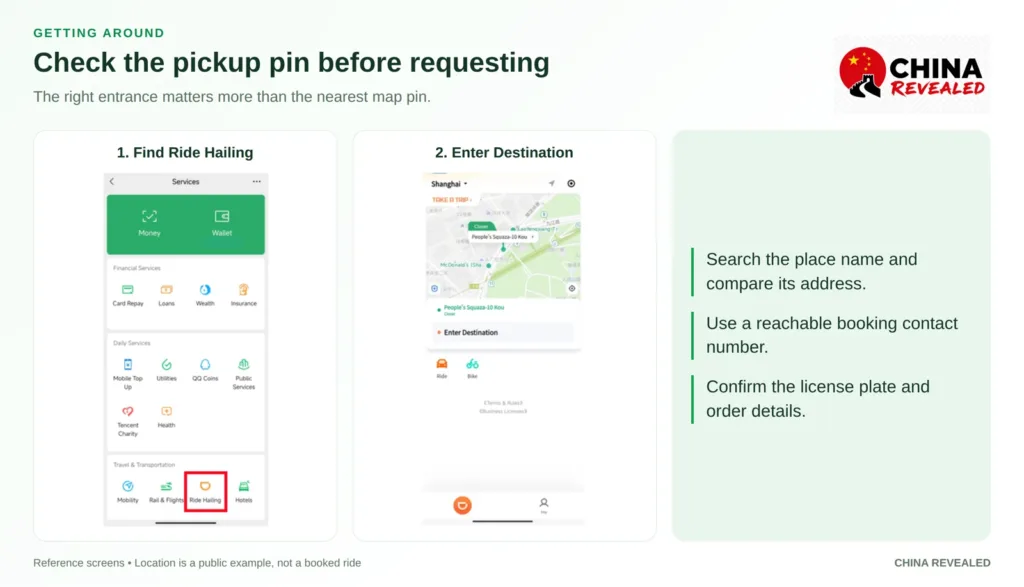
Search for your hotel, restaurant, mall, or attraction by name rather than typing a long address from memory. Keep its Chinese name or address available so you can compare the result.
Choose the right entrance. A pin across a busy road, inside a closed compound, or on the wrong level of an airport can turn an easy ride into a long wait. Check the car category and estimated price before requesting.
The service may require a separate contact-number verification. Try your own supported international number if it can receive the necessary messages and calls. Some services or flows still need a local number. A data-only eSIM is not a callable number.
If yours is unsupported, use a taxi or ask the hotel to arrange a ride. If someone offers to book for you, let them do so knowingly through their own account and coordinate the pickup. Do not use an employee’s number to create or take over your own account.
Check the license plate and vehicle before getting in. The driver may ask for the last four digits of the booking’s contact number, which can differ from your WeChat login number. Use the details on the actual order.
7. Order food to your hotel with Meituan
In Me → Services, open Meituan or the food-delivery service available to you. If it is not listed, search for its official mini program. Its sign-in and phone verification can be separate from WeChat registration.
Set the delivery location before choosing a restaurant. A menu near your previous hotel is not useful if the restaurant cannot deliver to your current one.
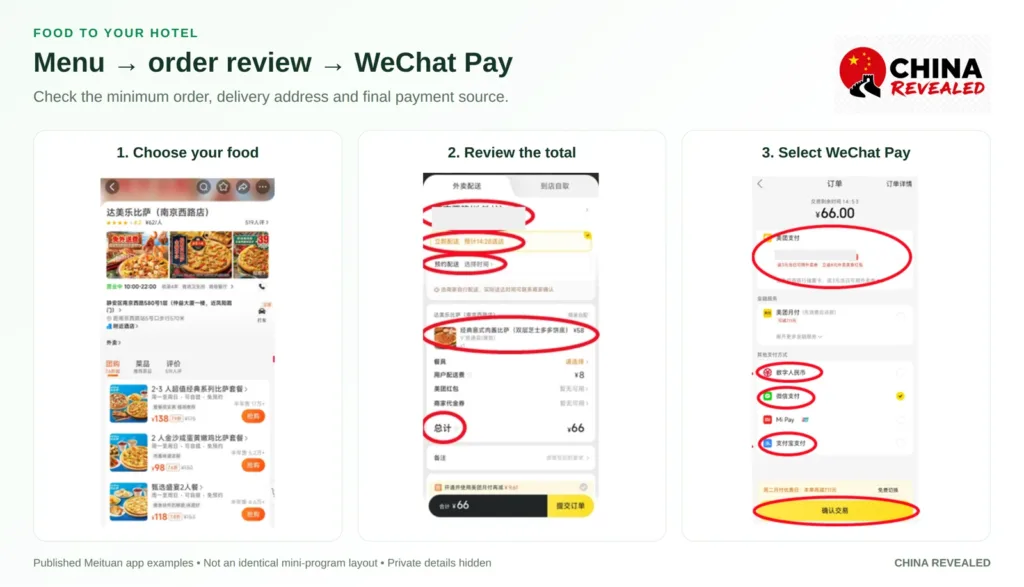
Our video uses a drink order to explain customization: choose the sugar level and temperature, then add it to the cart. The same idea applies to meals—check the actual options and ingredients, not only the photo.
If you cannot check out, inspect the minimum order amount. In the video’s example, a RMB 15 order does not reach a RMB 20 minimum. That is a cart requirement, not proof that your bank card failed. Delivery, packaging, and other charges can still be added separately.
Before ordering to a hotel, ask whether deliveries go to reception, a pickup shelf, or your room. Use the hotel’s correct Chinese name and full address, plus the recipient and a reachable number. Add a room number only if appropriate for the hotel’s delivery policy.
Review the total, delivery time estimate, and any cutlery option. Choose WeChat Pay when offered, then check the selected overseas card on the payment sheet. Seeing WeChat Pay in the list does not guarantee that every promotion, balance-only checkout, or order accepts an international card.
Keep an eye on messages and the pickup instructions. The roughly 30-minute delivery in the video is a typical example, not a guarantee. Weather, peak hours, and distance can change the estimate. For serious allergies, confirm ingredients directly; a translated menu alone is not enough.
The extra WeChat feature worth learning: message translation
Ask your hotel, guide, or local friend to share their WeChat contact. Add them with + → Add Contacts or scan their contact QR. Keep payment codes and contact codes separate.
In a chat, long-press a text message and choose Translate where available. This helps with hotel directions, pickup instructions, and simple conversations without copying every message into another app.
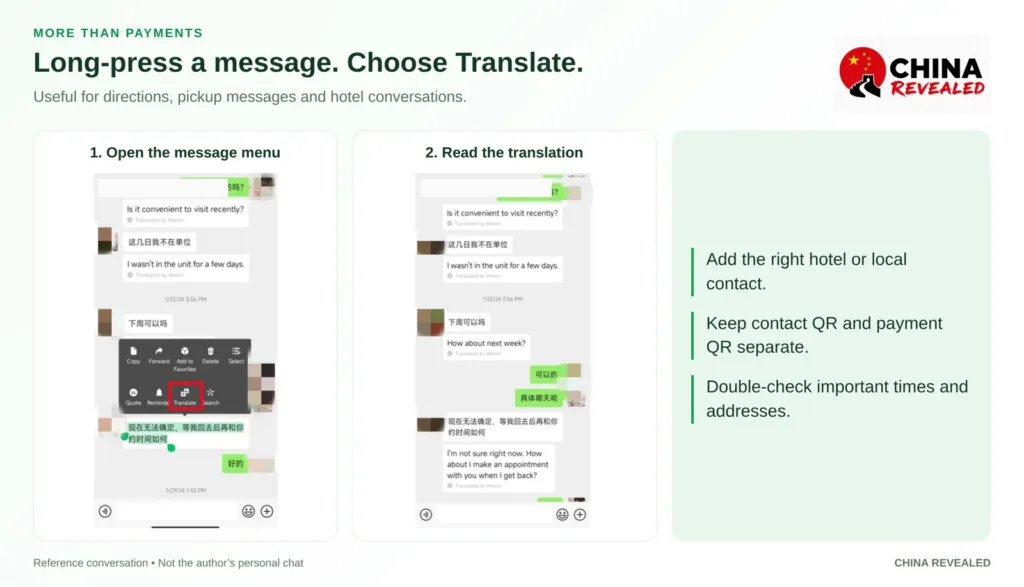
WeChat’s main interface can be switched to English in the language settings under Me → Settings → General. Individual mini programs may still use Chinese or offer their own language selector. Setting WeChat to English does not translate every local service automatically.
Common problems, and what to do next
Registration works, but payments are restricted
Read the wallet’s restriction notice. Complete any missing identity check through that flow and confirm that the bank card and payment password are set up. Reinstalling the app is not a substitute for the requested verification.
My card will not link
Check the entered card details and bank records. Make sure the issuer permits overseas online transactions and that you can finish its authentication. Try another eligible card you own if the first issuer rejects the link.
The bank shows a charge, but WeChat says the payment failed
Do not immediately repeat it. Check the WeChat transaction record, ask the merchant whether it received the payment, and see whether the bank entry is a pending authorization or a settled charge. Keep the amount, time, and reference for support.
A mini program rejects my phone or passport
That service’s requirements are separate from your wallet. Look for a supported document option or contact its support. If the service does not support your details, use a suitable standalone app, booking channel, or in-person service instead of entering someone else’s identity.
The checkout only offers Balance
A linked international card does not turn your account into an unrestricted RMB balance wallet. Use an eligible merchant checkout that offers your card or another accepted payment method. Do not rely on red packets or friend transfers to fix it.
My WeChat account is blocked
Follow the recovery or appeal options on the login screen. Do not create more accounts, buy an account, or hand your password to a “recovery” seller. Keep your backup payment app working while you resolve the issue.
Frequently asked questions
Can foreigners use WeChat Pay without a Chinese bank account?
Yes. Eligible overseas credit and debit cards can fund supported mainland-China merchant purchases after the required setup and checks. You do not need to open a Chinese bank account for that basic visitor use.
Do I need a Chinese phone number?
Not for the basic WeChat and international-card setup if your overseas number can receive verification SMS. A particular ride, delivery, or mini-program service may have additional contact-number requirements.
Does everyone need friend verification?
No. Some accounts register without it. Others need assistance or may be offered a card-based verification alternative. Follow your registration screen rather than a fixed checklist from another person’s account.
Can I send red packets or transfer money using my foreign card?
Not through the normal international-card merchant-payment route. Real-name verification does not automatically remove that funding-source restriction. Do not assume all features visible in Wallet are usable with your card.
Is WeChat harder than TenPayGo?
For a new user, it can be significantly harder because it adds social-account registration and security checks before payment setup. TenPayGo is the payment-focused shortcut; WeChat is useful when you want messaging and more local mini programs as well.
Which app should I set up first?
If payment is urgent, follow our TenPayGo tutorial for foreigners first. Set up WeChat before your trip if you want its wider services, and keep Alipay or another working method as a backup, as our video recommends.
You do not need to become an expert before buying lunch. Learn registration, Wallet, the two QR actions, and one service you will actually use. Test the payment once, then build from there.
Watch the China Revealed WeChat travel tutorial for the walkthrough behind this guide.
Watch the China Revealed WeChat walkthrough
About China Revealed
China Revealed is the world's largest, most professional, and most comprehensive English-language travel guide platform dedicated to China.
We provide the most extensive collection of China travel guides, destination information, local insights, and practical travel resources, all in one place.
Our comprehensive travel database covers China's provinces, cities, famous attractions, hidden gems, local cuisine, transportation, accommodation, visa requirements, digital payments, mobile connectivity, and everything travelers need to explore China.
What sets China Revealed apart is our unmatched depth of information, professional research, local expertise, and commitment to accuracy. Our guides combine official sources, detailed destination data, firsthand local knowledge, and regularly updated information to deliver reliable, practical, and comprehensive travel advice.
Whether you're visiting China for the first time or exploring beyond the popular destinations, China Revealed is your trusted, all-in-one resource for discovering the real China.
China Revealed — Your Ultimate Guide to China.