

Best Translation Apps for China: AI, Voice & Offline
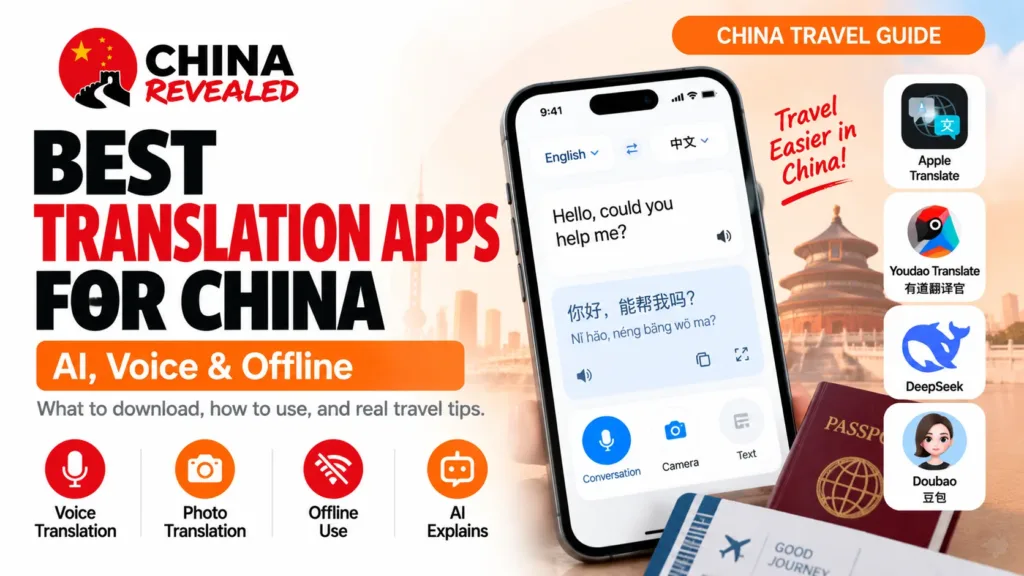
Translation apps for China work best as a pair: a quick voice-and-camera translator for talking to people, plus a Chinese AI for explaining what the words actually mean. On an iPhone, I would start with Apple Translate. On Android, I would start with Youdao Translate—有道翻译官. Add DeepSeek or Doubao, rather than filling your phone with eight competing apps.
I would not make online Google Translate the foundation of this setup. Access on a mainland local connection can be a problem, and a literal translation of a dish or a booking instruction still leaves questions that an AI can help explain. Keep an already-downloaded Google language pack as a backup if you use it; it does not need a VPN for basic offline translation.
Quick takeaways
- iPhone: Apple Translate for conversations, camera translation and downloaded-language offline use; add a Chinese AI.
- Android: Youdao Translate for short spoken exchanges and photos; check its available offline resources before flying.
- DeepSeek: especially useful for natural Chinese requests and English explanations. Doubao: useful for pictures, voice and follow-up questions.
- Download languages and test with both Wi-Fi and mobile data off. An installed app is not an offline setup.
- Keep your hotel’s Chinese address and a few important phrases as screenshots. Use WeChat’s message translation when you already have it set up.
In this guide
1. Install a small, useful toolkit
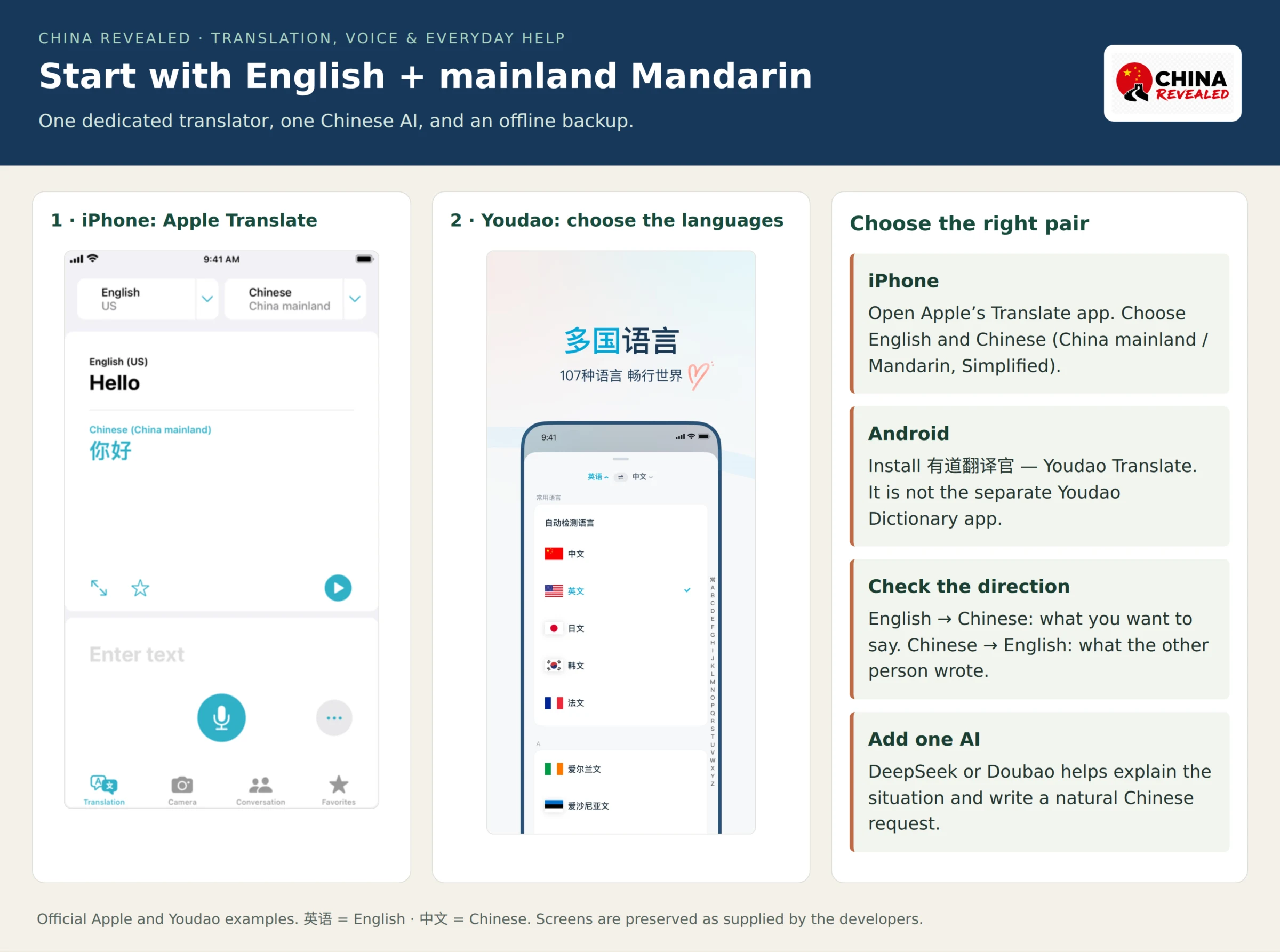
For iPhone, use Apple Translate. You may already have it installed; look for the app named Translate, made by Apple. Choose English and Chinese—Mandarin, Simplified/China mainland, as listed on your phone. Its Conversation, Face to Face and Camera tools cover most ordinary travel exchanges.
For Android, use Youdao Translate’s official download page. Search for 有道翻译官, not the separate 有道词典 / Youdao Dictionary. It is the translation app you want for spoken phrases and camera text. It is also available on iPhone if you prefer it to Apple’s app. Look for 英语 (English), 中文 (Chinese), 拍照翻译 (photo translation) and the microphone/voice function.
For your AI, use the official DeepSeek app entry or Doubao mobile download page. DeepSeek is an easy choice for typing an English request and getting a useful Chinese sentence. Doubao is worth trying if you want an assistant that works with pictures and voice as well as text.
Install and complete the available sign-in before departure. This is especially helpful for Doubao: its interface is mainly Chinese, and installation and login options depend on your app-store region. Use the options actually offered—do not assume it accepts every foreign phone number. Doubao can also show a region restriction outside its supported markets. If you encounter that, keep the translator working and set up DeepSeek instead.
2. Talk to someone face to face
The fastest approach at a counter is usually one short sentence, one response, then the next question. Do not start with a minute-long explanation of your entire itinerary. Translate “Which entrance should I use?” first, then ask about the opening time.
On iPhone
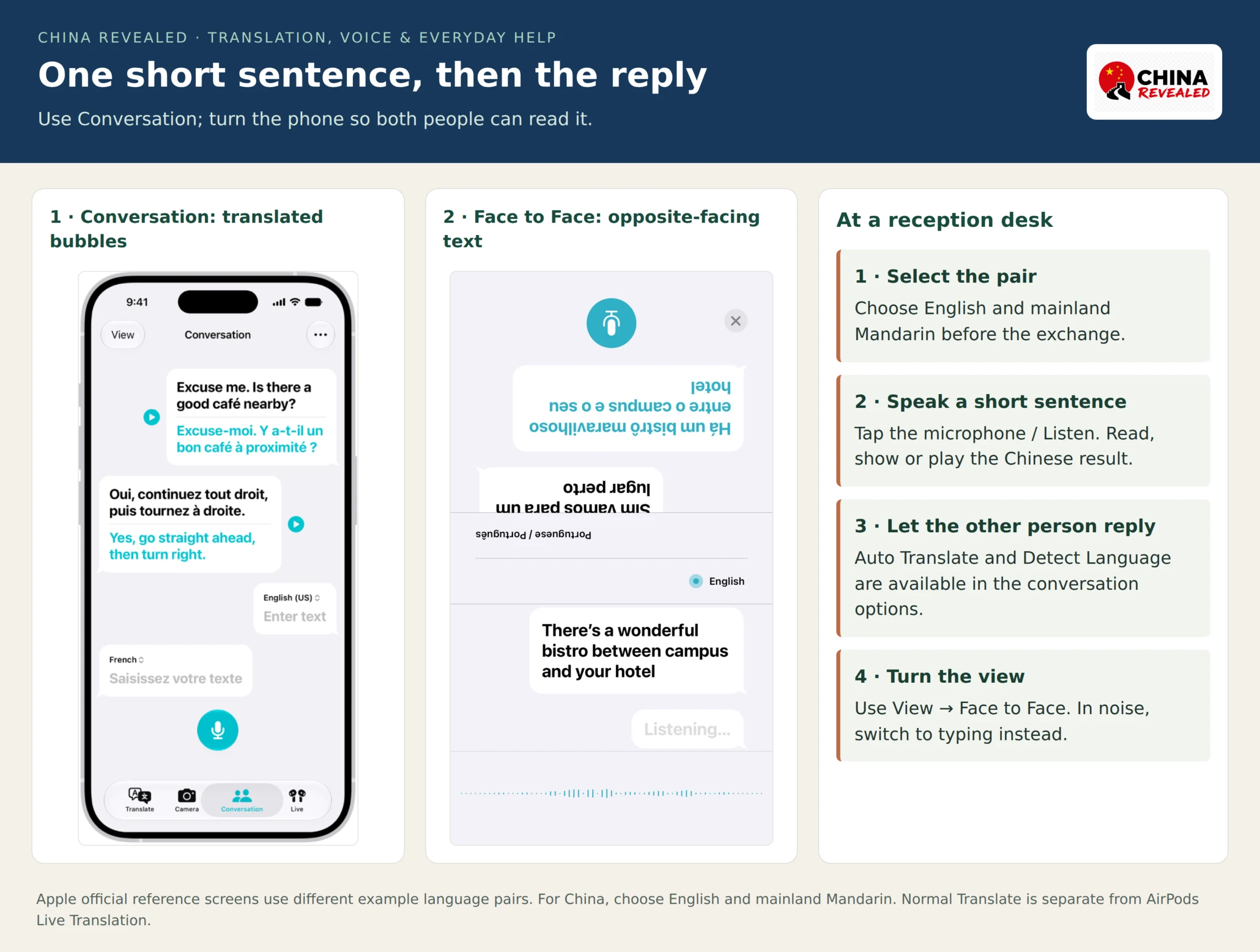
- Open Translate and select English and mainland Mandarin/Simplified Chinese.
- Open Conversation. Tap the microphone/Listen button and speak one clear sentence.
- Read the result, show the Chinese text or play its audio.
- Let the other person respond. You can enable Detect Language and Auto Translate in the options.
- Use View → Face to Face when both of you are looking at the phone from opposite sides.
Face to Face is particularly handy at a reception desk: each person sees their side of the exchange. You do not need translation earbuds or an Apple Intelligence-enabled phone for the ordinary app workflow.
On Android
In Youdao Translate, choose the source and target languages, then use the voice/microphone function. Speak, show or play the Chinese result, then switch the direction for the reply if needed. Start with ordinary short-phrase translation; save continuous interpreting modes for when you have checked their controls and language pair.
If a busy street, regional accent or noisy restaurant keeps producing strange words, switch to typing. This Chinese sentence helps:
我不会说中文。请打字,或者慢一点说。
I do not speak Chinese. Please type, or speak more slowly.
3. Read menus, signs and screenshots
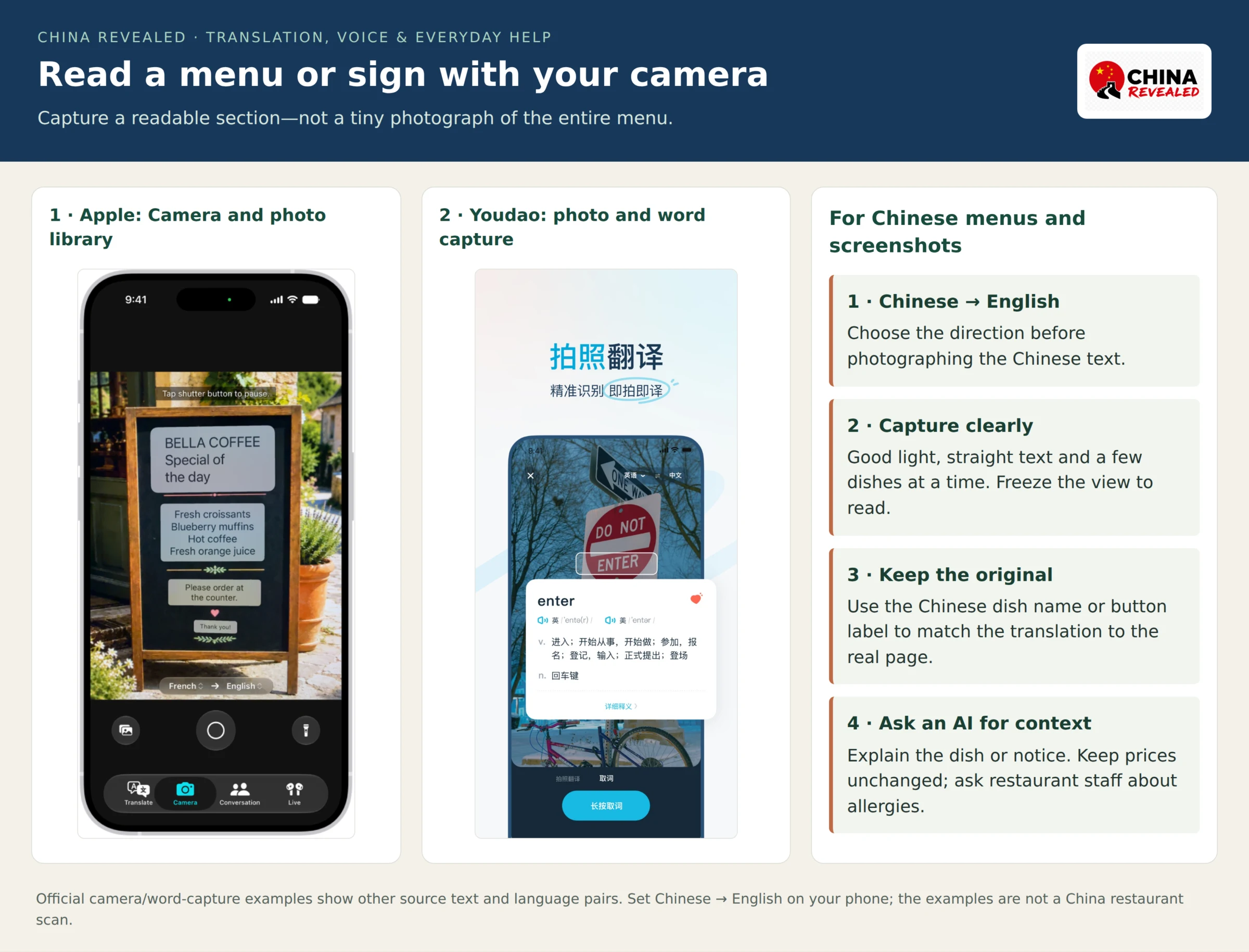
On iPhone, open Translate → Camera, choose Chinese to English and point at the text. Freeze the view to read it properly. You can also choose a picture from your photo library—useful for an ordering page or a sign you photographed earlier.
In Youdao, use 拍照翻译 / photo translation. Give the camera a clear, well-lit view, capture the text and check the English result. If the menu is packed with columns, photograph a few dishes at a time instead of expecting a tiny full-page image to be readable.
For a Chinese app, take a screenshot and translate it as a photo. Preserve the original page: you will need to match the translated label to the actual button. Crop out personal details that have nothing to do with the question.
Menu names are where I would bring in an AI. Camera translation can tell you the words; a Chinese AI can help explain what kind of dish they describe. Copy the name or upload the menu image in an app that offers image input, then ask:
Explain these Chinese dishes in English. For each dish, give its Chinese name, the main ingredients normally used, cooking style and whether it is usually spicy. Separate what the menu says from what you are inferring. Keep the printed prices unchanged.
A dish name is not an ingredient guarantee. For allergies, show your written requirement to the restaurant and ask the kitchen to confirm it—do not let an AI infer that a meal is safe from its name or photograph.
4. Use DeepSeek and Doubao well
DeepSeek: turn your intention into useful Chinese
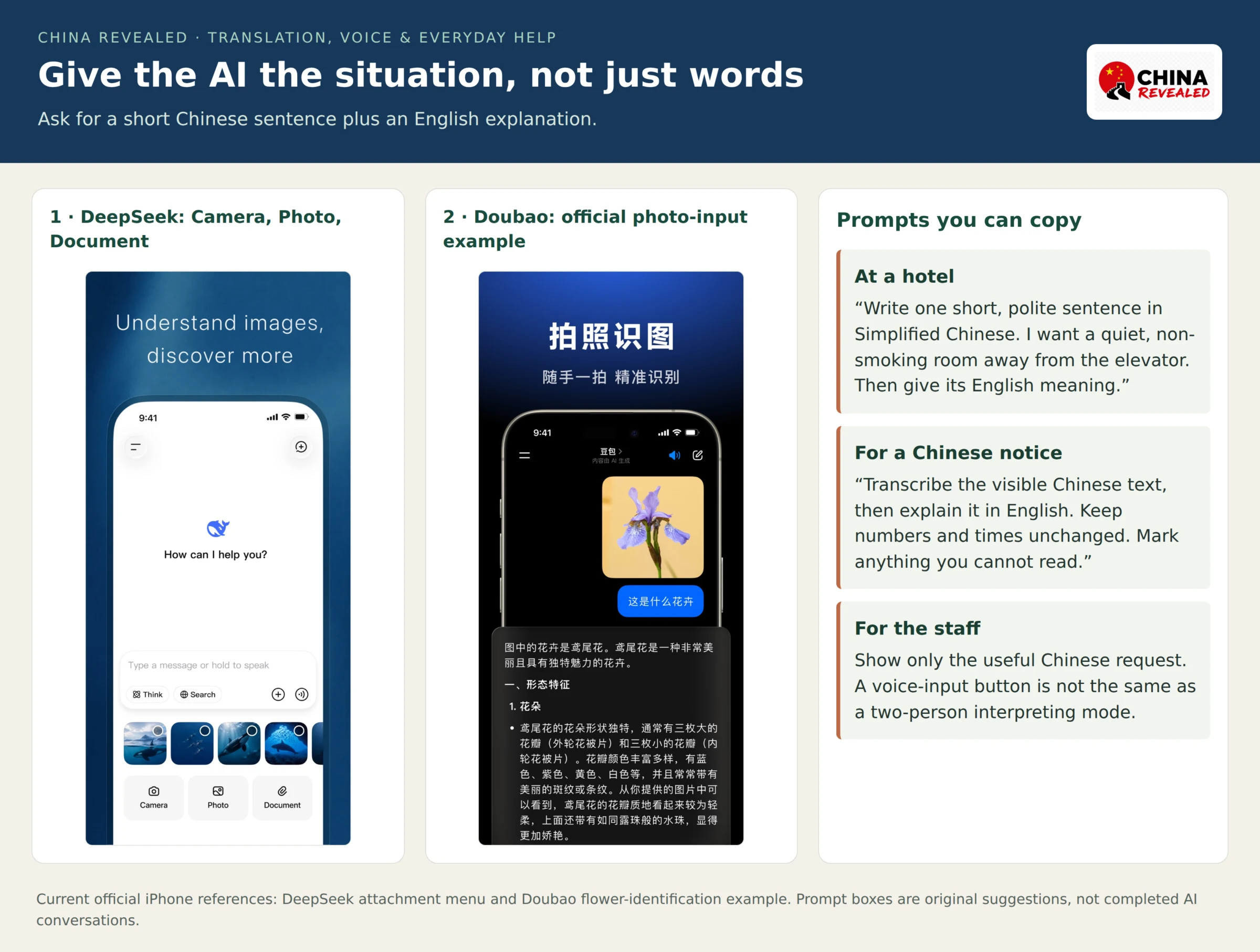
The most useful AI translation is often not “translate these words.” It is “write what I need to say in this situation.” Tell DeepSeek who you are talking to, what you want and how brief the Chinese should be.
For a hotel:
Write one short, polite sentence in Simplified Chinese for a hotel receptionist. I want a quiet, non-smoking room away from the elevator. Put the Chinese first, then the English meaning. Do not add requests I have not made.
For an instruction you do not understand:
Explain the Chinese text below in plain English. Tell me what I need to do next. Preserve every date, time, price, station name and document requirement. If something is unclear, point it out rather than filling it in: [paste the Chinese text].
The current official iPhone screenshots also show Camera, Photo and Document inputs under the attachment menu, plus spoken input. If those controls are in your installed version, you can use them too. A microphone for entering a message is different from a dedicated two-person interpreting mode; for rapid back-and-forth, I would still use the translator’s conversation workflow.
Doubao: pictures, voice and follow-up questions
Doubao—豆包—is useful when you want to keep asking about a picture or a Chinese explanation. Attach a menu or screenshot with the image/photo control, or use the voice input/call feature offered in your app. You can give the instruction in English and ask for an English explanation with a short Chinese sentence to show staff.
For a photographed notice:
Read this Chinese notice. First transcribe the visible text, then explain it in English. Keep numbers and times exactly as printed. Mark anything you cannot read. Finally, write one short Chinese question I can ask the staff to clarify the instruction.
Doubao also documents interpreting features such as 同声传译 and 原声翻译. If your version offers them, choose the languages and try a short exchange first. For an ordinary request, you do not need to find a special mode: typing a clear instruction and showing the answer is often quicker.
Show only the useful Chinese sentence, not a screen full of AI commentary. Keep the original Chinese beside an explanation of a ticket rule, price or deadline so staff can check the exact wording.
Book hotels, flights, train tickets, attractions and other travel services on Trip.com.
5. Translate hotel and guide messages
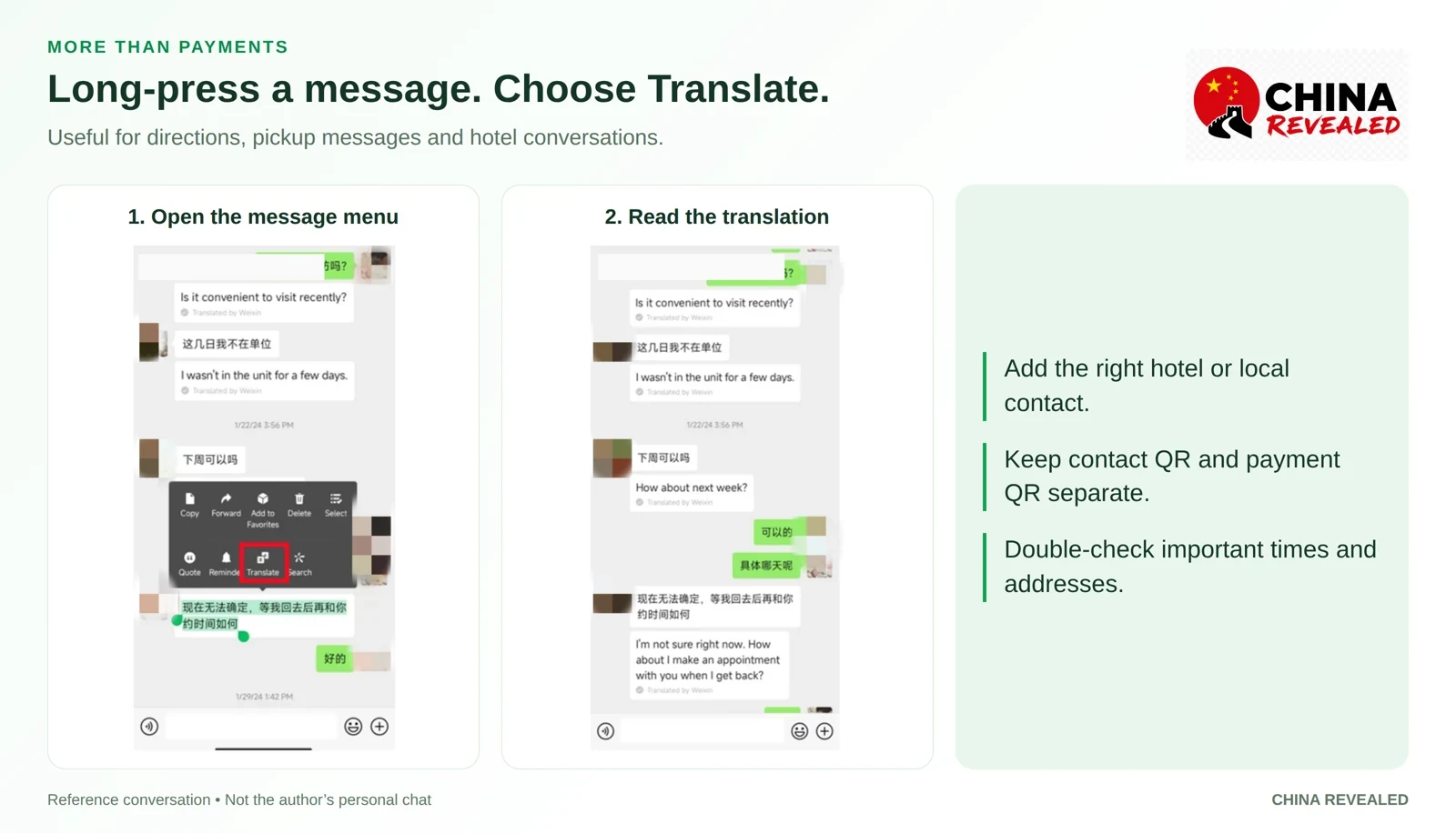
If you already use WeChat, you do not need to copy every hotel or guide message into an AI. Long-press a text message → Translate, where that option appears. It is useful for pickup instructions, meeting points and quick replies.
When replying, write a short English message or use DeepSeek/Doubao to draft clear Chinese. For a complicated pickup, send the actual location pin and ask the person to confirm the entrance. A translated place name is less useful than the Chinese address plus the correct map location.
Our WeChat guide for visitors covers the message-translation flow. In Alipay or a WeChat mini program, use an English setting or a Translate control if the particular service offers one; switching the main app to English does not convert every local service automatically.
6. Use a browser when you need a quick translation
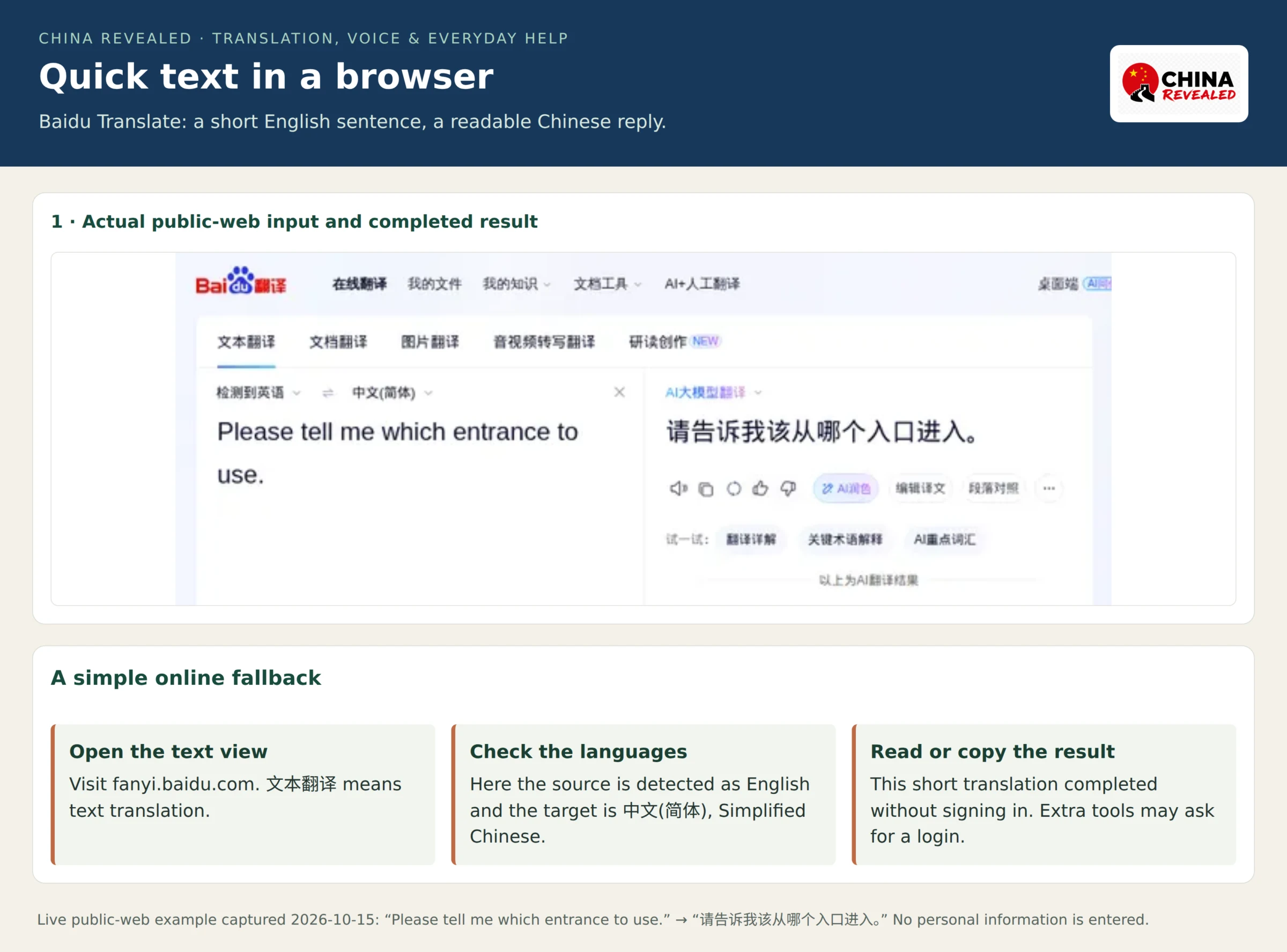
Baidu Translate is a useful online fallback when you only need to type a sentence or paste some Chinese. In the text-translation view, check the source language, choose 中文(简体) for a Chinese result or English for the reverse direction, enter the text and read the output.
When I checked its public web interface, the short sentence “Please tell me which entrance to use.” returned “请告诉我该从哪个入口进入。” without signing in. Extra tools such as rewriting can ask for a login. This is a browser option, not an offline backup.
7. Prepare the offline backup
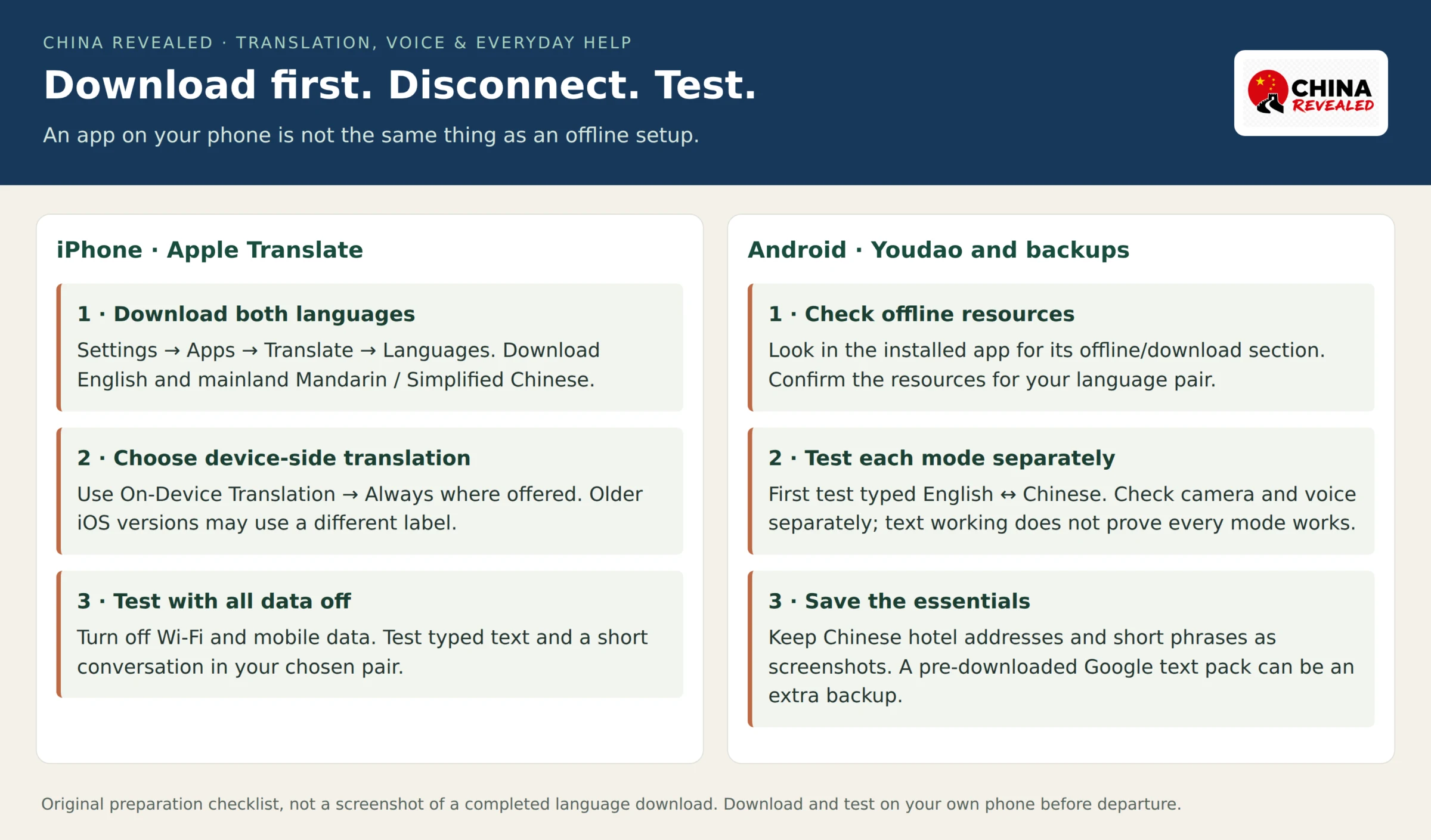
iPhone: download both languages
On current iOS, open Settings → Apps → Translate → Languages and download English and mainland Mandarin/Simplified Chinese. In the Translate settings, use On-Device Translation → Always if you want translation to use the downloaded languages. Older iOS versions may label the on-device setting differently.
Apple’s current guidance says conversations work with downloaded languages without an internet connection. Before flying, turn off Wi-Fi and mobile data and test your actual language pair, including a spoken exchange. Keep the modes that work on your phone as your backup.
Android: check what the app has downloaded
Youdao advertises offline translation, but the available resources and exact menu vary by version. Find its offline/download section, confirm the resources for your language pair and complete the download. Then test typed English↔Chinese text with all connectivity off. Check camera and voice separately; a working offline text translation does not prove those modes also work offline.
If your chosen app has no usable offline option, keep saved phrases and the original Chinese addresses ready. An already-installed Google Translate with pre-downloaded languages can also cover basic offline text without needing to reach Google’s servers.
Save these Chinese lines in your phone:
- 请帮我看一下这个地址。 — Please help me check this address.
- 请告诉我该从哪个入口进入。 — Please tell me which entrance to use.
- 请不要放辣椒。 — Please do not add chili.
- 请写下来,我用翻译软件看。 — Please write it down so I can use my translation app.
Also save your hotel’s original Chinese name and address, its contact details and your transport bookings. The China phone-connectivity guide helps with the internet side; downloaded languages and screenshots are what keep basic communication going when that connection disappears.
8. Other tools—and where Google fits
Baidu Translate, Tencent Translator—腾讯翻译君—and Microsoft Translator are additional choices for text, photo or spoken translation. If one is already working well on your phone, there is no need to replace it just for this trip. Check the modes you will use and any download or paid-feature prompts before relying on them.
For Microsoft, do not plan around old tutorials for its retired multi-device group conversation feature. That is separate from using one phone for a short spoken exchange. Likewise, Tencent’s closure of its old API service is not a statement that its mobile app has closed.
Google Translate is not useless, but I would treat it as a backup here. Online access can depend on the network and routing; some international roaming connections can reach Google while a local connection cannot. That does not mean every tourist must use a VPN. Downloaded offline text translation is a separate matter and remains useful without a connection.
My practical choice is simple: one translator for the exchange, one Chinese AI for the explanation, and a tested offline fallback. Keep sentences short, show the Chinese clearly and let the other person confirm the important detail.
About China Revealed
China Revealed is an independent English-language travel guide dedicated to China.
We bring together China travel guides, destination information, local insights and practical travel resources in one place.
Our travel database covers China's provinces, cities, famous attractions, hidden gems, local cuisine, transportation, accommodation, visa requirements, digital payments, mobile connectivity and the other practical details travelers need to explore China.
We focus on depth, careful research and accuracy. Our guides combine official sources, detailed destination data, local knowledge and regularly updated information to give reliable, practical travel advice.
Whether you're visiting China for the first time or exploring beyond the popular destinations, China Revealed is an all-in-one resource for discovering the real China.
China Revealed — Your practical guide to China.
Some links on China Revealed, such as Trip.com booking links, are affiliate links. If you book through them, we may earn a commission at no extra cost to you. This does not change what we recommend.