

Dianping for Foreigners: Find Restaurants, Buy Deals & Use Vouchers
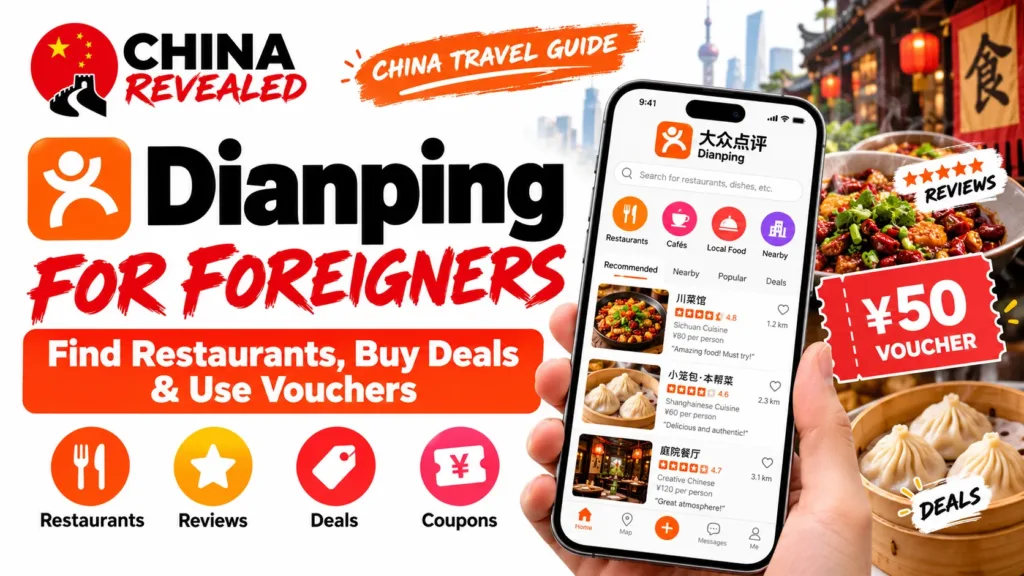
Use Dianping when you are going out to eat. Use Meituan when you want food delivered. Dianping (大众点评, Dàzhòng Diǎnpíng) is particularly useful for choosing a restaurant, checking customer photos and finding a discounted meal before you sit down. It also covers cafés, massage, entertainment and places to visit.
Its 团购 / group-buy deals are usually prepaid meal or service vouchers. You can buy one yourself; you do not need to organize a group. The practical skill is choosing the right branch, understanding what the voucher includes and getting it redeemed at the venue.
In this guide
- Dianping vs Meituan: which should you use?
- Download, register and set English
- Find a restaurant near the place you will actually be
- Read reviews and rankings like a useful shortlist
- Understand the deal before tapping Buy
- Buy the voucher and confirm it is ready to use
- Redeem it at the restaurant—not with your payment code
- A deal is not a reservation or queue number
- Refund a deal you will not use
- When something does not work
Dianping vs Meituan: which should you use?
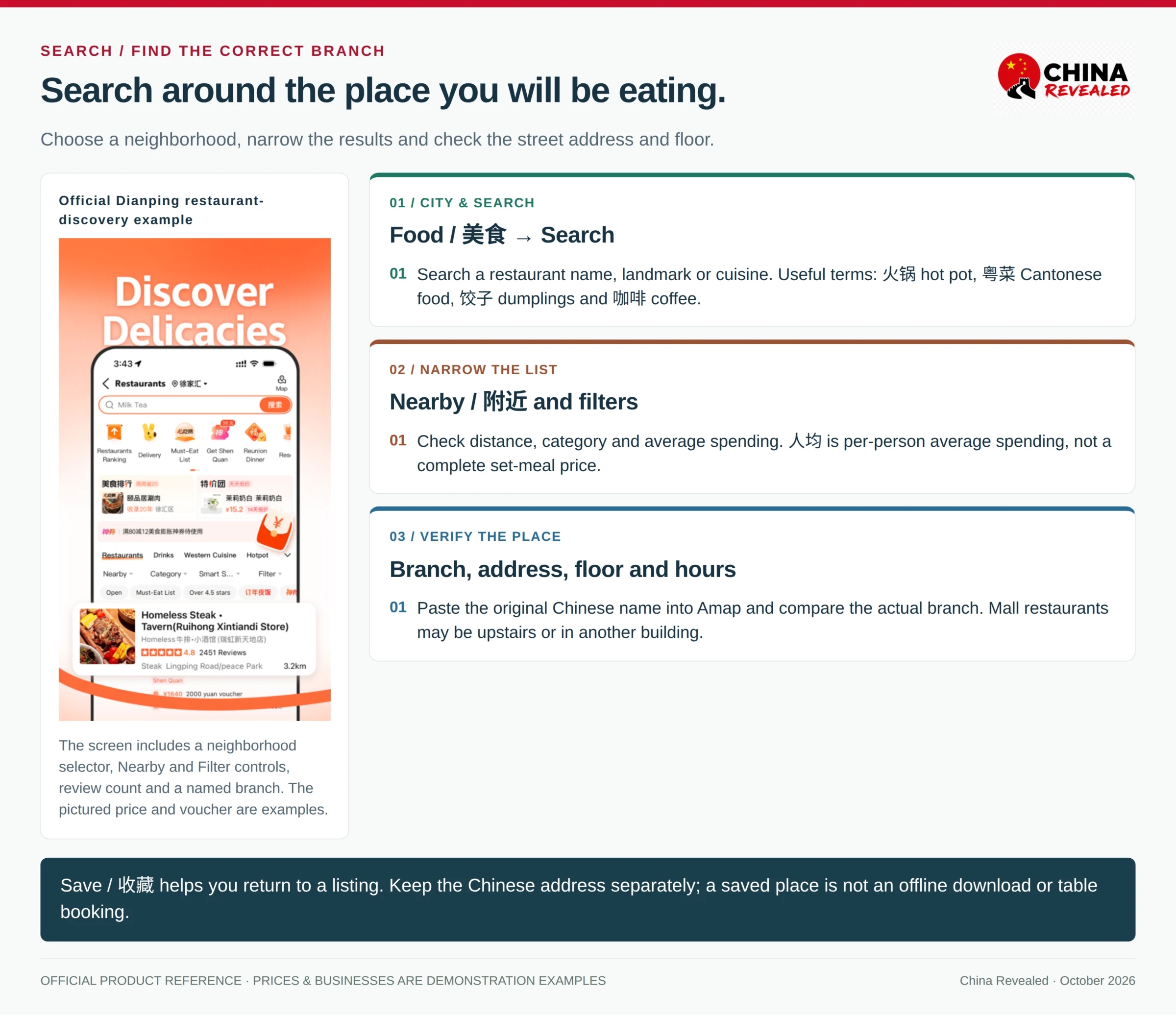
Dianping is part of the Meituan group, not a competing company. The two apps overlap, but they are built around different habits.
Dianping is the stronger starting point for deciding where to go. Browse restaurant listings, dish photos, recent reviews and city rankings, then look for a meal deal on the same business page. For visitors who want to explore beyond their hotel, this is its main value. A café, foot-massage shop or indoor activity can be researched in much the same way.
Meituan is the more convenient starting point for delivery and everyday orders. Food delivery, convenience-store shopping and broader local services are central to its main app. Meituan also has restaurant reviews and excellent dine-in deals; Dianping also has delivery and booking entrances. The difference is emphasis, not an absolute split in features.
For a restaurant meal, compare the same branch and same package in both apps if you already use them. Offers, account coupons and final checkout prices can differ. Neither app is always cheaper. Our Meituan guide covers delivery addresses, ordering and its wider services.
Already registered for Meituan? Start with that account’s phone number. Dianping uses the Meituan account system. Keep an order accessible in the app where you bought it rather than assuming every coupon, saved list and service page looks identical in both.
Download, register and set English
Get the official app
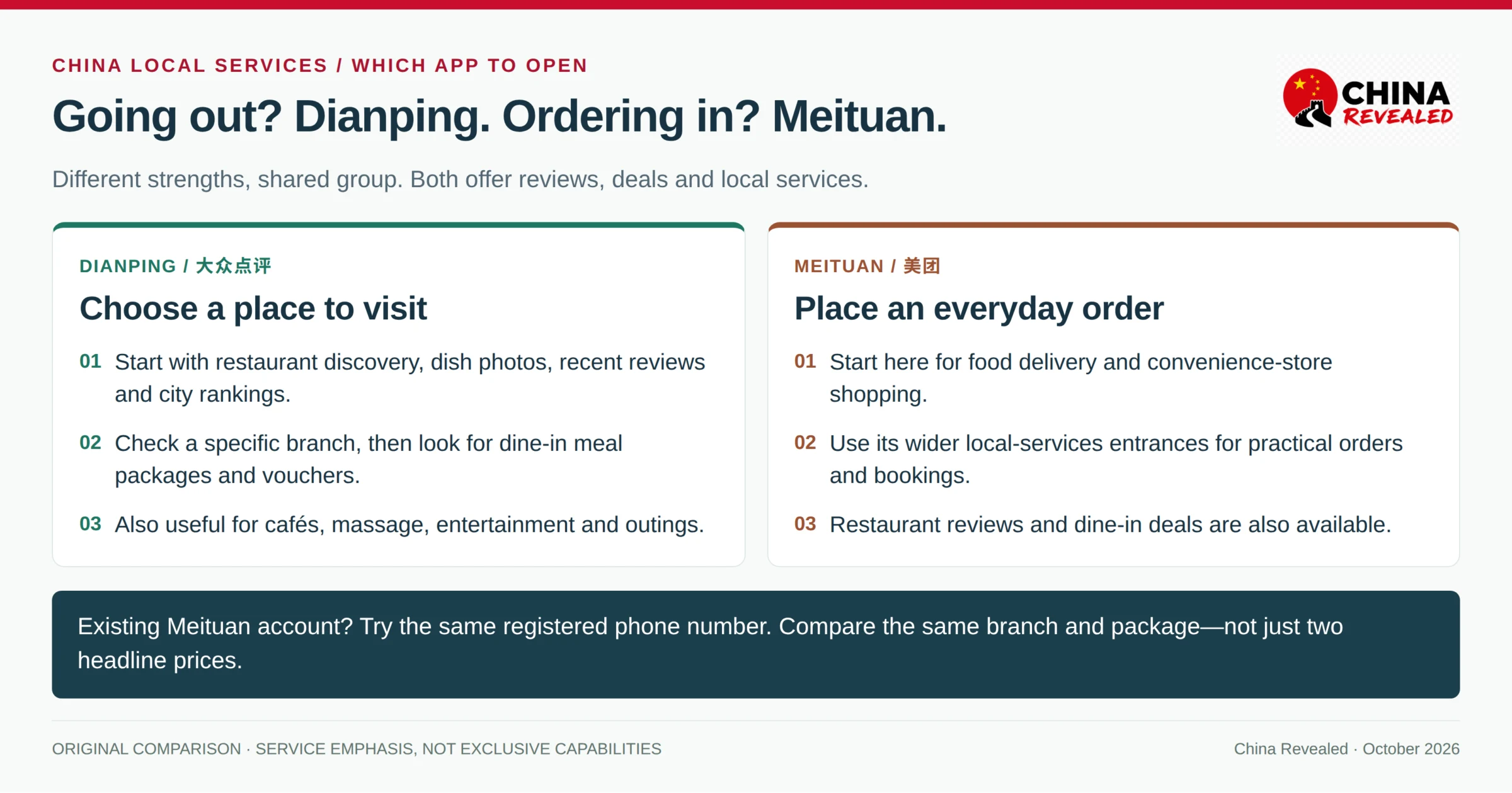
Use the official iPhone App Store listing or Google Play listing. Look for the orange Dianping icon and 大众点评. The iPhone developer is Hanhai Information Technology (Shanghai) Co.Ltd; Google’s listing shows 大众点评, with the same company named in its developer information.
Install before departure, especially if you rely on Google Play. Check your existing store first; you do not automatically need to change to a mainland China store region.
A WeChat mini program is another useful entrance: search 大众点评 in WeChat and open the official service. It saves installing the full app, but its pages, translation and login prompts can differ. WeChat authorization is not a guarantee that Dianping will never ask you to verify a phone number. The Dianping website can help with public listings, but shared links and deeper pages may ask for verification or direct you into the app.
Register only when you need an account
Basic browsing and search do not inherently require registration, according to Dianping’s policy. Try those first. Sign in for purchases, saved places or any page that asks for it.
Open Profile / Me / 我的 → Log in or Register / 登录或注册. Choose your phone number’s country code, enter the number and request the SMS verification code. Read and accept the account terms if you want to proceed, complete the code check and open your profile to confirm you are signed in.
Try your own overseas number if its country code is offered. Code delivery and later verification can vary by carrier. A data-only eSIM does not receive ordinary SMS; keep the SIM attached to your account accessible. A Chinese number in your own name is useful for frequent bookings and calls, but do not buy a local SIM solely because an old guide says no foreign number can work.
Use an existing Meituan login first if you have one. WeChat or other quick-login buttons may also be offered; follow the additional binding prompts rather than assuming they bypass registration. Ordinary restaurant research is not a paid membership or business-verification process.
Switch the interface to English
The current iPhone listing officially includes English, as well as Japanese, Korean and Chinese. Its published screens also demonstrate English menus. This is not a separate unofficial “Dianping International” app.
Open 我的 / Profile → 设置 / Settings, then look for 语言 / Language or 多语言 / Languages, choose English and save. The settings entrance may be a gear or menu icon. If your build does not show a language control, check for an official update and your phone’s per-app language setting where available.
Reviews, dish names and text inside photos may remain Chinese. Use screenshot text recognition or translation for these; do not expect long-pressing anywhere to translate the whole app. In a WeChat mini program, use its translation option if offered. Keep the original Chinese restaurant name for maps.
Allow location access while using the app for nearby results, or select the city manually. Camera and photo-library access are needed only for the features that use them—not for reading a restaurant listing.
Find a restaurant near the place you will actually be
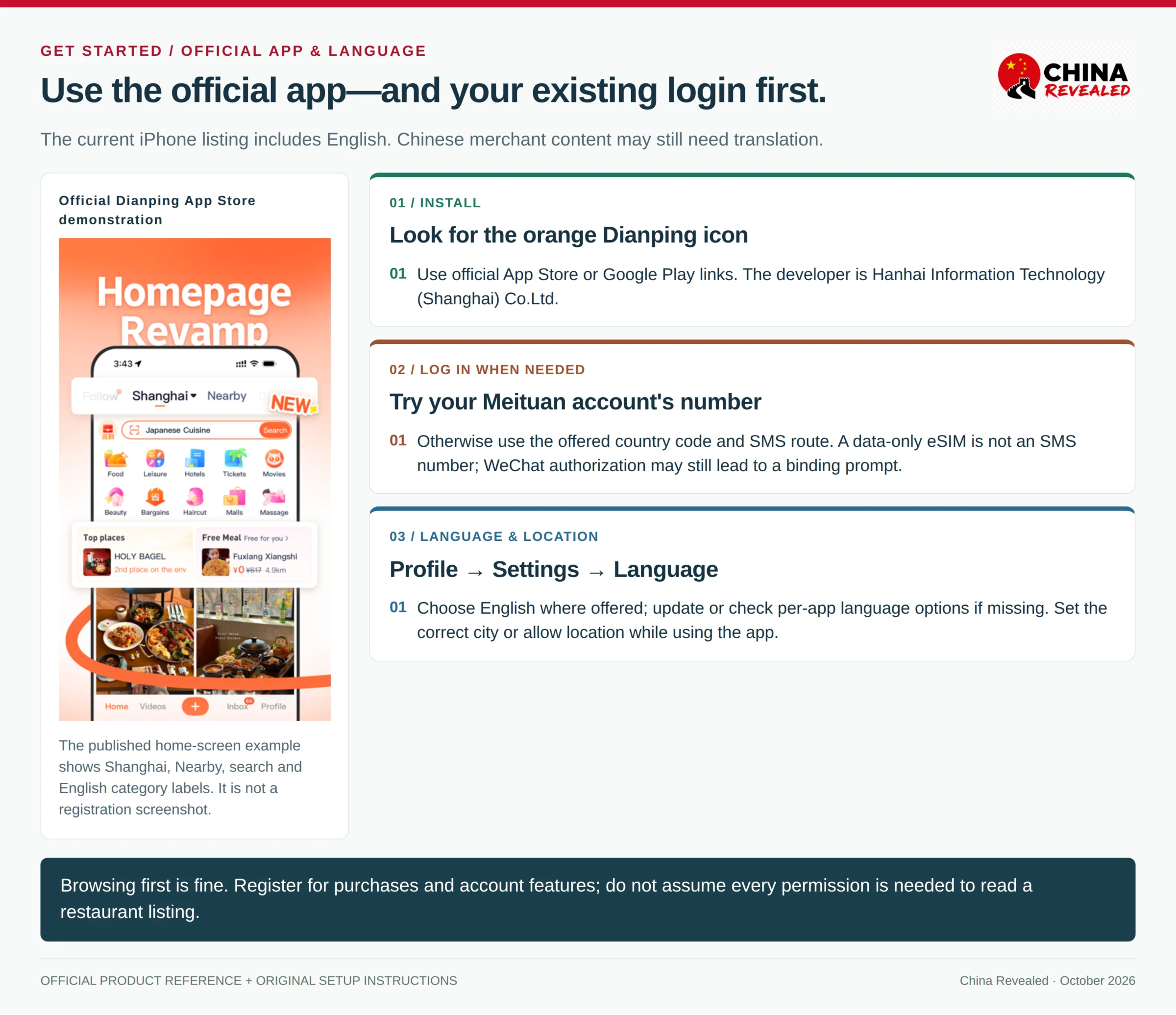
Check the city at the top of the home page, then tap Food / 美食 or the search bar. Search around your hotel, a subway stop or the attraction you will leave before dinner—not only around your current location.
Chinese names are especially useful for smaller restaurants. Copy the name from a recommendation (our Xiaohongshu guide shows where to find them), or try 火锅 for hot pot, 粤菜 for Cantonese food, 饺子 for dumplings, 咖啡 for coffee and 清真 for halal restaurant leads. Add a district or landmark to narrow the results. A halal keyword finds candidates; confirm the actual venue meets your requirements.
Use the available Nearby / 附近, Category / 菜系, price and sorting filters. 人均 is an indicative average spend per person, not the price of a full meal package. An “Open” label is useful, but check kitchen hours when arriving late or between lunch and dinner.
Open the listing and check its branch name, street address and floor. A restaurant in a large shopping mall may be upstairs or in a separate building. Chain branches can have different menus and deals. Copy the Chinese name into Amap and compare the address before setting off; our Amap guide shows how to check the correct pin and route.
Tap Save / 收藏 if you want to return to the listing, then check your saved section under Profile. Keep the Chinese address in a separate note as well. Saving a place is not an offline download or a table booking.
Read reviews and rankings like a useful shortlist
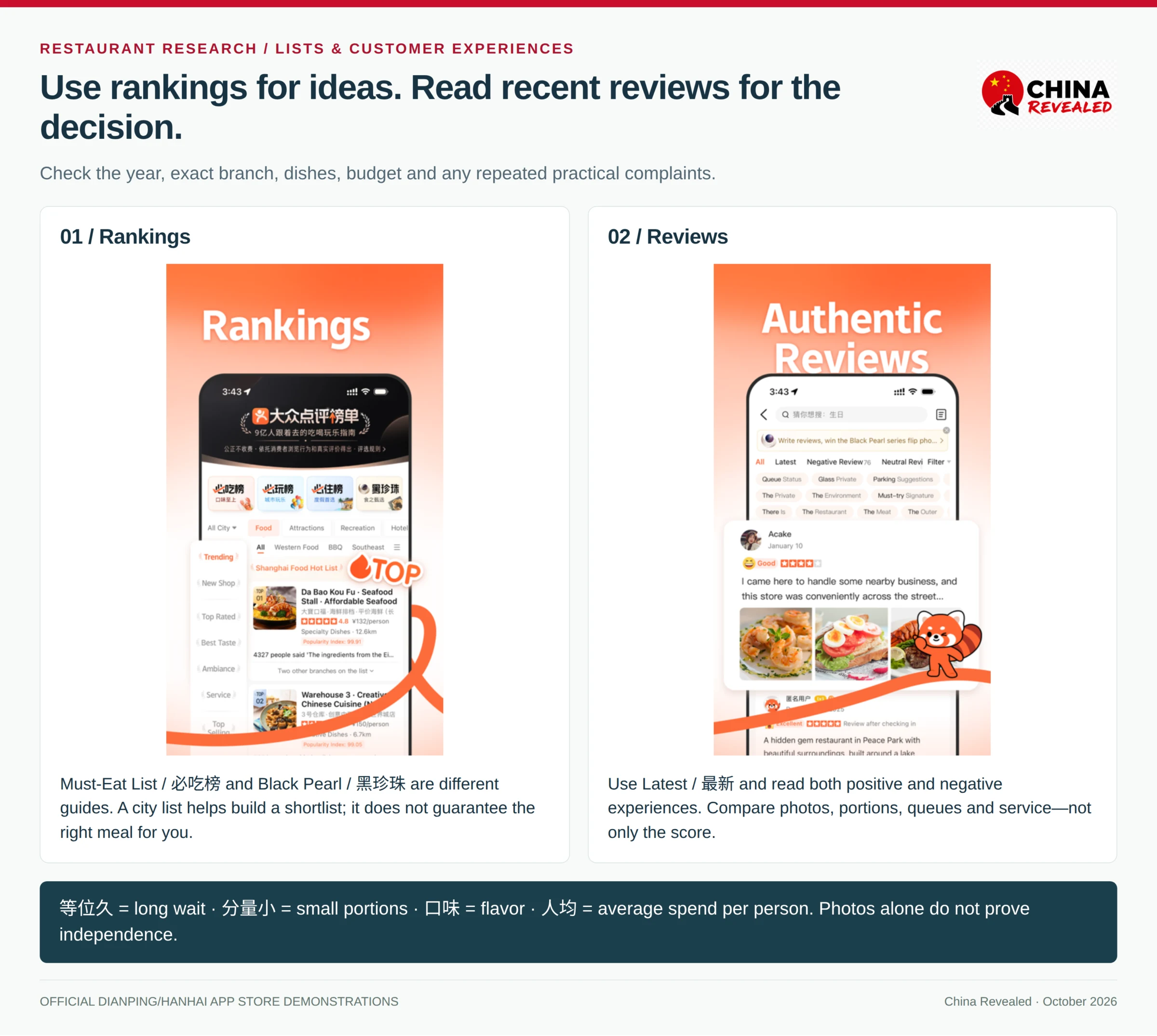
The star score is a starting point. Open Reviews / 评价, select Latest / 最新 and read a few positive and negative experiences. Customer photos help you judge portions, seating and the dishes people actually ordered. Compare several reviews; photos and high ratings alone do not prove independence.
Look for repeated practical comments. 等位久 means a long wait; 分量小 means small portions; 服务 concerns service; 口味 concerns flavor. A complaint that the food is very spicy may matter more to you than a minor complaint about décor. Check menu-photo dates before treating a pictured price as current.
Dianping’s Must-Eat List / 必吃榜 is a useful shortcut for unfamiliar cities. Black Pearl / 黑珍珠 is a different restaurant guide, not another name for the same list. Check the year, branch and budget. A city ranking can give you ideas, but a long detour or queue may not suit tonight’s plan. Promotion labels such as 广告 also deserve attention.
Understand the deal before tapping Buy
On the business page, open Deals / 团购, Offers or the equivalent section. Three common options do different jobs.
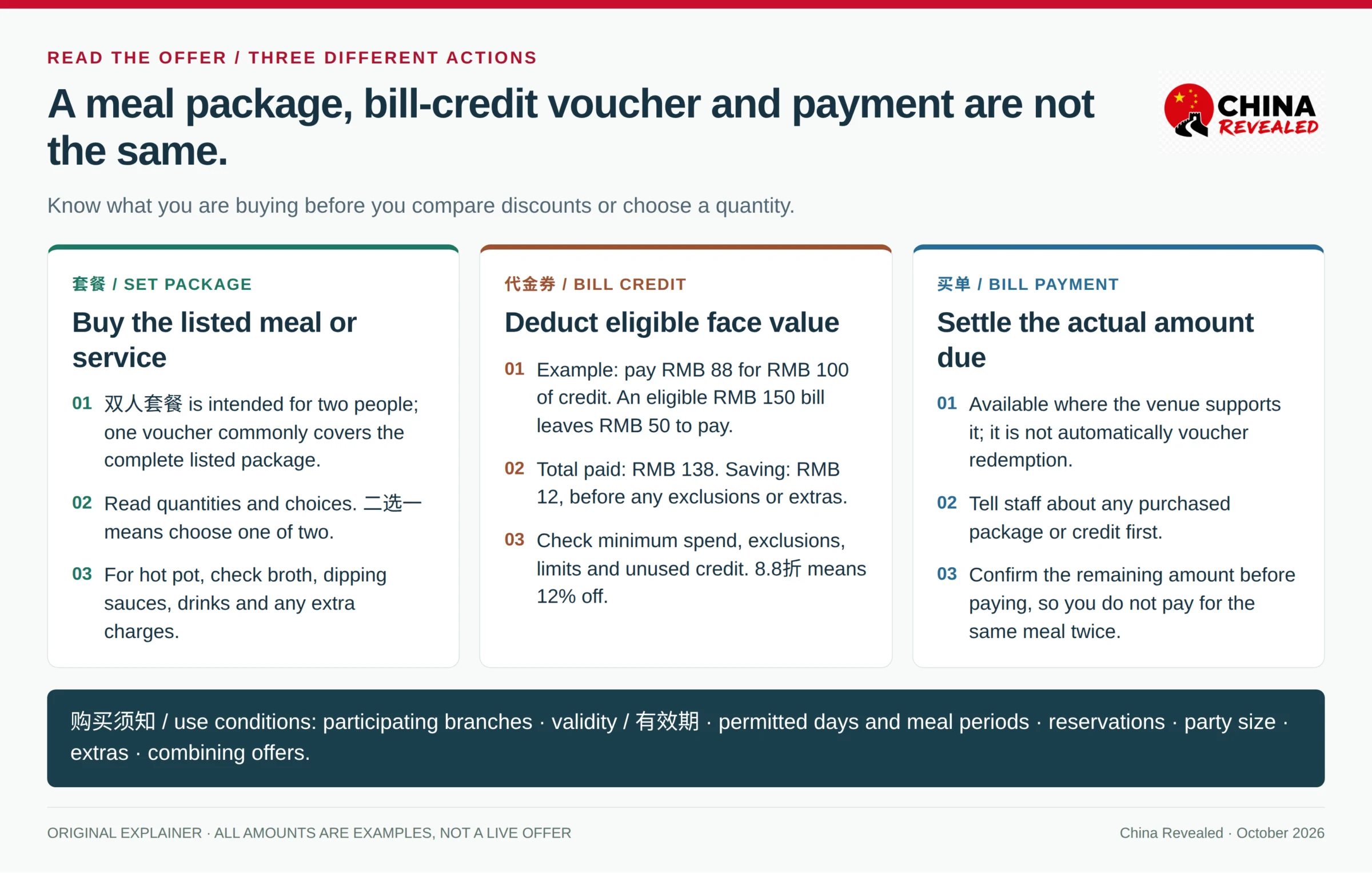
套餐: a set meal or service package
A 双人套餐 is a package intended for two people. One voucher commonly buys that whole listed package—not one serving per diner. A 单人餐 is a one-person offer. Read the dishes, quantities and any choices marked 任选. A 二选一 choice means choose one of two, not receive both.
For hot pot, check whether the 锅底 / broth base, 蘸料 / dipping sauces and drinks are included. A cheap package can be less useful if it excludes the items you need. Ask about substitutions before buying; the kitchen does not have to replace unwanted dishes for free.
代金券: credit toward an eligible bill
A 代金券 deducts its face value from qualifying spending. It is not the same as a listed set meal.
Example: you pay RMB 88 for a RMB 100 voucher. Your eligible restaurant bill is RMB 150, so you pay the remaining RMB 50 at the restaurant. Your total spend is RMB 138, saving RMB 12. This assumes the entire bill qualifies and no extra charges apply.
Check the minimum spend, excluded items, limit per table and whether several vouchers can be combined. Do not assume unused credit becomes cash change. In Chinese discount notation, 8.8折 means paying 88% of the original price—12% off, not 88% off.
买单: paying the actual bill
买单 is bill settlement, where the restaurant supports it. It may offer a discount, but it is not automatically your prepaid voucher. Ask staff which amount to enter and how any purchased deal will be deducted. Paying the full bill through 买单 without mentioning your voucher can mean paying for the meal twice.
Read 购买须知 before paying
The purchase or use conditions are often labeled 购买须知, 使用规则 or 使用须知. Check the participating branches, 有效期 / validity, permitted days and meal periods, reservation requirements, party size and exclusions. Look specifically for holiday restrictions, 不可叠加 / cannot combine with other offers, and charges such as tea, service fees or a broth base.
Buy for the meal you intend to eat, not simply the largest advertised discount. The crossed-out reference price is not a substitute for reading the contents and comparing the final total.
Buy the voucher and confirm it is ready to use
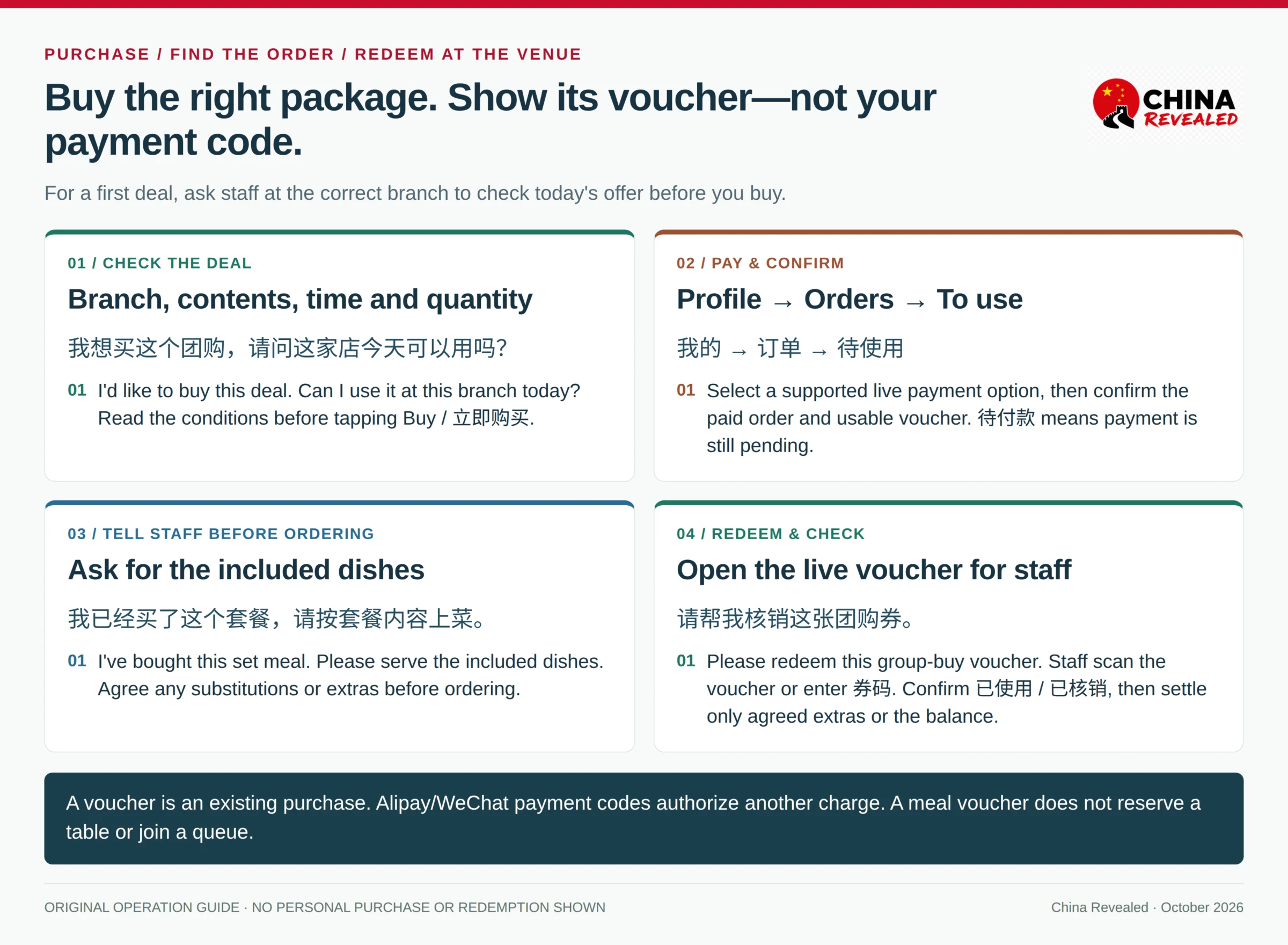
For your first restaurant deal, arrive at the correct branch and ask staff to check the offer before you buy. This avoids a wrong-branch purchase and confirms that the meal can be served now. You can buy ahead once you understand the restaurant’s rules.
Open the deal, choose the correct package and quantity, then tap Buy / 立即购买 / 抢购 or its equivalent. Review the branch, contents, use conditions and final amount. On the payment screen, select a working method actually offered on your order.
Prepare Alipay with an eligible foreign card or your existing supported WeChat Pay setup. Dianping lists these among its payment partners, but a card linked to a wallet is not a guarantee that this particular deal will accept it. The live checkout determines the options. You do not need to open a credit or installment product just to buy dinner.
After payment, open Profile / 我的 → Orders / 订单, then the unused order under To use / 待使用 where shown. Check that it is paid and that a usable voucher or redemption entry appears. 待付款 means payment is still pending. A bank notification alone is not the voucher.
If the result is unclear, check the order and wallet transaction history before retrying. If payment is declined, try another supported method already available to you. Otherwise, ask whether the restaurant can offer a direct price and pay normally. An app-price screenshot does not entitle you to that price without buying and using the deal.
Redeem it at the restaurant—not with your payment code
Tell staff about the package before ordering, so they can serve the included dishes rather than charge everything à la carte. Show the deal description first. Open its live voucher when staff are ready to provide the meal or service.
The usual route is 我的 → 订单 → 待使用 → the order → voucher or use entry. Staff scan the voucher QR code or enter its 券码 / redemption code. Follow any order-specific instruction, and confirm that the restaurant has successfully redeemed the right package.
This is not your Alipay or WeChat payment code. The voucher represents an existing purchase; a payment code authorizes another payment. Ask staff to explain a further charge before showing a payment code.
Treat the voucher code like something of value. Give it to the actual venue only when you are using the service. Platform rules treat redemption as provision of the service, so do not let a stranger redeem it “in advance.” For a booking-based activity, follow its specific check-in and redemption instructions.
Useful phrases to show staff:
我想买这个团购,请问这家店今天可以用吗?
I’d like to buy this deal. Can I use it at this branch today?
我已经买了这个套餐,请按套餐内容上菜。
I’ve bought this set meal. Please serve the dishes included in the package.
请帮我核销这张团购券。
Please redeem this group-buy voucher.
Pay only the agreed extras or the remaining eligible bill. 已使用 / 已核销 means the voucher has been used. If it still appears unused after staff scan it, ask them to check before leaving. Keep the order accessible until any billing question is resolved.
Book hotels, flights, train tickets, attractions and other travel services on Trip.com.
A deal is not a reservation or queue number
Buying a meal package does not secure a table. If the listing offers 订座 / Reserve, choose the date, time and party size, then check whether your booking is confirmed or still pending. Where no online reservation is available, ask the venue or your hotel to call.
排队 / 取号 is a waiting-list ticket, not a fixed-time booking. Select the correct party size, watch the live queue and the restaurant’s arrival instructions, and allow time to reach the branch. Estimates change and missed numbers may be cancelled. Do not buy an advance meal deal merely because you have joined a long queue.
For massage, KTV, escape rooms and other activities, check the duration, number of participants and whether you must book a slot separately. A ticketed attraction may also require a supported identity document or date selection; an ordinary restaurant voucher is not a model for every booking.
Refund a deal you will not use
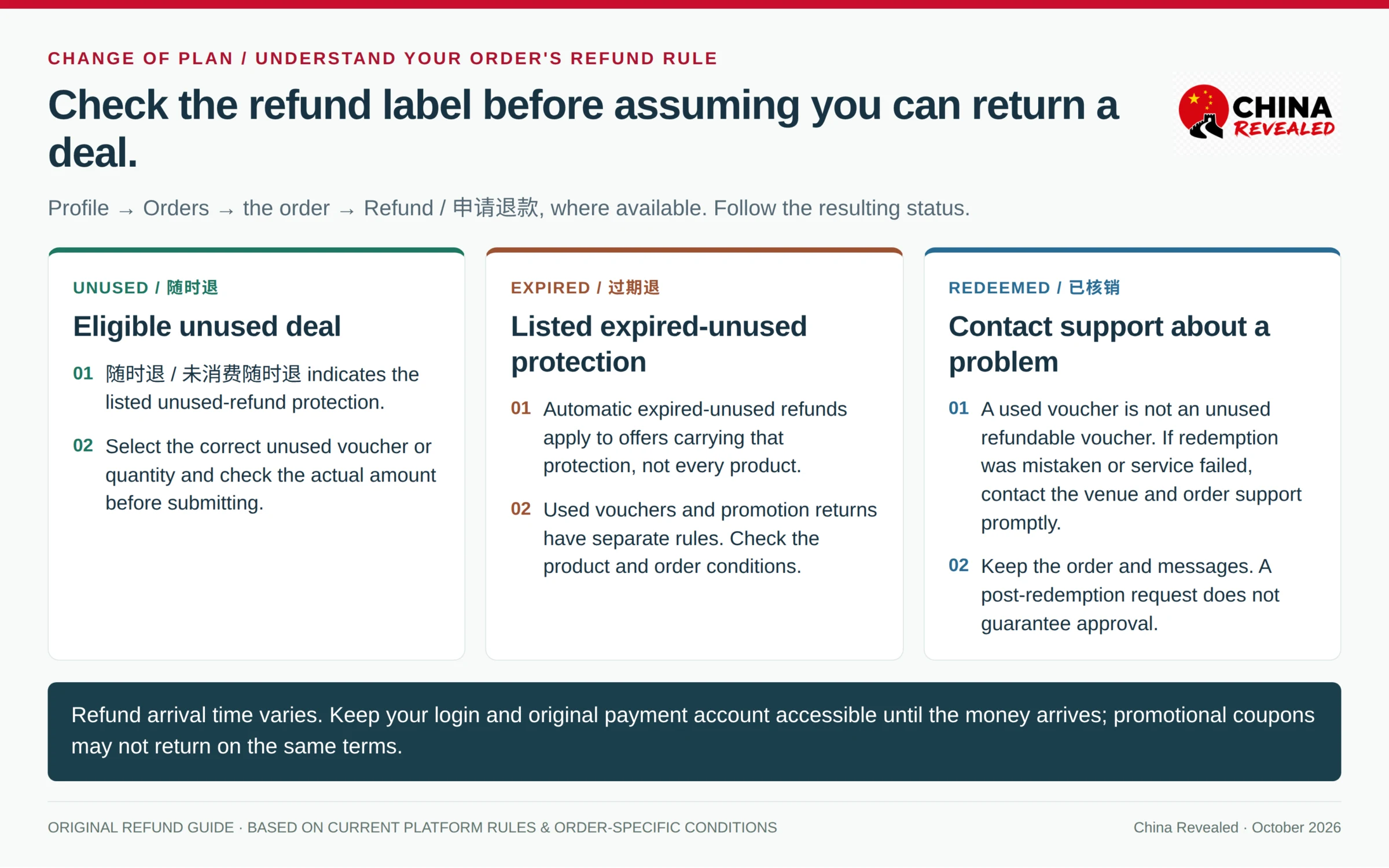
Open Profile → Orders → the order → Refund / 申请退款 where available. Select the unused voucher or quantity, read the amount to be refunded and submit the reason. Follow the resulting status, not just the fact that you tapped the button.
随时退 / 未消费随时退 indicates an eligible unused deal can be refunded under that rule. 过期退 indicates the listed expired-unused refund protection. Check these labels on the product; neither applies automatically to every deal, and redeemed vouchers are not unused.
Refunds are normally sent through the original payment route, subject to payment-system restrictions. Arrival time varies, and promotional coupons may have separate return rules. Keep your login and original payment account available after departure until the refund arrives.
If a voucher was redeemed by mistake or the service was not delivered, contact the restaurant and the order’s customer support promptly. A refund request after redemption can still be investigated, but approval is not automatic. Keep the order details and relevant messages.
When something does not work
No SMS: check the country code, number, signal and SMS reception. Wait for the displayed resend timer. Try your existing Meituan account or an offered official login method; a mini program may still require phone verification. If you can browse, continue researching instead of spending dinner time repeatedly requesting codes.
A voucher is rejected: check the branch, dates, meal period, quantity and booking conditions with staff. If the actual listing permits today’s use and the venue cannot honor it, use the order’s support route. Do not buy a second package until you understand the first failure.
Cannot find the order: check the account and phone number, the app where you purchased, and All Orders as well as To use. Look for pending payment or a refunded status. A saved offer is not a purchased voucher.
For app problems, use the in-app Customer service / 客服 or Help / 帮助 entry. Google Play lists app@dianping.com as its support email; Dianping’s published customer-service number is 10100011. Provide the error wording and order number if relevant, but not a password, SMS code or active payment code.
For a first outing, the simple approach works best: choose a nearby restaurant, read recent reviews, confirm the branch, and ask staff to check one straightforward meal deal. You get the useful part of Dianping without making dinner depend on mastering every feature. For what to order once you sit down, see our guide to eating in China for the first time.
About China Revealed
China Revealed is an independent English-language travel guide dedicated to China.
We bring together China travel guides, destination information, local insights and practical travel resources in one place.
Our travel database covers China's provinces, cities, famous attractions, hidden gems, local cuisine, transportation, accommodation, visa requirements, digital payments, mobile connectivity and the other practical details travelers need to explore China.
We focus on depth, careful research and accuracy. Our guides combine official sources, detailed destination data, local knowledge and regularly updated information to give reliable, practical travel advice.
Whether you're visiting China for the first time or exploring beyond the popular destinations, China Revealed is an all-in-one resource for discovering the real China.
China Revealed — Your practical guide to China.
Some links on China Revealed, such as Trip.com booking links, are affiliate links. If you book through them, we may earn a commission at no extra cost to you. This does not change what we recommend.