

How to Use DiDi in China as a Foreigner: Setup, Payment and Your First Ride
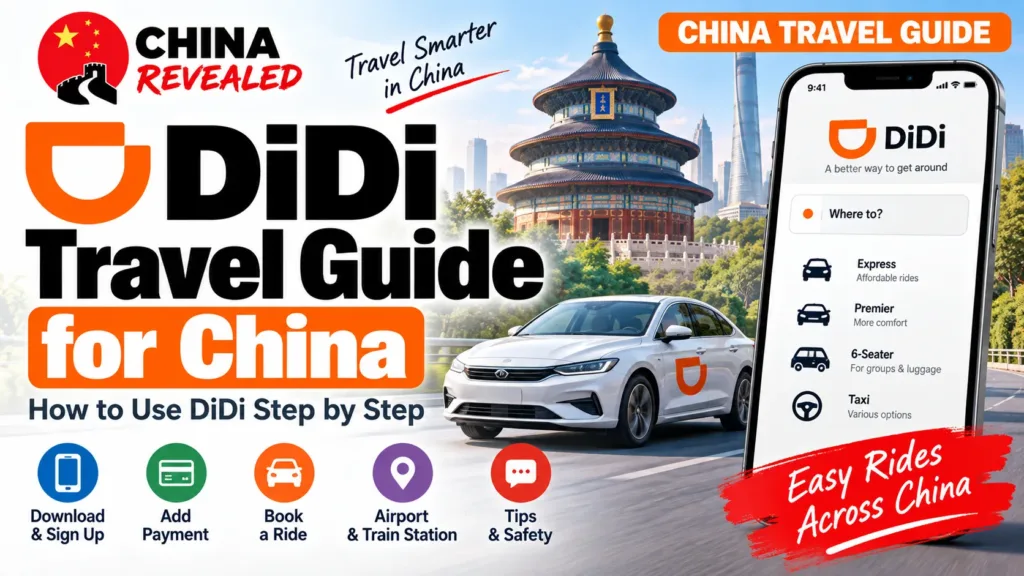
You can use DiDi in China with an eligible foreign phone number and international bank card. The China app has an English interface and Chinese–English message translation, so you do not need fluent Chinese or a mainland bank account just to book a normal ride.
If you have used Uber, the basic routine will feel familiar: enter a destination, check the pickup point, choose a car and request it. The part that catches visitors out is usually not pressing the booking button. It is standing at the wrong hotel entrance, choosing the wrong airport terminal or discovering that a travel eSIM cannot receive a verification text.
This China Revealed guide follows our DiDi YouTube walkthrough, with extra detail on those everyday problems. The reference screens show genuine app interfaces and published product examples, not a newly booked ride or a guarantee that your account will display the same options.
In this guide
- Choose your entry: DiDi app, Alipay or WeChat
- 1. Download the right DiDi app and switch to English
- 2. Register in the standalone app with your foreign number
- 3. Set up standalone-app payment before your first ride
- 4. Set the pickup point—not just your GPS position
- 5. Enter the destination and check the exact result
- 6. Choose a vehicle for your people and your bags
- 7. Use the correct airport or railway-station pickup zone
- 8. Message the driver in English
- 9. Match the car, then confirm your phone-number ending
- 10. Finish the ride and check payment
- 11. Cancellations, lost items and other problems
- 12. Scheduled rides and extra services
- Frequently asked questions
- Watch the China Revealed DiDi tutorial
Choose your entry: DiDi app, Alipay or WeChat
You do not need all three. You can open DiDi through its own China app, inside Alipay, or inside WeChat. Once you reach the actual DiDi booking page, the everyday ride process is broadly the same: check pickup → enter destination → choose a car → request → meet the driver → check payment. The buttons may look different, but you do not have to learn three completely different ways to call a car.
Option A: The standalone DiDi China app
Open DiDi China: Ride Hailing and sign in. It gives you a dedicated ride-hailing app, with its own account controls and Wallet. If you choose this route, follow the download, registration and payment steps below.
Option B: DiDi inside Alipay
- Open Alipay and search for DiDi / 滴滴出行.
- Select the official DiDi mini-program. Depending on your version, Transport → Taxi/Ride Hailing or a home-screen shortcut may also lead to a ride-booking page.
- Complete any requested location, phone/account and payment authorisation, then check the pickup and destination.
If you already use Alipay (our Alipay guide covers the setup), this can save you from installing another app. A general Taxi/Ride Hailing page may list multiple providers, so check that you are using DiDi rather than assuming every car offered there is a DiDi order.
Option C: DiDi inside WeChat
- Open WeChat → Me → Services → Ride Hailing/Mobility, where available.
- Open the DiDi service. Alternatively, use WeChat search to find the official DiDi / 滴滴出行 mini-program.
- Complete any requested account, phone, location and payment permissions before requesting a ride.
The shortcut’s name and position can differ by account, region and app version. If you cannot see it, search for the mini-program instead of looking for one exact icon from an old screenshot. Our WeChat guide also shows how to call a ride inside WeChat.
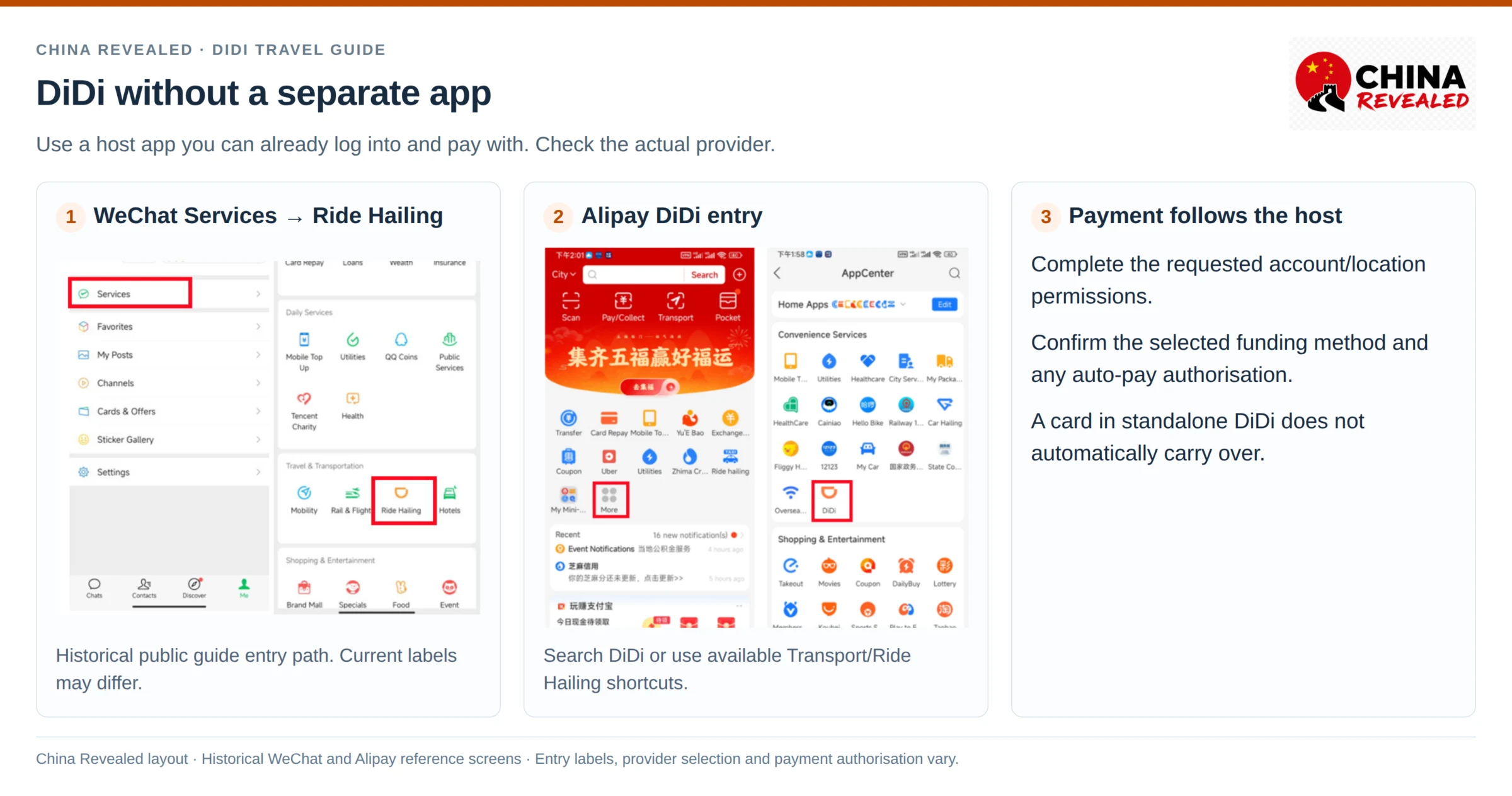
What changes—and what stays the same?
The entry, account permissions and payment authorisation can differ. The standalone app uses its own Wallet setup; a mini-program uses the options and authorisations shown inside its host app. Do not assume a card saved in the standalone app automatically carries over, or that opening a mini-program automatically enables payment.
The ride essentials stay the same. You still need the right pickup point, exact destination, suitable vehicle, matched licence plate and correct booking-number ending. Available categories, promotions and extra features can vary, so the screens are similar—not necessarily identical.
If you choose Alipay or WeChat and have completed the required setup there, you can skip the standalone-app instructions and go straight to “Set the pickup point”. Complete any extra verification your selected route asks for. Follow the rest of the ride guide in the entry you chose.
1. Download the right DiDi app and switch to English
For a mainland trip, look for DiDi China: Ride Hailing. Other DiDi-branded apps serve other markets; having the DiDi Rider app you use at home does not necessarily mean you are ready to book in China.
Use the official iPhone App Store listing or Android Google Play listing. Install it before departure, especially if you normally depend on Google Play. Check your store’s availability rather than downloading a random APK from an unfamiliar website.
Open the app and make sure the service region is Mainland China when prompted. Allow the location access needed to set the pickup point and use the ride features. If the home page shows a different city, check the city selector and location permission before searching for somewhere to go.
If the app does not open in English, look under Account → Language/语言. In some versions, the route is Me/我的 → Settings/设置 → General/通用 → Language/语言. Choose English and confirm; the app may restart. Learn the names of these functions rather than relying on a button being in the same position forever.
DiDi is a major ride-hailing platform in China. Its China Mobility business recorded about 13.7 billion completed rides in 2025—roughly 37.6 million a day averaged across that year. That figure counts trips, not users, and it is not a live estimate of today’s demand.
2. Register in the standalone app with your foreign number
You do not normally need a Chinese phone number. The China app supports global mobile-number login, subject to the supported number region, SMS delivery and any verification your account requests.
- Tap Account or the sign-in prompt.
- Select the country/region code for your phone number, not the country you are visiting. Use +44 for a UK number, for example—not +86 unless it is a Chinese number.
- Enter your number in the format requested by the app. Do not repeat the country code inside the number field when it is already selected separately.
- Receive the verification text and enter the code into DiDi.
- Complete any further prompts, then check that you can reach the home screen and Wallet.
A data-only travel eSIM is not a replacement for an SMS-capable phone number. It can provide the internet connection DiDi needs while your original SIM remains available for verification messages. Check your home operator’s roaming/SMS settings and charges before relying on that arrangement. Our China SIM vs eSIM guide compares the options.
If a code does not arrive, first check the country code, number, signal and whether your SIM can receive the message. Avoid repeatedly requesting codes without waiting for the countdown. If the problem persists, contact in-app support or use a working Alipay/WeChat route as a backup.
Keep the number you registered with accessible during the trip. A driver may call, and a login check can happen again. A Chinese SIM can make local calls easier during a longer stay, but it is not a universal prerequisite. If you change the registered number, finish the account’s official change process before booking—not while a driver is on the way.
If the account asks for identity verification, follow the actual international-user options shown. Do not assume every tourist must upload a passport for every ride, and do not choose a mainland ID option that does not apply to you.
3. Set up standalone-app payment before your first ride
In the standalone China app, open Account → Wallet → Payment Methods. You may see several domestic wallets and card options. Their presence in a menu does not mean every option is available to a new foreign visitor.
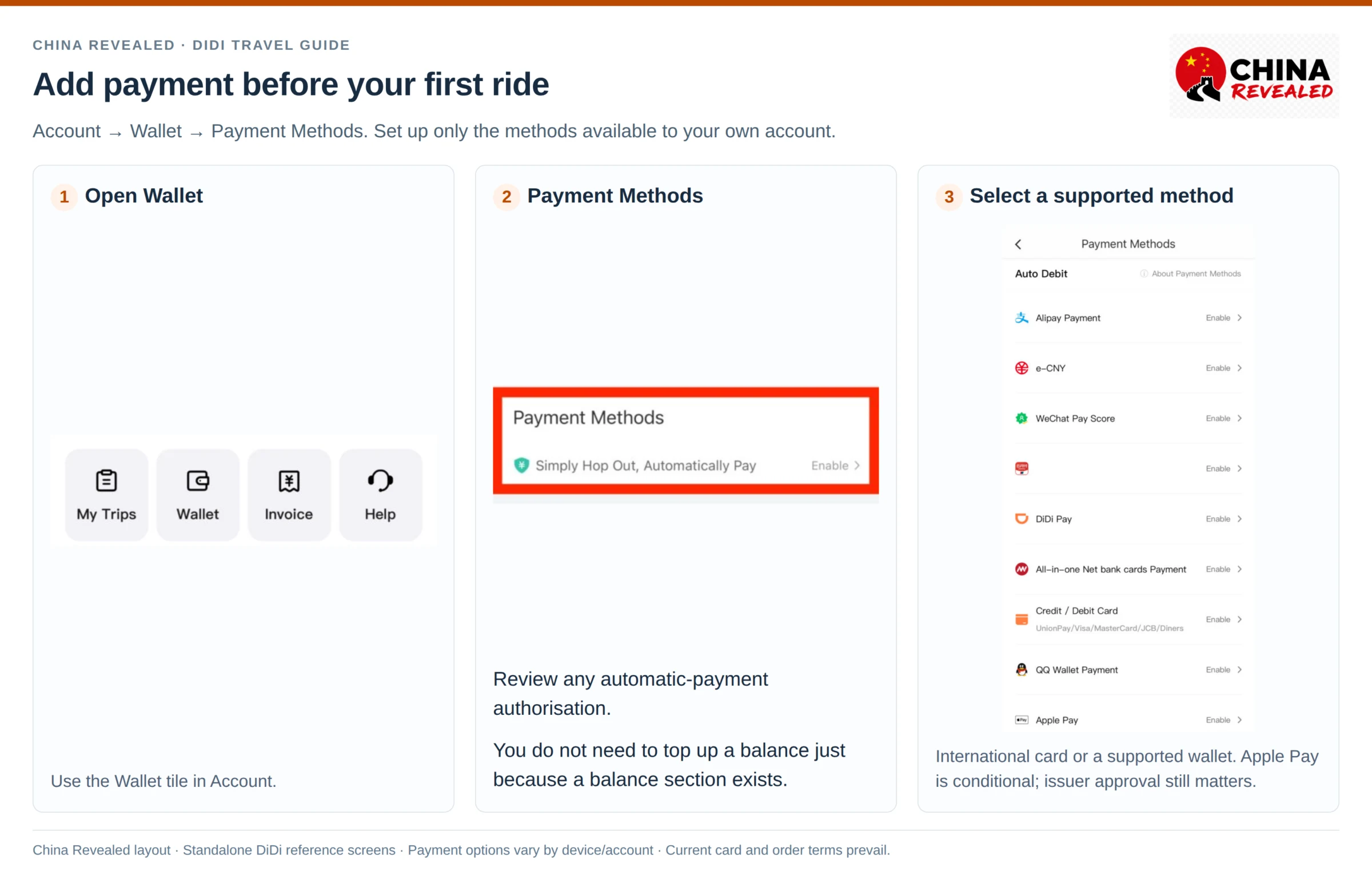
International credit or debit card
Choose Credit / Debit Card or the equivalent card option. Enter your own eligible card details and complete any bank verification requested. Keep the card’s banking app or SMS authentication available too.
Published reference screens list networks including Visa, Mastercard, UnionPay and JCB. Treat the current card-entry page as the authority for accepted networks and issuing countries. A successful card setup does not guarantee every later transaction will be approved; the issuer can still reject an overseas charge or trigger a security check.
You do not have to put money into a DiDi wallet balance just because the Wallet page contains a balance section. Follow the payment method you selected. Do not assume an unfamiliar domestic top-up product is necessary for your foreign card.
Alipay or WeChat Pay
If you already have a working Alipay or WeChat Pay account, you can use it where the app offers the option. Check the authorisation page, the funding card and whether you are enabling automatic payment.
WeChat Pay Score is a separate feature with its own requirements. Seeing that label does not mean every newly registered foreign WeChat user can activate it. Use a supported payment path rather than getting stuck trying to enable a feature you do not need.
Apple Pay, if it appears
On an eligible iPhone, Apple Pay may appear among the options. Set it up only if your current DiDi flow supports it and your Apple Wallet card can complete the payment. Do not treat an iPhone reference screenshot as evidence that Android has the same option, or that every country/card combination works.
Fees and a failed payment
Check the current order, payment-authorisation screen and your card issuer’s exchange-rate or foreign-transaction charges. Do not automatically apply an Alipay/WeChat foreign-card fee rule to a card charged directly by DiDi. Different payment routes can have different costs.
If your card fails, check the entered details, overseas-transaction settings and the bank’s security message. Try another supported card or a payment method you have already prepared. Avoid repeatedly submitting a declined payment without checking the reason, and do not post your card details or verification codes in driver chat.
4. Set the pickup point—not just your GPS position
The app’s suggested pin is a starting point, not proof that a car can stop there. A hotel’s location might be its back gate. A shopping mall may have entrances on two different roads. GPS can also be less reliable indoors or between tall buildings.
Before requesting the ride, check which entrance, side of the road, floor or marked pickup bay the app has selected. Choose somewhere you can actually reach and the driver can legally use. If you are at a hotel, ask the front desk which entrance DiDi drivers normally use.
A useful instruction is “I am at the main hotel entrance on the south side.” “I am here” tells a driver almost nothing when a building has four exits.
If you move after booking, use the order’s supported pickup-change function where available, or message the driver with the exact change. Moving the map around to inspect the area does not necessarily change an already confirmed booking.
5. Enter the destination and check the exact result
Tap Where to?, Enter Destination or the destination field shown in your version. Search for the hotel, station, mall or attraction by name. Then check the result’s address and position on the map before choosing it.
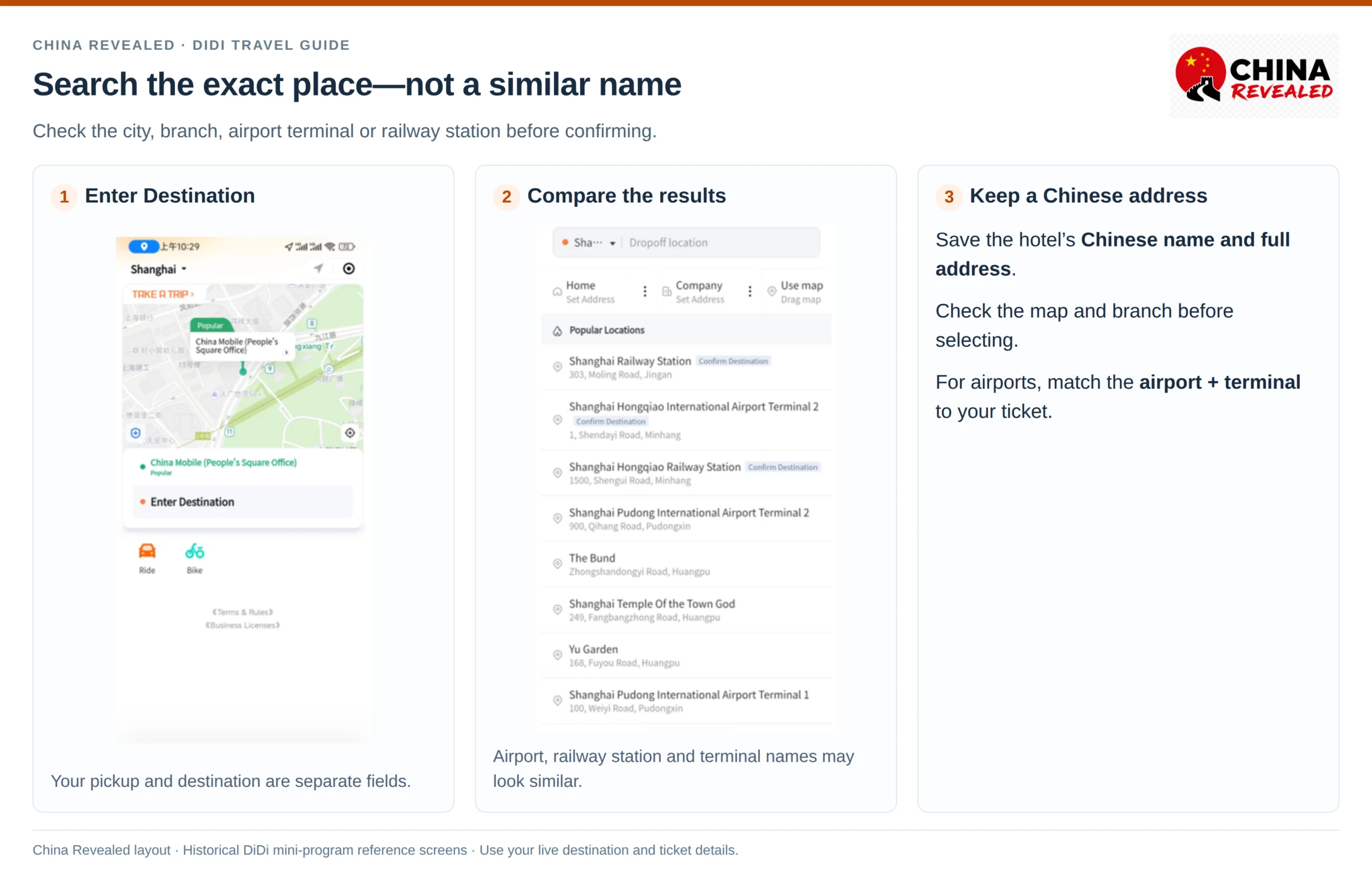
Keep your hotel’s Chinese name and full address in a note on your phone. If the English search gives poor results, paste the Chinese name. You can also look the place up in Amap first and copy its exact Chinese name. A hotel-chain name without its branch can take you to the wrong side of the city.
For airports, compare the destination with your ticket: airport + terminal. Shanghai Hongqiao Airport is not Shanghai Hongqiao Railway Station, and Hongqiao Airport is not Pudong Airport. Beijing Capital and Beijing Daxing are different airports too.
For a railway station, choose the exact station on the ticket and the appropriate passenger drop-off entrance where shown. Do not use an adjacent metro station simply because its name looks close.
Once selected, the destination goes to the driver through the order. You usually do not need to explain a long address aloud, but still check it before the trip starts.
6. Choose a vehicle for your people and your bags
After setting pickup and destination, compare the available car categories and estimated fares. Common labels include Express, Taxi, Premier and Luxe, while Discount Express, Select, larger vehicles or 6-Seater options may appear in certain cities and versions.
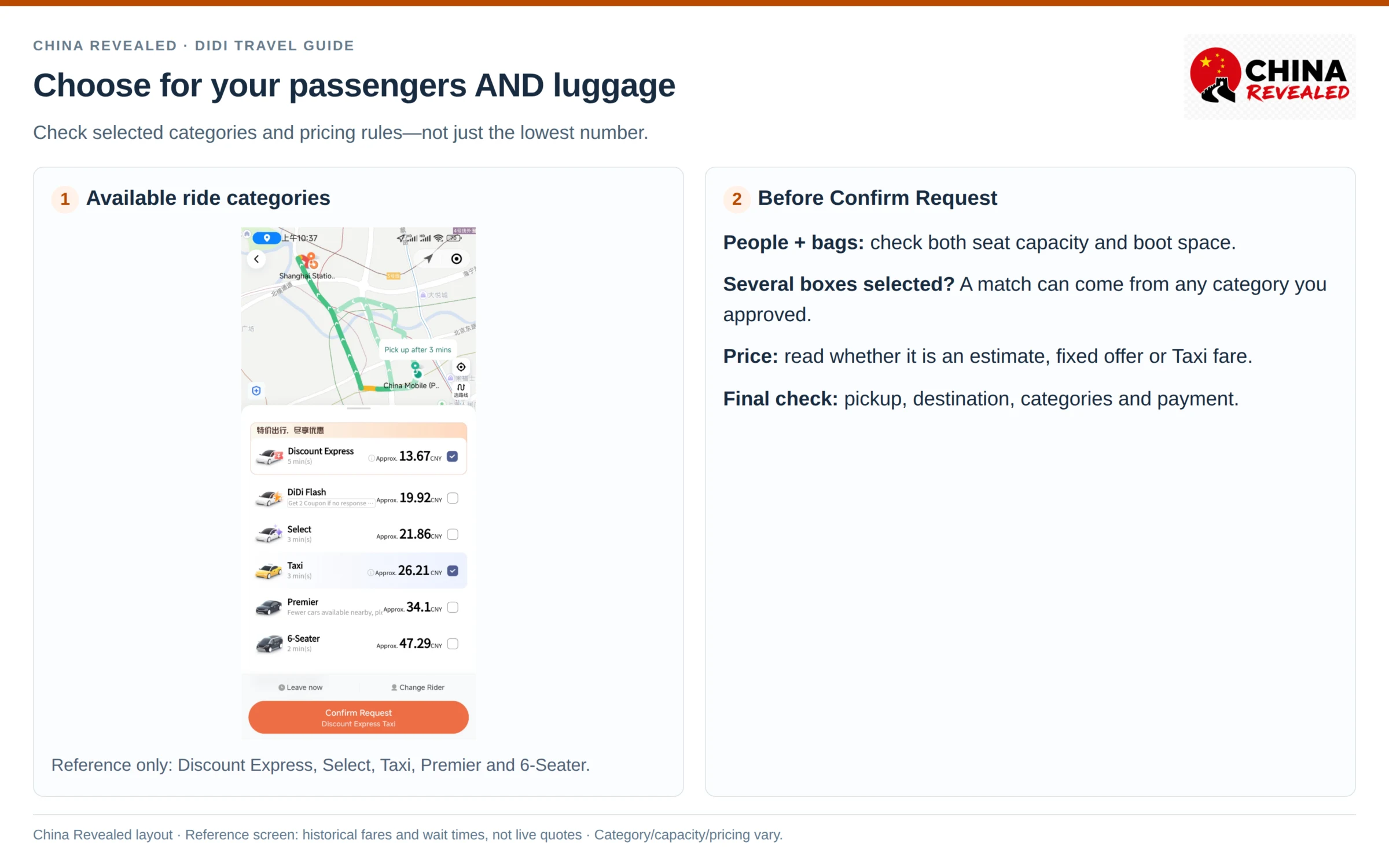
For one or two people travelling light, a basic private ride is often enough. With several travellers and large suitcases, check both passenger capacity and boot space. A more expensive car is not automatically a bigger car, and a displayed seat count does not guarantee space for six large cases.
If child seats, an accessible vehicle or another specific arrangement are essential, confirm that the service can provide what you need. Do not assume a normal ride category includes those facilities.
Some screens let you request more than one category at once. Check which boxes are selected: the vehicle eventually matched may come from any category you approved. Review the relevant prices before confirming. Do not accidentally request a taxi too if you only meant to choose Express.
Read whether the number shown is an estimate, a fixed-price offer or another pricing arrangement. Time, distance, waiting, tolls and other permitted charges depend on the order’s terms. A Taxi category can use different fare rules from a private ride. Do not assume every route has a fixed price just because a number appears before booking.
Before pressing Confirm Request, check pickup, destination, selected categories, passengers/luggage, fare rules and payment method. Requesting is not the same as having a driver: wait for a confirmed match.
Book hotels, flights, train tickets, attractions and other travel services on Trip.com.
7. Use the correct airport or railway-station pickup zone
At large transport hubs, the closest-looking place on the map can be on another level or inaccessible to ride-hailing cars. The taxi rank and the DiDi pickup area can be different places.
Clear immigration if necessary, collect your luggage and identify the correct pickup zone before ordering. You do not want a driver waiting while you are still in a passport queue or at baggage claim.
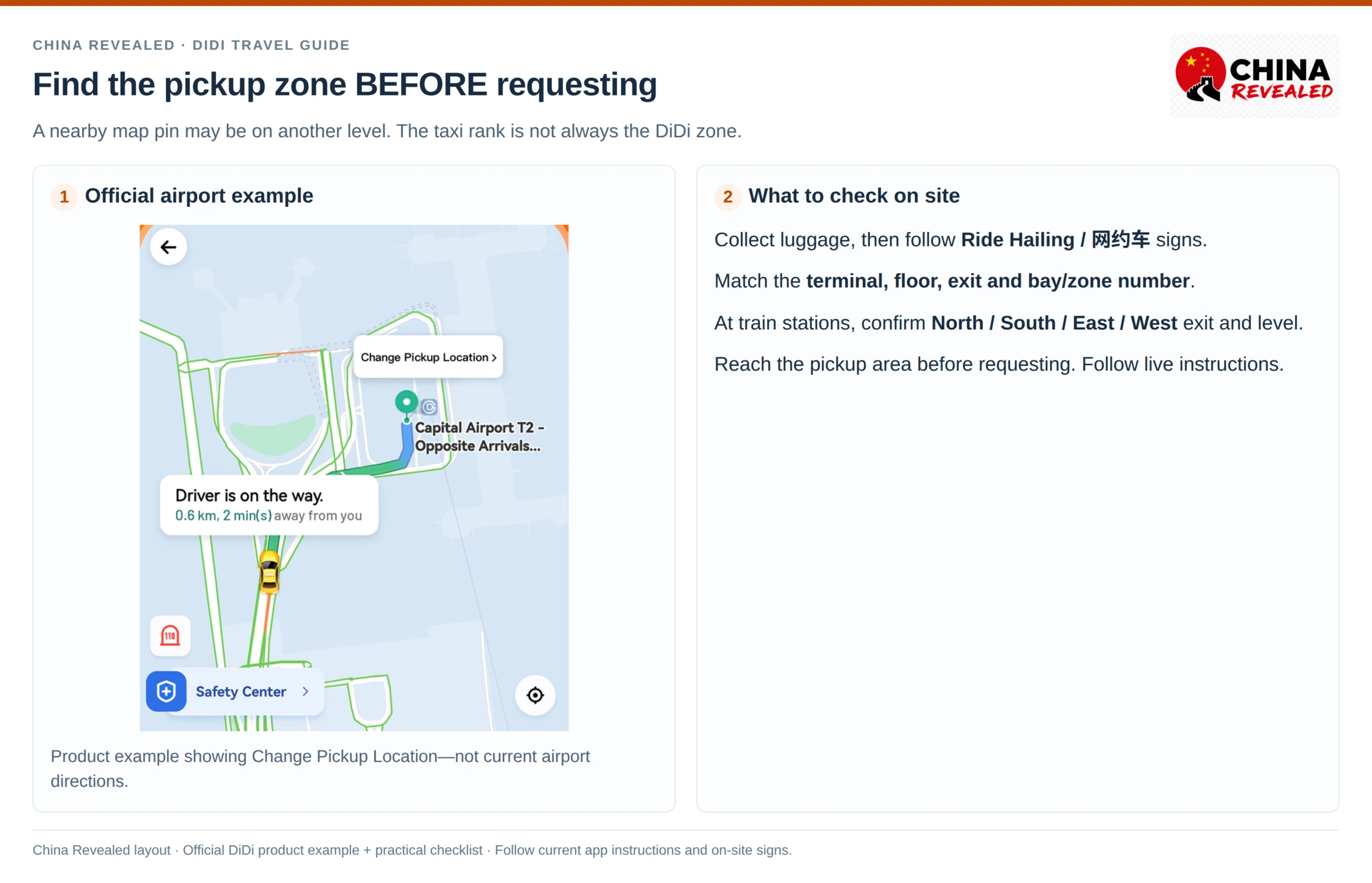
Look for Ride Hailing / 网约车 signs and compare them with the app’s pickup instructions. Check the terminal, floor, exit and zone/bay number. Some airports provide parking-area pickup guides or detailed walking instructions; follow the current guide rather than a screenshot from someone else’s visit.
At a high-speed railway station, first identify whether you exited North, South, East or West. Check whether the ride-hailing area is on the surface, in a car park or below ground. “I am at the station” is not enough when the driver is at a different entrance.
Do not cross barriers or restricted roads to chase a moving car. If the pickup is confusing, ask station staff or message the driver before booking again. At some locations the official taxi queue is simply easier; using DiDi is not a rule you have to follow at every airport.
8. Message the driver in English
Once matched, keep the order open and watch for calls or messages. DiDi supports Chinese–English text translation in its in-app chat. This does not mean the driver speaks English or that a phone call is automatically interpreted.
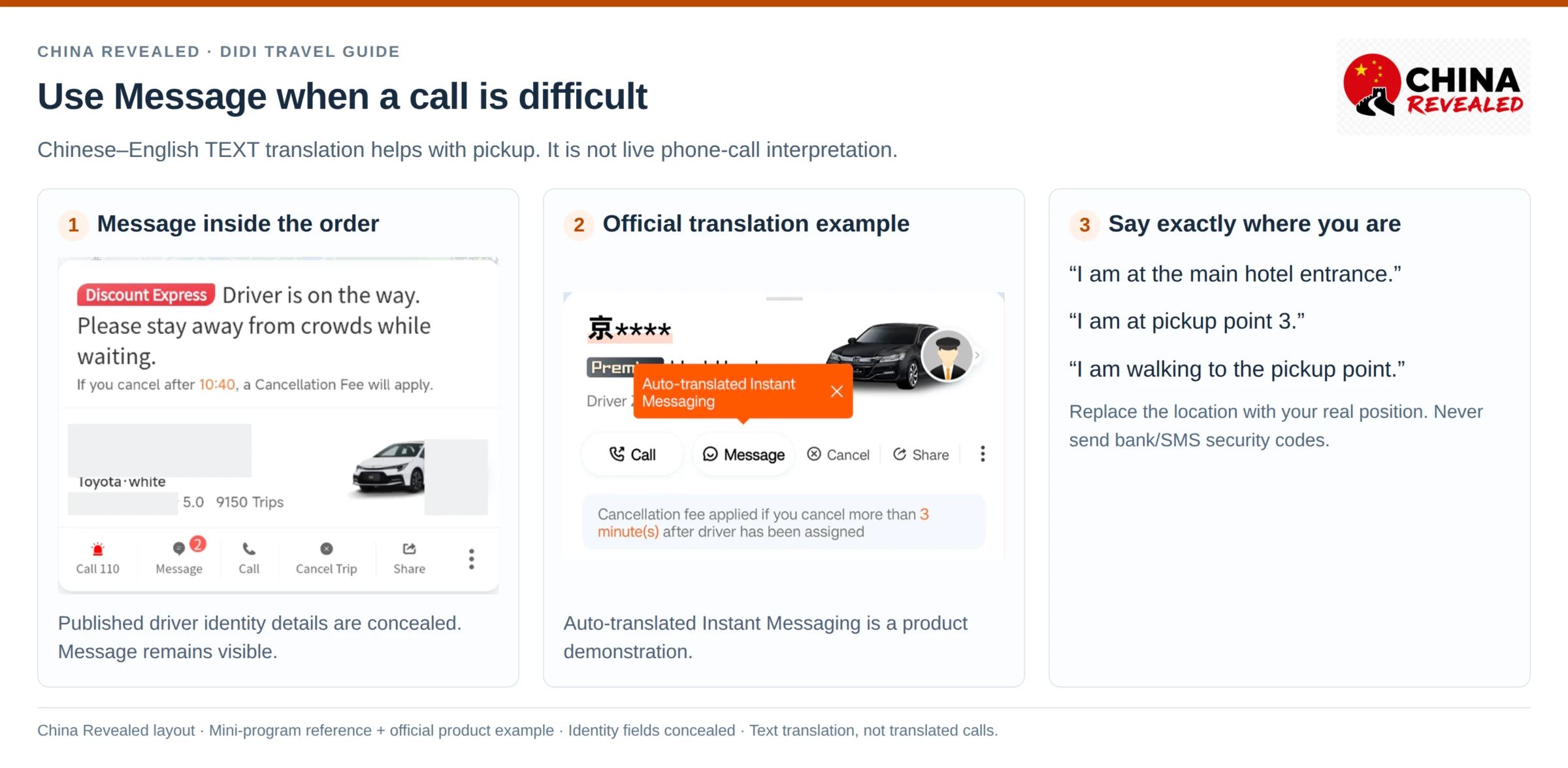
Good messages are specific and easy to translate:
- “I am at the main hotel entrance.” — 我在酒店正门。
- “I am at pickup point 3.” — 我在3号上车点。
- “I am walking to the pickup point.” — 我正在走去上车点。
- “I am wearing a blue jacket.” — 我穿着蓝色外套。
Replace “3” or “blue” with your real details. Include the terminal or road side when it helps. Send one clear message rather than a long paragraph containing several possible locations.
If the driver calls and you cannot explain in Chinese, open chat and send your exact location. If necessary, ask hotel or station staff to help. Keep communication inside the order where possible; you do not need to share your full passport, payment details or verification code to find a car.
9. Match the car, then confirm your phone-number ending
Check the full licence plate and vehicle details against the live order before getting in. Do not rely only on colour or someone waving at you. Cars in a busy pickup bay can look almost identical.
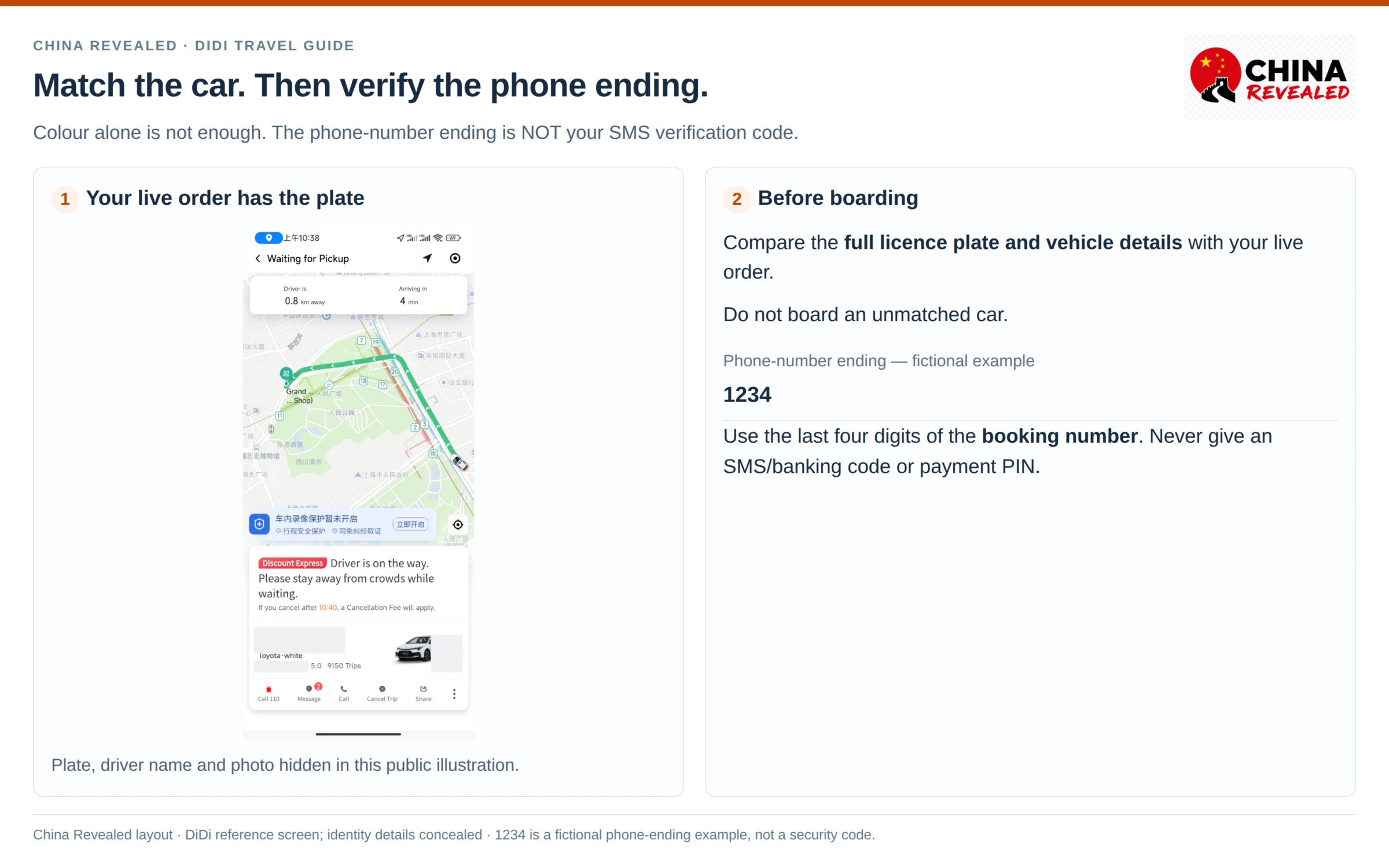
The driver may ask for the last four digits of the phone number used for the booking. This is the number attached to that order—not necessarily a new Chinese SIM you bought later.
Write those four digits in a note so you can show them. The driver might say “手机尾号?”—roughly, “phone-number ending?” If someone else booked for you, confirm the correct ending and passenger arrangement with that person beforehand.
Those four digits are not your SMS login code, banking code or payment PIN. Never give a driver a security code to “verify the ride.”
Once the vehicle and destination match, buckle up. Use the order’s safety/share-trip tools if helpful and let a trusted person know the journey. If the car or driver details do not match, do not board; report the issue through the order.
10. Finish the ride and check payment
On arrival, look at the final fare and payment status. If you authorised automatic payment, the app may charge the selected method. If it asks you to complete payment, follow that specific instruction. The end of the drive and the completion of payment are not always the same moment.
Do not assume cash is supported on every DiDi order. A traditional taxi or a particular Taxi booking may have different arrangements; use the methods shown for that trip.
If you are unexpectedly asked to pay by a separate QR code or give cash after an automatic charge, check the order and ask support before paying twice. Keep the booking and its payment history together wherever possible.
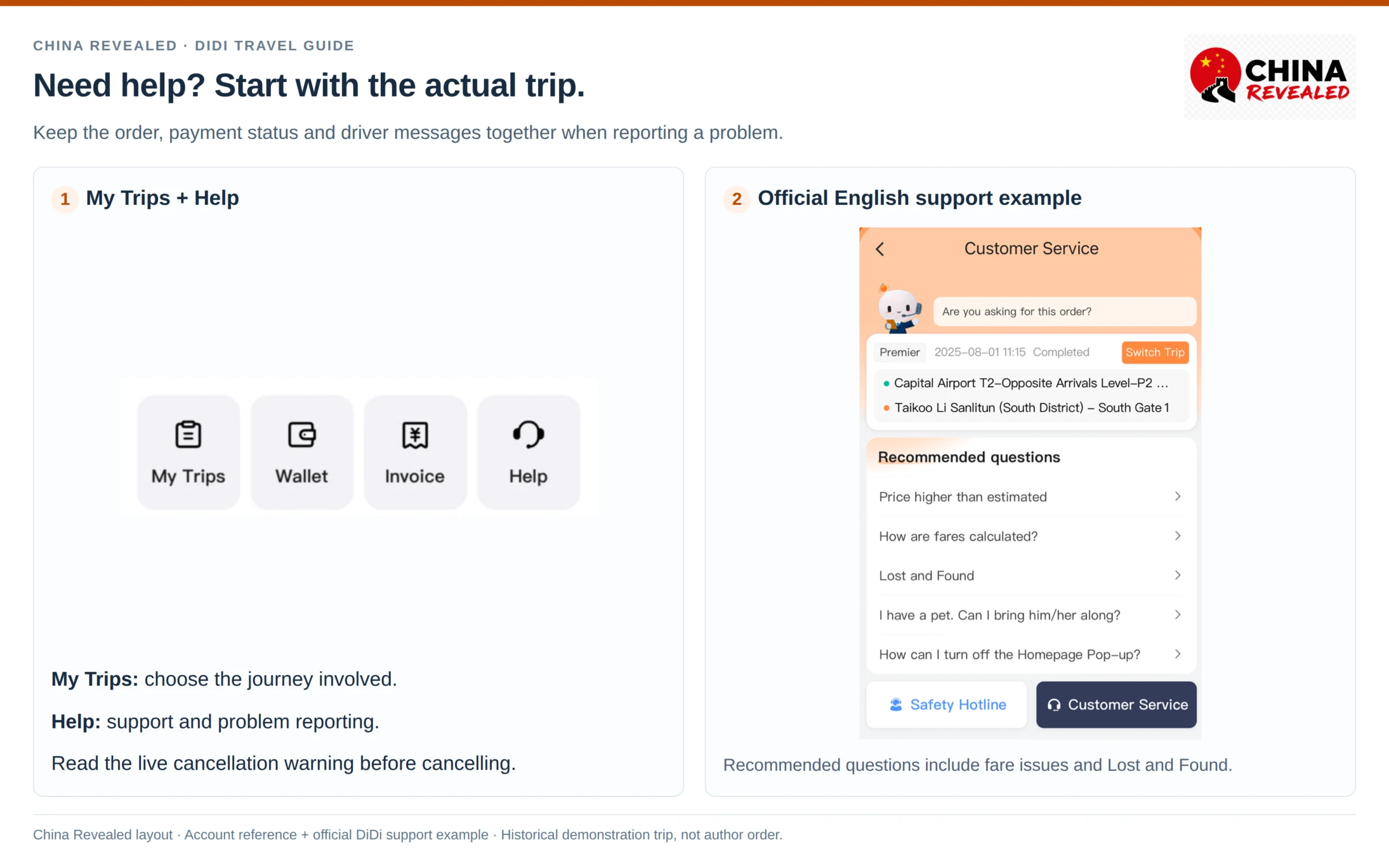
Check your phone, passport, wallet and all bags before leaving the car. If you later notice something is missing, use My Trips and the relevant completed ride to contact the driver or report a lost item promptly.
A pending bank authorisation can differ from a settled charge. If the amount looks wrong, check the trip’s charge breakdown and the bank transaction status before assuming a duplicate payment. Use the trip’s payment-help route for a dispute; no universal cancellation/refund time applies to every payment method.
11. Cancellations, lost items and other problems
Open Account → My Trips for journey records and Help/Customer Service for support. The China app advertises 24/7 in-app English customer service. The relevant order is usually the most useful starting point because it contains the driver, fare and payment record.
If you booked through Alipay or WeChat, reopen that same DiDi mini-program and find the affected order there. Do not assume switching to the standalone app will automatically display the same trip or its payment status.
No driver accepts, or the driver cancels
Check whether your pickup is easy to reach. Rain, holidays, rush hour or a large event can reduce availability. Consider another appropriate category, a clearer pickup area or the taxi/metro option. In a remote scenic area, arrange the return journey in advance instead of assuming a car will appear later.
You need to cancel
Read the live cancellation warning before confirming the cancellation. Charges can depend on the service, time since matching and whether the driver has arrived. A “three-minute” example in a promotional screen is not a universal free-cancellation allowance.
If the driver is in the wrong place or you have a genuine service issue, use the order’s help/report route. Keep the relevant messages. Do not simply abandon an active booking and order another car somewhere else.
You left something in the car
Open the completed trip immediately and use the contact/lost-item function. Describe the object and where you were sitting. Do not publish the driver’s number or plate online; give the details to support. Return arrangements and any charges should be agreed through the supported process.
Your phone has no data or battery
A saved hotel address and a power bank help, but a screenshot cannot receive a driver’s new message. Get a connection before booking. If that is impossible, use an official taxi rank and show the driver’s destination in Chinese, or ask your accommodation to arrange transport.
You need an urgent safety response
Use the live order’s Safety Center or emergency tools when appropriate. For an immediate police emergency in mainland China, call 110. In-app customer service is not a substitute for emergency assistance. Move to a safe place and ask nearby staff for help if needed.
12. Scheduled rides and extra services
Depending on the city, account and version, you may see Schedule, Airport, For Others or other specialist services. These are options to investigate, not promises that every foreign account has every feature.
For a scheduled ride, check the date, local time, pickup rules and confirmation status. A reservation is not a guarantee against traffic, driver shortages or a change of pickup area. Allow extra time for a flight or train.
An Airport shortcut may have a different booking and pricing flow from a normal immediate ride to an airport. Compare the terms instead of assuming the label means a staffed meet-and-greet transfer.
If booking For Others, use that function where available and enter the actual rider details requested. Make sure the person riding has the pickup point, vehicle information and verification details. Do not leave them dependent on an order they cannot see or contact.
Pet rides, larger cars and other special services need their own availability and conditions checked. If the app also offers hotel bookings or unrelated travel products, they are not needed to complete a standard ride.
Frequently asked questions
Can foreigners use DiDi in China without a Chinese SIM?
Yes, the China app supports eligible overseas numbers. You still need a working verification method and internet access during the ride process. A data-only eSIM does not receive SMS for your original number.
Do I need Alipay or WeChat Pay?
Not necessarily. The standalone China app supports eligible international bank cards. Alipay or WeChat can be useful alternatives, but having their accounts does not guarantee that every ride’s payment will be approved.
Does the app translate phone calls?
The advertised feature is bilingual text messaging. Do not assume calls have live interpretation. Use the in-order chat and a clear pickup description when speaking is difficult.
Which phone-number digits does the driver want?
Usually the last four digits of the booking phone number. This is not an SMS security code or banking verification code. If someone else placed the booking, confirm which number applies to the order.
Is the fare shown before booking always the final fare?
No. Read the specific fare rules: an estimate, fixed-price offer and Taxi booking can work differently. Demand and permitted additional charges can affect the cost. Historical screenshot prices are not quotes for your trip.
Can one account book a ride for a group?
You can normally request a vehicle for your party, provided everyone and their bags fit the selected service’s capacity. A higher-priced category does not automatically solve a luggage problem. Choose a suitable larger vehicle or split the party if necessary.
Will DiDi work for the trip back from a remote attraction?
Do not assume it will. Coverage, drivers and reception can be limited outside populated areas. Ask your hotel or the attraction about return transport before you go.
Can I use my Uber account instead?
Do not plan a mainland trip around an Uber account. The comparison in this guide is about the booking routine, not shared logins, payment cards or interchangeable services.
Before your first ride: prepare the login and payment, save your hotel’s Chinese address, and keep the booking number’s ending handy. At pickup: match the exact meeting point and licence plate. Those simple checks prevent most avoidable confusion.
Watch the China Revealed DiDi tutorial
Follow the full DiDi Travel Guide for China on YouTube to see the workflow alongside this written guide.
Prepared by China Revealed from our video script, with practical setup and pickup guidance. App menus, supported cards, prices and pickup arrangements can change; follow the current app and signs on site.
About China Revealed
China Revealed is an independent English-language travel guide dedicated to China.
We bring together China travel guides, destination information, local insights and practical travel resources in one place.
Our travel database covers China's provinces, cities, famous attractions, hidden gems, local cuisine, transportation, accommodation, visa requirements, digital payments, mobile connectivity and the other practical details travelers need to explore China.
We focus on depth, careful research and accuracy. Our guides combine official sources, detailed destination data, local knowledge and regularly updated information to give reliable, practical travel advice.
Whether you're visiting China for the first time or exploring beyond the popular destinations, China Revealed is an all-in-one resource for discovering the real China.
China Revealed — Your practical guide to China.
Some links on China Revealed, such as Trip.com booking links, are affiliate links. If you book through them, we may earn a commission at no extra cost to you. This does not change what we recommend.