

Xiaohongshu for Foreigners: Register, Find Travel Tips & Choose Restaurants
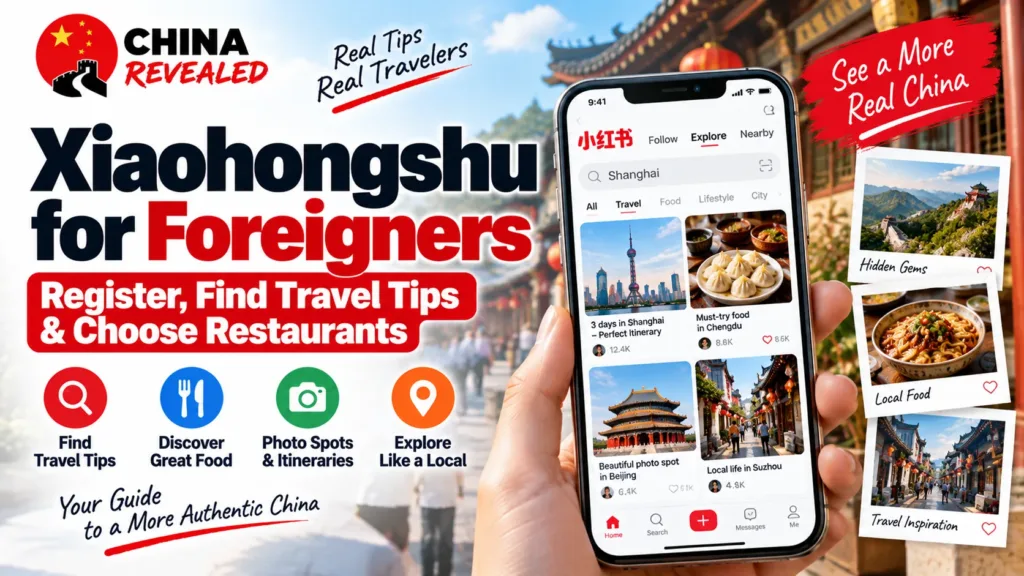
Want to know which Shanghai neighborhood is pleasant to walk around, what people actually order at a Chengdu restaurant, or whether a popular photo spot is worth the detour? Xiaohongshu / 小红书, commonly called rednote or Little Red Book in English, is a useful place to start. People share photos, short videos, itineraries and everyday experiences, then discuss them in the comments.
Think of it as a visual lifestyle community with some of the discovery and saving habits of Instagram and Pinterest, plus the practical questions you might ask in a discussion community. It is not a direct equivalent of Reddit, and it is not just another restaurant-rating app. Its strength for visitors is seeing a place through other people’s trips and meals, rather than only a polished business listing.
You can use it without becoming a content creator. Install the official app, register using an available login method, switch to English where supported and learn a few Chinese search terms. Use the community to discover ideas; use a map, the venue and your booking service to confirm the practical details.
About this guide: Prepared by China Revealed from current service information and practical China travel guidance. The images combine official app-store demonstrations, a real blank web-login reference and original explanatory cards. They are not presented as our own newly registered account, saved itinerary or completed restaurant visit. Menus and access can vary by version, account and region.
In this guide
- What can Xiaohongshu help you do in China?
- Is rednote the same as Xiaohongshu in 2026?
- Before you register: what do you need?
- Step 1: download the official app
- Step 2: register with your own phone number
- Step 3: set English and learn how translation works
- Step 4: search like a traveler, not like a scrolling account
- Step 5: choose a restaurant from more than one pretty post
- Step 6: save useful posts—and turn them into a workable trip
- Can you ask questions, comment or post in English?
- What if registration or a feature does not work?
- Your first useful session
What can Xiaohongshu help you do in China?
For travel, it is especially useful for neighborhood walks, short itineraries, rainy-day alternatives, photo locations and recent visitor experiences. A post may explain which entrance people used, how busy a place felt or what they would do differently. Those details are often what a visitor wants after reading a basic attraction description.
For food, you can look for dishes people ordered, pictures of portions, cafés near a particular district and discussions about queues or atmosphere. Instead of searching only “best restaurants in China,” search for your city, neighborhood and the kind of meal you actually want.
The home feed also includes fashion, beauty, pets, shopping and other everyday interests. If it looks unrelated to your trip, use Search / 搜索, rather than scrolling and hoping for a travel recommendation. You do not need to post your own life or grant access to your contacts to start researching.
Is rednote the same as Xiaohongshu in 2026?
You will hear the names used interchangeably in travel conversations, but there is now an important account distinction. The current official policies describe users registered outside mainland China as rednote users, and users registered in mainland China as Xiaohongshu users. They have different applicable terms and privacy policies.
For a foreign visitor preparing at home, the normal starting point is the official rednote listing in your app store. Do not assume a 2025 tutorial’s Chinese menus or desktop login page will exactly match your account. Features, web addresses and the content you see can differ; this guide does not promise identical access to every mainland feature or post.
To check your own account on a current app version, open Me / 我 → Settings / 设置 and look at the agreements near the bottom. Agreements named rednote indicate a rednote account; Xiaohongshu agreements indicate a Xiaohongshu account. Older versions may not identify this reliably. Visiting China does not mean you should create a second account or change to a mainland number just to search for dinner.
Before you register: what do you need?
Start with a supported iPhone or Android phone, an internet connection and a mobile number you control that can receive verification texts. A mainland Chinese number is not automatically required: use your own number if its country or region code appears in the current registration screen.
A data-only travel eSIM is not an SMS number (our China SIM vs eSIM guide explains the difference). If you sign up using your home mobile number, keep access to that number during the trip in case the app asks you to log in again. Check SMS reception and roaming conditions with your carrier; you do not necessarily need to use that SIM for your travel data.
The ordinary app download and community account are free. Shopping, paid services and creator or business features are separate. You do not need a blue verification badge or a paid professional account to research a holiday.
Follow the app’s actual age requirements and local rules. The current rednote terms exclude users under 13 and apply any higher age threshold required in the user’s jurisdiction. Enter truthful information if the app asks about age.
Step 1: download the official app
On iPhone, open the official rednote App Store listing. On Android, use the official rednote Google Play listing. Availability can depend on your store region and device.
You can also search for rednote, Xiaohongshu or 小红书. Check the developer, not just a familiar red icon. The verified store listings are associated with Xingin / Xingin Information Technology (Shanghai) Co., Ltd, shown on Google Play as 行吟信息科技(上海)有限公司. Avoid unrelated translation tools, unofficial “international edition” apps and APK links sent by strangers.
Download before departure if possible. It is easier to solve a store or SMS problem while you still have your normal connection and phone service. If your official store does not offer it, do not make the app essential to your first evening: you can still find places through your map and other travel services.
Step 2: register with your own phone number
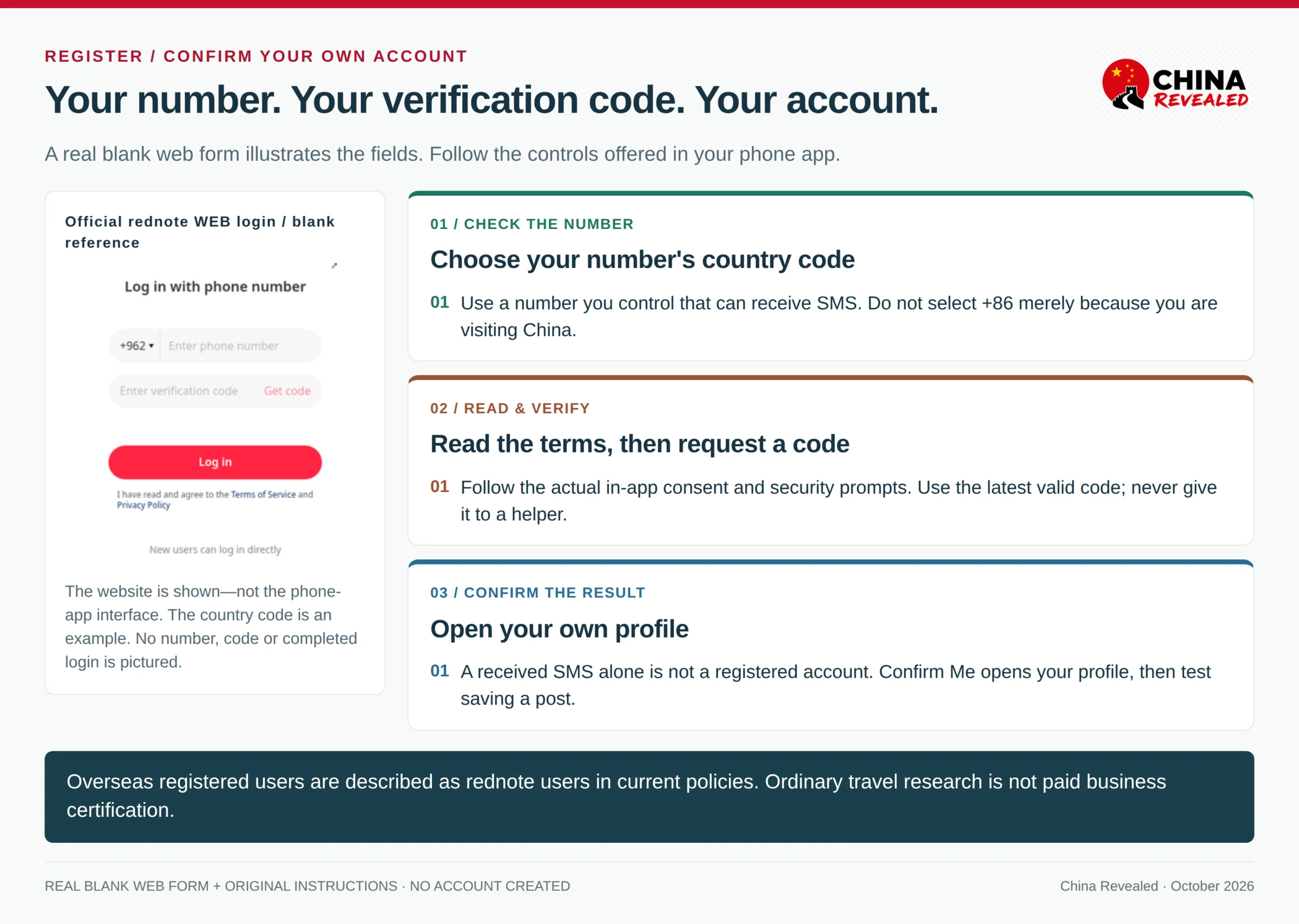
Open the app and look for Log in / Sign up / 登录. Some versions use one login screen for both new and existing users, so the absence of a separate “Create account” button is not necessarily a problem. Choose Continue with phone number / 手机号登录 or the equivalent option.
- Open the country or region code selector. Choose the code belonging to your phone number—not the country you are visiting. Do not leave a mainland +86 code selected for a foreign number.
- Enter the number in the format the app requests. When the country code is already selected separately, do not add it a second time. Check the app’s formatting guidance if your domestic number begins with a trunk zero.
- Read the terms and privacy notice. Accept them if you want to proceed, then tap Get code / Send code / 获取验证码 or the equivalent button. Complete any legitimate in-app security check that appears.
- Enter the SMS verification code. If you requested several codes, use the most recent valid one. The code is not a permanent password and should never be given to a stranger.
- Finish the prompts the app actually presents. These may include age information, a nickname or interests. Choose travel and food if offered; skip optional profile details where the app allows it.
Some screens offer Apple, WeChat or another third-party login. Use one only if it is actually available on your device and you are comfortable linking that account. Do not assume email-only registration, Google login or every third-party button is offered everywhere. A linked login can still lead to a later phone-verification prompt.
How do you know registration worked?
The SMS message arriving is only one step. Make sure the app takes you into the community and that Me / 我 opens your account profile instead of asking you to log in again. An assigned user ID or profile is useful confirmation. Later, save a post and check that it appears in your own saved section.
A nickname is enough to start; you do not have to publish your full legal name or a face photo. Keep a private record of the login method and your account ID so you can identify the account if you need help.
Do you need a passport or Chinese ID?
Do not confuse ordinary account setup with real-name checks, verified badges, livestreaming or business certification. The official rednote privacy policy describes identity or age checks for certain functions, account appeals and other situations where verification is required; it does not describe passport upload as a universal first step for every travel-search user.
If your account gets an identity prompt, read what it is for and which documents that specific flow accepts. Foreign-document options are not guaranteed in every verification screen. Use the official in-app support or appeal process if you cannot complete it. Never buy somebody else’s verified account or upload identification through a stranger’s chat link.
Step 3: set English and learn how translation works
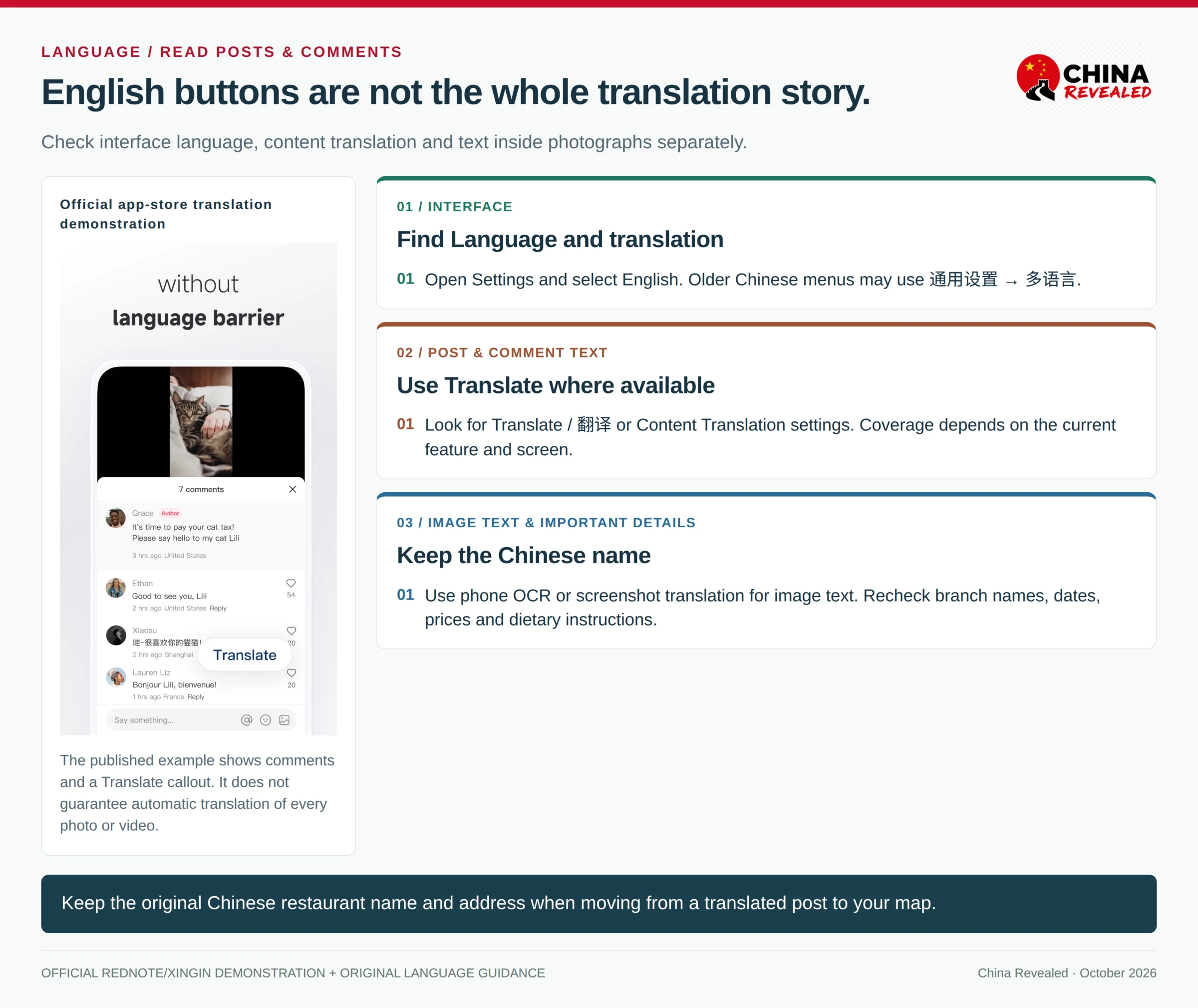
The current overseas App Store listing includes English. Interface language and post translation are different settings: English buttons do not mean all the community’s Chinese text, photo labels and videos will automatically become English.
Look for Settings / 设置 → Language and translation. Depending on the app version, Settings may be reached from the home-page menu, your profile menu or a gear icon. Older Chinese layouts may put language under General settings / 通用设置 → Language / 多语言. Choose English, then look for Content Translation or an automatic-translation option if your version offers it.
For an individual post or comment, use Translate / 翻译 where it is displayed. If the text is inside a photo, an ordinary post-translation control may not read it. Use your phone’s text-recognition or a screenshot-translation tool as a backup. Prepare a translation method that works on your actual connection in China rather than assuming every overseas online tool will be reachable.
Keep the original Chinese place name alongside the translation. A translated restaurant name can be hard to match in a map, and 分店 means a branch—not a completely different brand. Check numbers, dates and negatives carefully: a sentence about a restaurant being closed / 停业 is not a recommendation to visit it. For allergies, tickets or safety-critical instructions, confirm directly rather than relying on one machine-translated sentence.
Step 4: search like a traveler, not like a scrolling account
Tap the magnifying glass / Search / 搜索. English queries are a reasonable first attempt, especially for major cities, but Chinese names often give you more locally specific results. You do not need to type Chinese yourself: copy a query from this guide or translate the phrase, then paste it.
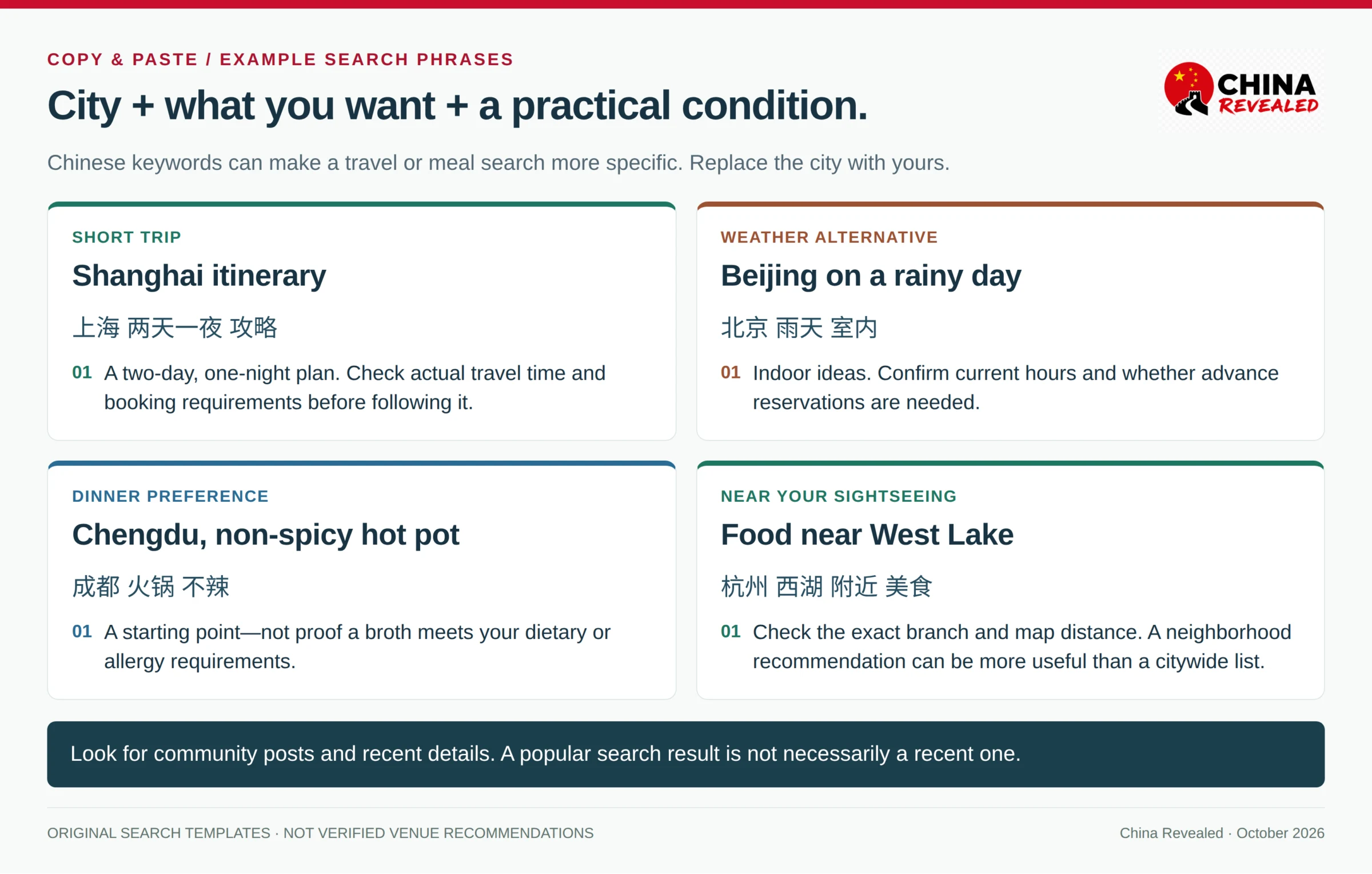
A useful formula is city or district + what you want + a practical condition. For a short trip, “Shanghai rainy-day activities” is more useful than an unlimited stream of “China travel.” For dinner, a neighborhood search can be more useful than a famous restaurant on the other side of the city.
Try these examples:
- 上海 两天一夜 攻略 — Shanghai, a two-day/one-night itinerary.
- 北京 雨天 室内 — Indoor ideas for a rainy day in Beijing.
- 成都 火锅 不辣 — Chengdu hot-pot options described as non-spicy.
- 杭州 西湖 附近 美食 — Food near West Lake in Hangzhou.
- 西安 本地人 早餐 — Xi’an breakfast recommendations associated with locals.
- 广州 清真 餐厅 — Halal restaurant leads in Guangzhou.
These are search prompts, not verified recommendations. A post saying “non-spicy” does not prove the kitchen can meet your request; a halal keyword is a starting point for checking the actual restaurant.
Where the current results page offers sorting or filters, use recent posts when recency matters, and check the publication date yourself. Result types may include posts, users, places or shops; choose community posts when you want experiences rather than a seller’s product page. A highly liked result is not automatically recent.
A few Chinese words worth recognizing
攻略 means a guide or practical plan. 美食 means food; 探店 is a venue visit or review, and may involve promotion. 人均 is an indicative per-person spending figure, not an all-inclusive fixed price. 避坑 / 避雷 flags things an author says to avoid. 打卡 / 网红 often points to a popular or photogenic place; neither means it is necessarily the right place for you. 种草 is recommendation or inspiration, while 广告 / 合作 can indicate advertising or a collaboration.
Book hotels, flights, train tickets, attractions and other travel services on Trip.com.
Step 5: choose a restaurant from more than one pretty post
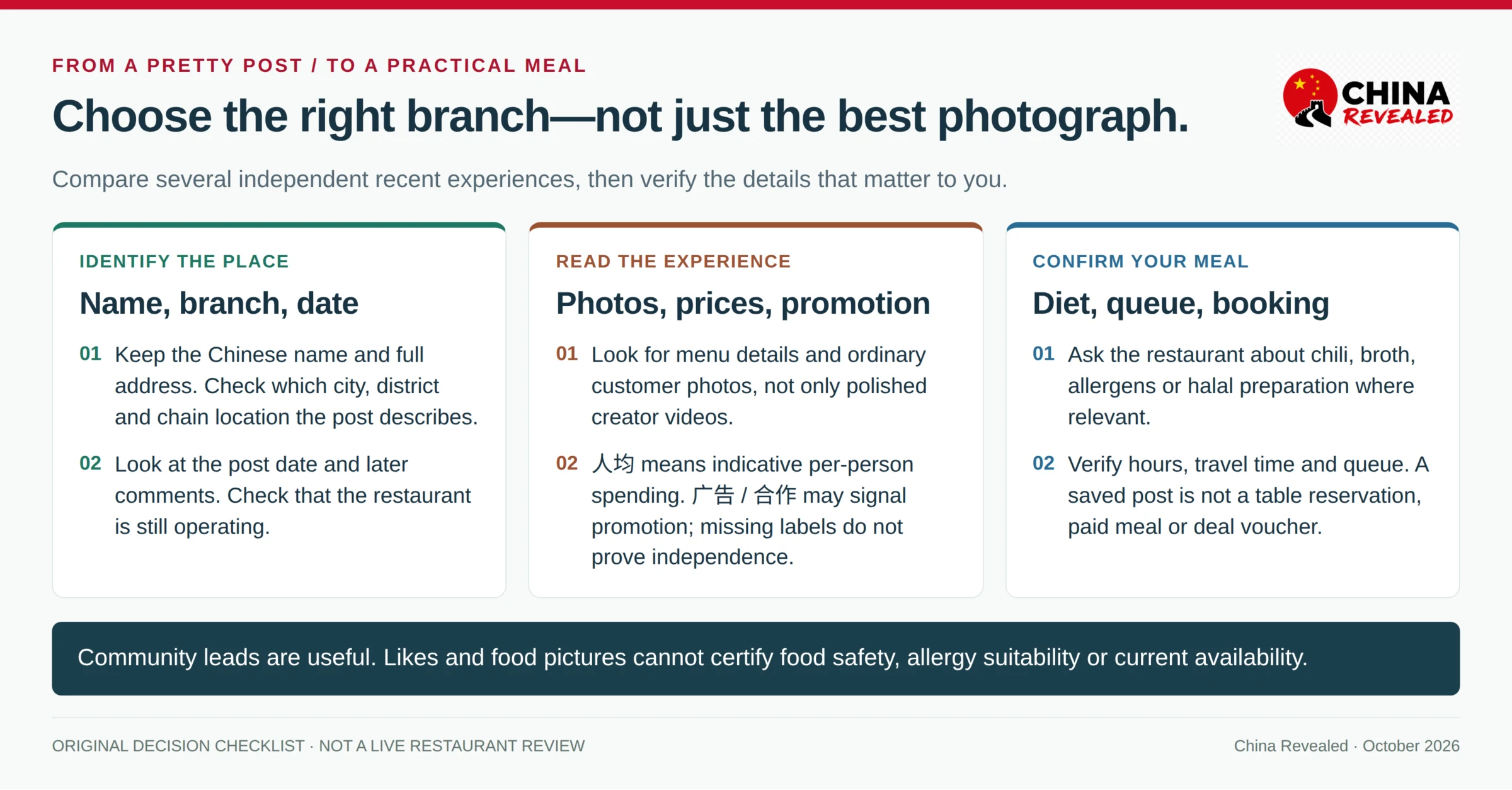
Start with a meal you want and a place you can realistically reach. Open a relevant post, read the main text and look through the comments. The practical information may be in a reply: the branch name, a changed entrance, an unexpected queue or a dish that is large enough to share.
Compare several independent recent posts about the same restaurant. Look for ordinary customer photographs, menu details and comments that explain both positives and drawbacks. A creator’s attractive video can be useful for seeing the atmosphere, but it is not proof of an independent review. Advertising and collaboration labels are useful signals; the absence of a label does not guarantee there was no commercial relationship.
Before setting off, check these details:
- The Chinese name and exact branch. Similar names, different districts and chain locations are easy to confuse.
- The date and current operation. An old recommendation can outlive a restaurant or its original hours.
- What the price represents. 人均 may be a reported average; a pictured deal can have separate eligibility and redemption terms.
- Your own meal requirements. Ask about chili, broth, meat stock, allergens or halal preparation when relevant.
- The practical cost of visiting. Distance, queues and closing time can matter more than the number of likes.
Posts can help you discover a vegetarian dish or a lighter meal, but they cannot certify food safety or allergy suitability. A red, chili-filled hot pot is not the only Chinese food worth trying. You can use the same app to find steamed dishes, dumplings, soups, rice noodle shops or cafés that fit your preferences.
Once you have a candidate, check its current business listing and contact the venue if an important detail is unclear. Our Meituan guide for foreigners explains restaurant listings, delivery and deals. A saved Xiaohongshu post is not a reservation, a paid meal, a queue number or a redeemable voucher.
Step 6: save useful posts—and turn them into a workable trip
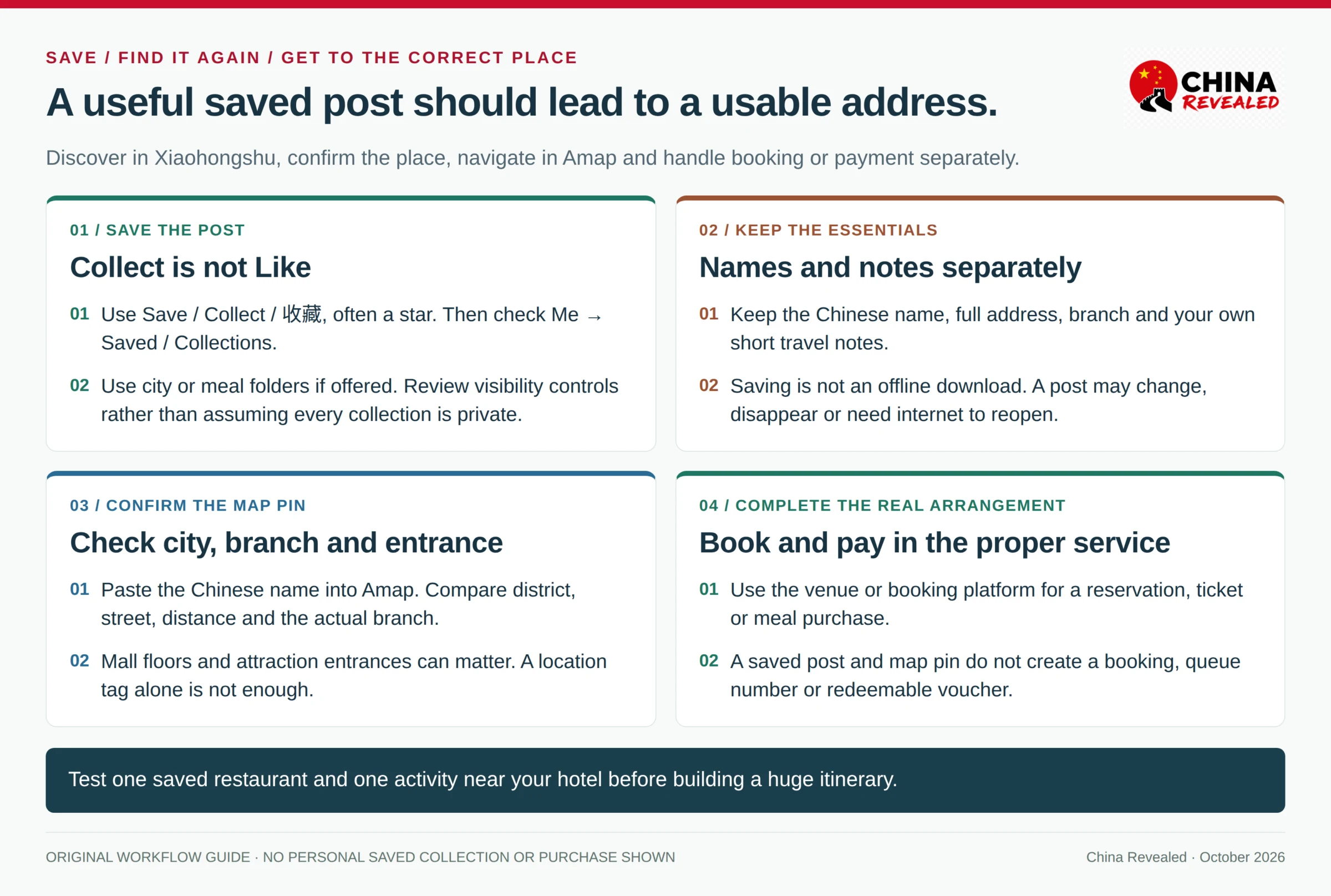
On a useful post, tap Save / Collect / 收藏, often shown as a star. A heart or Like / 点赞 is not the same action. Check the save indicator, then open Me / 我 → Saved / Collections / 收藏 or the equivalent section to make sure the post is there.
If your version offers folders or collections, use names such as Shanghai food, Beijing rainy day and Places near my hotel. Collection creation may be in a management menu or a plus control; follow the options your account shows. Review visibility settings where available rather than assuming all saved lists are private.
Saving is not the same as downloading for offline use. Posts can be changed, removed or inaccessible later, and reopening them may still require a connection. Keep the essential place name, full Chinese address, branch and your own short travel notes separately. For a ticketed attraction, keep the actual booking confirmation as well—not just somebody’s itinerary post.
Move from a post to the correct map pin
Copy the Chinese place name and address when the post provides them. If a location tag is available, use it as a lead, then check the result in your map. Not every post has a tag, and a tag is not guaranteed to identify the exact entrance.
In Amap, compare the city, district, branch, street address and distance from your hotel. For a restaurant inside a mall, check the floor and building; for an attraction, check the entrance stated on your ticket or by the venue. Only then plan the route. Our Amap guide for foreigners walks through Chinese-name search, place checks and transit directions.
The most useful sequence is simple: discover in Xiaohongshu, verify the place, navigate in Amap, and book or pay through the service that actually provides the meal or ticket. A map pin does not book a table, and a community post does not update the attraction’s official opening rules.
Can you ask questions, comment or post in English?
Yes, English content appears in the community, and translation can help people communicate. Whether your particular account can comment, message or publish depends on its current access and any checks the platform requires. You do not need those features to start using the app as a research tool.
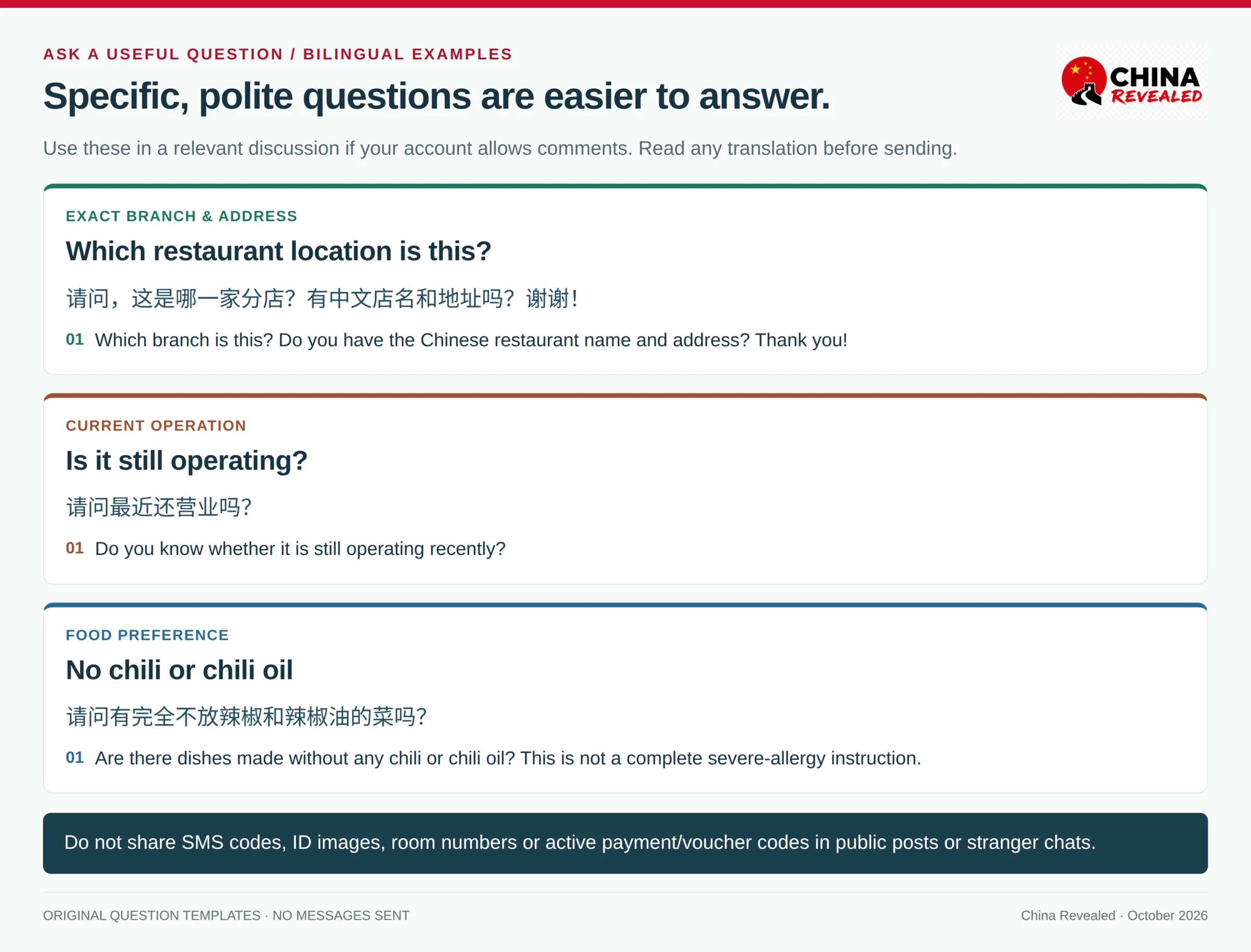
For a question, begin with the comments under a genuinely relevant post. Be specific and polite, and check whether somebody has already answered. “Which branch is this?” is easier to answer than “Please plan my whole China trip.” A short Chinese sentence alongside English can help, but read the translation before sending it.
Useful question templates are:
请问,这是哪一家分店?有中文店名和地址吗?谢谢!
Which branch is this? Do you have the Chinese restaurant name and address? Thank you!
请问最近还营业吗?
Do you know whether it is still operating recently?
请问有完全不放辣椒和辣椒油的菜吗?
Are there dishes made without any chili or chili oil?
The last question is about food preference, not a complete allergy instruction. A severe allergy needs direct communication with the restaurant and an appropriate translated allergy card.
If you want to share your own trip, look for Create / + / 发布, choose the format offered and add your own photos or video with an accurate caption. Review audience or visibility controls, location tags and the content itself before pressing Publish / 发布. Posting is optional; you do not need to publish just to finish registration.
Avoid showing passport pages, boarding-pass codes, active payment or voucher codes, your room number or a live schedule that reveals where you are staying. Ask permission before prominently publishing other people. Follow the community rules, and do not repost somebody else’s photographs as your own.
What if registration or a feature does not work?
No verification text arrives
Check the selected country code and the number first. Make sure the number can receive SMS, not just app messages or travel data. Check blocked or filtered messages, signal and any carrier restriction on international or automated texts.
Wait for the app’s resend timer rather than repeatedly requesting new codes. If several arrive together, use the newest valid code. Try again later on a stable ordinary connection and make sure the app is current. Delivery is not guaranteed for every carrier or number type. Use the official help route if it still fails; do not buy a shared verification number or hand your code to a “registration helper.”
You see an account-risk or verification prompt
Read the actual message. A temporary code limit, an identity request and a suspended account are different problems. Avoid creating a string of replacement accounts or repeatedly switching devices and regions to force the process through.
Follow the official appeal or verification route. Settings → Help Center → Feedback is the route described in the current App Store information, although labels may vary. For a rednote account, the official feedback page is also a support option. Include the error wording, app version, login method and country or region code; leave out passwords, SMS codes and unnecessary ID details.
The web feedback form asks for a rednote ID. If registration failed before you received one, or you cannot access the help page, the official support address is customer_support@rednote.com. Explain the problem without sending a password or verification code.
The web login or menus differ from an old guide
Use the current app first. For an overseas account, rednote’s official website is the relevant web starting point, rather than assuming every account should log in through a mainland creator page. The web and phone interfaces are not identical. QR login requires an account already available in the app; it is not a shortcut around creating your first account.
Do not assume the same feed, shopping options or creator tools are available to both rednote and Xiaohongshu users. If a feature is absent, a current version or the proper official account route may explain it, but there is no universal setting that unlocks every service.
You can read but cannot comment, message or publish
Those are separate capabilities. Check the account notice and any official verification request, then use feedback if needed. Being able to browse is not proof that every interaction is enabled. You can still plan meals and sightseeing from readable posts while resolving the issue.
You lose access to your original number
If you are still logged in, look for the official Account and security / 账号与安全 options and follow the number-change or recovery process before abandoning the old SIM. A login on a replacement phone may need verification. Do not log out casually while you have no way to receive your original account’s texts.
Your first useful session
You do not need hundreds of saved posts. Start by searching one city, opening a few useful recent results and saving one meal and one activity near your hotel. Check that you can find them again, keep the Chinese place names, and locate the correct branches on your map.
That is already a practical result: you have moved from an unfamiliar social feed to a small, usable plan. Treat Xiaohongshu as a community you can learn from—not an official source for visas, a guaranteed food-safety guide or a substitute for the business that takes your booking.
Prepared by China Revealed for foreign visitors to mainland China. Official app demonstrations are credited to rednote/Xingin; original guidance cards are by China Revealed. This guide does not include a newly completed personal registration or a dedicated China Revealed Xiaohongshu video walkthrough.
About China Revealed
China Revealed is an independent English-language travel guide dedicated to China.
We bring together China travel guides, destination information, local insights and practical travel resources in one place.
Our travel database covers China's provinces, cities, famous attractions, hidden gems, local cuisine, transportation, accommodation, visa requirements, digital payments, mobile connectivity and the other practical details travelers need to explore China.
We focus on depth, careful research and accuracy. Our guides combine official sources, detailed destination data, local knowledge and regularly updated information to give reliable, practical travel advice.
Whether you're visiting China for the first time or exploring beyond the popular destinations, China Revealed is an all-in-one resource for discovering the real China.
China Revealed — Your practical guide to China.
Some links on China Revealed, such as Trip.com booking links, are affiliate links. If you book through them, we may earn a commission at no extra cost to you. This does not change what we recommend.