

How Foreign Visitors Buy China Train Tickets: 12306, Trip.com, Passport Verification and Changes

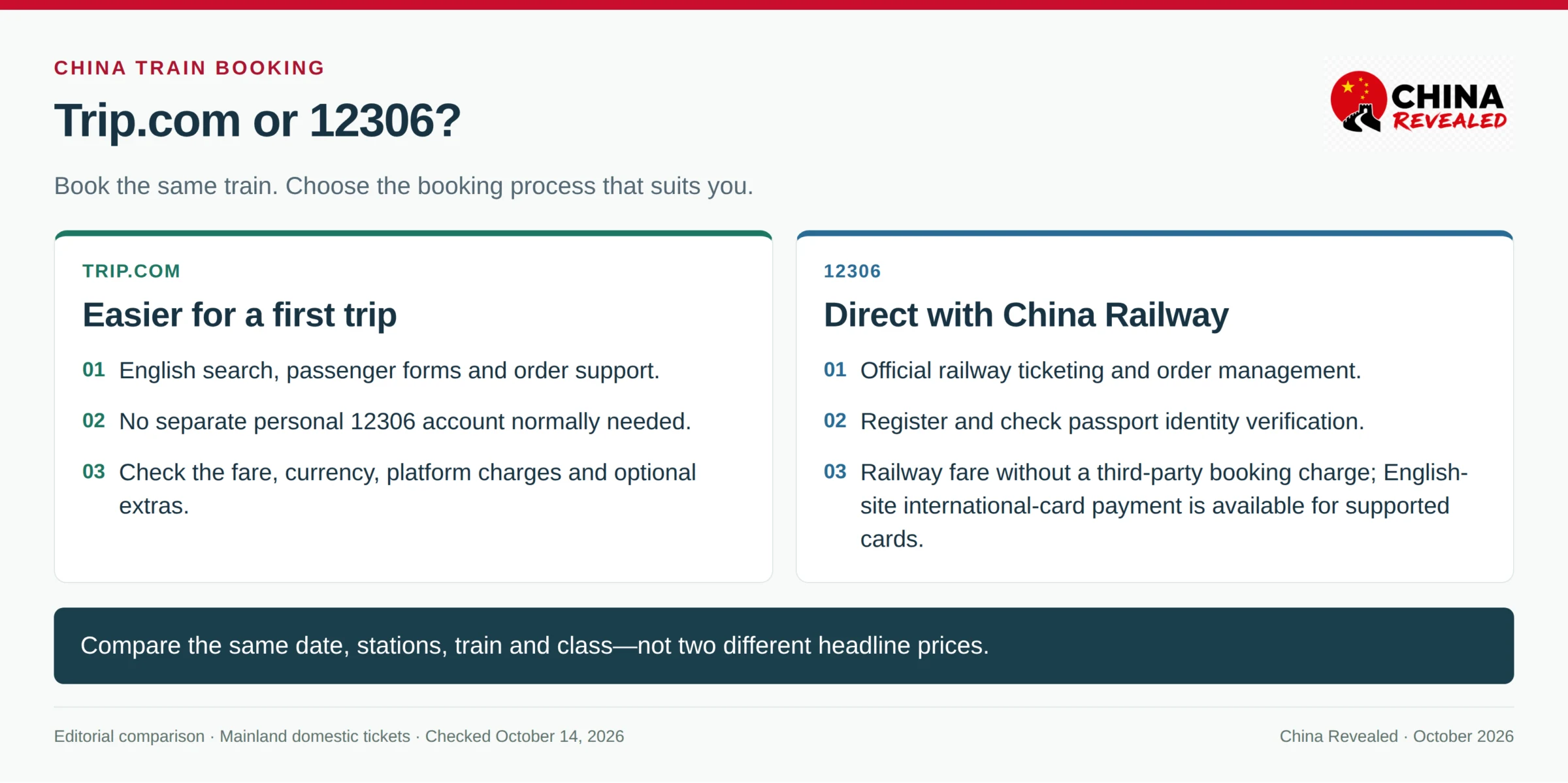
For a first trip to China, use Trip.com if you want straightforward English booking, international payment and help with an order. Use 12306 if you want to book directly with China Railway and are comfortable completing its passport verification. Both can get you onto the same train. The difference is the booking process—not a different railway.
The mistakes to avoid are specific: choosing the wrong station, putting your surname in the given-name field, booking with a passport you will not carry, and assuming that a payment confirmation means a ticket has been issued.
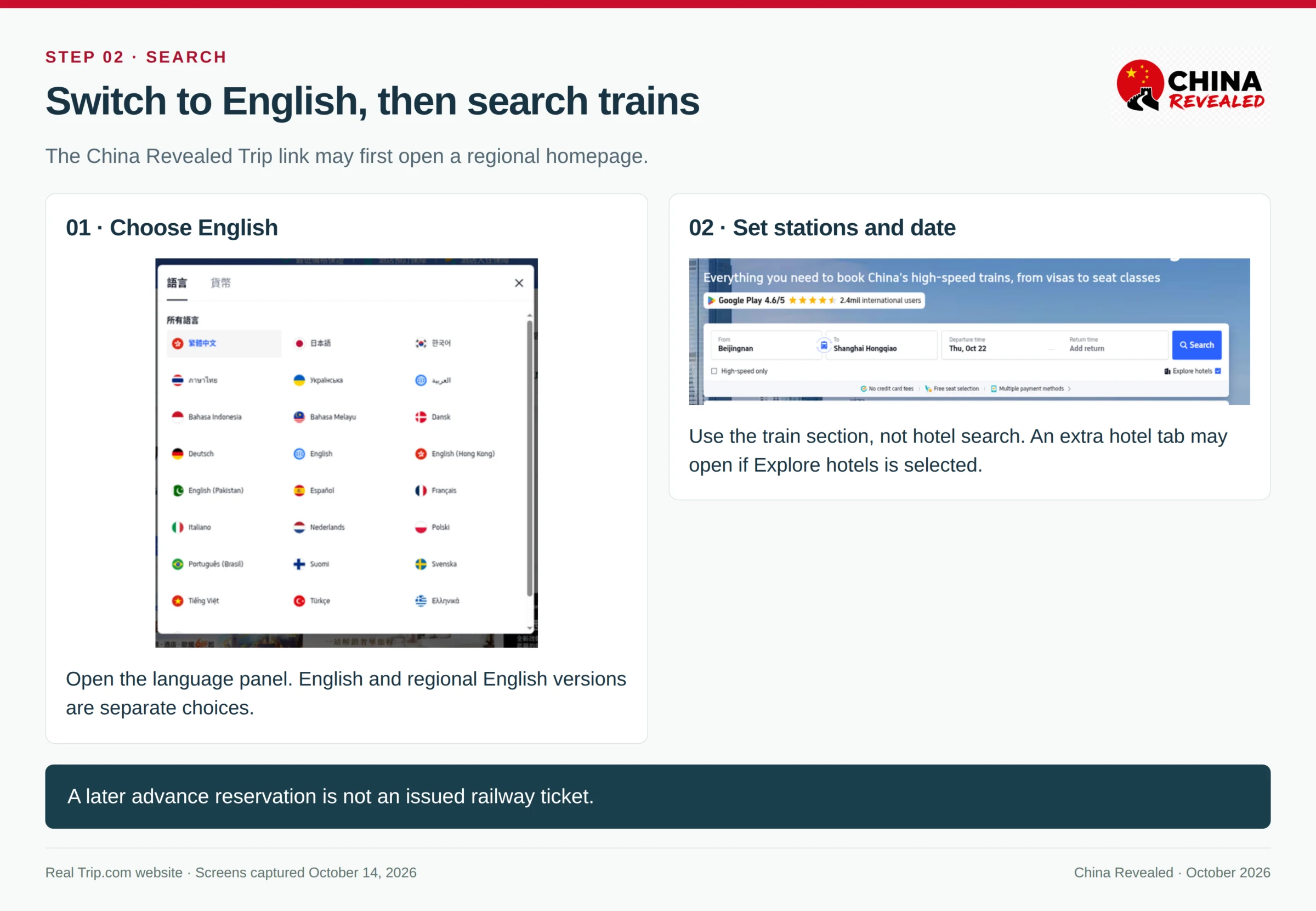
Search China trains through our Trip.com link. If it opens the Hong Kong homepage in traditional Chinese, switch the language to English, then choose Trains → Chinese Mainland and Hong Kong.
Railway rules and interface references checked on October 14, 2026. This guide covers ordinary mainland domestic tickets; Hong Kong and international cross-border tickets have separate rules.
In this guide
- 1. Trip.com or 12306: which should you use?
- 2. Choose the exact station before choosing the train
- 3. Booking on Trip.com: search, select and enter your passport
- 4. Copy your passport name correctly on both platforms
- 5. Using 12306: register, check identity status, then buy
- 6. Before paying: check the breakdown and your contact details
- 7. Paid, processing or issued? Check the actual ticket status
- 8. Refund a ticket from the order—not from a new search
- 9. Change the train, date or class—or change the destination
- 10. When you need a station service window
- Before you leave for the station
1. Trip.com or 12306: which should you use?
Trip.com is the easier starting point for most first-time visitors. You can search in English, enter a foreign passport and pay using an available international payment method. You do not need to create a separate personal 12306 account for the normal Trip.com booking route.
12306 is the official railway channel. Its English website supports foreign-passport ticket purchases, changes, refunds and changes of destination. It is useful if you already have a verified account, book several rail journeys or prefer managing tickets directly with the railway.
| What matters | 12306 | Trip.com |
|---|---|---|
| Who takes your booking | China Railway’s official booking system | A travel booking platform arranging a railway ticket |
| English | English website and supported English app functions; some help remains Chinese | English search, booking and order support |
| Passport setup | Register and check the account and passenger’s identity status | Add the passenger’s passport details in the booking flow; no separate personal 12306 account normally needed |
| Price | Railway fare, without a third-party booking charge | Check the railway fare as displayed in your currency, any platform charges, optional extras and the final total |
| Payment | The English website has an International Cards route for supported foreign cards, alongside its other offered methods | International cards and other methods available for your country, currency and checkout |
| Customer support | Railway customer service: 12306 and station staff | Trip.com order support; station staff handle railway and boarding matters |
| Changes and refunds | Managed through the official order or a suitable station window | Start in your Trip.com order; railway rules still apply, alongside any applicable platform terms |
Compare the same train—not two different search headlines
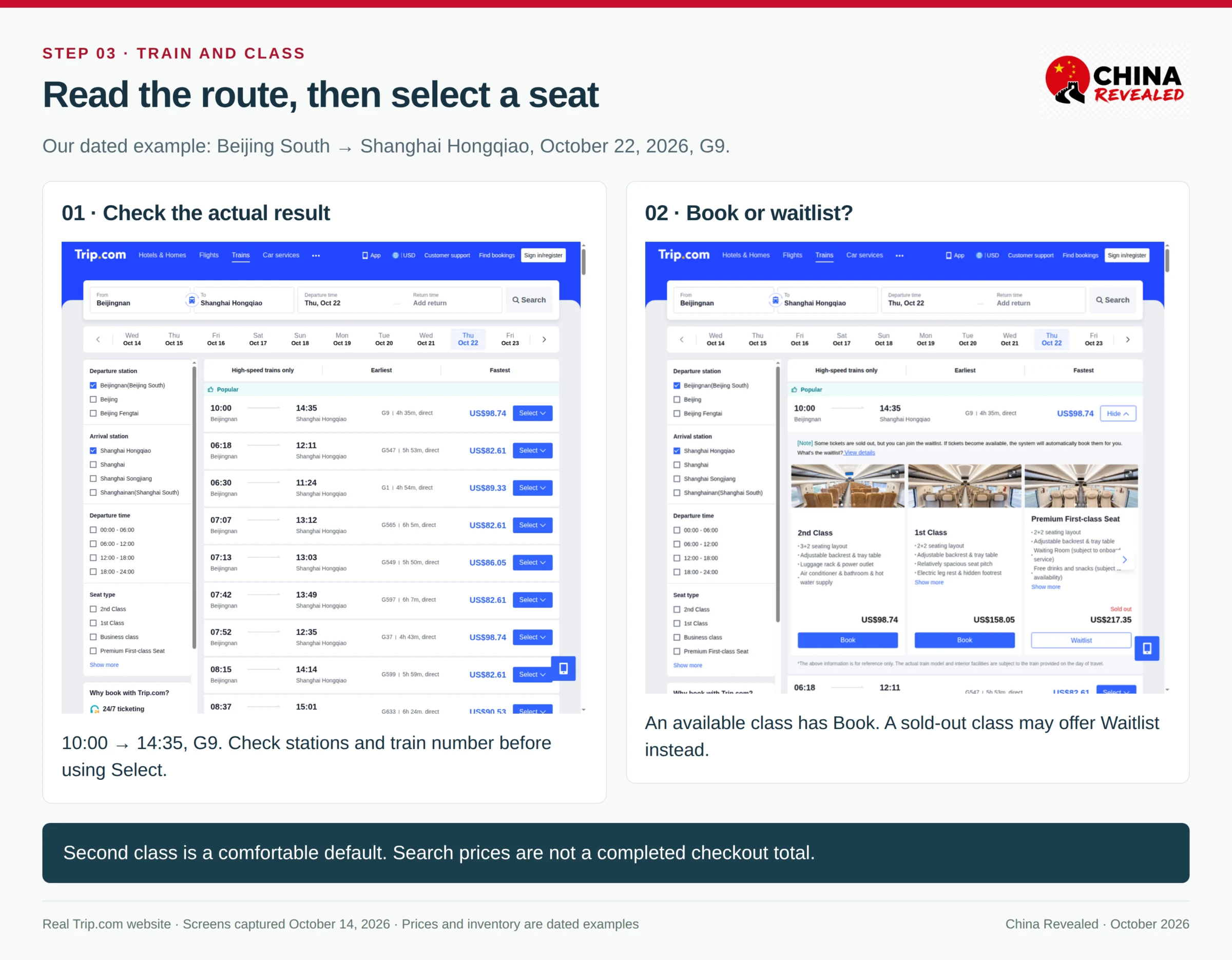
Our search example is Beijing South → Shanghai Hongqiao, October 22, 2026, G9, second class. The Trip.com screen showed a 10:00 departure, 14:35 arrival and a second-class search price of US$98.74 when captured. That is a dated search example, not a promised fare or a completed checkout total.
To compare properly, select that same date, train, boarding station, destination and seat class on 12306. Compare its RMB railway fare with Trip.com’s fare breakdown and final payment amount. A slower train, a different station or first class is not a like-for-like comparison.
Our Trip.com booking screen also offered US$3 per person for priority ticketing. Treat it as an optional add-on, not part of the railway fare. Check whether it is selected. Exchange rates, card issuer charges, promotions and other checkout items can affect what you finally pay; do not assume a fixed markup for every booking.
Trip.com helps with its own order. China Railway controls the train service, ticket inventory, real-name requirements and railway refund/change rules. A third-party platform cannot guarantee a sold-out seat or waive the railway’s identity checks.
2. Choose the exact station before choosing the train
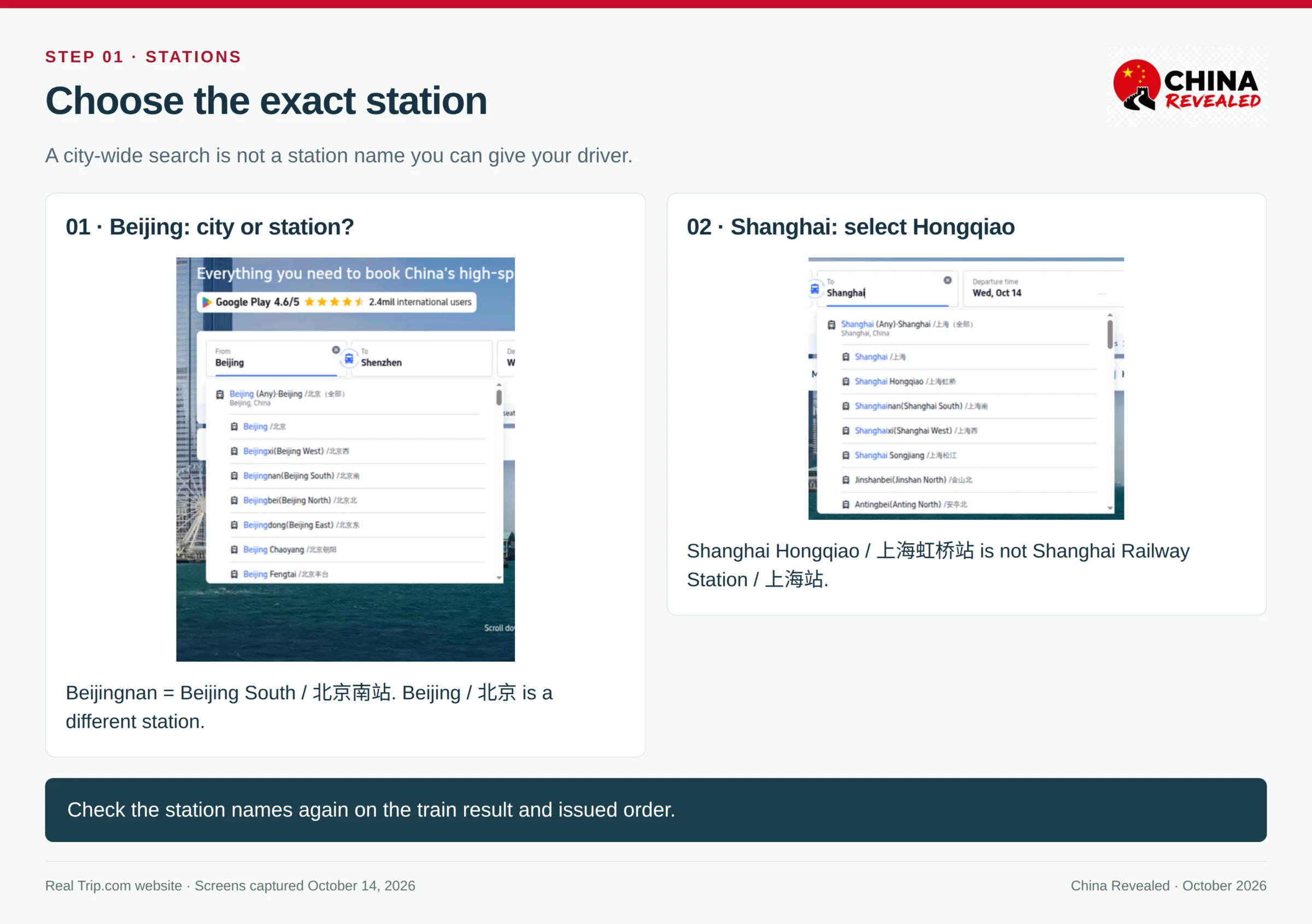
Beijing is a city. Beijing Railway Station, Beijing South and Beijing Fengtai are different stations. Shanghai Railway Station and Shanghai Hongqiao are different too.
In Trip.com, type the city, then select the specific station. “Any” means the city-wide search, not a station you can give your taxi driver. Even after a broad search, check each result: neighboring options may depart from or arrive at different stations.
Useful names for our example:
| English label | Chinese name | What it means |
|---|---|---|
| Beijing / Beijing Railway Station | 北京站 | Not Beijing South |
| Beijing South / Beijingnan | 北京南站 | Our example departure station |
| Beijing Fengtai | 北京丰台站 | A separate Beijing station |
| Shanghai / Shanghai Railway Station | 上海站 | Not Shanghai Hongqiao |
| Shanghai Hongqiao | 上海虹桥站 | Our example arrival station |
| Shanghai South / Shanghainan | 上海南站 | Another separate station |
Bei / 北 is north; nan / 南 is south; dong / 东 is east; xi / 西 is west. Those words are part of the station name. Do not drop them when searching or booking a ride.
Check the Chinese station name in Amap before buying if you need to understand the transfer from your hotel. A cheap train is not necessarily the best option if it leaves from a much less convenient station.
3. Booking on Trip.com: search, select and enter your passport
Open the train search and choose a date
Open our Trip.com booking link, switch to English if necessary and enter the train section. Select your departure and arrival stations, travel date and passengers. If Explore hotels is selected, the search may also open a hotel page; your train results are a separate page.
Ordinary mainland train tickets normally open for sale within a 15-day presale window, including the current day, with release times varying by station. Check the current 12306 release information around holidays or timetable changes. An advance reservation shown for a later date is a request to buy when sales open—not an issued ticket.
Select a train and seat class
Read the station names, departure time, arrival time, duration and train number. A “+1” beside arrival means the following day. For a normal daytime high-speed journey, second class is a comfortable default. First class gives more space; business class costs considerably more. A standing ticket does not include a reserved seat.
Open Select, then choose the class. Book leads into the passenger-details step. If the class says Waitlist, you are not buying an available reserved seat. Keep another workable train in mind, especially for an airport connection or a must-arrive date.
Add the passenger—not just the contact person
Under Passenger Info, open Add/edit passengers. Choose Passport, not Mainland Chinese ID Card. Enter the passport number and names in their actual fields.
The contact name, email and phone number are for the booking contact. They do not replace the passenger record. Every person who needs a ticket must be correctly listed as a passenger.
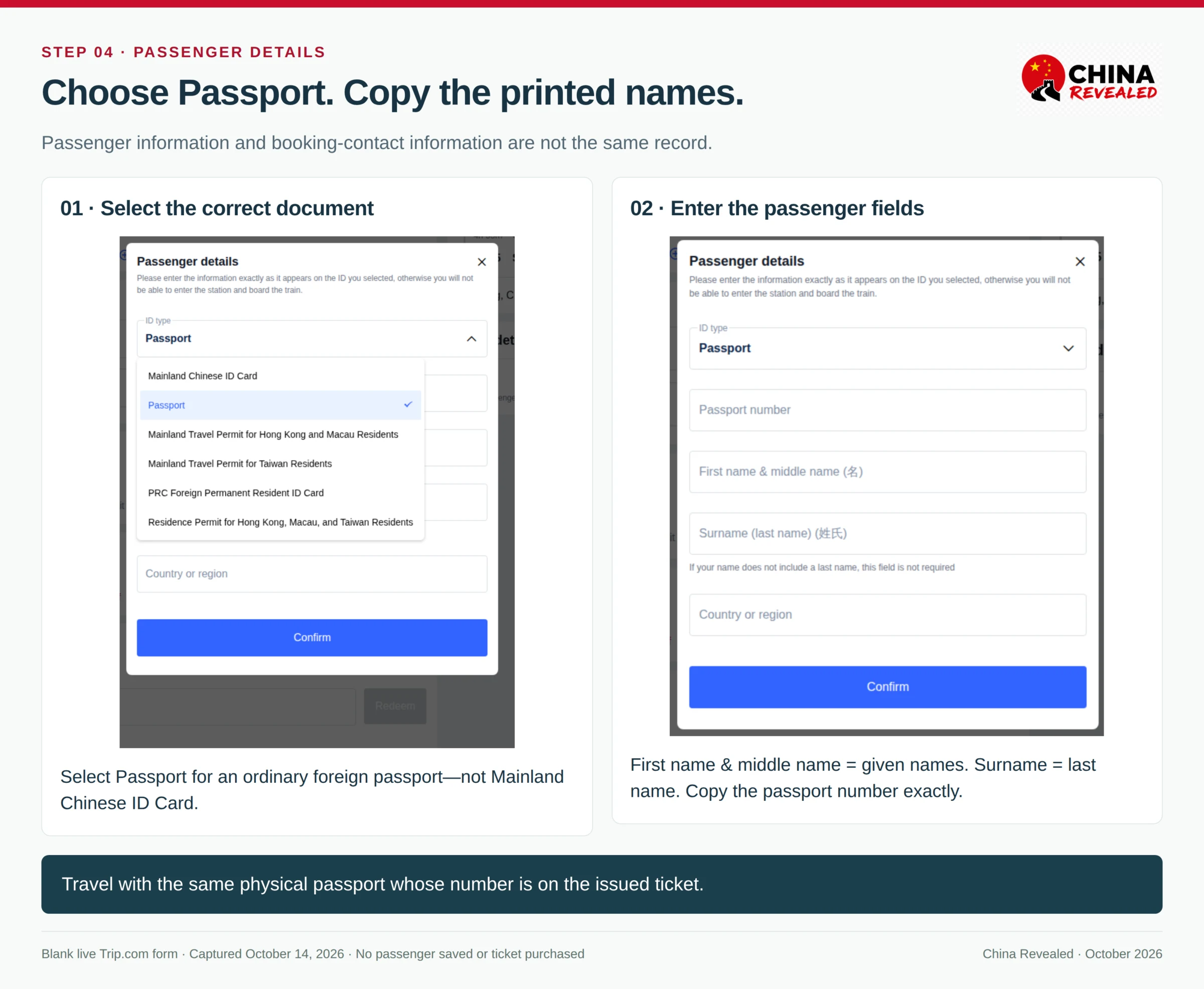
Fill any requested nationality, date-of-birth and passport-expiry fields from the same document. For Country or region, follow the field’s passport/nationality meaning—not the country where your hotel is located. Recheck the saved passenger summary before proceeding.
4. Copy your passport name correctly on both platforms
Keep your passport open while booking. Use its printed Latin-letter name, not a nickname, a Chinese translation or the abbreviated name your friends use.
On Trip.com’s current form:
- First name & middle name / 名: your given names, including middle names shown in the passport.
- Surname (last name) / 姓氏: the surname shown in the passport.
- Passport number: the passport number, not a visa number, a national ID number or the entire machine-readable line.
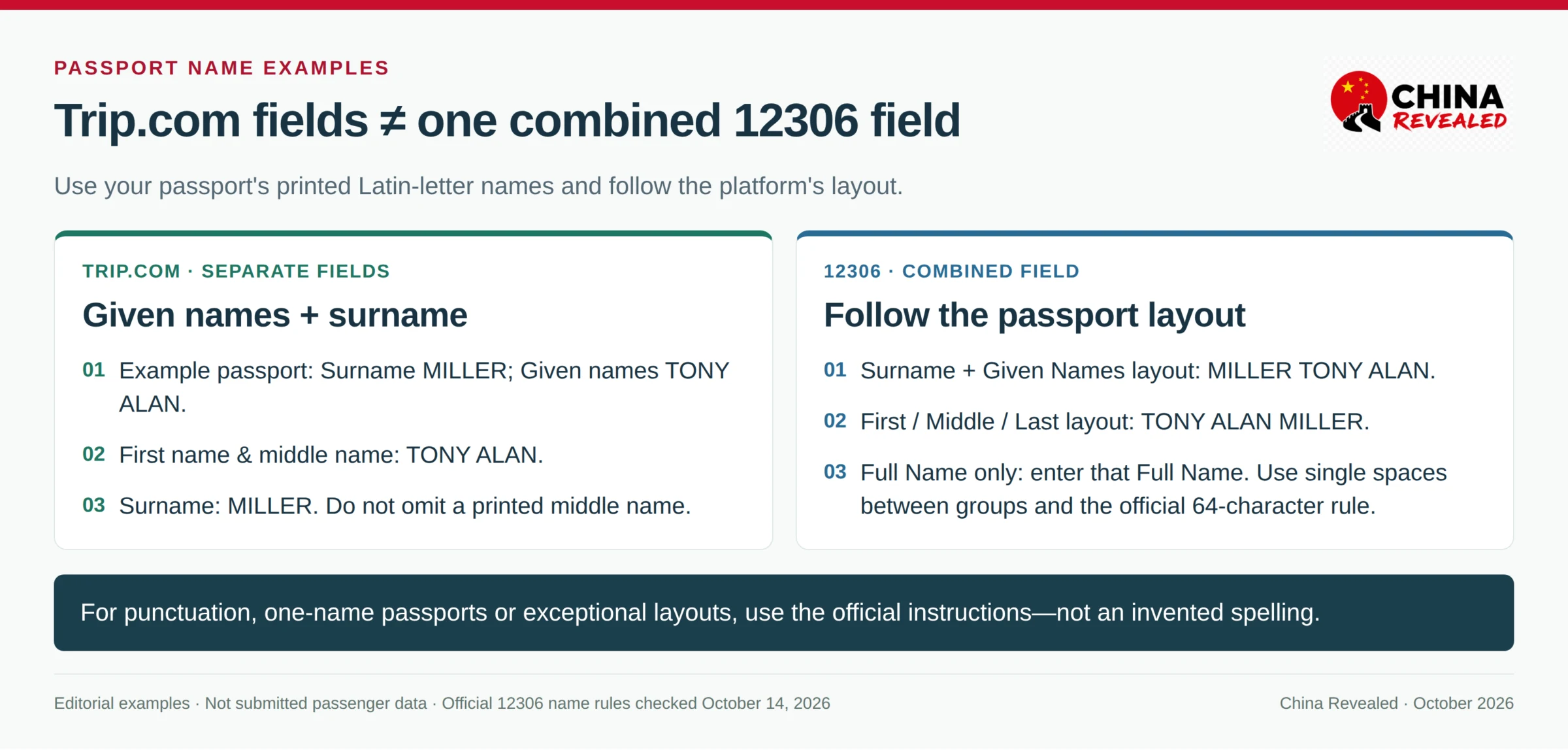
For example, if the passport shows Surname: MILLER and Given names: TONY ALAN, Trip.com takes TONY ALAN in the given-name field and MILLER in the surname field.
12306’s combined name field uses its own official passport-layout instructions. Do not simply copy the order of separate Trip.com fields into one box:
| Your passport’s printed layout | 12306 combined-name instruction |
|---|---|
| Surname + Given Names | Surname, one space, then all given names |
| First Name + Middle Name + Last Name | Follow that printed first–middle–last sequence, with spaces |
| Full Name only | Enter the Full Name shown in the document |
12306 uses Latin letters, single spaces between name groups and a 64-character limit. Its official instructions explain punctuation, multiple languages and other exceptions. For hyphens, apostrophes or unusual layouts, use the official passport-name entry guide or ask support rather than inventing a shorter spelling.
A one-name passport needs the platform’s one-name handling; Trip.com’s current form says a surname is not required if the passenger has none. Do not invent a surname merely to make the form look complete.
The ticket belongs to that passport
Travel with the same physical passport whose number is on the booking. A second passport from another nationality, a replacement passport with a new number or a photo of the booked passport is not automatically interchangeable. If your passport changes before travel, contact the booking platform or a station ticket office before departure.
After issuance, a saved-profile edit does not rewrite an existing railway ticket. A wrong passenger name or document number normally requires refund and rebooking, not a train change. If you used 12306 and spot the mistake immediately, check the limited-time mistaken-purchase refund explained below.
5. Using 12306: register, check identity status, then buy
Start at the official 12306 English website or the official Railway 12306 app. Create an account, choose a foreign passport and complete the contact verification requested by the current registration flow. Use an email or number you can access; a data-only travel eSIM cannot receive SMS (see our SIM vs eSIM guide).
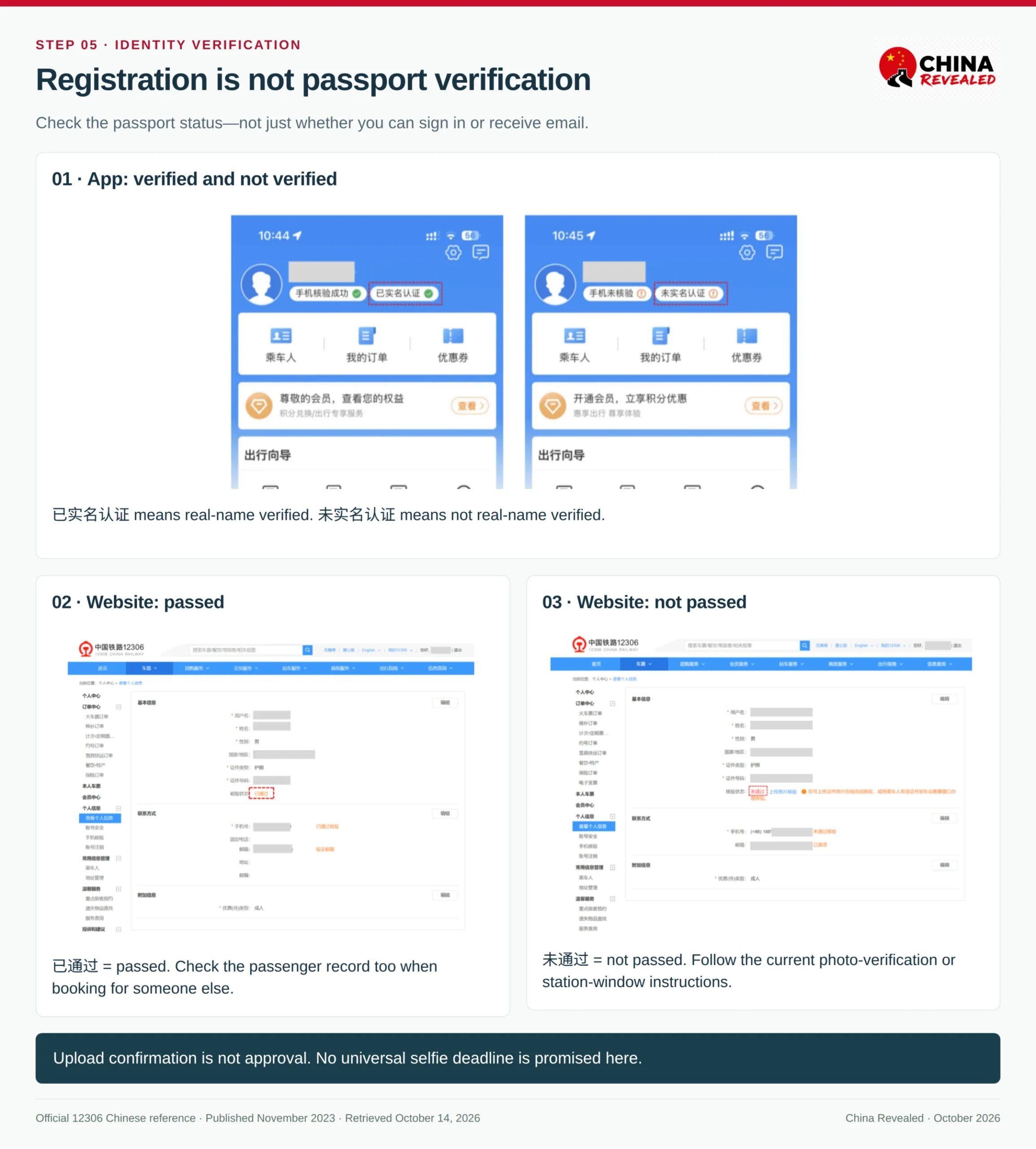
Account registration, email activation and passport identity verification are separate checks. Being able to sign in is not proof that your passport is verified.
Open your personal information and check ID verification status. Also check the passenger record if you are booking for someone else:
| Status or message | Your next step |
|---|---|
| Verified / 已通过 or 已实名认证 | Check the passenger details and proceed if the booking screen permits |
| Pending / 待核验, ready to be verified or not verified | Read the actual passport-specific prompt; do not assume the same booking permission for every status or version |
| Failed / 未通过 | Correct any wrong details and follow the offered re-verification or station-window route |
| Photos submitted / under review | Check back for the result; upload confirmation is not approval |
The English FAQ and some older Chinese pages use different translations and status wording. Follow the current instruction attached to your own foreign-passport record, not an old screenshot’s color alone.
If online passport verification fails
Use the official photo-verification option if it is offered. The current privacy policy describes a passport information-page photo and a photo of you holding that page. Follow the instructions on your screen; old help images may describe a different upload flow.
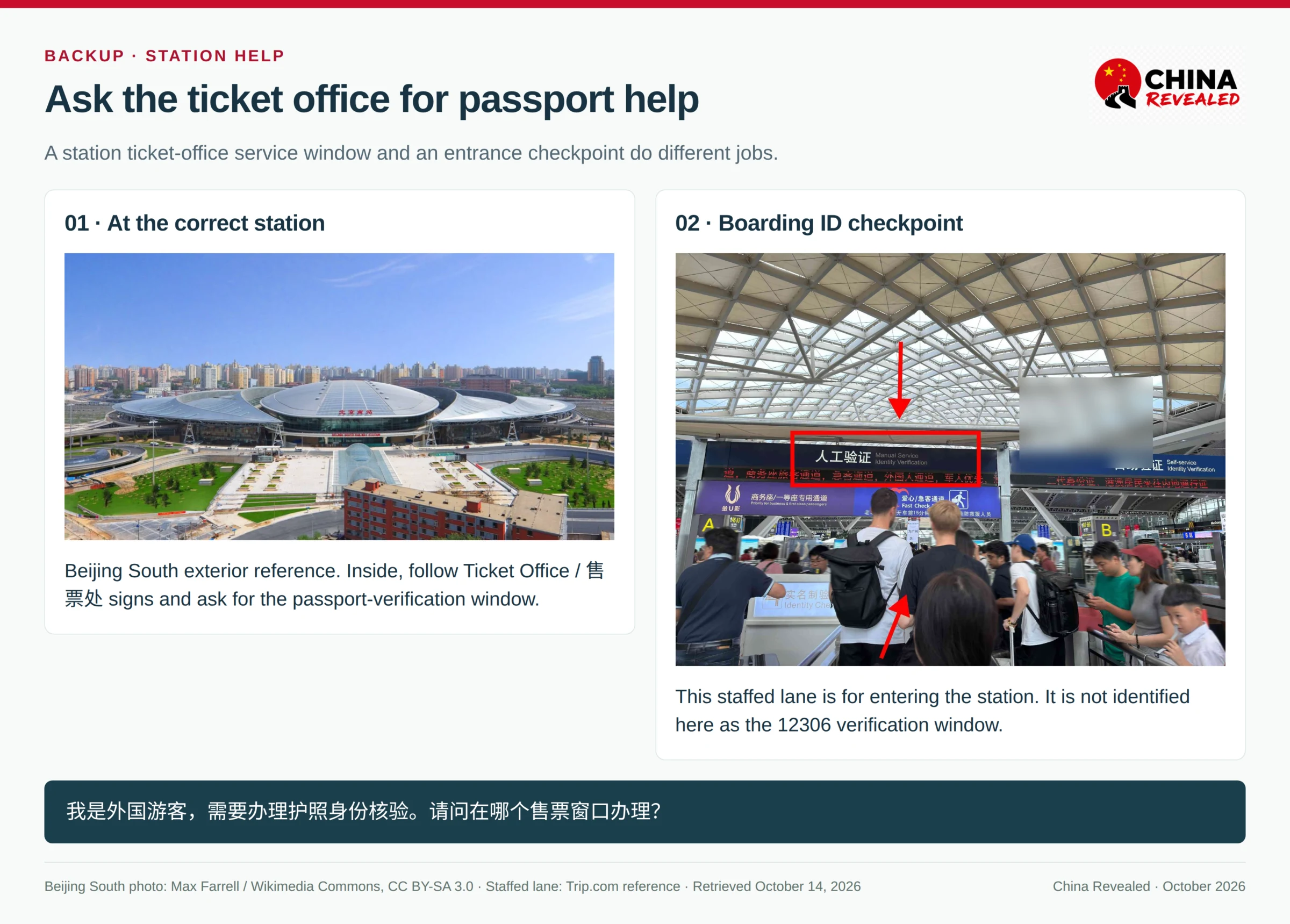
There is no universal selfie deadline or guaranteed approval time to rely on. If the record remains unverified, fails again or departure is getting close, take the original booked passport to a railway station’s designated ticket-office/service window and ask for manual foreign-passport identity verification. Bring your booking number as well if you already have an order.
Show this sentence:
我是外国游客,需要办理护照身份核验。请问在哪个售票窗口办理?
I am a foreign visitor and need passport identity verification. Which ticket-office window handles it?
Look for 售票处 / Ticket Office, 综合服务窗口 / Comprehensive Service Window or 人工服务 / Staffed Service. Stations arrange services differently; ask which window handles passport verification. The staffed lane at the entrance is for boarding identity checks and is not necessarily the place to fix your 12306 account.
.jpg)
Once the account and passenger are accepted, search the train, select the seat, submit the ticket request and pay within the time shown by 12306. 12306 is not restricted to Chinese bank cards: its English website has an International Cards payment route for supported foreign-issued cards, with the card details and any bank authentication completed on the payment page. Check the logos and options actually offered for your ticket; support for a card network does not guarantee that every issuing bank will approve the payment.
6. Before paying: check the breakdown and your contact details
On either platform, review these together: passenger name, passport number, train, date, boarding station, arrival station and seat class. Then check the total, currency, optional services and the displayed change/refund terms.
Trip.com offers international payment methods such as eligible cards and supported wallets, with availability determined by the checkout. Complete your bank’s security approval if required. A payment app linked to a foreign card is not a guarantee that every railway checkout will accept that card.
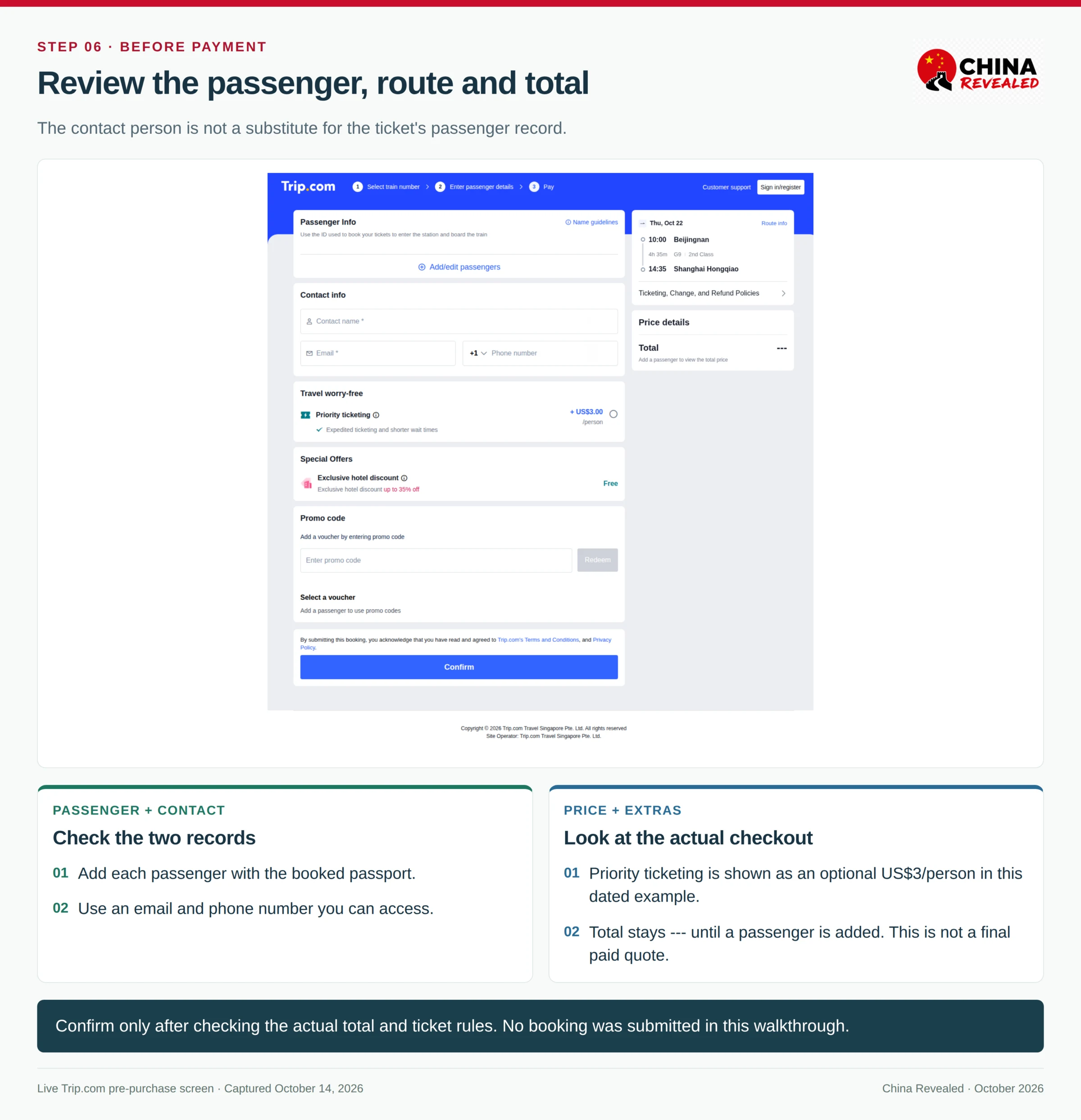
If payment fails, check the order status before trying again or using another platform. You do not want two requests for the same passenger and journey while one is still being processed.
7. Paid, processing or issued? Check the actual ticket status
On Trip.com, open My Bookings / Bookings → Trains → the relevant order, or use the booking-confirmation email. On 12306, open your train-ticket orders / completed orders.
Purchasing Ticket(s), processing, advance reservation and waitlist are not issued tickets. For a ticketed booking, look for the issued status and railway journey details. Trip.com’s reference order uses Ticket Purchased; wording can change by version.
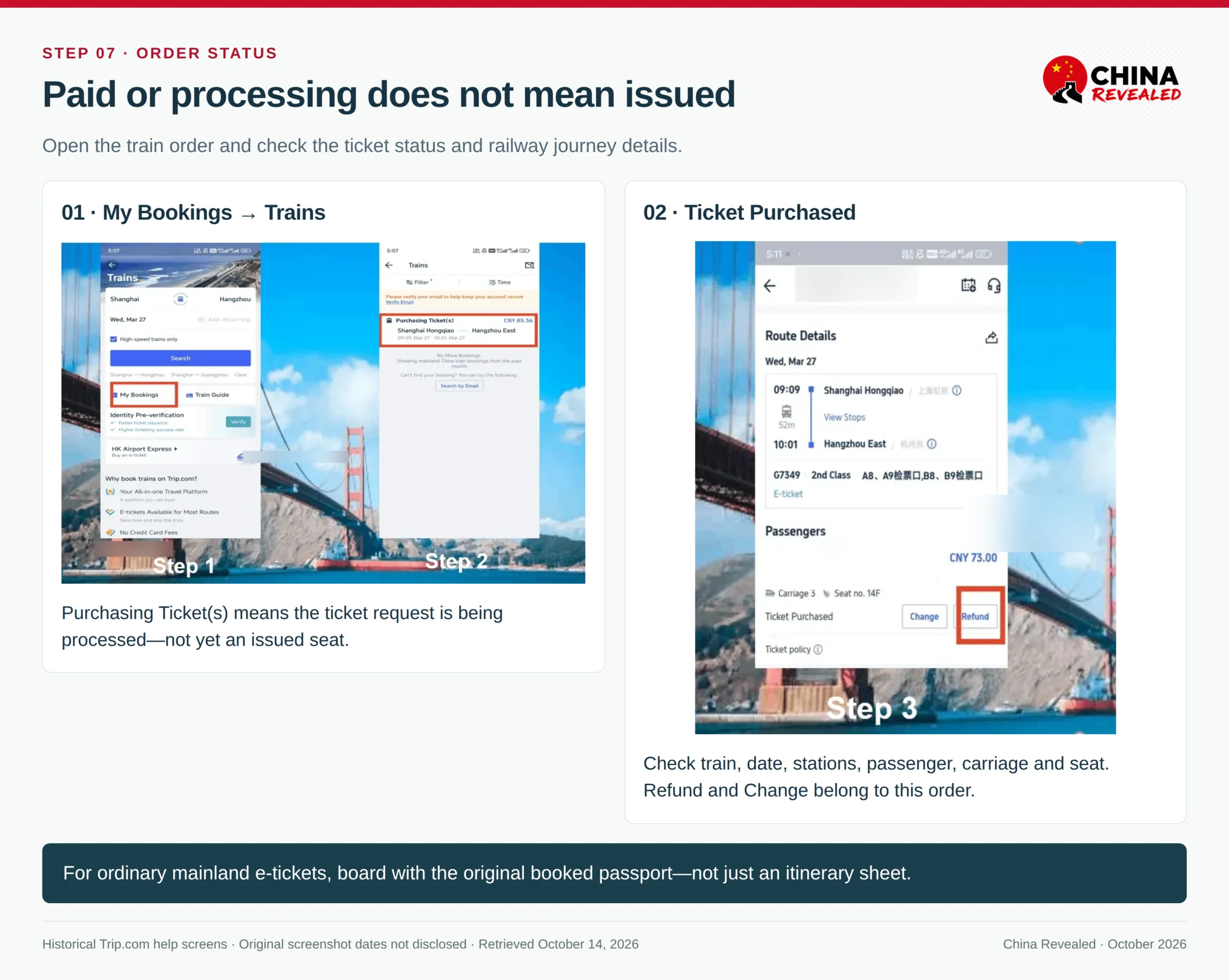
Check the issued order for the exact passenger, date, stations, departure time, train and assigned carriage/seat. Keep the confirmation accessible and save the station’s Chinese name.
You normally board an ordinary mainland e-ticket with the original booked passport, not by collecting a separate paper ticket. Use a passport-capable reader where supported or the staffed channel when needed. A Trip.com itinerary, a 12306 itinerary sheet and a reimbursement invoice are not substitutes for the railway ticket and booked identity document.
Plan on reaching the station about 60 minutes before departure for a first journey, with more time during holidays or if you still need a service window. That is practical planning advice, not the railway’s official boarding cutoff. The gate closes before train departure; follow your station and order’s instructions.
For the ride to the station, use our DiDi guide and the exact Chinese station name. Amap’s arrival estimate should leave time for security and boarding, not just getting out of the car.
8. Refund a ticket from the order—not from a new search
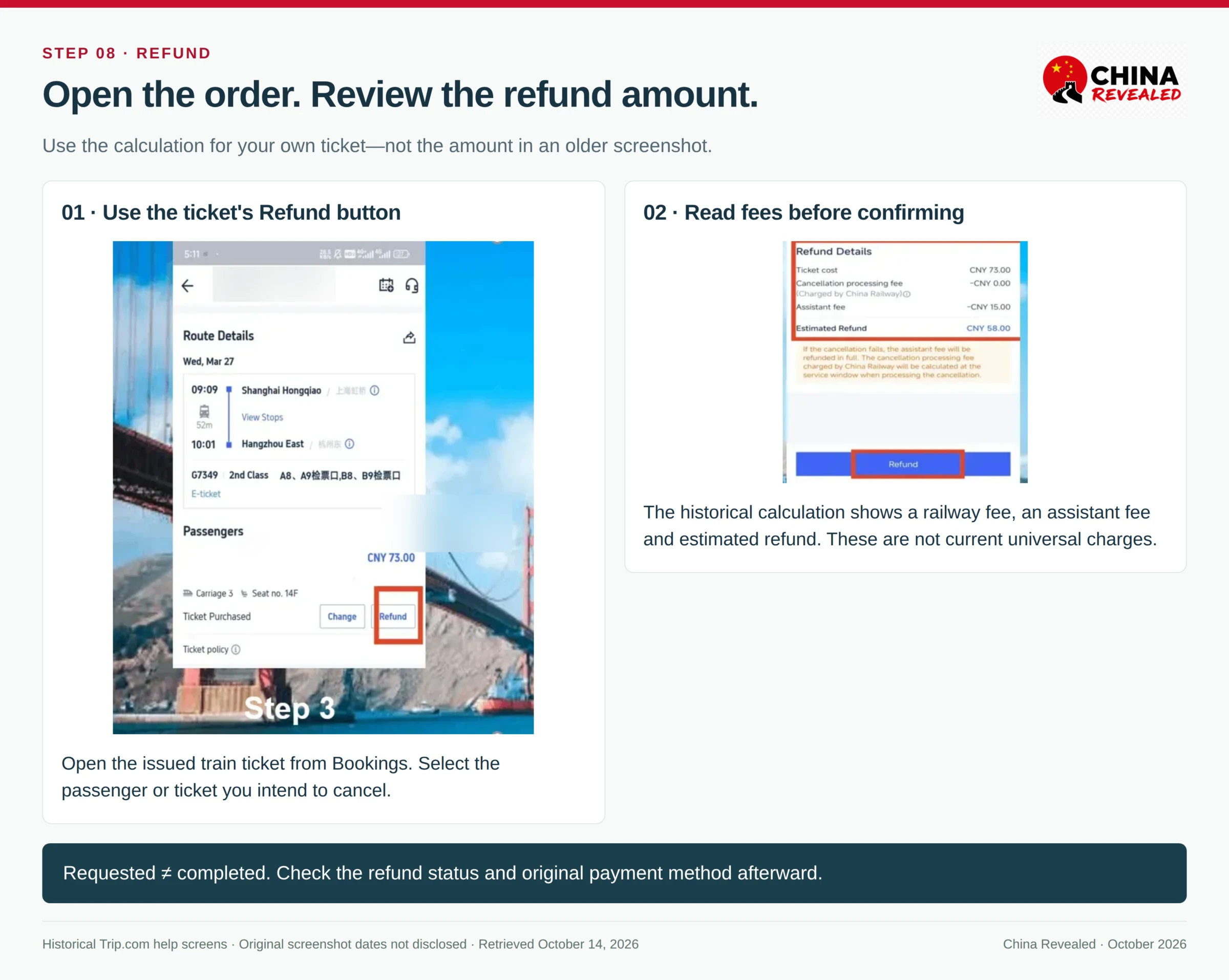
On Trip.com
- Open Bookings / My Bookings → Trains → your issued order.
- Choose Cancel / Refund for the relevant ticket or passenger.
- Read the calculation: railway refund fee, any applicable platform charge and the amount due back.
- Confirm only after checking the calculation. Keep the refund-request record and later check the completed status.
Some versions use Calculate Refund before the final cancellation. Opening that estimate does not itself cancel the ticket. A refund requested is also not the same as money already returned to your card.
On 12306
Open the relevant ticket order, select the passenger/ticket and choose Refund / 退票. Review the fee and refund amount, then confirm. Ordinary refunds must be handled before the booked train departs, subject to the ticket’s rules and the platform’s operational deadline.
Standard mainland railway refund fees
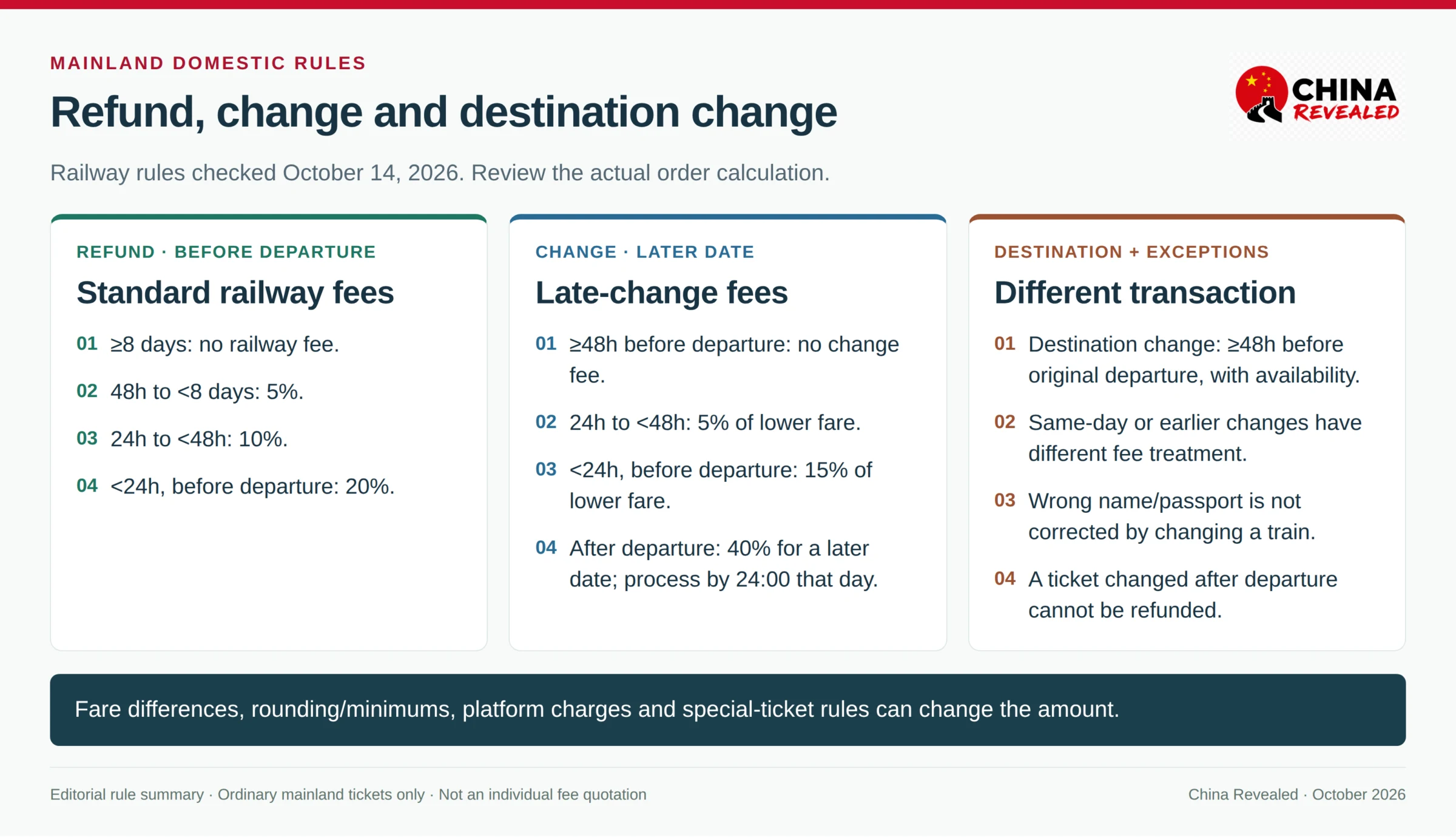
For an ordinary eligible domestic ticket, measured from the booked departure at your boarding station:
| Time before departure | Standard railway refund fee |
|---|---|
| At least 8 days | No railway refund fee |
| At least 48 hours, less than 8 days | 5% of ticket fare |
| At least 24 hours, less than 48 hours | 10% |
| Less than 24 hours, before departure | 20% |
These are railway fees, not a promise that every Trip.com order has no additional applicable charge. Railway rounding and minimum-fee rules apply. Tickets changed into the Spring Festival travel period, tickets moved outward then cancelled, and special ticket products can have different outcomes; review the order’s calculation.
Bought the wrong ticket just now? Check 12306’s free-refund window
Since January 2026, eligible 12306 purchases have a limited-time mistaken-purchase refund. The request must be within 30 minutes of successful payment and at least 4 hours before departure. It covers the specified electronically/points-paid bookings for travel from February 2, 2026 onward.
The limit is one qualifying order per booker per calendar day. Rescheduled tickets, advance reservations and waitlisted bookings are excluded. If you spot a name, date or station mistake, check this option immediately in the 12306 order. Do not assume a Trip.com order automatically receives the same concession; contact Trip.com through that order.
9. Change the train, date or class—or change the destination
A train change does not correct the passenger’s identity. For a different journey time or class, open the existing order and select Change / Reschedule / 改签, then choose the new train and seat.
On Trip.com, use its order’s available change function or order support if the required change is not offered. On 12306, open the railway order and choose Change. Review the new fare, fare difference, railway change fee and any applicable platform charge before confirming. Then check the updated ticket rather than keeping the old itinerary as your boarding plan.
There must be available ticket inventory. One ordinary railway ticket normally permits one change; cancelling and buying again is a different transaction with its own refund fee and availability risk.
What does a late change cost?
| When you change | Ordinary mainland rule |
|---|---|
| At least 48 hours before original departure | No railway change fee within the allowed presale period; fare differences still apply |
| Less than 48 hours before departure, to the original travel date or an earlier date | Normally no railway change fee; fare differences still apply |
| 24 to under 48 hours before departure, to a later travel date | 5% of the lower original/new fare |
| Under 24 hours before departure, to a later travel date | 15% of the lower original/new fare |
| After original departure, to another train on the same day | Normally no railway change fee; fare differences still apply |
| After original departure, to a later travel date | 40% of the lower original/new fare |
Post-departure changes must be handled by 24:00 on the original departure day, with seats available. A third-party platform may need an earlier processing deadline or staff assistance. A ticket changed after departure is not refundable. If you are about to miss the train, open the order or speak to railway staff promptly.
A more expensive replacement requires paying the difference. A cheaper replacement can involve a refund fee on the difference; “free change” does not necessarily mean you get every RMB of the difference back.
A new destination is a separate option
For a different arrival station, look for Change Destination / 变更到站 on 12306, or ask Trip.com whether its order supports that change. Ordinary destination changes require at least 48 hours before the original departure and available tickets.
Do not assume you can rewrite any departure station through ordinary rescheduling. A destination-changed ticket cannot then be changed again, and a ticket already rescheduled generally cannot use the separate destination-change service. If the proposed journey falls outside the allowed change, compare the refund-and-rebook cost first.
10. When you need a station service window
Take the original booked passport and order details if:
- Passport verification remains unresolved and you need manual verification.
- The issued name or document number is wrong, or you now hold a replacement passport.
- Your ticket was bought with cash or the order requires handling a previously issued paper reimbursement voucher.
- The online order does not offer the required change, or departure is too close for the platform to process it.
For a Trip.com purchase, tell staff that it is a third-party booking and keep Trip.com support available. The window handles the railway matter; the platform handles any separate charge or problem in its own transaction.
Do not go to a window just to collect a paper reimbursement receipt for an ordinary new e-ticket. The paper-to-electronic railway-invoice transition ended in 2025. An itinerary sheet is travel information; an invoice is for reimbursement. Neither is what makes your passport ticket valid for boarding. Older paper-voucher cases must follow their actual order instructions.
Useful sentences:
我用这本护照订了票,订单号在这里。
I booked with this passport. Here is the booking number.我的护照信息填错了,请帮我确认怎么处理。
My passport details were entered incorrectly. Please help me check what to do.我想改签这张票。请问需要补多少钱?
I would like to change this ticket. How much more would I need to pay?
Before you leave for the station
Have an issued ticket, the same original passport, the correct station’s Chinese name and enough time for security and the gate. If you need a change or passport help, handle it before turning the station trip into a last-minute problem.
For related steps, read Amap for navigation, DiDi for station transfers and your first-day arrival guide.
Check your stations, date and available trains on Trip.com, then book with the passport you will actually carry.
About China Revealed
China Revealed is an independent English-language travel guide dedicated to China.
We bring together China travel guides, destination information, local insights and practical travel resources in one place.
Our travel database covers China's provinces, cities, famous attractions, hidden gems, local cuisine, transportation, accommodation, visa requirements, digital payments, mobile connectivity and the other practical details travelers need to explore China.
We focus on depth, careful research and accuracy. Our guides combine official sources, detailed destination data, local knowledge and regularly updated information to give reliable, practical travel advice.
Whether you're visiting China for the first time or exploring beyond the popular destinations, China Revealed is an all-in-one resource for discovering the real China.
China Revealed — Your practical guide to China.
Some links on China Revealed, such as Trip.com booking links, are affiliate links. If you book through them, we may earn a commission at no extra cost to you. This does not change what we recommend.