

Why I Recommend Trip.com for China (and How to Use It)

Trip.com belongs to Ctrip (Trip.com Group), China’s biggest travel company. More than 90% of China’s hotel bookings go through Ctrip, and most hotels in China have exclusive pricing agreements with the group. For Chinese travelers, Ctrip is simply the default. Whether it’s a business trip, a holiday or going home for Chinese New Year, most people book their hotels on Ctrip.
Trip.com is part of the same group and has access to all of Ctrip’s hotel inventory in China. Using Trip.com is essentially using Ctrip. The difference is that Trip.com is built for international travelers: it comes in English and other languages, accepts foreign credit cards and PayPal, and offers English-speaking customer service. You get the same hotels and prices that locals use every day.
Search for Chinese hotels on Booking.com or Agoda and you’ll notice they list far fewer properties than Trip.com. Many hotels in smaller cities, local chains and newly opened hotels don’t show up at all. Even when the same hotel is listed, the price is usually no better, and sometimes it’s higher. That’s why we recommend Trip.com: for hotels in China, no platform has more choice or more competitive prices than the Ctrip network.
If you book through my links, I earn a small commission at no extra cost to you. That income keeps this site running and lets us keep publishing free, practical China travel guides. Thank you for your support!


In this guide
- Price and payment currency: compare the real total
- Set up a Trip.com account before traveling
- Book China hotels: branch, room, payment and confirmation
- Book China trains with a foreign passport
- Book domestic flights and check the fare
- Find bookings and handle changes or refunds
- A practical booking order for a first trip
- Trip.com China FAQs
Price and payment currency: compare the real total
A real Shanghai hotel price check
The public pages below were checked on October 18, 2026, for Campanile Shanghai Bund Hotel, November 11–13, one room and two adults, without logging in. They show why Trip.com is worth opening first for value:
| Platform | Displayed quotation | What the offer included |
|---|---|---|
| Trip.com | US$187 total for two nights, including taxes and fees | Deluxe Queen Room, one queen bed; no breakfast; prepaid; free cancellation until November 10 at noon |
| Booking.com | US$214 for two nights, excluding 6% VAT | Deluxe Double Room, one queen bed; no breakfast; pay at property; free cancellation until November 11 at 6 pm |
| Agoda | SAR254 per night before taxes and fees | Standard twin room, two single beds; breakfast included; a different currency and room offer |
Trip.com showed a lower displayed amount and an all-in US-dollar total. Booking’s offer allowed later cancellation and payment at the hotel; Agoda’s visible offer was a different room and currency. The Trip.com offer was attractive, but these were different rate plans—not an identical-product price ranking. These are dated quotes, so check live prices for your own dates.
Pay and compare in a familiar currency
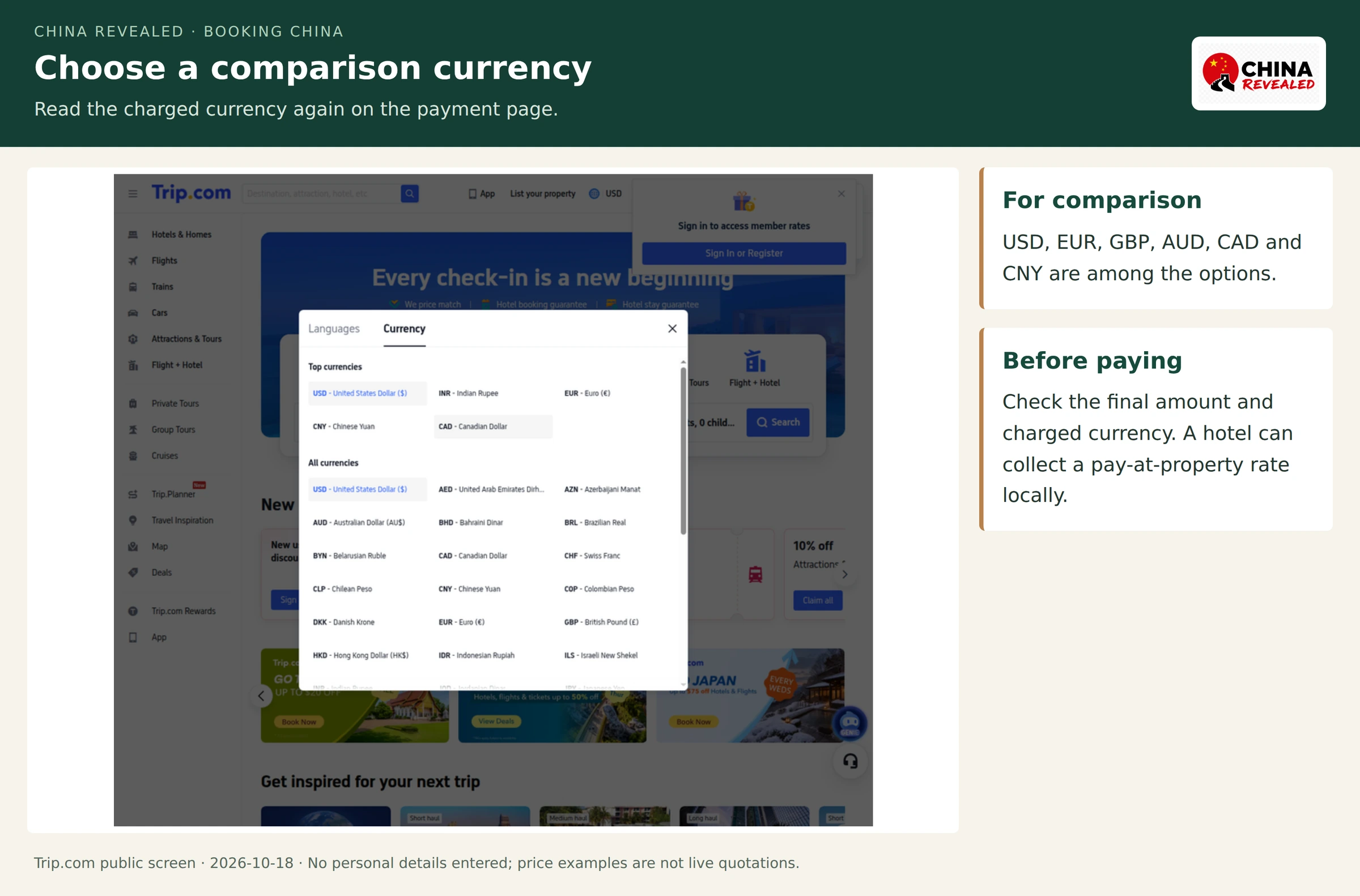
Trip.com’s official brand page lists 35 local currencies. The actual selector checked for this guide included USD, EUR, GBP, AUD, CAD and CNY. Set a useful comparison currency, then read the final amount and charged currency at checkout. Pay-at-hotel rates are collected by the property; card conversion and issuer fees depend on the payment used.
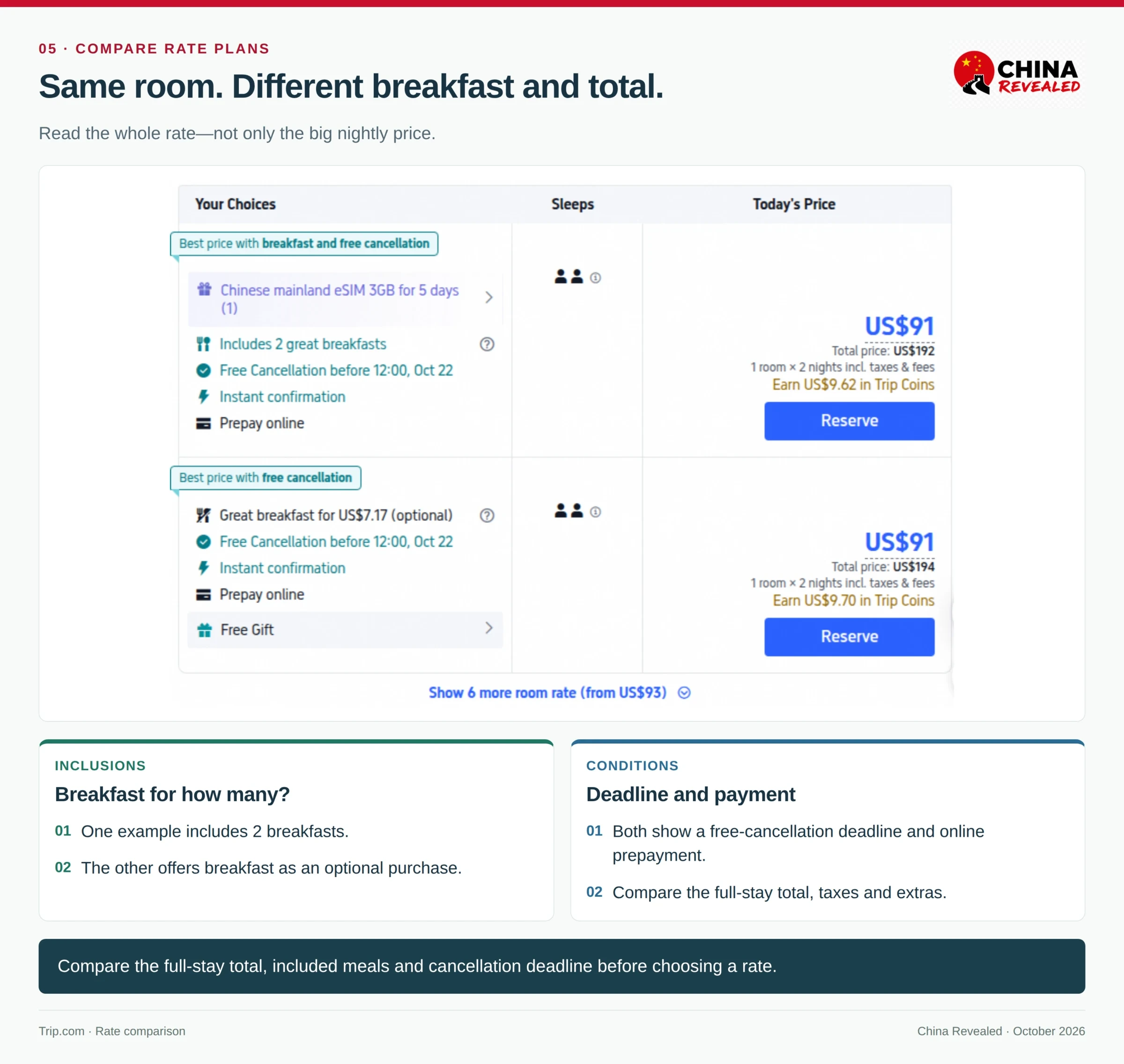
Room benefits matter too. The real Trip.com screenshot below has two US$91 nightly headlines but US$192 and US$194 two-night totals, with different breakfast inclusions. Compare the full stay, meals and cancellation deadline together. Those screenshot amounts are dated examples.
For trains, include the railway fare, platform charges and optional services. For flights, include bags and change rules. Use the complete payable product—not a nightly headline, future reward or coupon banner—as the comparison.
Set up a Trip.com account before traveling
1. Open the international service and set English
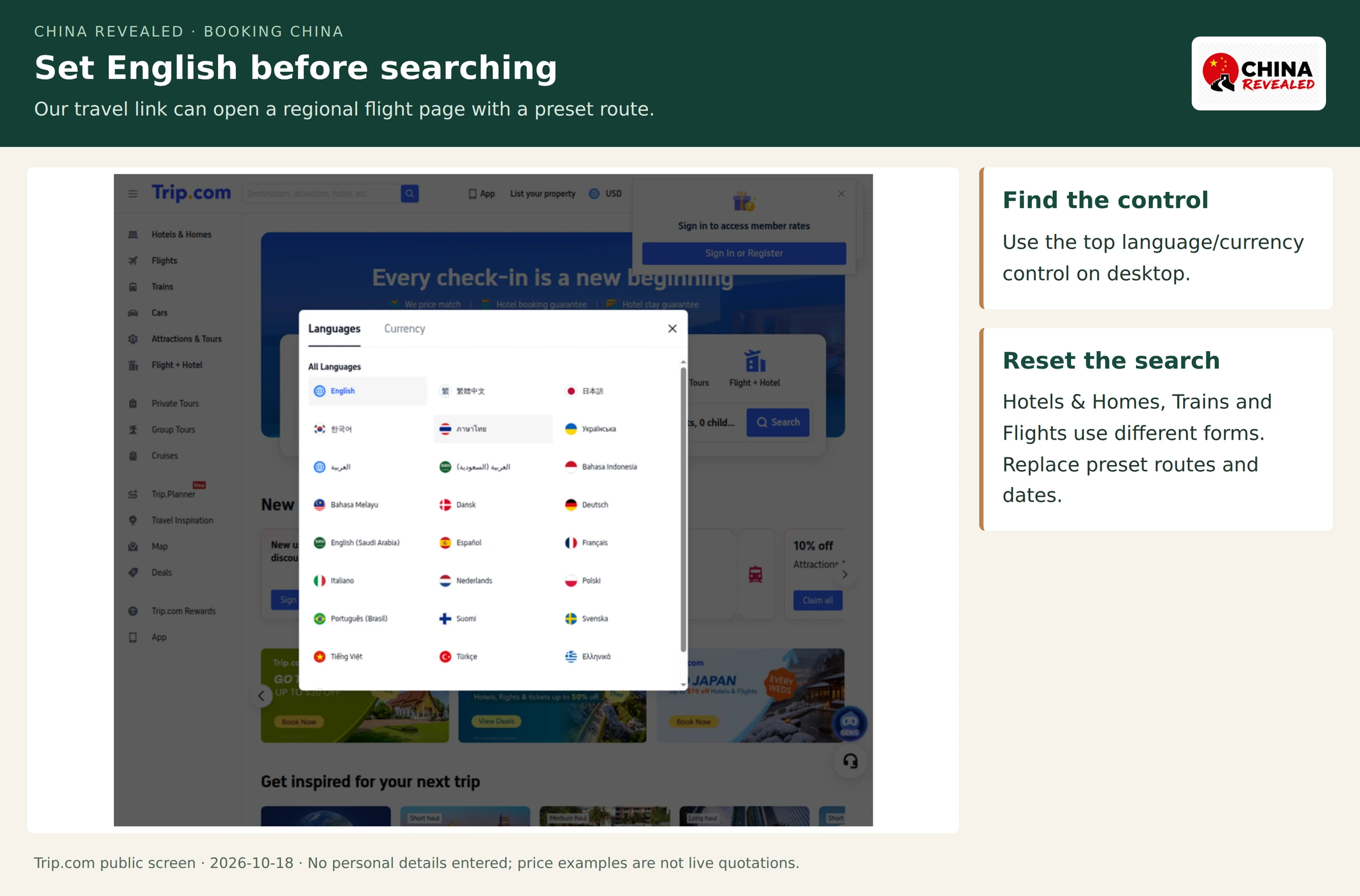
Open Trip.com through our travel link. Depending on where you are, it may open a regional Trip.com site in another language. Choose English, then Hotels & Homes, Trains or Flights, and enter your own cities and dates.
On desktop, the globe/language-and-currency control is in the top navigation. The app places language and currency in its account or settings area. Choosing English changes the booking interface; it does not create an account or alter the traveler’s passport identity.
2. Choose a sign-in method that can be accessed abroad
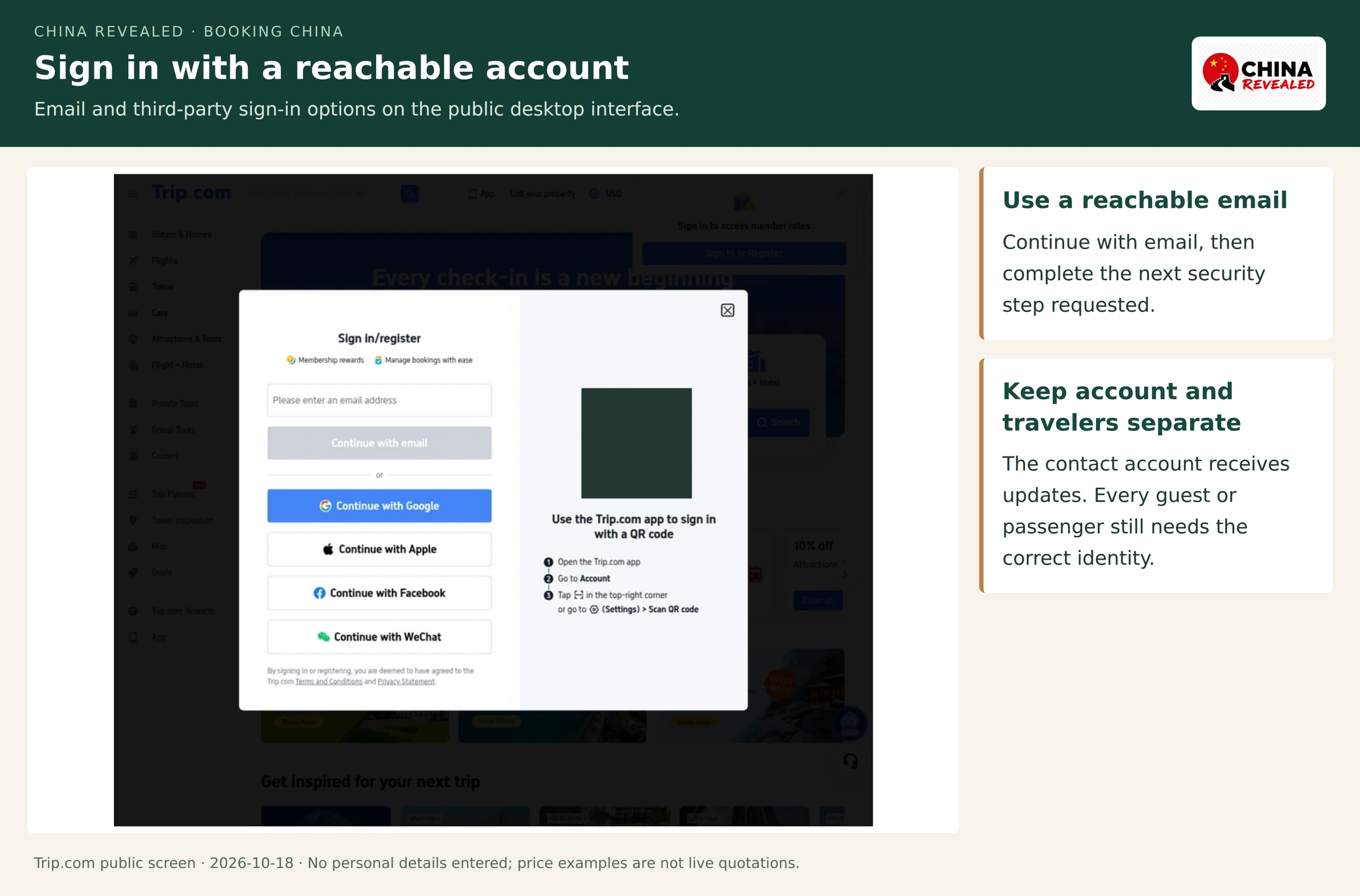
Select Sign in/register. The public desktop screen checked for this guide offered Continue with email, Google, Apple, Facebook and WeChat, plus an app QR-code sign-in route. The available methods can differ by device and region.
Email is a sensible starting point if the traveler does not want the account to depend on an external social-login service during the trip. Enter an email that can actually receive messages, choose Continue with email and complete the verification or account-security step requested on the next screen. An email sign-in option is not a request to obtain a Chinese mobile number.
Use the same sign-in method consistently. Booking through one email and later signing in through a different social account can make an order seem to have disappeared. A shared travel account also needs a reachable contact person; do not use an old number that cannot receive messages abroad.
3. Keep the booking contact and travelers separate
The account owner can book for other people. The contact email and telephone number receive updates; the guest or passenger details identify the person staying or traveling. One does not replace the other.
For trains and flights, keep every traveler’s original passport open while entering the details. Add middle names where the form requires them and select Passport, not a mainland identity card. A saved profile makes later entry faster, but recheck it before each booking. Editing that profile afterwards does not automatically rewrite an already-issued ticket.
Book China hotels: branch, room, payment and confirmation
1. Search the actual nights and guest count
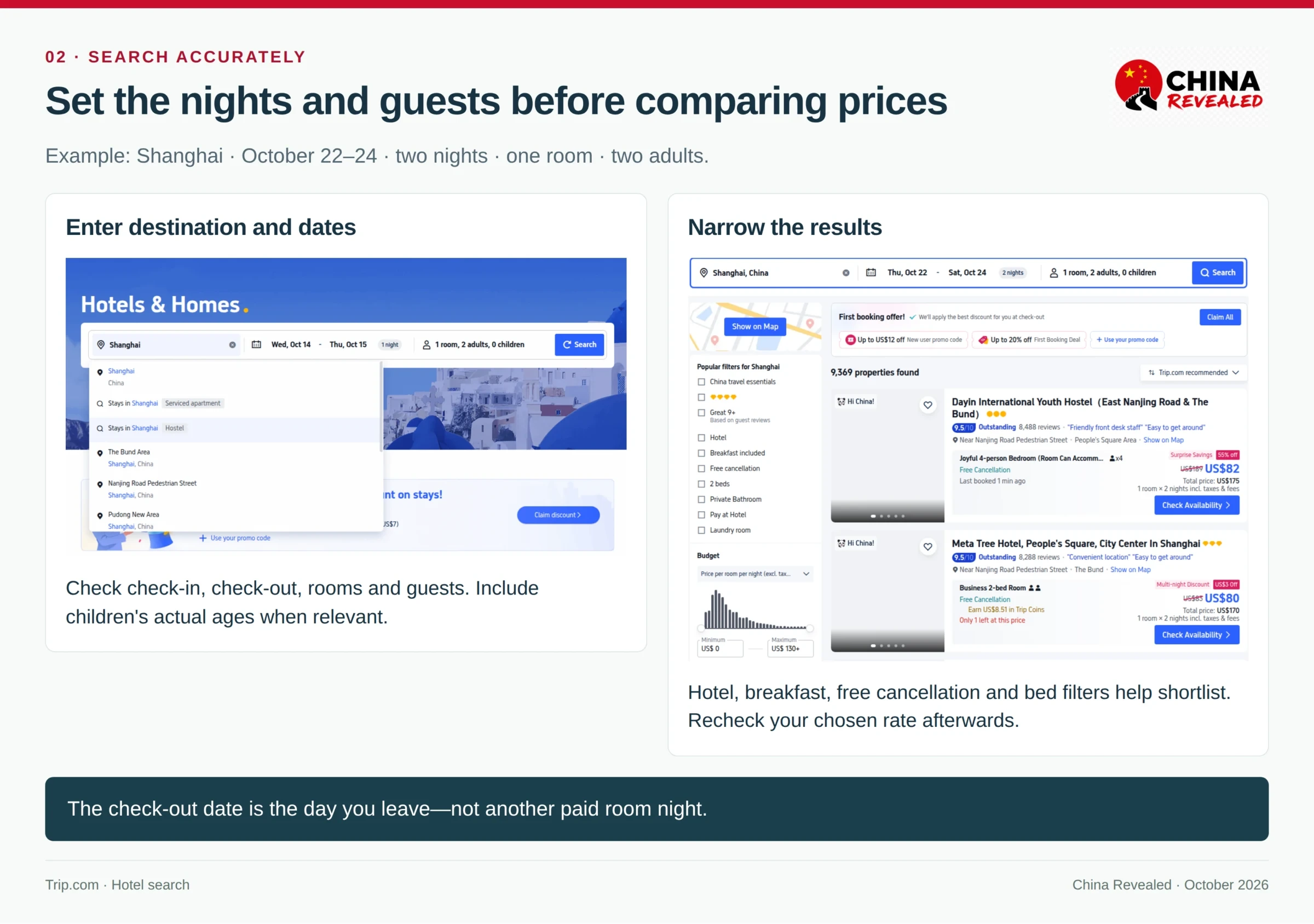
Choose Hotels & Homes, enter the city, check-in and check-out dates, rooms, adults and children. For example, Shanghai, October 22–24, one room, two adults is a two-night stay. The check-out date is not another paid night.
Enter children’s actual ages. A room marketed as suitable for families is not proof that a third adult, an extra bed and everyone’s breakfast are included. The room’s maximum occupancy and rate plan answer those questions.
2. Pick the neighborhood and the exact branch
Use the listing map, then check the route in Amap. I would prioritize a useful metro line and a straightforward arrival over an impressive lobby in the wrong part of the city.
A real Shanghai example makes this clear: Atour Hotel Nanjing East Road, Shanghai on the Bund and Atour Hotel Shanghai Hongqiao Shuicheng Road are different branches in different areas. The word Hongqiao in the second name does not place it inside Shanghai Hongqiao Railway Station.
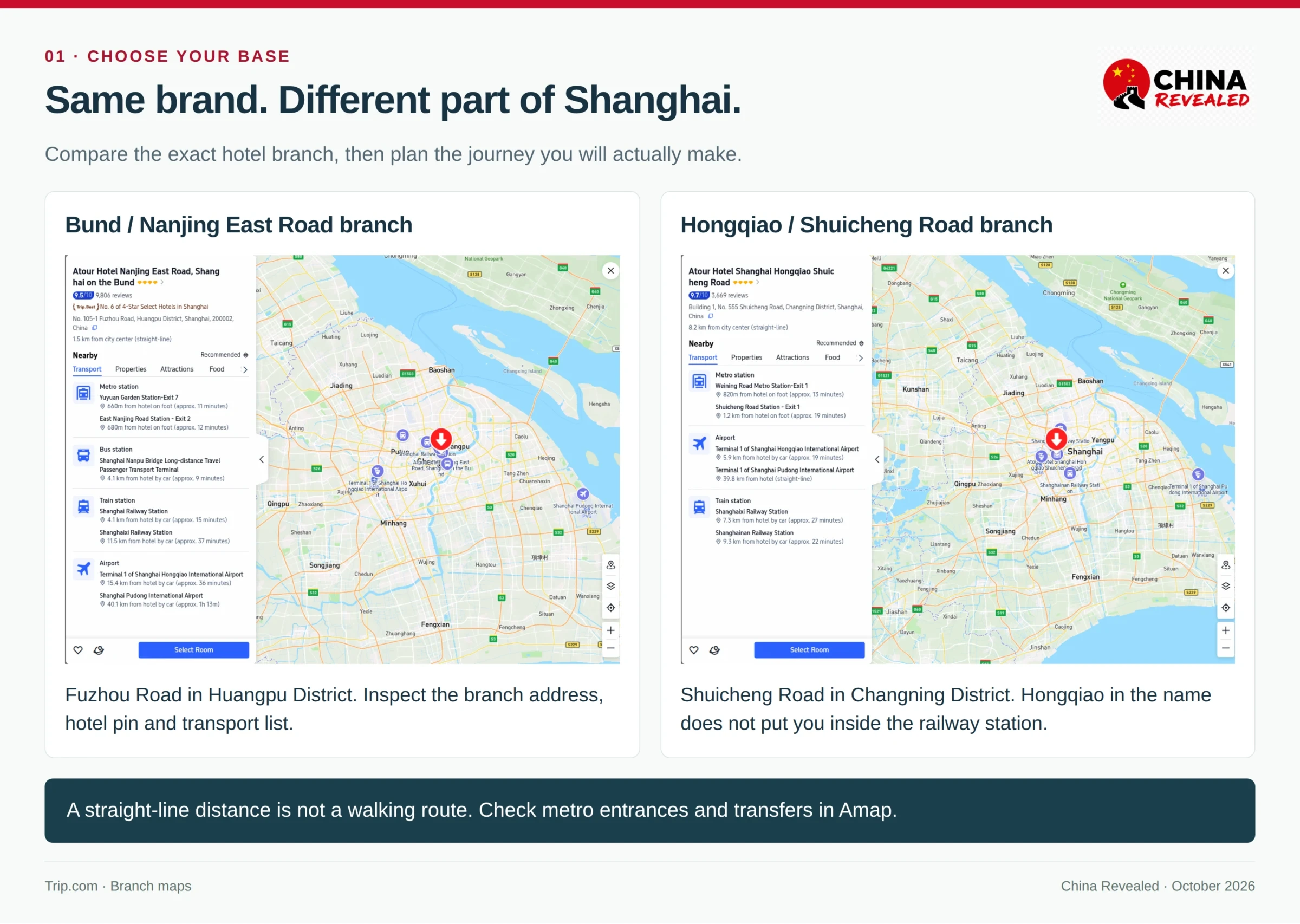
Copy the hotel’s Chinese branch name, full address and reception number from the listing. Do not translate the brand name into Chinese and assume the taxi app will find the correct building. Check airport or station access for the time of day of the actual journey, especially after a late arrival.
3. Read guest photos and the room specification
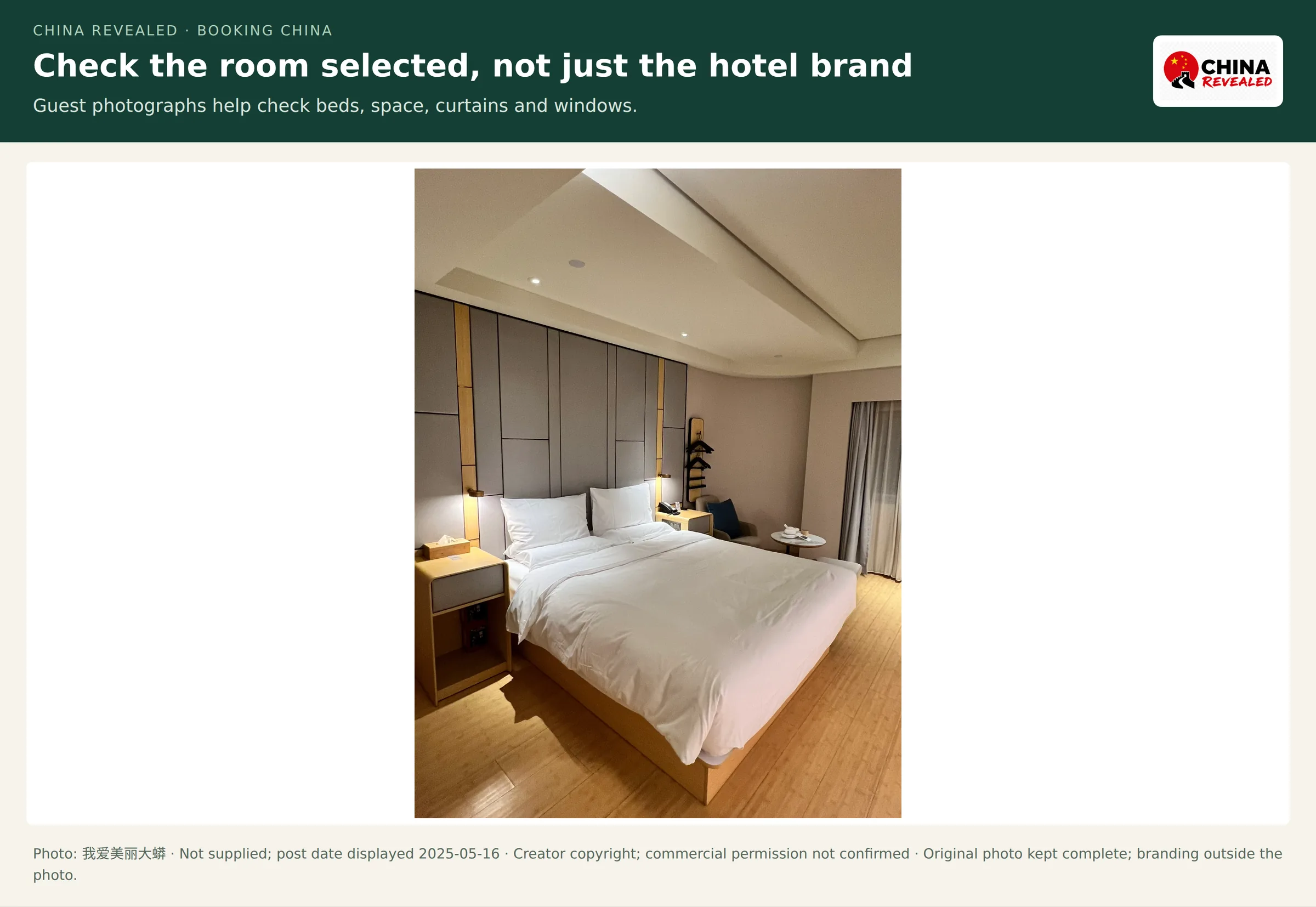
Check the bed arrangement, external window, room size, private bathroom and smoking policy. A queen room and a twin room are not the same. An inner window can face a hallway rather than the street. The best room in the property’s gallery may be a different category from the one selected.
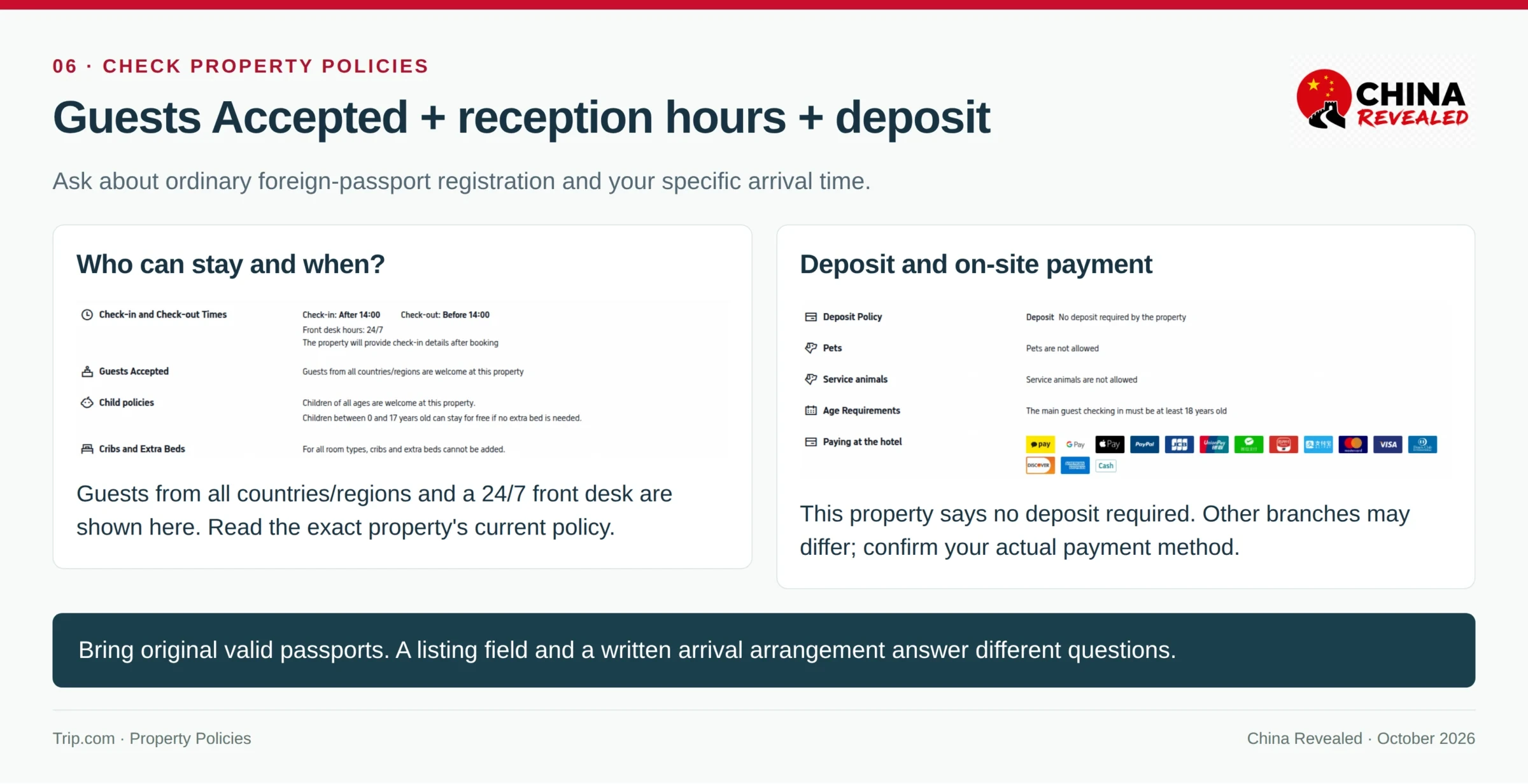
For a first visit, a staffed front desk and a clear guest-registration process are worth choosing. Read Property Policies → Guests Accepted, front-desk hours, check-in time and any deposit rules. Bring every guest’s original passport. If a small apartment or late self-check-in has unclear instructions, resolve them before paying for a restrictive rate.
4. Understand payment and cancellation as separate conditions
Prepay online, Pay later and Pay at hotel describe when or where the room is paid. Free cancellation and Non-refundable describe the cancellation terms. They are different parts of the purchase.
A prepaid room can still have a reception deposit. A pay-at-hotel booking can still charge a cancellation or no-show fee. If the plan is to use a foreign card at reception, ask whether that branch accepts it for both the room and any deposit; the hotel’s terminal is not Trip.com’s online checkout.
Fill the lead guest’s name and reachable contact details, then read the final room summary, nights, breakfast, taxes, currency and payment deadline. Remove unwanted optional services before confirming.
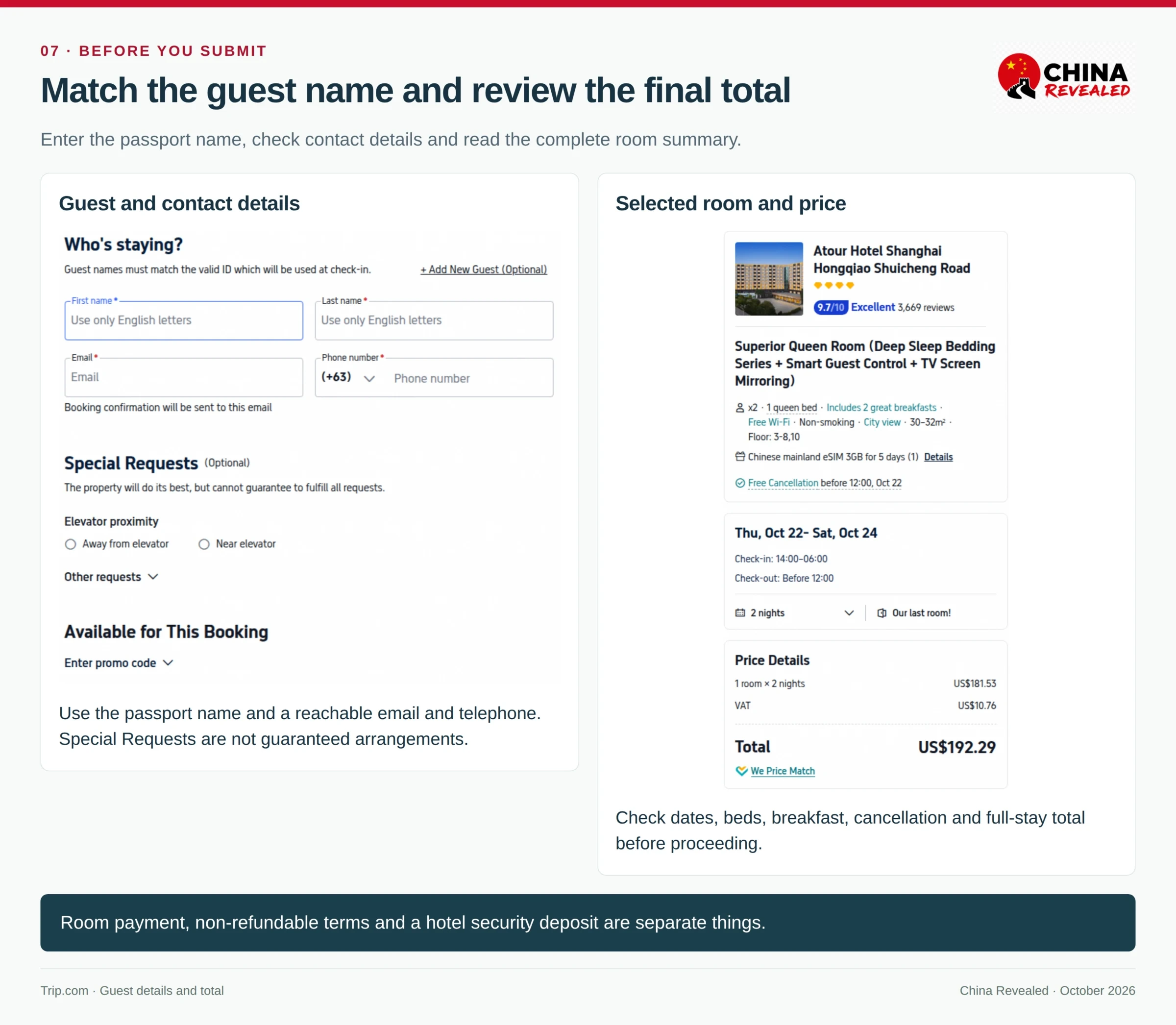
5. Check confirmation and settle the arrival time
After booking, open the hotel order and check Confirmed, the guest details and the check-in voucher or confirmation email. Save the Chinese address offline as well as the reservation number.
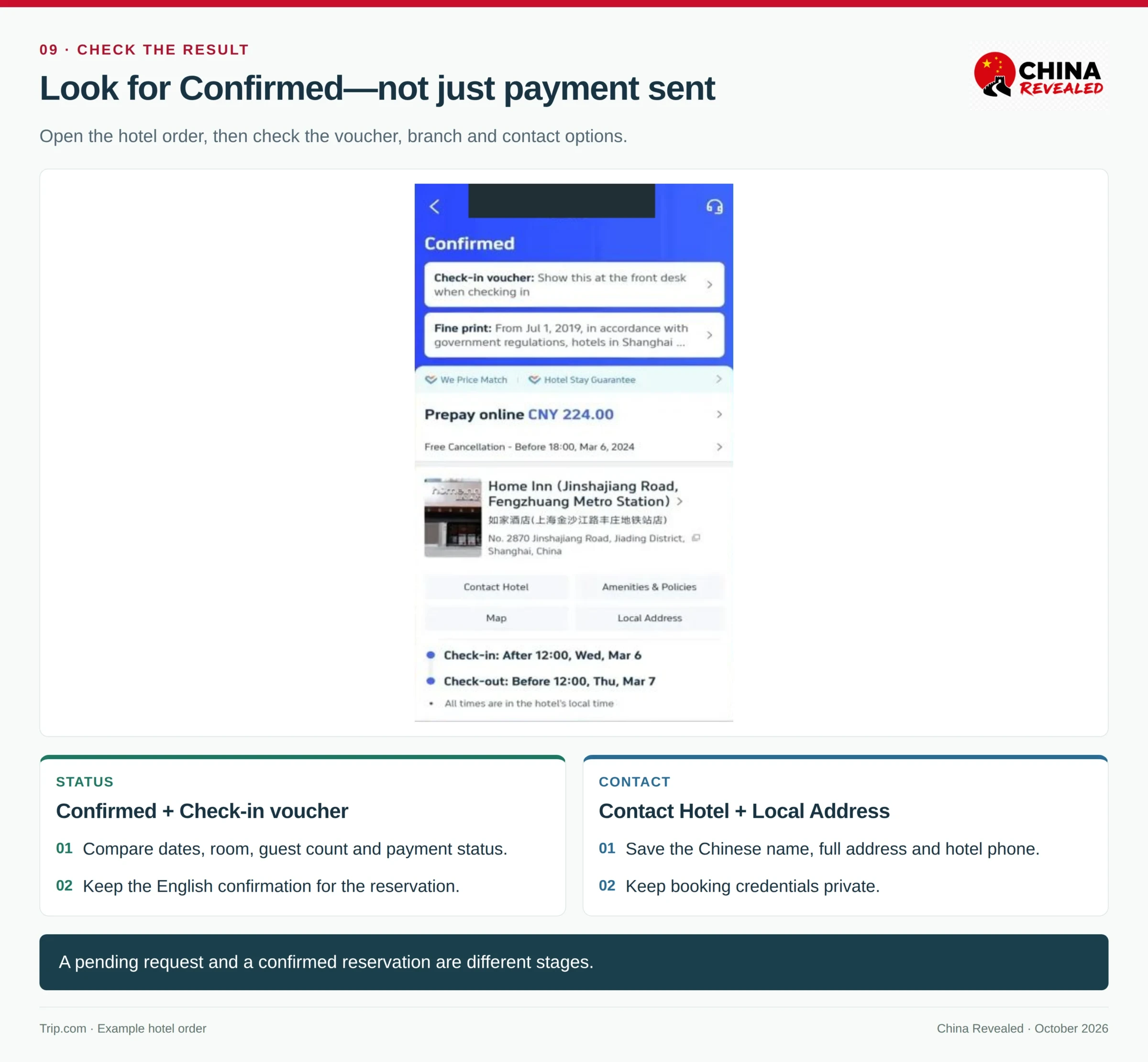
If arriving at 1 am on October 23, the October 23 hotel night usually begins that afternoon. The room needed on arrival is normally booked from October 22, with reception agreeing to hold it overnight. Ask for that specific date and time to be confirmed; a special-request note is not the same as an accepted arrangement.
For room windows, deposits, reception messaging and the full passport check-in sequence, continue to our China hotel-booking guide.
Book China trains with a foreign passport
1. Choose the exact stations, not just the cities
Open Trains and select the mainland China/Hong Kong train-search section where the interface offers a region choice. Type the cities, then read the station suggestions carefully.
Beijing South / Beijingnan / 北京南站 is different from Beijing Railway Station / 北京站. Shanghai Hongqiao / 上海虹桥站 is different from Shanghai Railway Station / 上海站. A city-wide “Any” search can be useful for finding trains, but the issued ticket will name specific stations.
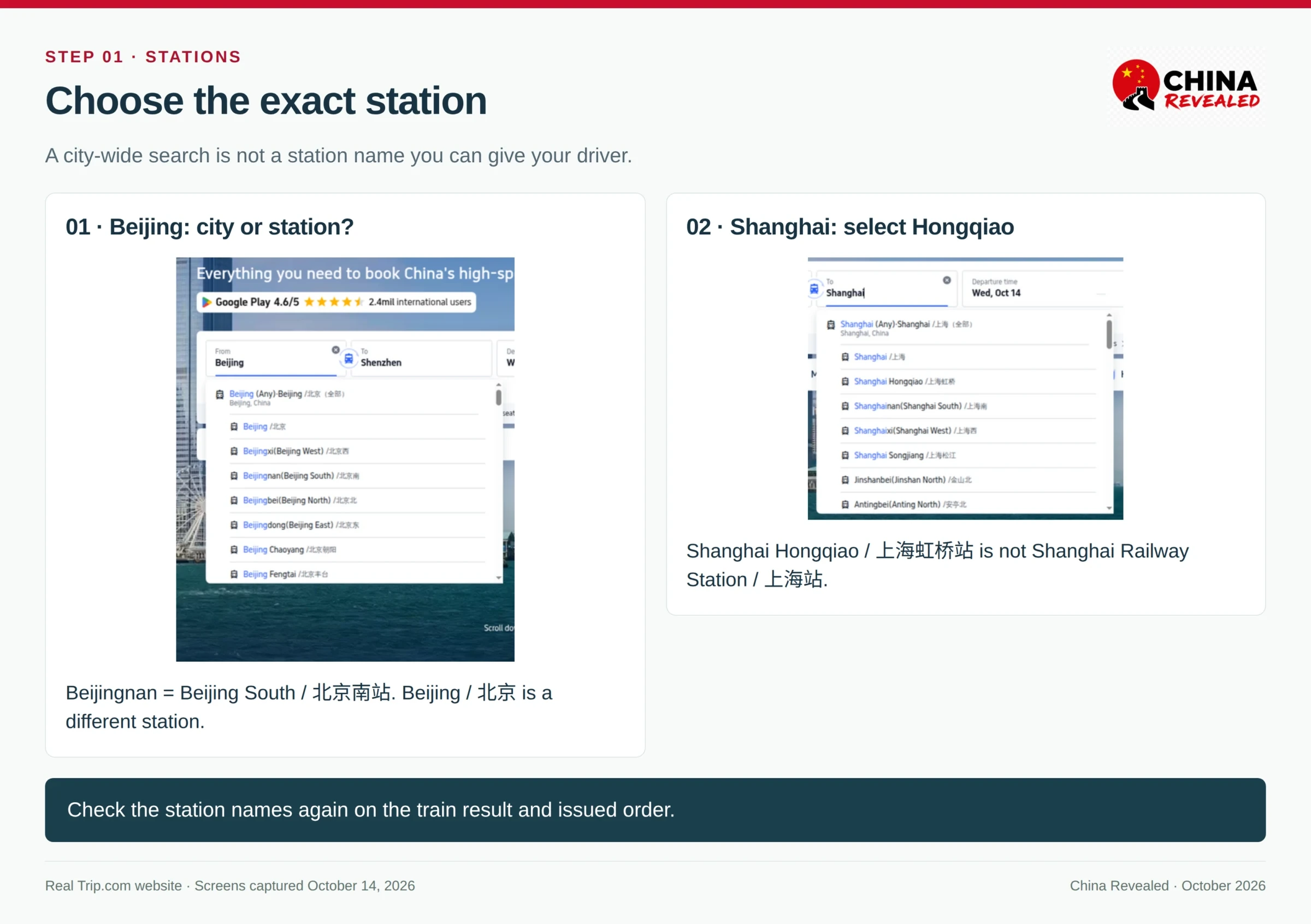
Add the station-to-hotel journey before choosing a departure. An early train can be inconvenient if the hotel is on the other side of the city. Avoid a tight separate connection to an international flight simply because the train arrives in the same metropolitan area.
2. Understand advance reservations and seat availability
Ordinary mainland railway tickets currently use a 15-day sales window including the current day, with station-specific release times. For this guide’s October 18, 2026 check, 12306’s official calendar showed sales through November 1. A Trip.com request for a later date is an advance request to obtain a ticket when sales open, not proof that a seat has already been secured.
Read the train number, stations, departure and arrival times, duration and class. Select the class marked Book when available. Waitlist or a ticket-purchasing request is a different situation; keep another workable train or time in mind for an essential travel day.
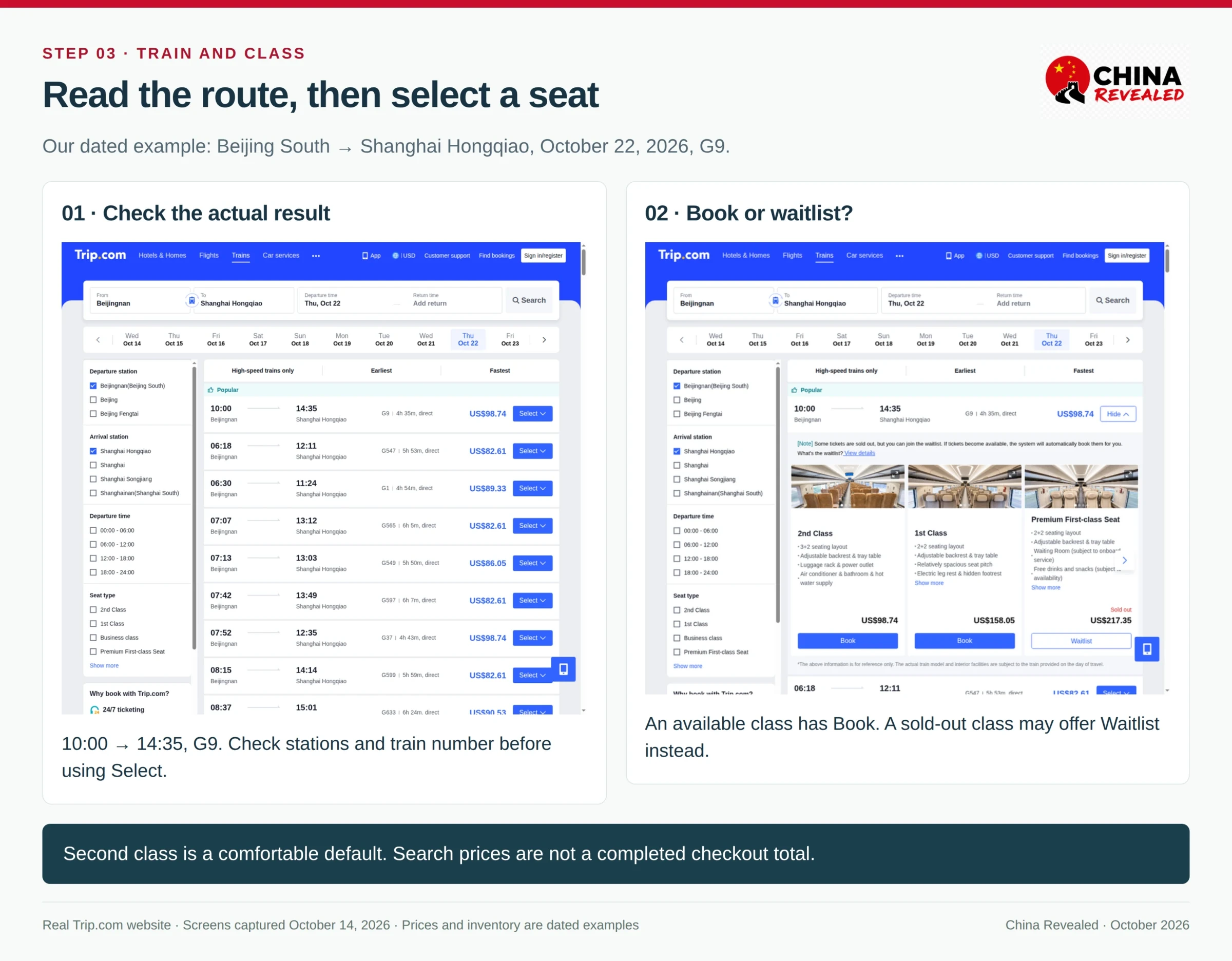
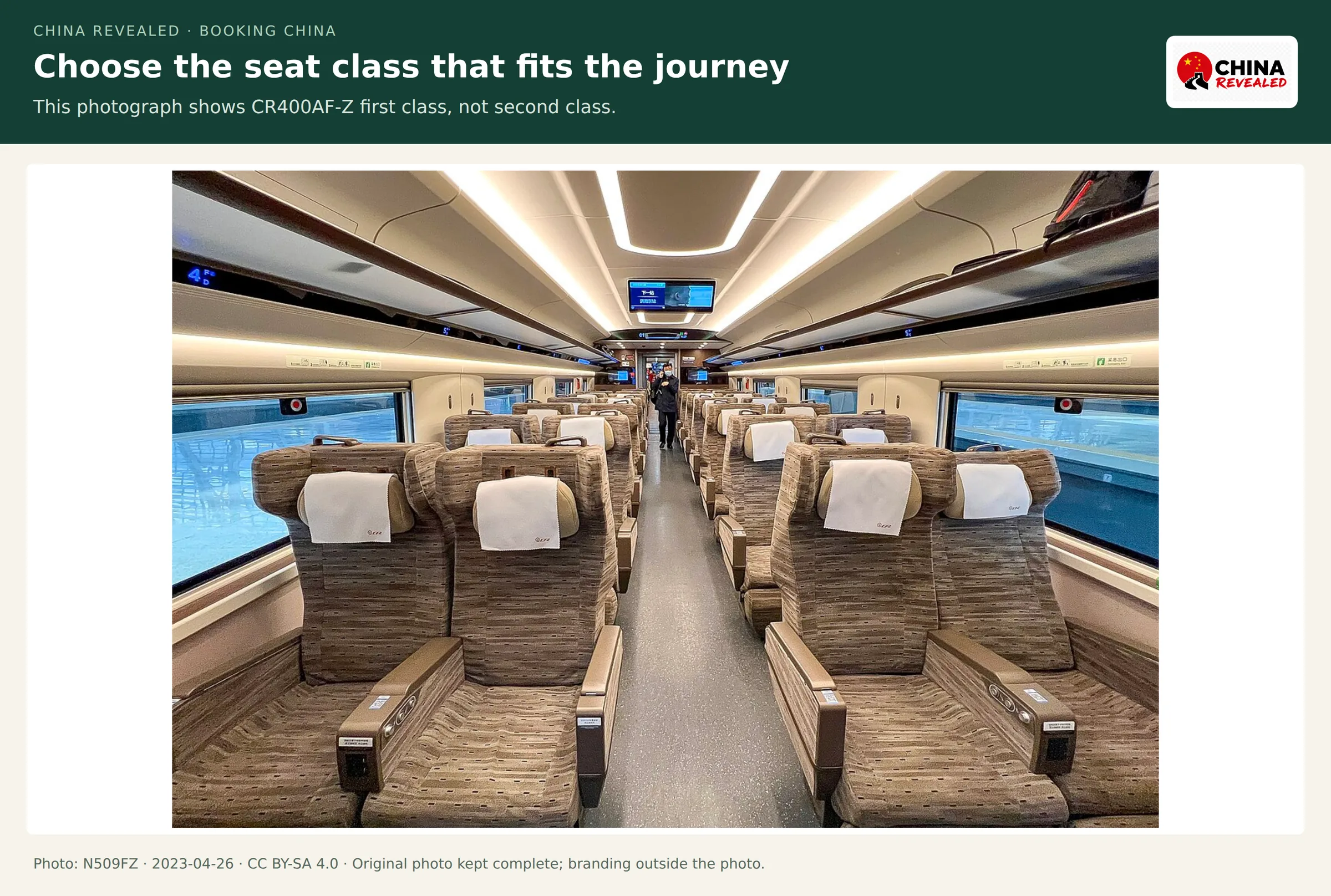
For most first-time travelers, I would choose second class on a daytime high-speed service. First class offers more room; business class is a larger upgrade. Do not confuse China’s comfortable ordinary high-speed seat with a standing ticket, which has no reserved seat.

3. Add each passenger’s passport correctly
Open Passenger Info → Add/edit passengers and choose Passport. Enter the document number, given names, middle names and surname into the fields provided. Copy the Latin-letter passport identity, not a nickname or a Chinese translation.
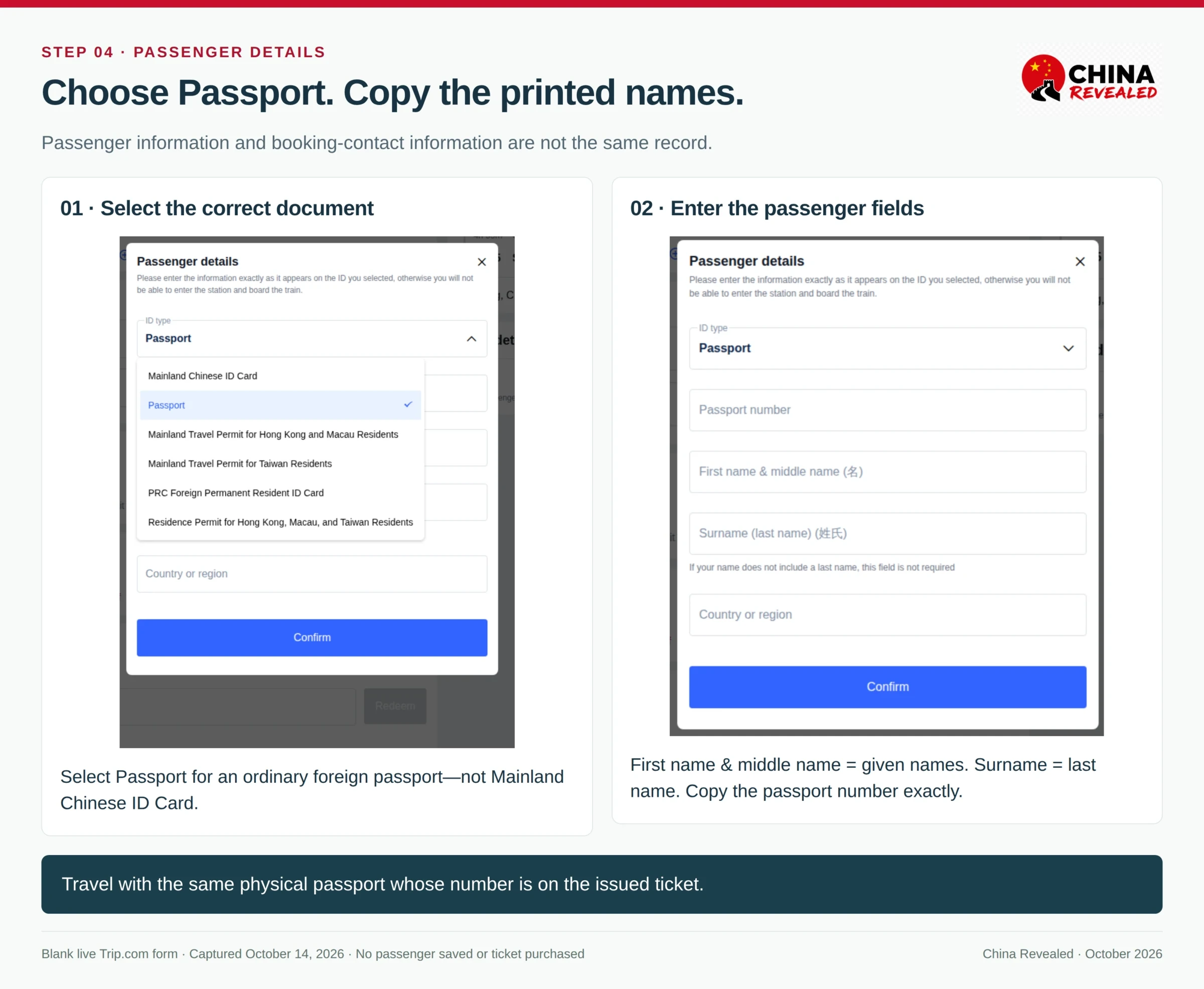
The contact name is not the passenger name. Make sure every person who needs a ticket appears in the passenger list. Use the same physical passport when traveling; a photo or a different passport with another number is not the normal boarding document.
Trip.com’s usual foreign-passport booking route does not require creating a separate personal 12306 account. Any passport-specific verification prompt still needs to be resolved before relying on the ticket. Our China train-ticket guide explains name layouts and verification in more detail.
4. Review charges, pay and check that tickets are issued
Read the railway fare, any platform handling charge, optional priority services and the final amount in the selected currency. A platform service fee is not a railway seat upgrade. When comparing against 12306, use the same train and class, and compare the full payment breakdown.
After payment, check My Bookings / Bookings → Trains → the order. A historical Trip.com example uses Purchasing Ticket(s) before Ticket Purchased. The issued record should identify the passenger, train, stations, date and carriage/seat where assigned.
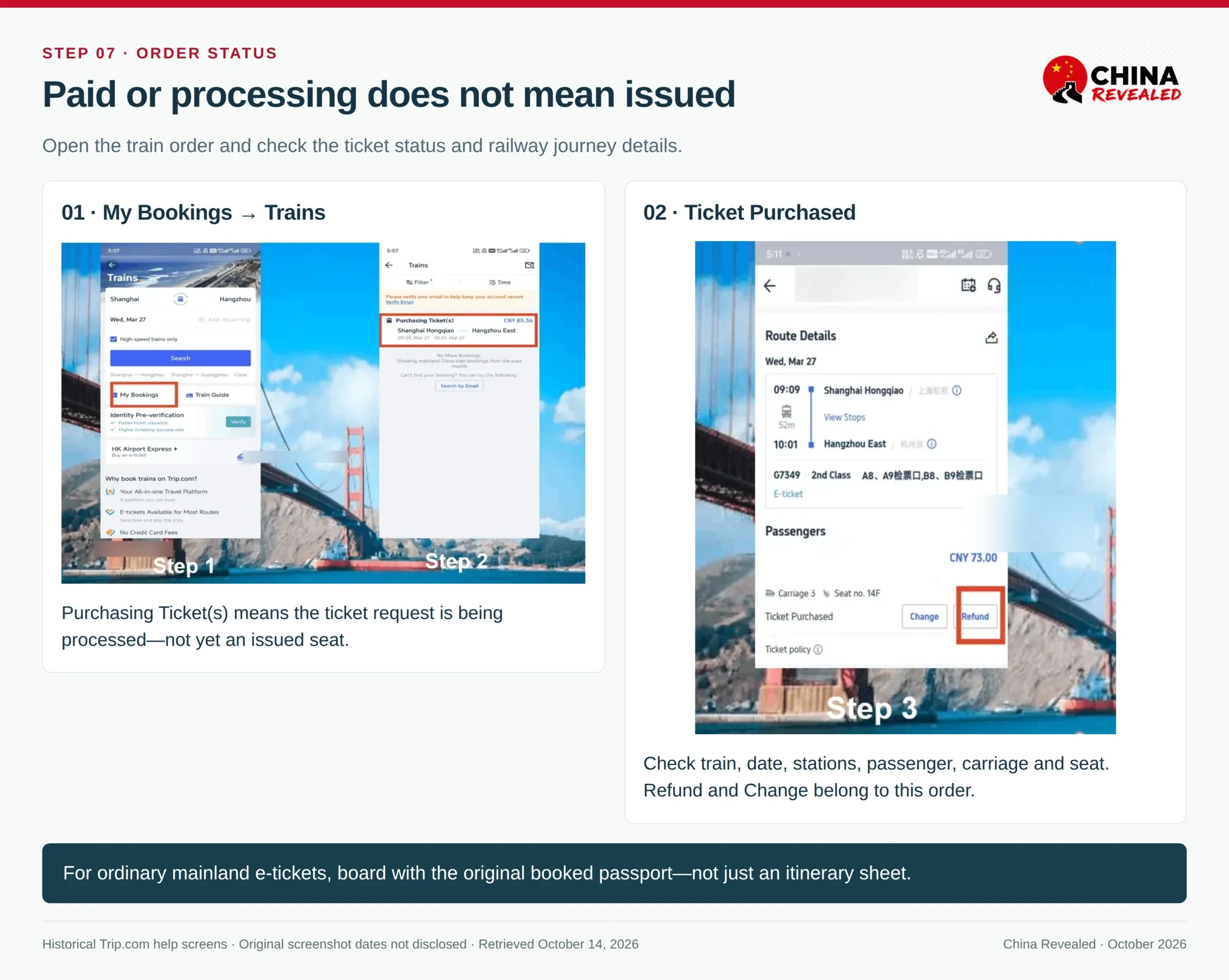
Do not leave the process at “payment successful.” If a request is still processing near its stated deadline, contact the order’s support rather than buying a duplicate ticket elsewhere.
For a first rail journey, I recommend reaching the correct station about 60 minutes before departure, with more time for holidays or a service-window visit. The actual boarding cutoff is earlier than train departure. Take the original booked passport and follow the staffed channel if the gate cannot read it.
Search China trains on Trip.com → — open the Trains tab and enter your own route and date.
Book domestic flights and check the fare
1. Search the cities, then read the airport codes
Choose Flights, one-way or round-trip, cities, dates, passenger count and cabin. For a city-to-city China leg, I would start with Nonstop and compare convenient departure times before sorting purely by price.
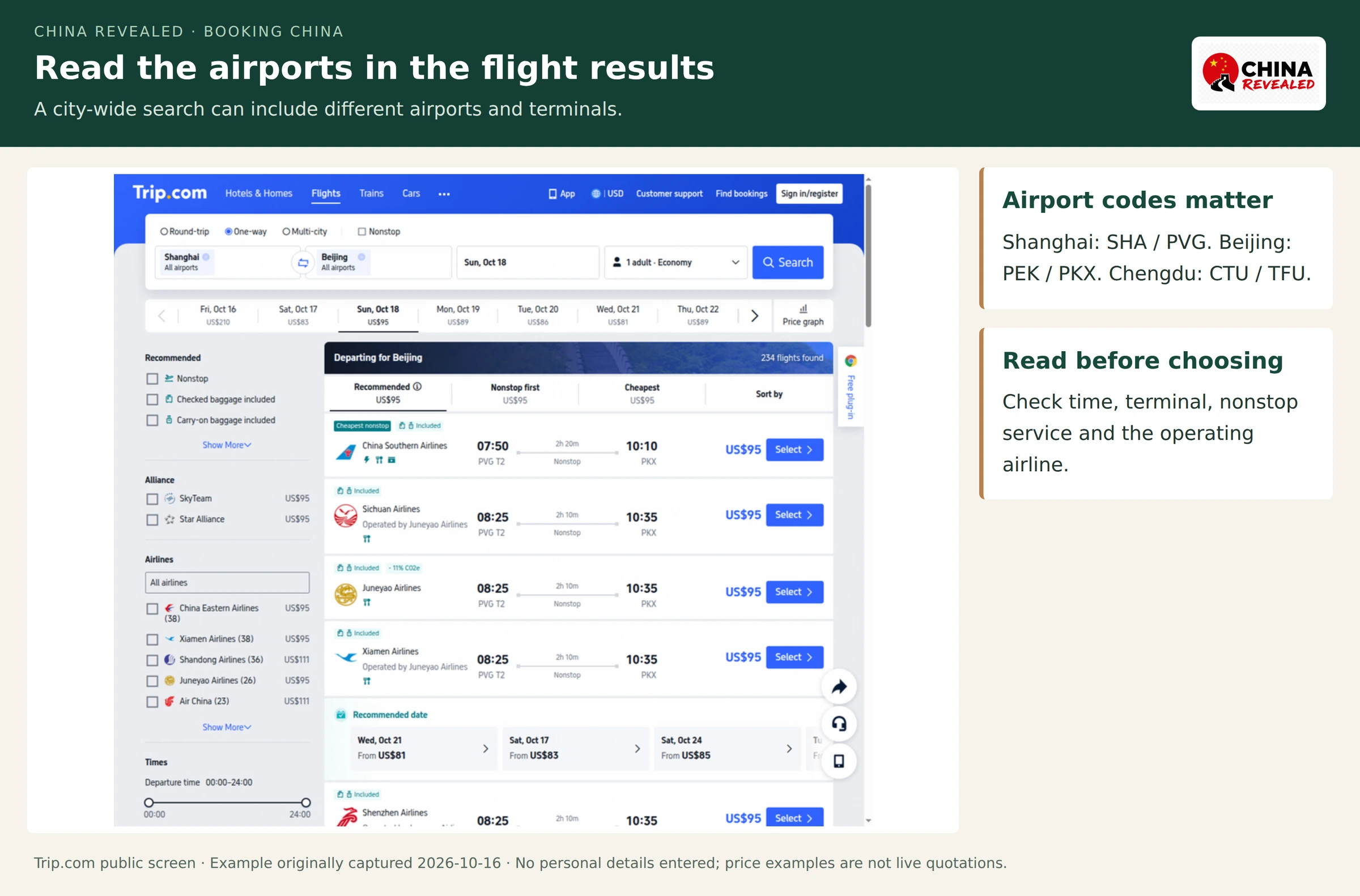
Three airport pairs deserve particular attention:
| City | Airports that are different destinations |
|---|---|
| Shanghai | Hongqiao SHA and Pudong PVG |
| Beijing | Capital PEK and Daxing PKX |
| Chengdu | Shuangliu CTU and Tianfu TFU |
Read the terminal too. A Shanghai city search can show departures from either airport, and a Beijing result can land far from the sightseeing base chosen. Compare the hotel-to-airport journeys in Amap before treating the cheaper flight as the cheaper travel day.
2. Open the baggage and change rules before selecting a fare
Choose Select, then inspect the fare options. Compare cabin baggage, checked baggage, change fees, cancellation fees and any fare difference payable on a change. On a codeshare, read Operated by to identify the airline actually flying the service.
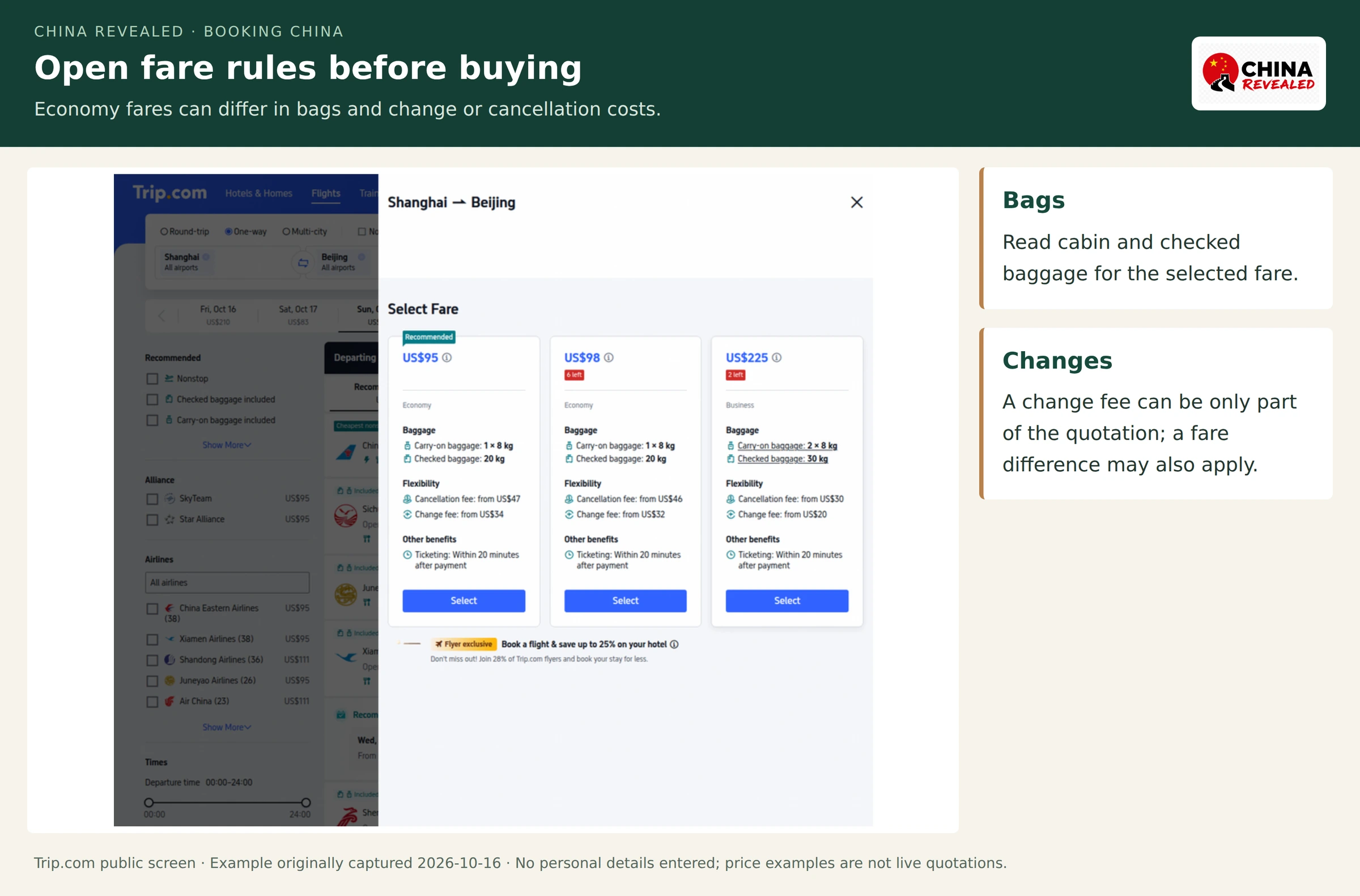
The illustrated options show why “Economy” alone is not enough: fares can have different baggage or flexibility benefits even on the same flight. A displayed change fee is not necessarily the entire cost of moving to a more expensive departure. The flight’s stated ticketing time is also a timeline to check, not a reason to stop looking for an issued record.
For short direct train journeys, rail may be the better use of a travel day. For longer legs, a nonstop flight can make sense. Our domestic-flight guide covers that decision, Chinese airline choices and baggage in depth.
3. Enter the passenger identity and verify the final purchase
Select Passport where a document type is requested. Copy the name into the matching surname/given-name fields and provide nationality, date of birth, passport number and expiry date when asked. Recheck each traveler; the person paying is not automatically the only passenger.
Use a reachable contact email and a telephone number with the correct country code. Review the full itinerary, actual airports, passenger names, bags and optional extras before selecting the payment method. If the form rejects an unusual name, use support rather than inventing a shortened identity.
4. Save the issued ticket, then use the airport’s check-in process
A Flight Payment Successful message is not the final check. Look for the ticket-issued or confirmed result and keep the itinerary, e-ticket number and airline booking reference where provided. If issuance remains pending beyond the displayed timeline, ask support from that order.
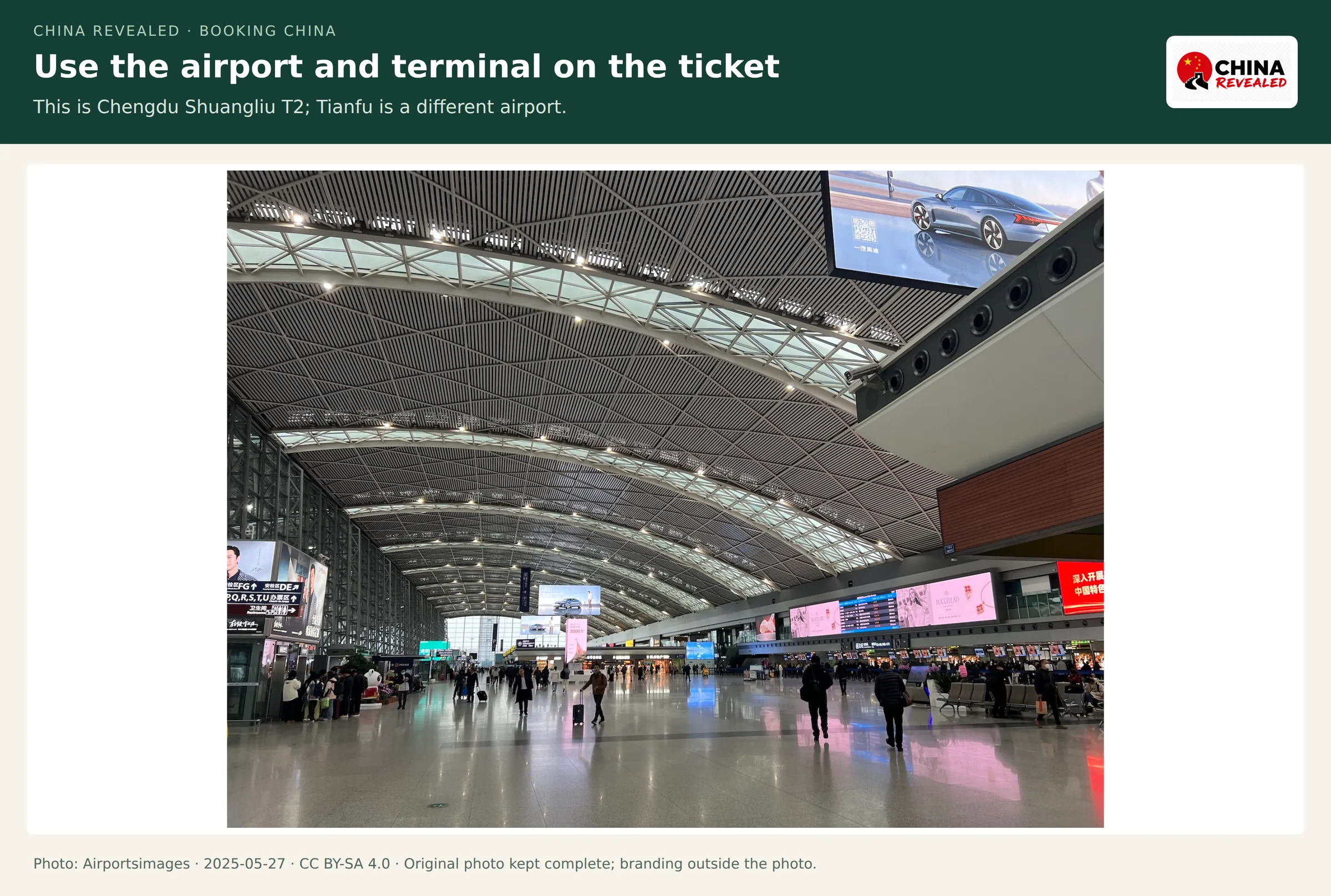

For an ordinary mainland domestic flight, bring the original booked passport to Domestic Departures / 国内出发. If an app or self-service kiosk cannot handle it, use the staffed check-in counter. I would arrive around two hours before departure for a first domestic journey, allowing more time at an unfamiliar airport or during a holiday. Follow the flight’s actual check-in and gate deadlines.
Compare China flights and fare options on Trip.com →
Find bookings and handle changes or refunds
Start with the original order
On the website, use Find bookings or the signed-in booking area. In the app, use My Trips, My Bookings or Account → All Bookings, depending on the version. Sign in with the same account used for the purchase, or retrieve the booking using the details requested on the official lookup form.
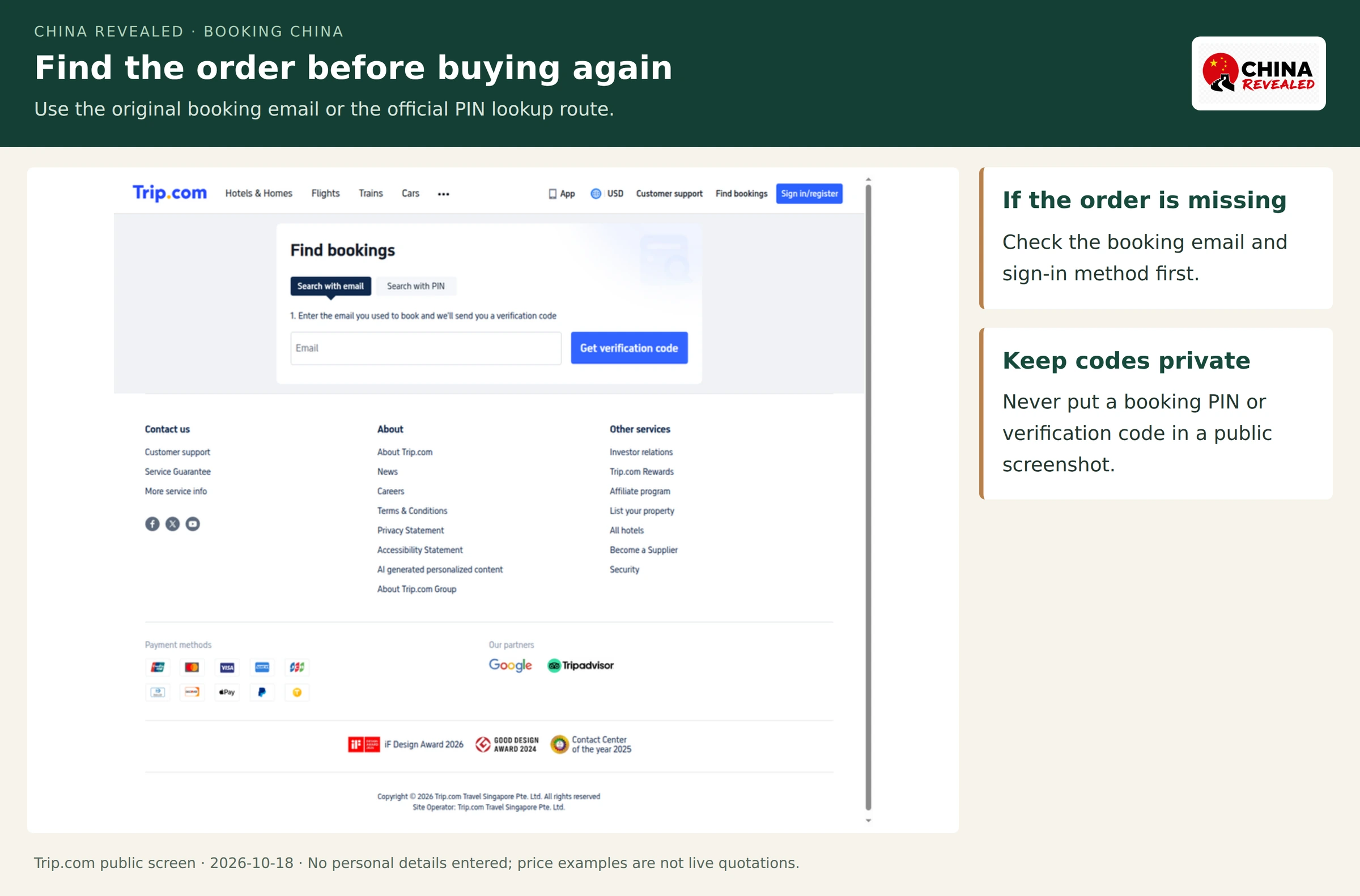
If an order is missing, check the booking email, sign-in method and whether a companion made it under their own account. Search for the confirmation email before creating a replacement booking. Keep the booking number and any retrieval PIN private.
Hotels: cancellation has a deadline; changes have a price
Open the hotel order → Cancel Booking → read the cancellation policy and refund estimate → confirm only if the calculation is acceptable. Then check the cancellation result and Refund Details. Starting a support chat before the deadline does not itself cancel the room.
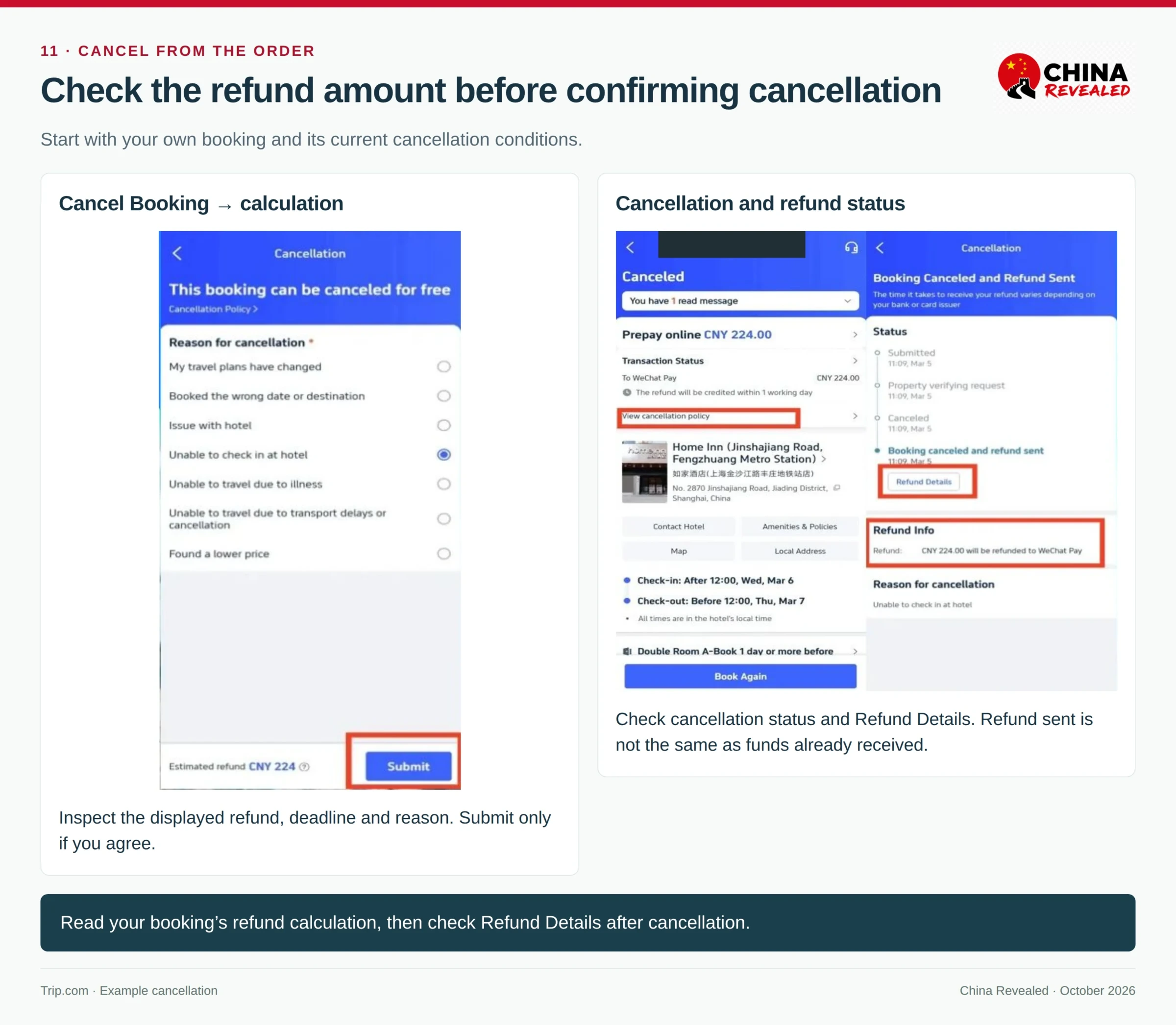
For different dates or a different room, use Change / Modify where offered or ask support. Availability and the new rate can differ. For a non-refundable rate, an exception or date change can be requested, but do not plan around it being granted. If the existing rate is flexible, compare the replacement before releasing a useful room.
If delayed en route, contact the hotel from the order and give the new date and time in China local time. Ask the property to confirm the room is held. That is especially important when an evening arrival slips past midnight.
Trains: change the journey, not the identity
For an issued railway ticket, open the train order and choose the relevant Change or Refund option. Review the railway fee, any platform charge and the amount payable or refundable before confirming. A new train is subject to seat availability.
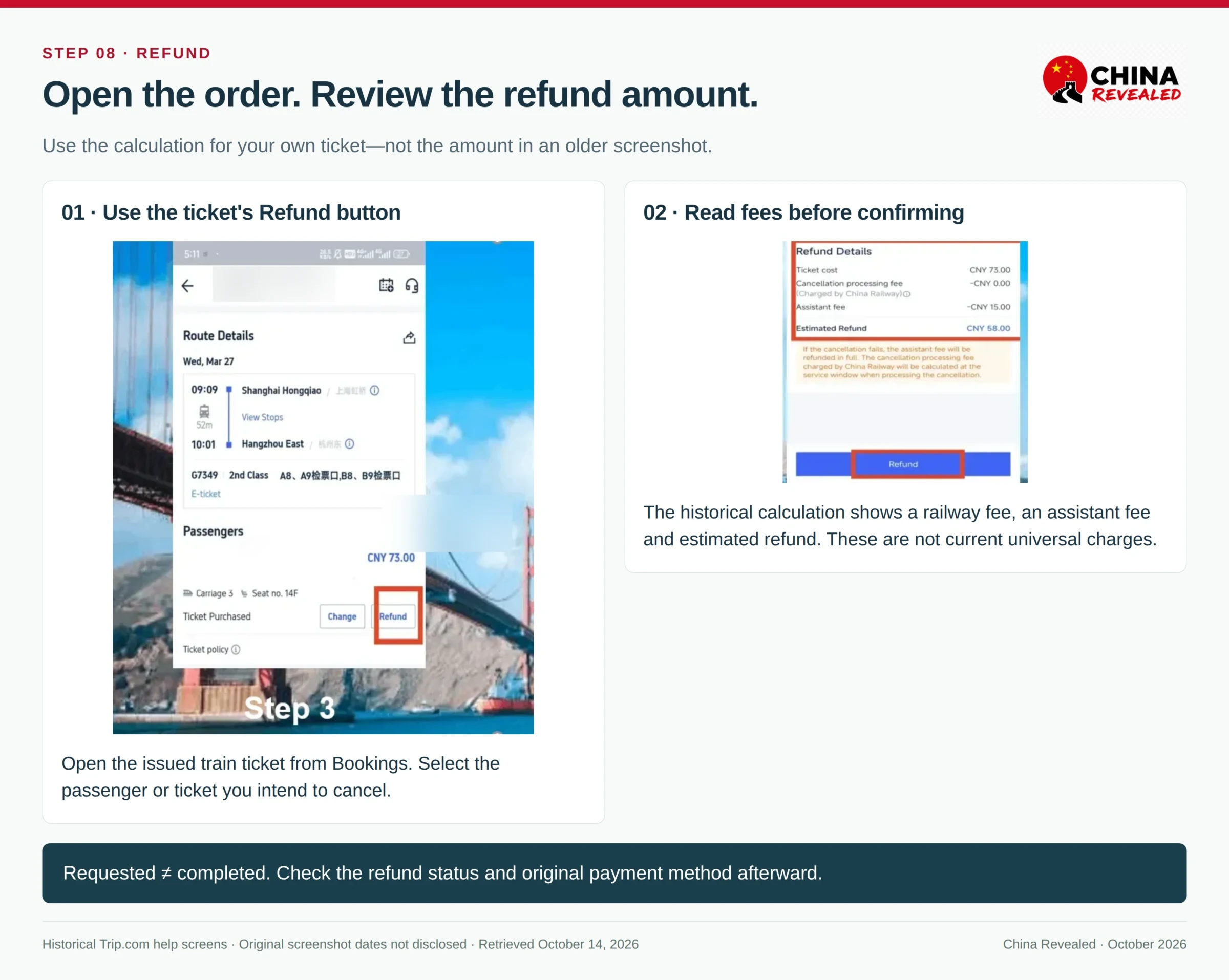
Refund fees depend on the time before departure and other railway conditions. Do not apply an old screenshot’s refund amount to a new order. A wrong passenger name or passport number is not fixed by changing the train time; resolve the identity error with support, usually through refund and rebooking where required. Editing a saved passenger profile alone is not enough.
After a successful change, open the updated ticket and check the new train, date, stations, class and assigned seat. Travel using the new record, not the old saved screenshot. The detailed railway guide covers standard refund bands and the distinction between changing a train and changing the destination.
Flights: separate a voluntary change from a cancelled service
Open the flight order and use its change or cancellation flow. A voluntary change can involve the fare difference, airline charges and applicable service charges. Look at the total quotation, not just the headline “change fee.” Confirm the new flight only after checking its airports, bags and timing.
When the airline cancels or substantially changes a service, open the affected order’s notification and available options. Those can differ from voluntarily cancelling a normal flight. Use the airline desk for immediate airport assistance and the booking channel for the order’s formal change or refund; do not assume buying a new flight automatically cancels the old one.
A replacement flight ticket should be checked for issued status just like the original purchase. Reconfirm any onward hotel or transfer affected by the change.
Track the refund all the way to the payment account
Cancellation submitted, booking cancelled, refund approved, refund sent and money received are different stages. Trip.com’s terms generally send a refund back to the original payment method. Watch the order’s refund record and the card or payment account used for the purchase.
A card statement can show a different home-currency amount because the conversion or bank charges differ. Keep the original charged currency and the approved refund currency in the support conversation. If the order’s stated processing period has passed, ask for the refund trace or payment reference instead of opening a new unrelated enquiry.
Contact support from the booking, with the useful details
Use the order’s Customer support, chat or telephone option. If the order cannot be accessed, the official Trip.com support page provides booking lookup and contact routes. Avoid an unverified phone number found in a sponsored search result.
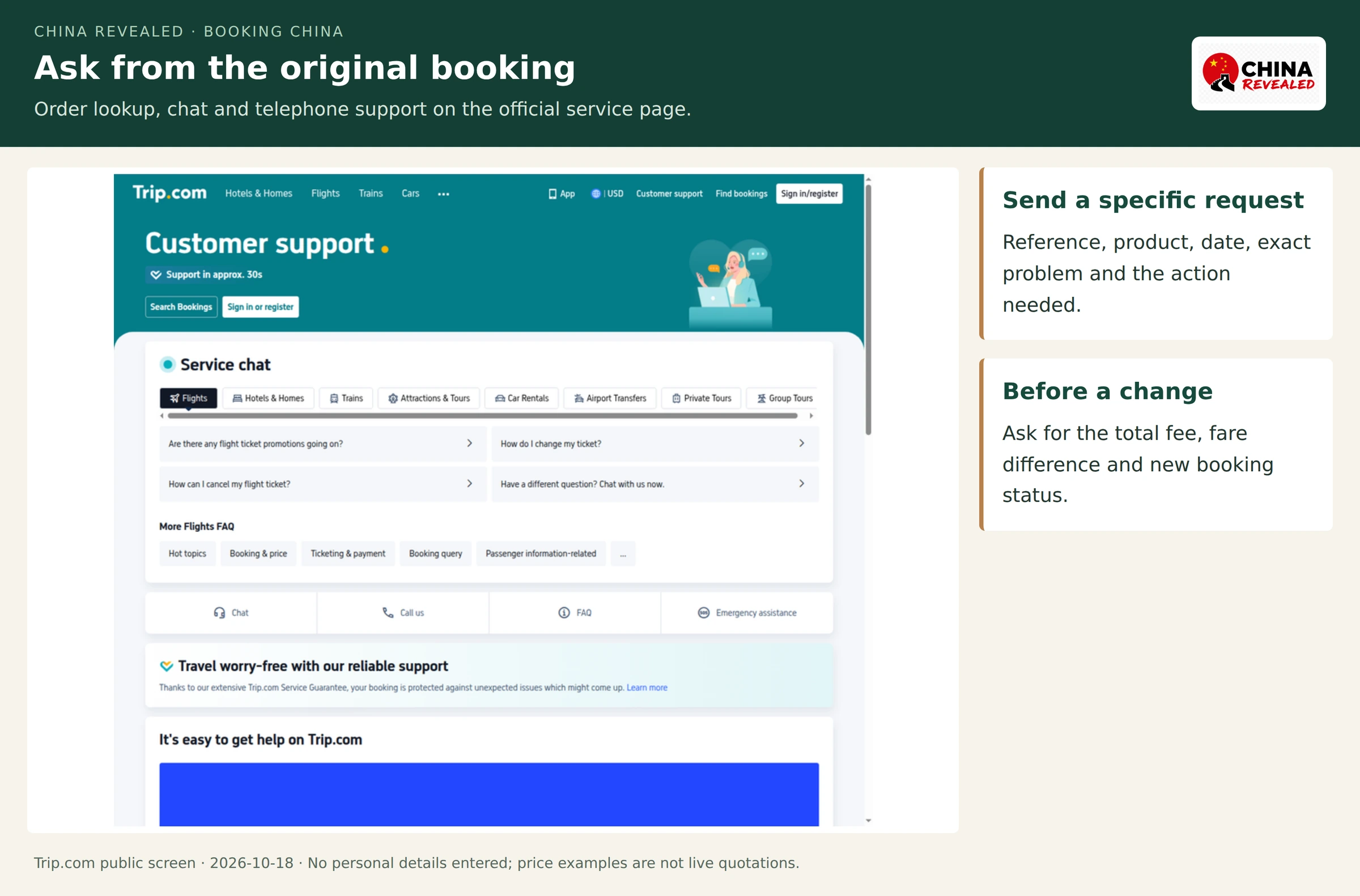
A clear message is more effective than “my booking is wrong”:
Booking reference: [reference]. Product: [hotel/train/flight]. Travel or stay date: [date].
The issue is [specific problem]. I need [the requested change, confirmation or refund information]. Please confirm any fee, fare difference and the new booking status before proceeding.
Keep the conversation in the original order. For a hotel with an imminent check-in problem, ask support to contact that branch. For a flight or railway disruption at the terminal, keep the passport and issued-ticket record available for staff as well.
A practical booking order for a first trip
I would organize the trip in this order: confirm the international arrival and departure gateways; shortlist the hotel neighborhoods; choose flexible rooms where plans are not settled; identify the exact intercity stations and airports; then complete the train and domestic-flight bookings at the appropriate sales stage.
Once the orders are confirmed, keep one offline note with the hotel’s Chinese address, the booked railway station names, flight airports/terminals and each confirmation reference. Do not fill every gap with another paid service: a useful hotel base and a sensible departure time do more for a first trip than a collection of optional add-ons.
For the booking tool itself, Trip.com is the starting point I recommend. Use it to bring the China itinerary together, cross-check equivalent hotel rates when useful and keep each confirmed order accessible.
Build your China booking plan on Trip.com →
Trip.com China FAQs
Is Trip.com the same as Ctrip?
They are different brands in Trip.com Group. Trip.com is the international service used in this guide; Ctrip is the group’s China-rooted travel brand. Use the seller and account shown on the actual confirmation when looking for an order or asking for help.
Is Trip.com always cheaper than Booking.com or Agoda?
No platform is the permanent winner for every room and date. I recommend Trip.com first for the overall China booking workflow. For hotel value, compare the equivalent room, breakfast, cancellation and full-stay checkout total. Do not compare an incomplete nightly search price with another platform’s tax-inclusive total.
Do travelers need a Chinese bank card or a Chinese phone number?
Trip.com’s public international sign-in flow offers email, and its booking service offers international online payment options. Use the methods available for the specific booking and a contact number/email that can receive updates. A hotel’s pay-at-property card terminal is a separate payment arrangement.
Can train tickets be booked weeks before the railway sells them?
An advance request can be submitted where Trip.com offers it, but the railway’s sales window still controls when a ticket can be obtained. Check for an issued ticket, not only an accepted request or payment notification.
Does a confirmed flight mean online check-in will accept a foreign passport?
Ticketing and check-in are separate. Keep the issued record and original passport. If the airline app or kiosk cannot process the document, use the staffed counter at the correct terminal.
What is worth saving before the trip?
Save the booking confirmations, Chinese hotel addresses, exact train stations, flight airports, issued-ticket references and cancellation deadlines. Keep retrieval codes private. That is the information needed when the phone has no connection or the itinerary changes.
Platform information and public interfaces checked October 18, 2026. Historical order screens are identified in their captions; prices shown in screenshots are examples.

About China Revealed
China Revealed is an independent English-language travel guide dedicated to China.
We bring together China travel guides, destination information, local insights and practical travel resources in one place.
Our travel database covers China's provinces, cities, famous attractions, hidden gems, local cuisine, transportation, accommodation, visa requirements, digital payments, mobile connectivity and the other practical details travelers need to explore China.
We focus on depth, careful research and accuracy. Our guides combine official sources, detailed destination data, local knowledge and regularly updated information to give reliable, practical travel advice.
Whether you're visiting China for the first time or exploring beyond the popular destinations, China Revealed is an all-in-one resource for discovering the real China.
China Revealed — Your practical guide to China.
Some links on China Revealed, such as Trip.com booking links, are affiliate links. If you book through them, we may earn a commission at no extra cost to you. This does not change what we recommend.